
Mastering Online Safety: Your Comprehensive Guide to Digital Self-Defense
Essential Strategies for Navigating the Digital World Securely in 2025
In today's interconnected world, the internet is an indispensable tool for communication, commerce, education, and entertainment. However, with its vast benefits come inherent risks. Protecting yourself and your personal information online is more crucial than ever. Cyber threats are constantly evolving, and understanding how to mitigate these risks is vital for everyone, regardless of age or online activity level. This guide provides comprehensive tips and strategies to enhance your online safety and privacy.
Key Takeaways for Online Safety
- Strengthen Your Digital Defenses: Employ strong, unique passwords and enable two-factor authentication (2FA) on all accounts.
- Be Mindful of Sharing: Limit the personal information you share online, especially on social media, and be wary of unsolicited requests for information.
- Secure Your Connection: Use a Virtual Private Network (VPN), especially on public Wi-Fi, and ensure your home network is password-protected and encrypted.
Building a Strong Foundation: Passwords and Authentication
Your passwords are the first line of defense against unauthorized access to your online accounts. Weak or reused passwords make you an easy target for cybercriminals. Strengthening your password practices is fundamental to online safety.
Creating and Managing Robust Passwords
The key to effective password security lies in complexity and uniqueness. Avoid using easily guessable information such as birthdays, names, or common words. Instead, create strong passwords that are a combination of upper and lowercase letters, numbers, and symbols. Aim for passwords that are at least 12 characters long.
Tips for Password Creation:
- Use a passphrase: Combine several unrelated words to create a memorable yet secure password.
- Avoid using personal information that can be easily found online.
- Do not use the same password for multiple accounts.
Managing numerous unique passwords can be challenging. This is where password managers become invaluable. A password manager is a secure application that stores all your passwords in an encrypted vault, requiring you to remember only one master password.
Benefits of Using a Password Manager:
- Generates strong, unique passwords for each account.
- Securely stores all your login credentials.
- Reduces the risk of credential stuffing attacks (where hackers use stolen login information from one site to access others).
Enabling Two-Factor Authentication (2FA)
Two-factor authentication adds an extra layer of security beyond just a password. With 2FA enabled, even if a hacker obtains your password, they would still need a second form of verification to access your account. This second factor can be something you have (like a code sent to your phone or generated by an authenticator app) or something you are (like a fingerprint or facial scan).
Why 2FA is Crucial:
2FA significantly reduces the risk of unauthorized access by requiring a second verification step, making it much harder for cybercriminals to breach your accounts.
Protecting Your Personal Information Online
In the digital age, personal information is a valuable commodity for cybercriminals. Oversharing can lead to identity theft, fraud, and other malicious activities. Being mindful of what you share and where you share it is paramount.
Limiting Your Digital Footprint
Think carefully before posting personal details online, especially on social media. Information such as your full name, address, phone number, workplace, and even seemingly innocuous details like your pet's name or your mother's maiden name can be used by attackers to piece together your identity or answer security questions.
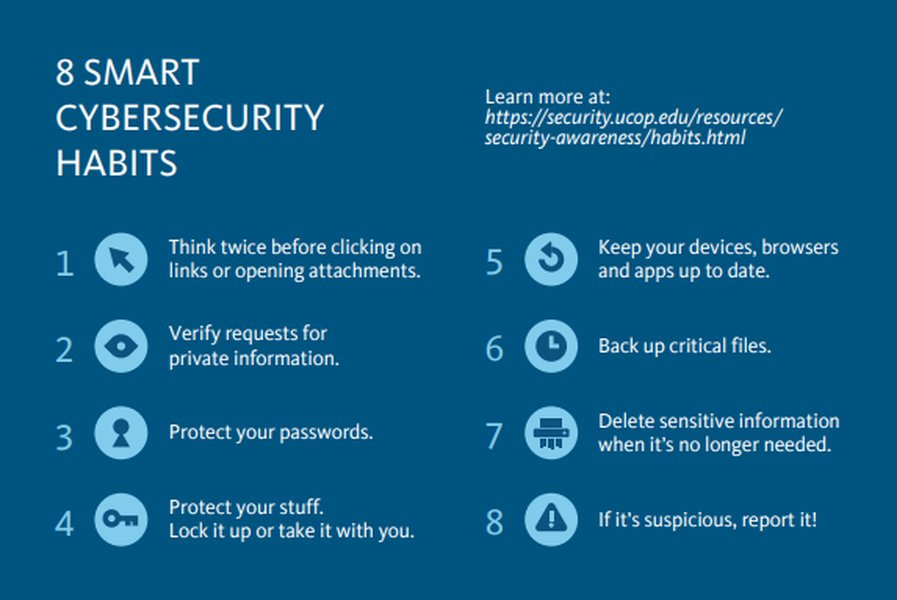
Eight simple habits for better online security.
Tips for Limiting Information Sharing:
- Adjust privacy settings on social media platforms to limit who can see your posts and personal information.
- Be wary of online quizzes or games that ask for personal information.
- Avoid sharing identifiable photos or videos of yourself or your family.
- Remove your name from websites that share personal information obtained from public records, if possible.
Recognizing and Avoiding Phishing Attacks
Phishing is a common tactic used by cybercriminals to trick individuals into revealing sensitive information. This often involves fraudulent emails, texts, or websites that imitate legitimate businesses or organizations.
How to Spot Phishing Attempts:
- Be suspicious of unsolicited emails or messages requesting personal information.
- Look for poor grammar, spelling errors, or unusual phrasing.
- Verify the sender's email address or phone number.
- Avoid clicking on suspicious links or downloading attachments from unknown sources. Instead, navigate directly to the official website.
Securing Your Online Connections and Devices
The security of your internet connection and devices plays a critical role in protecting your online privacy and data.
Practicing Safe Browsing Habits
Be mindful of the websites you visit. Ensure that websites where you enter personal or financial information use secure connections. Look for "https://" in the web address and a lock icon in the browser's address bar.
Safe Browsing Tips:
- Be wary of clicking on pop-up ads or suspicious links.
- Use a reputable antivirus software and keep it updated.
- Consider using a browser extension like uBlock Origin to block malicious ads and trackers.
Securing Your Network with a VPN
A Virtual Private Network (VPN) encrypts your internet connection, creating a secure tunnel for your data. This is particularly important when using public Wi-Fi networks, which are often unsecured and vulnerable to snooping by cybercriminals.
Benefits of Using a VPN:
-
Encrypts your internet traffic, protecting your data from being intercepted.
-
Masks your IP address, enhancing your online anonymity.
-
Provides a secure connection when using public Wi-Fi.
Keeping Software and Devices Updated
Software updates often include crucial security patches that fix vulnerabilities that could be exploited by hackers. Regularly updating your operating system, web browser, antivirus software, and other applications is essential for maintaining a secure online environment.
Importance of Updates:
Updates address security flaws, improve performance, and introduce new features, all of which contribute to a safer online experience.
Being Aware of Online Strangers and Interactions
While the internet facilitates connections, it also provides a platform for individuals with malicious intentions. Exercising caution when interacting with strangers online is crucial.
Wary of Online Strangers:
Be cautious when communicating with people you don't know in real life. Avoid sharing personal information, engaging in private conversations that feel suspicious, or agreeing to meet in person. The FBI estimates that a significant number of predators are online each day.
Reporting Suspicious Activity:
If you encounter suspicious behavior, cyberbullying, or attempts at exploitation, report it to the platform or website where it occurred. If necessary, report it to the relevant authorities.
Developing strong cybersecurity habits is key to online safety.
Additional Online Safety Measures
Beyond the core strategies, several other practices can further enhance your online security.
Encrypting Your Data
Encrypting your data, both on your devices and in cloud storage, makes it unreadable to unauthorized users. This is a crucial step in protecting sensitive files and information.
Regularly Reviewing Account Activity
Periodically check your online accounts, including bank statements and credit reports, for any suspicious or unauthorized activity.
Securely Disposing of Old Devices
Before selling or donating old devices, ensure all personal data is securely erased. Simply deleting files is not enough; use data wiping software or professional services.
Understanding Online Privacy Settings
Take the time to review and adjust the privacy settings on your social media accounts, email providers, and other online services. Customize these settings to control who can access your information.
Beware of Online Scams and Offers
Be skeptical of unsolicited offers, giveaways, or requests for financial information. If something seems too good to be true, it likely is.
Internet Safety Best Practices Table
The following table summarizes some key internet safety best practices:
| Area of Focus | Best Practices | Why it's Important |
|---|---|---|
| Passwords | Use strong, unique passwords; employ a password manager. | Prevents unauthorized account access. |
| Authentication | Enable two-factor authentication (2FA). | Adds an extra layer of security beyond passwords. |
| Personal Information | Limit sharing online; adjust privacy settings. | Reduces risk of identity theft and fraud. |
| Browsing | Practice safe browsing; use secure connections (HTTPS). | Avoids malicious websites and data interception. |
| Network Security | Use a VPN on public Wi-Fi; secure your home network. | Protects your data in transit and prevents unauthorized network access. |
| Software Updates | Keep all software and devices updated. | Patches security vulnerabilities. |
| Online Interactions | Be wary of online strangers; report suspicious activity. | Protects against online predators and harmful interactions. |
Understanding the Risks: A Visual Perspective
Visual aids can help illustrate the importance of online safety. Here's a video that provides additional tips for staying safe online:
Learn more about protecting yourself from online threats.
This video from Malwarebytes highlights various online threats like phishing, scams, and ransomware, and provides actionable tips to avoid becoming a victim. Understanding the nature of these threats is the first step in defending against them.
Frequently Asked Questions About Online Safety
What is the most important thing I can do to stay safe online?
While many factors contribute to online safety, using strong, unique passwords and enabling two-factor authentication on your accounts are arguably the most critical steps you can take to protect yourself from unauthorized access.
How can I tell if a website is secure for online shopping?
Look for "https://" at the beginning of the website's address and a lock icon in the browser's address bar. This indicates that the connection is encrypted, protecting your payment information.
Is it safe to use public Wi-Fi?
Public Wi-Fi networks are often unsecured, making your data vulnerable to interception. If you must use public Wi-Fi, it is highly recommended to use a Virtual Private Network (VPN) to encrypt your connection.
How often should I update my software?
You should update your software, including operating systems and applications, as soon as updates are available. These updates often contain crucial security patches.
What should I do if I think I've been a victim of an online scam?
If you believe you have been scammed online, report it to the relevant authorities, such as the Federal Trade Commission (FTC) in the U.S., and change any compromised passwords immediately. Contact your bank or credit card company if financial information was involved.
References
Last updated May 6, 2025