
Unveiling the Blueprint: How Top Tech Principal Designers Forge Impactful Products
An end-to-end look at the processes, methods, and mindset driving innovation at Apple, Google, and Meta.
Principal Product Designers at elite technology companies like Apple, Google, and Meta operate at the intersection of user needs, business strategy, and technological feasibility. They orchestrate a sophisticated end-to-end process designed to transform complex problems into intuitive, delightful, and valuable solutions. This journey blends rigorous methodology with creative intuition, ensuring products not only capture market share but also genuinely enhance users' lives. Let's delve into the systematic approach these leaders employ.
Essential Insights: The Core of Elite Product Design
- Deep User Empathy is Foundational: Understanding user needs, behaviors, and mental models through comprehensive research is the starting point for impactful design.
- Iterative Validation Mitigates Risk: Continuously testing assumptions and prototypes with users ensures the final product is usable, desirable, and aligned with objectives.
- Strategic Alignment Drives Success: Designs must consciously connect user delight with measurable business outcomes like revenue growth, retention, and market differentiation.
The End-to-End Product Design Lifecycle: From Spark to Scale
A Phased Approach to Innovation
The journey from an initial idea to a successful product launch and beyond is structured yet flexible, often adapting agile principles. While specifics vary by company and project, the core phases remain consistent, ensuring a thorough and human-centered approach.
Phase 1: Discovery & Research – Understanding the Terrain
This foundational phase is about deeply understanding the problem space, the target users, the business context, and the market landscape. It's about asking the right questions before jumping to solutions.
- Activities: Conducting stakeholder interviews to align on goals and constraints, performing qualitative user research (contextual inquiries, ethnographic studies, interviews), deploying quantitative research (surveys, analytics review, A/B test baselines), analyzing competitors, and synthesizing findings.
- Methods & Frameworks: Jobs-to-be-Done (JTBD) to understand user motivations, Empathy Mapping to build user understanding, Contextual Inquiry for deep observation, Affinity Mapping for synthesizing research data.
- Goal: To ground the team in verified user needs and strategic opportunities, defining *what* problem to solve and *why*.
Phase 2: Definition & Ideation – Charting the Course
Armed with insights, the team defines the core problem(s) and generates a wide range of potential solutions. This phase focuses on creativity grounded in strategy.
- Activities: Facilitating co-design workshops with cross-functional teams (design, product management, engineering), brainstorming and sketching concepts, developing storyboards to visualize user scenarios, defining high-level user flows and information architecture (IA), and prioritizing features using frameworks like RICE (Reach, Impact, Confidence, Effort).
- Methods & Frameworks: Design Thinking (Empathize, Define, Ideate), the Double Diamond model (Discover, Define, Develop, Deliver), Opportunity Solution Trees to map potential paths.
- Goal: To converge on a clear product vision and a high-level solution concept aligned with user needs and business objectives.
Phase 3: Design & Prototyping – Giving Form to Ideas
Here, abstract concepts are translated into tangible designs and interactive prototypes. The focus shifts to crafting the user experience and interface in increasing fidelity.
- Activities: Creating low-fidelity wireframes, progressing to high-fidelity UI mockups (adhering to platform standards like Apple's Human Interface Guidelines or Google's Material Design), defining detailed interaction design (micro-interactions, animations, feedback), building interactive prototypes for testing, and conducting early usability testing sessions.
- Methods & Frameworks: Atomic Design for building scalable design systems, applying usability heuristics, leveraging established design patterns.
- Goal: To create a detailed, testable representation of the product solution, iterating based on early feedback.
Phase 4: Validation & Refinement – Ensuring Effectiveness
This phase rigorously tests the design with real users to ensure it's intuitive, effective, and meets the defined goals. It's a cycle of testing, learning, and iterating.
- Activities: Conducting comprehensive usability testing (moderated and unmoderated, remote and in-person), running beta programs or pilot tests with target user groups, setting up and analyzing user behavior analytics, A/B testing design variants, and refining the design based on qualitative feedback and quantitative data.
- Methods & Frameworks: HEART metrics framework (Happiness, Engagement, Adoption, Retention, Task Success) for measuring user experience, continuous discovery habits.
- Goal: To validate the solution's effectiveness, identify and fix usability issues, and optimize the design for key metrics before large-scale development.
Phase 5: Delivery & Launch – Bringing the Product to Life
This involves close collaboration with engineering to ensure high-quality implementation, followed by the product launch and initial market introduction.
- Activities: Providing detailed design specifications and assets to developers, conducting design QA to ensure implementation fidelity, performing final accessibility checks, collaborating with marketing on launch messaging and storytelling, developing support materials, and planning for post-launch monitoring.
- Methods & Frameworks: Utilizing design handoff tools (Figma, Zeplin, Abstract), adhering to agile development practices (like Scrum), crafting compelling product narratives.
- Goal: To successfully build and launch a high-quality product that meets user and business needs.
Phase 6: Post-Launch Iteration & Growth – Continuous Improvement
The work doesn't end at launch. Top-tier products continuously evolve based on real-world usage data, user feedback, and changing market dynamics.
- Activities: Monitoring key performance indicators (KPIs) and user feedback channels, conducting ongoing A/B tests to optimize features, prioritizing the product backlog for future iterations and enhancements, updating the strategic roadmap based on learnings and new opportunities.
- Goal: To ensure the product remains relevant, continues to delight users, achieves sustained growth, and maximizes its positive impact over time.
Visualizing the Process: Core Activities
A Mind Map of the Product Design Journey
This mind map illustrates the interconnected phases and key activities within the end-to-end product design process employed by Principal Designers. It highlights the cyclical and iterative nature of creating impactful digital experiences, from initial understanding through to ongoing refinement.
Key Deliverables: Tangible Outputs of the Design Process
Communicating Insights and Solutions
Throughout the design lifecycle, Principal Designers and their teams produce various artifacts known as deliverables. These documents and visualizations serve to communicate research findings, design rationale, proposed solutions, and specifications to stakeholders, engineers, and other team members. They ensure alignment and provide a clear record of the design evolution.
The following table outlines some of the most common and crucial deliverables produced during the end-to-end product design process:
| Deliverable | Purpose | Typical Phase(s) |
|---|---|---|
| Research Reports / Insights Summary | Documents findings from user research, market analysis, and competitive reviews. Highlights key insights and opportunities. | Discovery & Research |
| User Personas / Archetypes | Fictional representations of target user segments, based on research. Details their goals, needs, behaviors, and pain points. | Discovery & Research |
| User Journey Maps | Visualizes the user's steps, thoughts, and emotions while interacting with a product or service to achieve a goal. Identifies pain points and opportunities. | Discovery & Research, Definition & Ideation |
| Mental Model Diagrams | Illustrates users' existing beliefs and expectations about how a system or domain works. Informs intuitive design choices. | Discovery & Research |
| Problem Statements / Opportunity Areas | Clearly articulates the specific user problems or business opportunities the design aims to address. | Discovery & Research, Definition & Ideation |
| Storyboards | Visually narrates user scenarios, showing how the product fits into the user's context and helps them achieve goals. | Definition & Ideation |
| User Flows / Information Architecture (IA) Diagrams | Maps the paths users take through the product and organizes its content and navigation structure. | Definition & Ideation, Design & Prototyping |
| Wireframes (Low-Fidelity & High-Fidelity) | Basic structural layouts (low-fi) and more detailed screen blueprints (hi-fi) showing content hierarchy, layout, and core elements without full visual polish. | Design & Prototyping |
| Interactive Prototypes | Simulations of the final product, ranging from simple click-throughs to highly interactive mockups, used for testing and demonstrating functionality. | Design & Prototyping, Validation & Refinement |
| UI Mockups & Style Guides / Design Systems | Pixel-perfect visual representations of the interface, along with comprehensive guidelines and reusable components for consistency and scalability. | Design & Prototyping, Delivery & Launch |
| Usability Testing Reports | Summarizes methods, findings, and recommendations from usability testing sessions. Highlights key issues and areas for improvement. | Validation & Refinement |
| Accessibility Audit Reports & Guidelines | Evaluates the design against accessibility standards (e.g., WCAG) and provides recommendations for inclusive design. | Design & Prototyping, Validation & Refinement |
| Design Specifications & Handoff Assets | Detailed documentation and assets (specs, icons, fonts, etc.) provided to engineers for accurate implementation. | Delivery & Launch |
| KPI Dashboards / Usage Reports | Tracks key metrics related to user engagement, task success, retention, and business goals post-launch. | Post-Launch & Iteration |
| Product Roadmaps / Iteration Backlogs | Outlines the strategic direction and prioritized list of features, improvements, and fixes for future development cycles. | Definition & Ideation, Post-Launch & Iteration |
Leveraging Psychology: Designing for the Human Mind
Building Intuitive and Engaging Experiences
Top-tier product design goes beyond aesthetics and functionality; it deeply considers human psychology. By understanding cognitive principles and user mental models, designers can create interfaces that feel intuitive, reduce cognitive load, and foster positive emotional responses.
Understanding User Mental Models
A user's mental model represents their existing understanding and expectations of how something works, often based on past experiences with similar systems. Designs that align with these models feel natural and easy to learn. Principal Designers prioritize research to uncover these models and ensure the product's conceptual model (how it *actually* works) matches the user's intuition as closely as possible.
Applying Psychological Principles
- Cognitive Load Theory: Designing interfaces that minimize unnecessary mental effort required from the user. This involves simplifying tasks, providing clear information hierarchy, and reducing clutter.
- Hick's Law: Recognizing that the time it takes to make a decision increases with the number and complexity of choices. This principle guides designers to limit options and streamline decision-making processes.
- Gestalt Principles: Using principles of visual perception (like proximity, similarity, closure) to organize information logically and create visually coherent layouts that users can quickly understand.
- Fogg Behavior Model / MAT: Understanding that behavior occurs when Motivation, Ability, and a Trigger converge. Designs can influence behavior by making tasks easier (increasing Ability), tapping into user Motivations, and providing clear Triggers or prompts.
- Feedback Loops: Providing immediate and clear feedback for user actions confirms their input was received and shows the system's status, reducing uncertainty.
- Visual Hierarchy: Intentionally guiding the user's eye to the most important elements on the screen through size, color, contrast, and placement.
- Cognitive Biases: Being aware of common biases (like confirmation bias or anchoring) helps designers create more objective experiences or, sometimes, leverage biases ethically to guide users towards beneficial actions.
By integrating these psychological insights, designers craft experiences that are not just usable but truly delightful, feeling effortless and aligned with how people think and behave.
Principal Designer Skill Focus: A Radar View
Balancing Diverse Capabilities
A Principal Product Designer requires a multifaceted skill set, balancing deep craft expertise with strategic thinking, leadership, and business acumen. This radar chart provides an opinionated visualization of the relative importance of key capability areas for success in such a role at a top tech company. It highlights the need for strong strategic and user-focused skills, complemented by execution, collaboration, and technical understanding.
The Art of Storytelling in Product Design
Crafting Narratives for Impact and Alignment
Storytelling is a critical, yet sometimes underestimated, tool in the Principal Product Designer's arsenal. It's used not just in marketing, but throughout the design process to build empathy, align teams, persuade stakeholders, and ultimately, create more meaningful products.
- Building Empathy and Understanding: User stories, personas, and journey maps are narrative forms that help the entire team connect emotionally with the user's experience and challenges.
- Communicating Vision and Rationale: Designers use storytelling techniques (like storyboards or narrative presentations) to articulate the product vision, explain design choices, and illustrate how the proposed solution addresses user needs and business goals. Frameworks like the "hero's journey" can frame the user as the hero and the product as their guide.
- Aligning Cross-functional Teams: A compelling narrative about the product's purpose and potential impact can unify diverse teams (engineering, marketing, sales, support) around a shared goal.
- Persuading Stakeholders: Presenting design concepts within a narrative structure, often supported by data, is more persuasive than simply showing screens. It helps stakeholders understand the 'why' behind the 'what'.
- Designing Engaging Experiences: Narrative principles can be woven into the product itself, guiding users through onboarding, highlighting benefits, and creating a more cohesive and emotionally resonant experience.
By mastering storytelling, designers can elevate their influence, foster better collaboration, and ensure the products they create resonate deeply with users.
Understanding the Product Development Lifecycle
From Idea to Launch and Beyond
The following video provides a comprehensive overview of the Product Development Lifecycle, covering the key phases involved in bringing a product from initial concept to market launch and subsequent iteration. Understanding this broader lifecycle context is crucial for Principal Product Designers, as their work integrates deeply with each stage, influencing strategy, development, and market success. It reinforces the structured yet iterative nature of creating successful digital products.
Video detailing the phases of the Product Development Lifecycle.
Visualizing the Flow: A Product Development Process
Mapping the Journey
Flowcharts are often used to visualize complex processes. This example illustrates a typical product development flow, highlighting the sequence of steps from ideation through launch and post-launch activities. Such diagrams help teams understand the overall process, dependencies between stages, and key decision points, aligning with the structured approach discussed earlier.
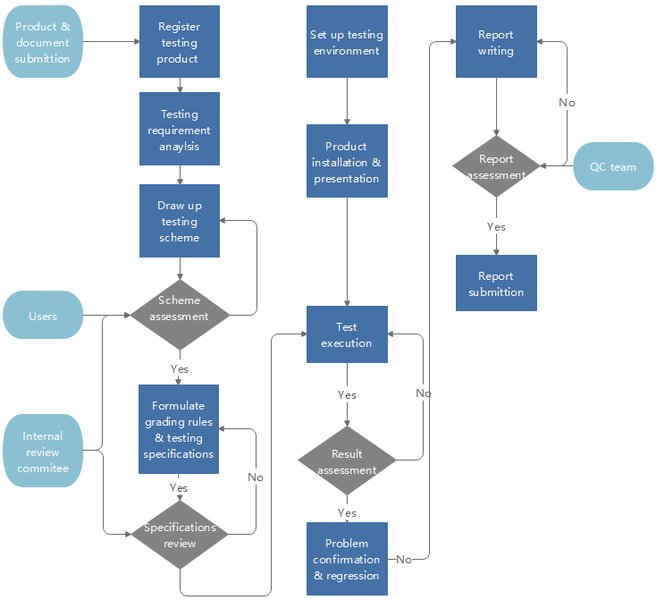
An example flowchart illustrating stages in product development.
The Trifecta: Driving Delight, Revenue, and Impact
Achieving Meaningful Outcomes
The ultimate goal of this rigorous, human-centered design process is to create products that succeed on multiple levels:
- User Delight: By deeply understanding user needs, mental models, and psychological principles, the process yields solutions that are intuitive, efficient, aesthetically pleasing, and emotionally resonant. This leads to high user satisfaction, loyalty, and positive word-of-mouth.
- Revenue Growth: The process explicitly links design decisions to business objectives. Through user research, A/B testing, and analytics, features are optimized for engagement, conversion, and retention. Solving real user problems effectively often translates directly into market adoption and monetization opportunities (e.g., subscriptions, targeted advertising revenue).
- Positive Human Impact: Top-tier designers aim to create products that offer genuine value beyond utility or profit. This can manifest as improved accessibility for people with disabilities, tools that foster meaningful connections (like at Meta), platforms that democratize information or creativity (like at Google), or devices that seamlessly integrate into and enhance daily life (like at Apple). By considering ethical implications and striving for positive outcomes, design can contribute meaningfully to users' well-being and societal progress.
In essence, the end-to-end process employed by Principal Product Designers at leading tech firms is a sophisticated system for turning user needs into desirable, viable, and impactful realities.
Frequently Asked Questions (FAQ)
What distinguishes a Principal Product Designer from a Senior Product Designer?
While both roles involve hands-on design work, a Principal Designer typically has a broader scope and influence. They often lead design for larger, more complex, or ambiguous product areas, drive design strategy and vision, mentor other designers, and have significant cross-functional influence. Senior Designers are typically focused on executing design within a more defined scope, though they also contribute to strategy and mentor junior designers.
How long does this end-to-end process typically take?
The duration varies significantly based on the project's complexity, scope, team size, and methodology (e.g., Agile sprints vs. waterfall). A small feature might take weeks, while developing a new major product or platform could span 6-18 months or even longer from initial discovery to launch and first iteration cycles.
How is the success of a product design measured?
Success is measured through a combination of qualitative and quantitative methods. Key metrics often include:
- User Experience Metrics: Usability test success rates, task completion times, error rates, System Usability Scale (SUS) scores, qualitative feedback, HEART metrics (Happiness, Engagement, Adoption, Retention, Task Success).
- Business Metrics: Conversion rates, user acquisition cost, retention/churn rates, engagement metrics (e.g., daily active users), revenue generated, market share.
- Impact Metrics: Measures related to the product's specific goals, such as improved user well-being, increased accessibility, or positive social impact indicators.
What are the most common tools used in this process?
Designers use a variety of tools depending on the phase and task:
- Design & Prototyping: Figma, Sketch, Adobe XD are industry standards for UI design and prototyping.
- Research & Synthesis: Tools like Miro or FigJam for collaboration and affinity mapping, Dovetail for research data management, survey tools (e.g., Google Forms, SurveyMonkey), usability testing platforms (e.g., UserTesting.com, Lookback).
- Handoff & Collaboration: Figma, Zeplin, Abstract for sharing specs with developers; project management tools like Jira, Asana, Trello; communication tools like Slack.
- Analytics: Google Analytics, Mixpanel, Amplitude for tracking user behavior.
Recommended Further Exploration
- How does the Jobs-to-be-Done framework specifically inform product discovery?
- What are the pros and cons of HEART metrics compared to other UX measurement frameworks?
- Can you provide examples of how psychological principles are applied ethically in product design?
- How do design systems help large companies like Google or Meta scale their product design efforts effectively?
References
Last updated May 5, 2025