
Unlock Automated Telecom Test Pack Generation: Your Custom Web App Prompt
Crafting the perfect instructions for lovable.dev to build your multi-sheet Excel export tool.
Creating a specialized web application requires clear instructions, especially when leveraging AI development platforms like lovable.dev. You need a tool that takes specific inputs about telecom products and automatically generates a comprehensive, multi-sheet Excel test pack. This response provides a meticulously crafted prompt designed to guide lovable.dev in building exactly that.
Essential Insights for Your Project
Key considerations when building your test pack generator:
- Multi-Sheet Excel Mastery: The core challenge is generating a single Excel file (
.xlsx) containing multiple, logically organized worksheets directly from the web application, often requiring specific server-side libraries. - Structured Data is Crucial: Predefined test cases must be stored in an organized manner (e.g., database, JSON), keyed by product type, and include detailed fields like ID, description, steps, and expected results.
- User Experience Matters: A simple, intuitive interface for selecting product type and entering the name, coupled with clear feedback during generation and download, is vital for usability.
The Engineered Prompt for lovable.dev
Provide this detailed prompt to guide the AI development process:
Act as an expert full-stack web application developer with specialized experience in the telecom industry, automated testing processes, data management, and advanced Excel file generation. Your mission is to design and generate the complete source code for a web application that automates the creation and export of multi-sheet Excel test packs for telecom operator products based on user specifications. **Project Title:** Automated Telecom Test Pack Generator **Core Objective:** Develop a robust and user-friendly web application where users can select a telecom product type, provide a specific product name, and trigger the automatic generation of a downloadable Excel file (<code>.xlsxformat). This Excel file must contain pre-defined manual test cases relevant to the selected product type, organized across multiple distinct worksheets. **I. Frontend User Interface (UI):** * Develop a clean, intuitive web page featuring the following components: * **Product Type Selector:** A dropdown menu populated with the following initial options. Ensure the list is designed for easy future expansion: * Mobile Promotion * Mobile Plan * Mobile Discounts * Mobile Recurring Addon * Mobile One-Time Addon * Consumer Fixed Line Plan * Enterprise Fixed Line Plan * **Product Name Input:** A standard text input field for the user to enter the specific name of the telecom product (e.g., "Summer Data Boost 2025", "Unlimited Fibre Home"). Implement basic input validation (e.g., non-empty). * **Action Button:** A clearly labeled button, such as "Generate Test Pack", to initiate the backend process. * **Progress Indicator:** Visual feedback (e.g., loading spinner, status message) to inform the user that the test pack generation is in progress. * **Download Trigger:** Upon successful generation, provide a prominent "Download Test Pack" button or automatically initiate the file download. **II. Backend Logic and Data Management:** * **Test Case Repository:** * Implement a persistent storage mechanism (e.g., SQL database, NoSQL database like MongoDB, structured JSON files) to store and manage the pre-defined manual test cases. * Each set of test cases must be keyed or categorized by "Product Type". * Define a clear structure for each test case entry, including essential fields: *TestCaseID(Unique identifier, potentially auto-generated or predefined) *TestCaseDescription(Clear objective of the test) *StepsToExecute(Numbered or bulleted list of actions) *ExpectedResult(The anticipated outcome if the test passes) *TestCategory(e.g., Functional, Billing, Provisioning, UI/UX, Performance, Security) *Priority(e.g., Critical, High, Medium, Low) *Status(Default to 'Not Started'; potentially include 'Passed', 'Failed', 'Blocked') *NotesComments(An empty field for tester input) * **Test Case Retrieval and Processing:** * When the user submits the Product Type and Product Name: * Retrieve the complete set of pre-defined test cases associated with the selected "Product Type" from the repository. * Dynamically insert or reference the user-provided "Product Name" into relevant fields within the retrieved test cases (e.g., prepending it to descriptions or including it in specific steps where applicable). * **Excel File Generation (Multi-Sheet):** * This is a critical requirement: Generate a *single* Excel workbook (.xlsx). * The workbook *must* contain multiple worksheets. Organize the test cases logically across these sheets. Examples of organization strategies include: * One sheet perTestCategory(e.g., "Functional Tests", "Billing Tests"). * Sheets based onPriority(e.g., "Critical & High Priority", "Medium & Low Priority"). * A "Summary" sheet with metadata (Product Type, Product Name, Generation Date) and subsequent sheets with detailed test cases. * Logical groupings specific to telecom testing phases (e.g., "Provisioning", "Usage & Rating", "Deactivation"). * Use a robust server-side library suitable for the chosen backend stack to create the Excel file programmatically. Recommended options include: * **.NET (C#):** ClosedXML or OpenXML SDK. * **Node.js (JavaScript/TypeScript):** SheetJS (js-xlsx) or ExcelJS. * **Python:** openpyxl or XlsxWriter. * Ensure each worksheet is appropriately named (e.g., "Functional - [Product Name]", "Summary"). * Populate each worksheet with the corresponding test case data in a clear, tabular format. Use the defined test case fields as column headers. Apply basic formatting for readability (e.g., bold headers). * **File Download:** * Configure the backend endpoint to stream the generated Excel file directly to the user's browser for download. * Set the correct HTTP headers: *Content-Type: application/vnd.openxmlformats-officedocument.spreadsheetml.sheet*Content-Disposition: attachment; filename="[Product Name]_Test_Pack_[Date].xlsx"(Dynamically generate the filename). **III. Technical Stack and Considerations:** * **Technology Choice:** Select a suitable web development stack (e.g., Node.js with Express/React, Python with Django/Flask, C# with ASP.NET Core/Blazor/Razor Pages). Document the chosen stack. * **Scalability:** Design the application architecture to handle a reasonable number of concurrent users and a growing repository of test cases. * **Error Handling:** Implement comprehensive error handling for invalid inputs, data retrieval issues, Excel generation failures, etc., providing informative feedback to the user. * **Security:** Adhere to standard web security best practices (e.g., input sanitization, prevention of injection attacks). * **Maintainability:** Structure the code logically with clear separation of concerns (UI, business logic, data access, Excel generation). Ensure the test case repository is easy to update or extend with new product types and test cases. * **AI Assistance (Optional Enhancement):** Consider integrating capabilities (if feasible within lovable.dev's scope) to allow AI suggestions for refining existing test cases or generating new ones based on product descriptions, although the core requirement is using pre-defined ones. **IV. Deliverables:** * Complete, runnable source code for the web application (Frontend and Backend). * Clear instructions for setting up the development environment, installing dependencies, and running the application. * Documentation outlining the application's architecture, data structures (especially the test case schema), and instructions on how to add/modify product types and their associated test cases in the repository. **Desired Outcome:** A fully functional web application that meets all the specified requirements, enabling users to efficiently generate standardized, multi-sheet Excel test packs for various telecom products, ready for quality assurance activities.
Visualizing the Application Structure
A Mindmap of Key Components
This mindmap illustrates the high-level architecture and workflow of the proposed Telecom Test Pack Generator application. It shows the interaction between the user interface, backend processing, data storage, and the final Excel generation step.
(based on Product Type)"] id2b2["Populate Product Name"] id2b3["Organize Data for Sheets"] id2c["Excel Generation Module"] id2c1["Use Library
(e.g., ClosedXML, SheetJS)"] id2c2["Create Workbook"] id2c3["Add Multiple Worksheets"] id2c4["Populate Sheet Data"] id2c5["Set Headers & Formatting"] id3["Data Storage"] id3a["Test Case Repository
(Database / JSON Files)"] id3a1["Schema Definition
(ID, Description, Steps, etc.)"] id3a2["Data Keyed by Product Type"] id4["Output"] id4a[".xlsx File"] id4a1["Multiple Worksheets"] id4a2["Structured Test Cases"] id4a3["Ready for Download"]
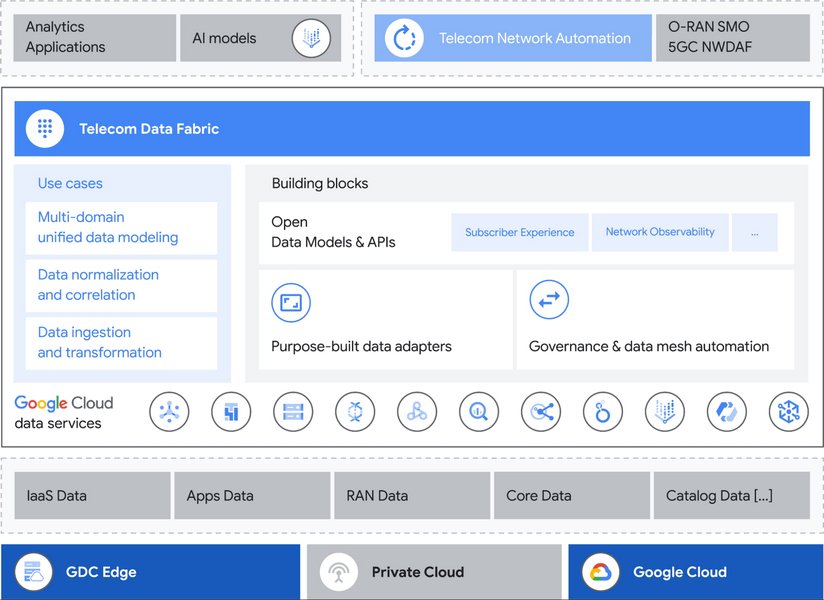
Conceptual representation of managing complex telecom data, relevant to organizing test case information.
Choosing the Right Technology Stack
Comparing Potential Backend Technologies
Selecting the right backend technology is crucial for features like multi-sheet Excel generation. This radar chart compares common backend choices based on factors relevant to this project. Higher scores indicate better suitability for that specific aspect.
Interpreting the Chart
All listed options are viable. .NET often has very mature, built-in support for Office documents via libraries like OpenXML. Node.js benefits from a vast ecosystem and asynchronous handling, making it potentially fast. Python excels in rapid development and data manipulation tasks. The best choice depends on the specific requirements of lovable.dev or the developer's expertise.
Defining the Test Case Structure
Data Fields for Your Predefined Test Cases
A clear, consistent structure for your predefined test cases is essential for the application's logic. The table below outlines the recommended fields, their purpose, and examples. This structure should be implemented in your chosen data store (database or JSON files).
| Field Name | Description | Data Type | Example |
|---|---|---|---|
TestCaseID |
A unique identifier for the test case (e.g., MP-FUNC-001). | String | MP-FUNC-001 |
TestCaseDescription |
A brief summary of what the test case aims to verify. | String | Verify successful activation of the [Product Name] mobile plan. |
StepsToExecute |
A detailed, ordered list of actions the tester needs to perform. | Array of Strings or Text (with formatting) | 1. Navigate to activation portal. |
ExpectedResult |
The specific, observable outcome expected if the test passes. | String | System confirms successful plan activation. Subscriber receives confirmation SMS. Plan details reflect correctly in account profile. |
TestCategory |
Classifies the test case type (e.g., Functional, Billing, UI). | String (Enum Recommended) | Functional |
Priority |
Indicates the test case importance (e.g., Critical, High, Medium, Low). | String (Enum Recommended) | High |
Status |
Tracks the execution status (e.g., Not Started, Passed, Failed). | String (Enum Recommended) | Not Started |
NotesComments |
A field for testers to add observations, defect IDs, or comments. | Text | (Empty by default) |
Tutorial: Exporting to Multiple Excel Sheets
Understanding the Core Technical Challenge
Generating an Excel file with multiple sheets from a web application typically involves server-side processing. The backend code needs to fetch the relevant data, organize it into structures representing different sheets, and then use a library (like ClosedXML for .NET, SheetJS for Node.js, or openpyxl for Python) to build the Excel file in memory. Finally, this file is streamed to the user's browser for download.
The video below demonstrates this concept within a .NET Core Web API context, showcasing how data can be structured and exported into multiple sheets within a single Excel file, which is directly applicable to the requirements of your telecom test pack generator.
Video demonstrating multi-sheet Excel export in a .NET Core Web API.
Frequently Asked Questions (FAQ)
Common queries about building this application:
Can I customize the predefined test cases or add new ones easily?
Which library is best for generating multi-sheet Excel files?
How will the application handle a very large number of test cases?
Can the generated Excel file include formatting like colors or conditional formatting?
Recommended Next Steps
Explore related topics for deeper insights:
- How can I best design a database schema for storing and managing software test cases effectively?
- What are the key differences between SheetJS and ExcelJS for server-side Excel generation in Node.js?
- What are the best practices for implementing secure file downloads in an ASP.NET Core web application?
- Can AI tools effectively suggest relevant test cases based on product requirements or user stories?
References
Sources used in this analysis:
Last updated May 4, 2025