
Is Your RCA Phone Blinking and Buzzing? Unraveling the Mystery of the Message Waiting Light
A step-by-step guide to troubleshoot and resolve the flashing blue light, busy tone, and "Message waiting L1" on your RCA TC25424RE1.
Experiencing a persistent flashing blue light, an annoying busy tone when you pick up the handset, and a "Message waiting L1" display on your RCA TC25424RE1 phone can be frustrating. These indicators typically signal that your phone has a new voicemail message waiting on Line 1. This guide will walk you through understanding these signals and the steps to resolve the issue, drawing on common solutions and troubleshooting techniques for your specific phone model.
Essential Insights: Key Takeaways
- Voicemail is Calling: The flashing blue light and "Message waiting L1" almost certainly mean there's a new voicemail message on Line 1, provided by your telephone service company.
- Listen Up to Clear: The most common solution is to access your voicemail service for Line 1 and listen to or delete any new messages. This typically deactivates the indicator.
- Reset and Recheck: If listening to voicemails doesn't work, a simple power reset of the phone or checking the phone's own answering system can often resolve minor glitches causing the persistent indicators.
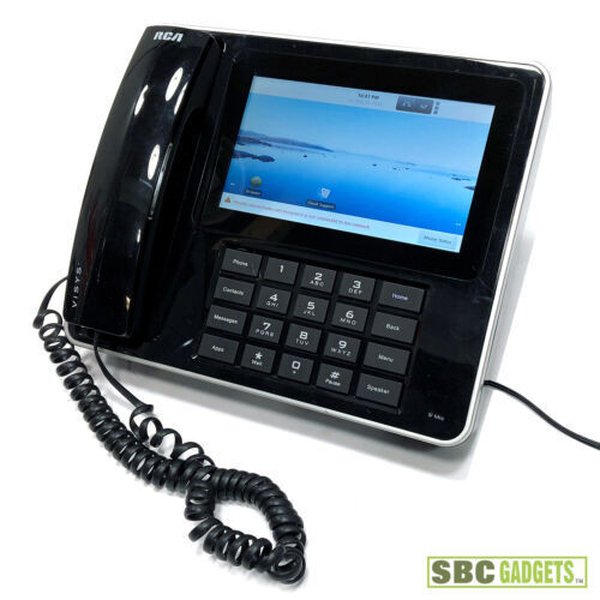
The RCA TC25424RE1, a multi-line business phone.
Decoding Your Phone's Signals
Your RCA TC25424RE1 phone uses specific visual and auditory cues to communicate its status. Understanding these is the first step to troubleshooting.
Understanding the Indicators
The combination of a flashing blue light, a "Message waiting L1" display, and a busy tone points directly to a message-related event on the first phone line connected to your device.
- Flashing Blue New Message Light: This is the primary visual alert signifying one or more unread messages.
- "Message waiting L1" Display: This text on your phone's screen specifically confirms the message is on Line 1. Your phone model can support multiple lines, so this pinpoints the source.
- Busy Tone Upon Pickup: This can occur for a few reasons:
- The line might be temporarily "held" by the message waiting signal itself from the phone company.
- It's an auditory reinforcement that a message requires attention before the line can be used normally.
- In rarer cases, it could indicate a line fault or an issue with the phone's hook switch.
The "Message Waiting Indicator" (MWI) feature, responsible for the light and display message, is typically activated by a signal from your telephone service provider when a voicemail is recorded in their system. The RCA TC25424RE1 is designed to recognize this signal.
Step-by-Step Troubleshooting Guide
Follow these steps systematically to resolve the message waiting indicators on your RCA TC25424RE1.
Step 1: Access and Clear Your Voicemail (Primary Solution)
The most common reason for these indicators is a new message in your phone company's voicemail service for Line 1. Listening to or deleting these messages is usually all that's needed.
How to Access Voicemail:
- Pick up the handset for Line 1. You may hear the busy tone initially.
- Dial your voicemail access number. This number is provided by your phone service provider (e.g., *98, *68, or your own phone number). If you are unsure of this number, you will need to contact your provider.
- Follow the prompts to listen to your new messages. Ensure you listen to all new messages or explicitly delete them.
- Once all messages are reviewed or deleted, the flashing light and "Message waiting L1" display should turn off automatically. This may take a few moments.
If you have listened to all messages and the light persists, wait a few minutes, as there can sometimes be a delay in the "clear" signal reaching your phone.
Step 2: Check the Phone's Integrated Answering System (If Applicable)
The RCA TC25424RE1 also features a built-in digital answering system with a mailbox for each line and approximately 60 minutes of recording time. While the "Message Waiting L1" light is typically for carrier voicemail, it's worth checking the phone's own system if Step 1 didn't work.
Accessing On-Device Messages:
- Locate the answering system controls on your phone's base unit.
- Press the button for Line 1 messages (if distinct line buttons exist for message playback) or the general **Play/Stop** button.
- Listen to any recorded messages.
- Use the **Delete** button to remove messages after listening, if desired.
Some users report that pressing and holding the **Delete** button for a few seconds can sometimes clear a "stuck" message waiting indicator, even if no messages are present.
Step 3: Power Reset Your Phone
A simple power reset can often resolve minor electronic glitches that might cause the indicators to remain active incorrectly.
How to Perform a Power Reset:
- Unplug the phone's power adapter from the electrical outlet.
- Disconnect the phone line cord (for Line 1) from the wall jack and from the phone itself.
- Wait for at least 60 seconds. This allows any residual power to dissipate and the internal memory to clear.
- Reconnect the phone line cord to Line 1 on the phone and to the wall jack.
- Plug the power adapter back into the electrical outlet.
- Allow the phone a minute or two to reboot and re-establish its connection. Check if the indicators have cleared.
Step 4: Inspect Physical Connections and Hardware
Loose connections or a malfunctioning component can sometimes cause unexpected behavior, including persistent busy tones or false indicators.
Hardware Checks:
- Line Cord: Ensure the telephone line cord for Line 1 is securely plugged into both the phone and the wall jack. Try a different line cord if you suspect the current one might be damaged.
- Hook Switch: When you lift the handset, the hook switch (the small button or lever in the cradle) should pop up freely. If it's stuck or sticky, it might not correctly signal that the handset is off-hook, potentially leading to a busy signal or other issues. Clean it gently if necessary.
- Speaker/Mute Buttons: Ensure the speakerphone is not active (the speaker indicator light should be off) and that the mute function is not engaged, as these could affect line behavior.
Troubleshooting Effectiveness Overview
The following chart provides a visual representation of the general effectiveness and ease of various troubleshooting steps for resolving message waiting indicator issues on phones like the RCA TC25424RE1. "Likelihood of Resolution" estimates how often the step solves the problem, while "Ease of Execution" reflects the simplicity of performing the step.
This chart illustrates that accessing carrier voicemail is typically the most effective and relatively easy first step. If initial steps fail, contacting your service provider becomes a highly likely path to resolution, though it's less easy for the user to execute independently.
Visualizing the Troubleshooting Path
To further clarify the process, the mindmap below outlines the logical flow for addressing the "Message Waiting L1" issue on your RCA TC25424RE1. Starting from the observed symptoms, it branches out into primary causes, initial troubleshooting actions, further checks, and escalation paths if the problem persists.
Flashing Light & Busy Tone"] idS["Symptoms Identified"] idS1["Blue Flashing Light"] idS2["Display: 'Message waiting L1'"] idS3["Busy Tone on Pickup"] idPC["Primary Suspected Cause"] idPC1["Voicemail Waiting (Carrier Service)"] idTS["Initial Troubleshooting Steps"] idTS1["1. Access & Clear Carrier Voicemail"] idTS1a["Dial voicemail access number"] idTS1b["Listen/Delete all new messages"] idTS2["2. Check Phone's Answering System"] idTS2a["Use phone's play/delete buttons"] idTS2b["Hold 'Delete' if applicable"] idTS3["3. Power Reset Phone"] idTS3a["Unplug power & phone line"] idTS3b["Wait 60 seconds"] idTS3c["Reconnect & test"] idFC["Further Diagnostic Checks"] idFC1["Inspect Physical Line Connections"] idFC2["Verify Hook Switch Functionality"] idFC3["Check for Stuck Speaker/Mute Buttons"] idEP["Escalation & Advanced Options"] idEP1["Contact Phone Service Provider"] idEP1a["Verify MWI signal status"] idEP1b["Check for line issues"] idEP2["Consult RCA User Manual"] idEP3["Possible Phone System Error (e.g., 'Error: Inhibited')"] idEP3a["May require factory reset (see manual)"] idEP3b["Consider professional repair if hardware fault suspected"]
This mindmap helps visualize that checking carrier voicemail is the central first action, followed by other device-specific checks and, eventually, seeking external assistance if needed.
Interpreting Phone Indicators: A Quick Reference
The following table summarizes the common indicators you're experiencing and the typical actions to address them on your RCA TC25424RE1:
| Indicator | Typical Meaning | Primary Action |
|---|---|---|
| Flashing Blue New Message Light | New unread message(s) in voicemail or phone's answering system. | Access voicemail/answering system to review messages. |
| Display: "Message waiting L1" | Confirms the message is on Line 1; usually refers to carrier voicemail. | Focus troubleshooting on Line 1 voicemail service. |
| Busy Tone When Picking Up Handset | Line is occupied (possibly by MWI signal), message pending, or potential line/phone fault. | Clear messages first; if persists, check connections and consider power reset. |
| "ERROR: INHIBITED" (if displayed) | A more significant phone system error or internal fault. | Power reset; consult manual for factory reset; may require service. |
Step 5: When to Contact Your Phone Service Provider
If you have diligently followed all the above steps and the message waiting indicators persist, or if you cannot access your voicemail, it's time to contact your telephone service provider.
Reasons to Call Your Provider:
- They can confirm if their Message Waiting Indicator signal is "stuck" for your line and manually reset it from their end.
- They can verify there are no issues with your voicemail service subscription or your phone line itself.
- They can provide the correct voicemail access number and any necessary PINs or passwords if you've forgotten them.
- Sometimes, there can be an "uninitialized parameter" in your account with the phone company or a slight incompatibility between the phone and the connection type they provide, which they can address.
If your provider confirms that the MWI signal is clear on their end and there are no line issues, and the problem still persists, it might point to an internal fault within the RCA TC25424RE1 phone itself. In such cases, consulting the user manual for advanced reset options or contacting RCA support (or Thomson Inc., often the manufacturer/distributor) might be necessary, especially if the phone is still under warranty.
Frequently Asked Questions (FAQ)
Why is my phone showing "Message waiting L1" but I have no messages in my carrier voicemail?
Can a busy tone be caused by something other than a waiting message?
What if the buttons on my RCA TC25424RE1 are not working properly?
Does the RCA TC25424RE1 have its own answering machine, or does it only work with my phone company's voicemail?
Conclusion
The flashing blue light, "Message waiting L1" display, and busy tone on your RCA TC25424RE1 are clear signs that your phone is trying to tell you something – usually, that a voicemail is waiting on Line 1 from your carrier. By systematically working through the steps of accessing your voicemail, checking the phone's own answering system, performing a power reset, and inspecting connections, you can typically resolve this issue. If these self-help steps don't clear the indicators, your phone service provider is your next best resource to ensure the message waiting signal is correctly managed for your line.
Recommended Next Steps & Related Queries
To further explore related topics or troubleshoot other potential phone issues, consider these queries:
- How do I perform a factory reset on my RCA TC25424RE1 phone if basic troubleshooting fails?
- What should I do if my RCA multi-line phone has no dial tone on one or more lines?
- Where can I find the complete user manual for the RCA TC25424RE1 for advanced features?
- What are the steps to manage the phonebook and stored numbers on the RCA TC25424RE1?
References
The information in this guide was synthesized from various resources, including user manuals and troubleshooting forums. For more detailed information, you can consult the following sources:
 images10.newegg.com
 amazon.com
 static.rca.com
Last updated May 21, 2025