
Visualizing Sales Data: Using Histograms and Ogives for Retail Analysis in Hyundai Cars
An in-depth exploration of data visualization techniques for understanding Hyundai car sales trends
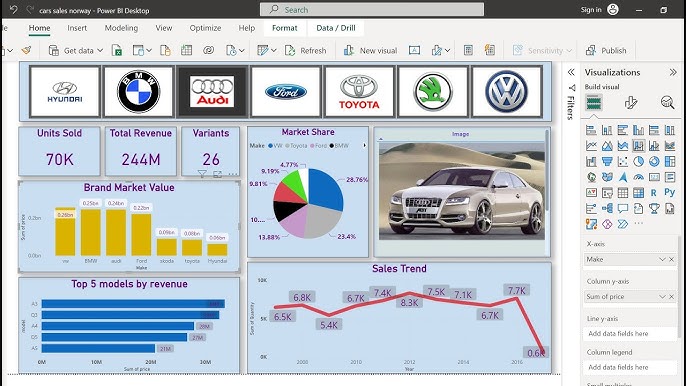
Key Highlights
- Visual Tools Utility: Histograms reveal distribution patterns while ogives present cumulative trends to foster better retail analysis.
- Actionable Insights: Both visualizations offer critical insights for performance evaluation, trend forecasting, and inventory management.
- Data-Driven Decisions: Utilizing these tools assists in strategic decisions across production, marketing, and sales initiatives for Hyundai cars.
Introduction
In today's competitive retail environment, visualizing sales data is a critical component of effective business analysis and decision-making. For automotive companies like Hyundai, leveraging statistical graphics such as histograms and ogives, also known as cumulative frequency graphs, can provide significant insight into sales performance, consumer behavior, and market trends.
This comprehensive guide discusses the methods for creating and interpreting histograms and ogives using Hyundai's sales data. Through an integrated approach that combines data collection, visualization techniques, and detailed analysis, we explore how these tools can facilitate informed retail strategies and optimize sales performance.
Understanding Histograms in Retail Analysis
What is a Histogram?
A histogram is a graphical representation that organizes a group of data points into user-specified ranges (bins). In the context of Hyundai car sales, a histogram might display the number of units sold per day, per month, or for each car model, thus highlighting the distribution of sales volumes over defined intervals.
Key Features of Histograms:
- Data Distribution: Visual cues on where the majority of sales events occur versus outlier periods with exceptionally high or low sales.
- Frequency Counts: The number of occurrences falling within specific ranges, such as daily or monthly sales counts.
- Skewness and Kurtosis: Identification of symmetry or asymmetry in the sales data distribution, and the sharpness of the distribution.
Historical Context and Practical Applications
Historically, histograms have been a mainstay in statistical analysis. For Hyundai's retail analysis, histograms allow stakeholders to answer essential questions such as:
- Which Hyundai models are sold most frequently?
- What sales ranges are common during peak versus off-peak periods?
- How do monthly or seasonal trends vary across different vehicle types, including electric vehicles?
Example Scenario
Imagine receiving daily sales data per Hyundai model over a fiscal year. By grouping this data by the number of units sold each day, you can construct a histogram displaying the frequency of specific sales levels. For instance, if many days record sales between 20 and 30 units, the mode of the distribution will indicate that this range is typical. Conversely, very few days showing sales above 50 units could suggest outlier data influenced by promotional events or market anomalies.
Understanding Ogives in Retail Analysis
What is an Ogive?
An ogive is a cumulative frequency graph that charts the running total of data values as opposed to the frequency of occurrence in bins. This visualization technique is particularly valuable when assessing the cumulative performance of sales over time or across categories.
Key Characteristics of Ogives:
- Cumulative Trends: They illustrate how sales accumulate over specified intervals, such as days or months.
- Percentile Determination: Ogives enable the determination of what percentage of sales events fall below a certain threshold, an essential metric for setting performance benchmarks.
- Smooth Curve Analysis: The slope and curvature can highlight periods of rapid sales increases or stagnation, informing future sales forecasting.
Utility in Hyundai Sales Analysis
By integrating an ogive into your sales data analysis, key decision-makers can track cumulative sales progress over time. In the case of Hyundai cars, this technique could be used to understand how cumulative sales evolve as new models enter the market or during significant promotional campaigns.
Analyzing Cumulative Sales Trends:
To build an ogive, one starts with a frequency histogram, computes cumulative frequencies for each bin, and then plots these values. This offers a clear depiction of cumulative sales—helping you pinpoint at what sales level a particular percentage of the total has been reached. For example, if 75% of Hyundai’s accumulated annual sales occur below a certain figure, that threshold becomes a critical metric for forecasting.
Step-by-Step Visualization Process
Step 1: Data Collection and Preparation
The first step in visualizing Hyundai's sales data is gathering comprehensive and reliable datasets. This can include information such as dates, models, units sold, and regional performance. You must ensure that the data is clean and structured for effective analysis.
Key Elements to Collect:
- Time Periods: Daily, monthly, or yearly sales figures to capture short-term performance and long-term trends.
- Vehicle Models: Detailed data for each Hyundai model, including variations such as hybrid or electric variants.
- Geographical Segments: Sales by region or market to highlight localized performance differences.
- Additional Metrics: Supplementary data like pricing, promotional periods, and comparative market analyses.
Step 2: Creating a Histogram
Once the data is ready, an immediate visualization tool is the histogram. Let’s break down the process:
Histogram Construction:
- Bin Selection: Decide on the appropriate bin size. For daily sales, this might be a range of 10 units or another suitable interval based on overall sales volume.
- Data Segmentation: Group the sales data into bins assigned by ranges of units sold. This grouping is crucial to understand the frequency distribution across different sales levels.
- Visualization Tool: Use tools like Excel, R, or Python with libraries (matplotlib, seaborn) to design the histogram.
- Interpret Results: Quantify the number of days falling into each sales bin to determine which sales performance levels are most common.
Example Table of Histogram Data
| Units Sold Range | Number of Days |
|---|---|
| 0 - 10 | 15 |
| 11 - 20 | 45 |
| 21 - 30 | 60 |
| 31 - 40 | 25 |
| 41 - 50 | 10 |
This table represents how daily sales might be distributed over a month, offering insights into the frequency of varying sales levels. The histogram created from such a table will typically have the x-axis representing sales ranges and the y-axis indicating the corresponding frequencies.
Step 3: Constructing an Ogive
After creating a histogram, you can derive an ogive by calculating the cumulative frequency. This involves summing the frequencies of all bins up to a certain point.
Ogive Creation Process:
- Cumulative Count: Begin with the frequency in the first bin and progressively add the frequencies from subsequent bins.
- Plotting: Plot these cumulative frequencies against the upper boundary of each bin. The result is a curve that steadily ascends, reflecting cumulative growth in sales.
- Interpretation: Analyze how steep or flat the curve is at various intervals to deduce where sales accumulate most rapidly.
For example, if your ogive shows that 80% of total sales are reached by the time you hit a sales figure of 30 units per day, this metric provides a benchmark for setting monthly targets or anticipating growth during peak periods.
Analyzing Hyundai’s Sales Data: Practical Insights
Sales Performance Across Models and Regions
Hyundai’s sales data can be categorized by individual models (e.g., Tucson, Elantra, Sonata, IONIQ series) and regions (domestic versus international markets). Histograms can be generated for each model to compare performance visually, while ogives can track cumulative sales performance across these segments.
Key Insights from Visual Analysis:
- Identifying Best-Sellers: Through histograms, best-selling models can be identified by noting which sales bins are most frequently populated. For example, an analysis may reveal that compact SUVs like the Tucson show consistently higher daily sales frequencies than sedans.
- Regional Trends: By segmenting sales data by regions, disparities in performance become apparent. A histogram comparing unit sales in North America versus international markets helps tailor specific marketing strategies.
- Cumulative Growth Patterns: Ogives facilitate an understanding of how quickly sales are accumulating over a month or year. Sharp increases within an ogive might correlate with promotional campaigns or seasonal variations, providing actionable insight into consumer behavior.
Cumulative Benchmarks and Performance Targets
One clear advantage of using ogives is the ability to derive cumulative benchmarks. For instance, from an ogive derived from daily or monthly sales data, one might ascertain that 70-80% of annual sales are achieved by mid-year, flagging a slowdown period thereafter. This information is crucial for setting realistic performance targets and for planning inventory management and marketing strategies.
Example Analysis Using Data Points:
Assuming Hyundai sold a total of 836,802 units with a noticeable spike in particular models during certain months, the ogive visualization might reveal that:
- A majority of sales (e.g., 75%) happens with daily unit counts below a specific threshold during off-peak periods.
- During promotional windows, sales performance in those histograms shifts rightward, indicating that higher bins are being populated.
Leveraging Data Visualization Tools
Software and Programming Tools
Modern retail analysis leverages multiple data visualization and statistical software tools, which offer flexible and powerful ways to create these visualizations. Common tools include:
- Excel: Widely accessible for basic histogram generation and cumulative frequency analysis through pivot tables and chart functions.
- R: Provides advanced statistical analysis and highly customizable visualization capabilities through libraries like ggplot2.
- Python: With libraries such as pandas, matplotlib, seaborn, and Plotly, Python enables both static and interactive visualizations to explore Hyundai's sales data in depth.
Example: Histogram and Ogive in Python
Below is an example snippet of Python code for generating a histogram followed by an ogive based on structured Hyundai daily sales data:
# Import required libraries
import pandas as pd
import matplotlib.pyplot as plt
import numpy as np

# Load Hyundai sales data from a CSV file
data = pd.read_csv('hyundai_sales.csv')

# Group data by date and aggregate units sold
daily_sales = data.groupby('Date')['Units_Sold'].sum().reset_index()

# Plot Histogram
plt.figure(figsize=(10, 6))
plt.hist(daily_sales['Units_Sold'], bins=10, color='skyblue', edgecolor='black')
plt.title('Histogram of Daily Units Sold for Hyundai Cars')
plt.xlabel('Total Units Sold per Day')
plt.ylabel('Frequency')
plt.show()

# Compute histogram data for ogive
bins = np.linspace(daily_sales['Units_Sold'].min(), daily_sales['Units_Sold'].max(), 11)
counts, bin_edges = np.histogram(daily_sales['Units_Sold'], bins=bins)
cumulative_counts = np.cumsum(counts)

# Plot Ogive
plt.figure(figsize=(10, 6))
plt.plot(bin_edges[1:], cumulative_counts, marker='o', linestyle='-', color='orange')
plt.title('Ogive (Cumulative Frequency) of Daily Units Sold')
plt.xlabel('Total Units Sold per Day')
plt.ylabel('Cumulative Frequency')
plt.grid(True)
plt.show()
This simple script demonstrates how one can generate visualizations using Python, offering flexibility to analyze different parameters of Hyundai’s sales data.
Interactive Visualizations
Interactive dashboards are increasingly popular in retail analysis. Platforms like Tableau or Plotly Dash allow sales teams to interact dynamically with data, offering customizable filters such as date ranges, regional segmentation, or even vehicle model differentiation. These interactive tools enable decision-makers to drill down into specifics, providing a more granular understanding and real-time monitoring of sales trends.
Broader Applications and Insights
Strategic Decision Making Using Visual Data
Retail analysis for Hyundai extends beyond simple sales tracking. By combining histograms and ogives, executives can identify both the micro and macro trends in sales performance. Some of the broader applications include:
Inventory and Supply Chain Optimization:
Understanding the distribution of sales through histograms assists in planning production volumes and inventory stocking. If a certain model frequently falls into higher sales bins, production could be increased and inventory levels adjusted accordingly. Conversely, models with sporadic sales might be better supported by a just-in-time manufacturing approach.
Marketing Strategy and Promotions:
Visualizations reveal how cumulative sales respond to marketing efforts. By studying shifts in the ogive before and after a promotional period, marketing teams can assess campaign effectiveness and better schedule future promotions.
Sales Forecasting:
Cumulative frequency curves can serve as a predictive tool. If an ogive shows that a certain percentage of total expected sales normally occurs by mid-quarter, retailers can use this insight to forecast overall performance, adjust targets, and plan resource allocation more effectively.
Model-Specific and Regional Analysis
Hyundai’s robust portfolio includes a diverse range of vehicles. Breaking down sales data by model and by region provides layered insights. For example:
- Model Differentiation: Customers' preferences might favor specific models such as SUVs during certain seasons, whereas electric vehicles could see a surge during eco-friendly campaigns. Histograms can capture these peak buying times for each category.
- Region-Specific Trends: Sales trends differ by market, with some regions experiencing rapid cumulative increases due to localized economic factors or strong dealership networks. Analyzing such data can lead to market-specific strategies, like regionally tailored promotions.
Comprehensive Workflow: From Data Collection to Actionable Insights
Workflow Overview
A comprehensive approach to visual data analysis integrates multiple steps, ensuring that the transition from raw data to actionable insights is smooth and insightful. The overall workflow might include:
- Data Collection: Compile daily, monthly, and annual sales figures from various channels such as dealerships, online orders, and authorized distributors.
- Data Cleaning and Preparation: Ensure that data is error-free, consistent, and categorized appropriately—consider filtering out anomalous data that may misrepresent typical sales patterns.
- Preliminary Analysis: Use summary statistics (mean, median, mode, standard deviation) to get an initial understanding of the data distribution.
- Visualization: Construct histograms to visualize frequency distributions and ogives to view cumulative data trends. Customize bin sizes and intervals to reflect different time scales.
- Detailed Analysis: Overlay additional statistical measures such as the kernel density estimate (KDE) on histograms. This enhances the visual representation by showing probability distributions.
- Interpretation: Analyze visual data to identify trends, outliers, and periods of peak performance. This interpretation will be key in making informed business decisions.
- Implementation of Findings: Utilize the insights gained to adjust marketing strategies, inventory levels, production schedules, and even to forecast future demand.
Visualization Summary Table
| Visualization Tool | Purpose | Key Benefits |
|---|---|---|
| Histogram | Displays frequency distribution of sales data | Identifies common sales ranges and outliers |
| Ogive | Charts cumulative sales over time | Facilitates the identification of performance benchmarks and forecasting |
Real-World Impact on Retail Strategy
Optimizing Production and Inventory Management
For Hyundai, the implementation of histograms and ogives in retail analysis translates directly into tactical advantages. When a histogram of daily sales highlights a consistent concentration of sales in a specific range, production planning can be fine-tuned to ensure sufficient inventory is available during peak days. Similarly, an ogive highlighting rapid cumulative sales growth in certain periods provides an early warning system for potential shortages or the need to scale production.
Enhancing Marketing and Sales Channels
Data visualizations also empower Hyundai’s marketing teams by clarifying the relationship between campaigns and sales performance. When histograms reveal a shift towards higher sales bins during a recent marketing campaign, ogives can further verify whether these increased sales are accumulating in a sustained manner. This can bolster confidence in future campaign investments, refine target demographics, and even solidify region-specific strategies.
Sales Channel Analysis
Retailers can use these visual tools to compare various sales channels, including direct dealership sales, online sales, and third-party commerce platforms. Monitoring histograms for different channels may show varying peak sales times, while ogives can track cumulative performance. This dual analysis helps determine which channels yield the most consistent returns and where additional support might be required.
Future Directions and Innovations in Sales Data Visualization
Incorporating Advanced Analytics
As data collection becomes more robust and advanced analytics tools become more accessible, Hyundai can incorporate machine learning to refine its sales predictions and visualization approaches. Tools that integrate real-time data streams with interactive dashboards will offer a more dynamic perspective of sales trends, allowing for rapid adjustments to stock levels and targeted marketing interventions.
Real-Time Monitoring and Edge Computing
Future innovations include the use of edge computing to process data locally and deliver immediate insights. By combining real-time data with historical trends displayed in histograms and ogives, decision-makers can respond promptly to market shifts. For example, if an ogive begins to deviate from historical patterns, an alert system can trigger investigations into potential market anomalies or supply chain disruptions.
Interactive Dashboards and Mobile Integration
Modern data visualization platforms allow for the incorporation of interactive dashboards that can be accessed on various devices, including mobile phones. Retail teams can monitor live data, view interactive histograms, and adjust ogives in real time, making informed decisions on the go.
Conclusion and Final Thoughts
The visualization of Hyundai car sales data using histograms and ogives is a powerful approach to unlocking actionable insights within retail analysis. Histograms offer a clear perspective on how sales figures are distributed across different models, time periods, or regions, while ogives provide a cumulative overview that is invaluable for identifying performance benchmarks and forecasting future sales trends.
By integrating these techniques into retail analysis, Hyundai can optimize production, enhance marketing strategies, and ensure better alignment between demand and supply. The methodologies outlined—ranging from data collection and cleanup to advanced analytical techniques—are not confined to a single tool or software. Instead, they form a cohesive strategy that blends statistical rigor with practical, visible insights. Whether leveraging traditional platforms like Excel or advanced programming environments like Python and R, the fusion of histograms and ogives ultimately leads to more informed decision-making, a core component of a successful retail strategy.
This comprehensive approach not only paints a detailed picture of current performance but also equips decision-makers with the data-driven foresight necessary to adapt to market trends and consumer behaviors efficiently. The real-world applications—from inventory management to dynamic marketing—underscore the critical importance of sound sales data visualization methodologies.
References
- Hyundai Motor America Reports All-Time December, Q4 and 2024 Sales - Hyundai News
- Hyundai Sales January 2025 - Hyundai News
- Electric Car Sales Jan 2025 - Rush Lane
- Hyundai Sales January 2025 - Just Auto
Recommended Further Exploration
Last updated February 20, 2025