
Unlock Housing Market Insights: How to Systematically Scrape and Organize Real Estate Data by Zip Code
Efficiently extract property sales, metrics, and listings from a single company's website and compile it into a powerful Excel database.
You have access to a wealth of housing data spread across numerous webpages from the same company – sales records, property metrics, zip codes, purchase/sale dates, and current market listings. Your goal is to consolidate this valuable information into a single, organized Excel spreadsheet, grouped by zip code. This guide provides a comprehensive strategy to achieve precisely that, leveraging web scraping techniques effectively and ethically.
Key Highlights for Efficient Data Extraction
- Leverage Website Consistency: Since all pages belong to the same company, look for consistent HTML structures (tags, classes, IDs) for data points like price, address, zip code, and dates. This simplifies automated extraction.
- Choose the Right Tool: Select a scraping method based on your technical skills and the website's complexity – from user-friendly no-code platforms (like Apify or Octoparse) to powerful coding libraries (like Python with BeautifulSoup or Scrapy) or specialized APIs.
- Structure and Export Strategically: Collect data systematically, clean it as needed, and use tools like Python's Pandas library to group information by zip code before exporting it into a well-organized Excel file (.xlsx).
Understanding Your Target: Analyzing the Website Structure
The first crucial step is to understand how the information is presented on the company's webpages. Since all pages originate from the same source, they likely share common design patterns and HTML structures. This consistency is your advantage.
Inspect the Elements
Use your web browser's built-in developer tools (often accessed by right-clicking on a webpage element and selecting "Inspect" or "Inspect Element") to examine the underlying HTML code. Look for specific tags (like <div>, <span>, <td>) and attributes (like class="..." or id="...") that consistently contain the data you need:
- Property Address and Zip Code
- Sale Price or Listing Price
- Date Bought/Sold
- Key Metrics (e.g., square footage, number of bedrooms/bathrooms)
- Listing Status (e.g., 'For Sale', 'Sold', 'Pending')
Note whether the content loads immediately with the page (static HTML) or appears after a slight delay or interaction (dynamic content loaded with JavaScript). This distinction will influence your choice of scraping tools.
Choosing Your Scraping Arsenal: Tools and Techniques
Several methods exist for scraping web data. The best choice depends on the website's complexity, the volume of data, and your technical comfort level.
No-Code Scraping Platforms
These tools offer a visual interface, allowing you to select data elements by clicking on them. They are excellent for users with limited programming experience and can handle many common scraping challenges automatically.
- Examples: Octoparse, Apify (especially its Zillow-specific scrapers if applicable), Axiom.ai, Browse AI.
- Pros: User-friendly, faster setup for simple tasks, often handle JavaScript rendering and basic anti-scraping measures, direct export to CSV/Excel.
- Cons: Can be less flexible for complex logic, may have limitations or costs associated with higher volumes or advanced features.
Code-Based Solutions (Python)
Writing your own scraper, typically using Python, offers maximum flexibility and control. This is ideal for large-scale projects or websites with unique structures.
- Key Libraries:
requests: For fetching the HTML content of webpages.BeautifulSouporlxml: For parsing HTML and XML documents and extracting data from static pages.SeleniumorPlaywright: For automating a web browser, necessary for sites that heavily rely on JavaScript to load content dynamically.Scrapy: A comprehensive framework for building scalable web crawlers and scrapers, managing requests, processing data, and exporting.pandas: Essential for structuring the scraped data into tables (DataFrames) and exporting to Excel.homeharvest: A specialized Python library mentioned for scraping property data, potentially useful depending on the source site.
- Pros: Highly customizable, scalable, full control over the scraping process, cost-effective (libraries are open-source).
- Cons: Requires programming knowledge, steeper learning curve, need to manually handle anti-scraping measures (delays, proxies, user agents).
Specialized APIs and Data Downloads
Before scraping, check if the company provides an official API (Application Programming Interface) or if related public data sources offer downloadable datasets.
- Examples: Some large real estate platforms (like Redfin mentioned in sources) offer data centers with downloadable market data (often in CSV format). Commercial services like Oxylabs Real Estate Scraper API provide structured data directly, bypassing the need for manual scraping.
- Pros: Often the most reliable and efficient method, provides structured data directly, avoids potential legal issues related to scraping terms of service.
- Cons: APIs might have usage limits or costs; downloadable datasets might not be granular or real-time enough for your specific needs.
Visualizing the Scraping Workflow
The process of scraping housing data involves several key stages, from initial analysis to final export. This mindmap outlines the typical workflow:
(Price, ZIP, Dates, Metrics, Status)"] id1c["Analyze Page Structure (HTML/JS)"] id1d["Check robots.txt & Terms of Service"] id2["2. Tool Selection"] id2a["No-Code Platforms
(Octoparse, Apify)"] id2b["Coding Libraries
(Python: Requests, BeautifulSoup, Selenium, Scrapy, Pandas)"] id2c["APIs / Data Services
(Official API, Redfin Data, Oxylabs)"] id3["3. Scraper Development"] id3a["Write Extraction Logic (Selectors)"] id3b["Handle Navigation (Pagination)"] id3c["Implement Anti-Blocking Measures
(Delays, User Agents, Proxies if needed)"] id4["4. Data Extraction & Processing"] id4a["Run the Scraper"] id4b["Collect Raw Data"] id4c["Clean & Validate Data
(Standardize Formats)"] id5["5. Organization & Export"] id5a["Structure Data (e.g., Pandas DataFrame)"] id5b["Group Data by ZIP Code"] id5c["Export to Excel (.xlsx)"]
This workflow provides a structured approach, ensuring all necessary steps are considered for successful data extraction and organization.
Comparing Scraping Approaches
Choosing the right scraping method involves trade-offs. This chart compares common approaches based on several key factors. Scores are relative (1=Low, 10=High) and subjective, intended to guide your decision based on your priorities.
As the chart illustrates, no-code tools excel in ease of use and development speed, while Python solutions offer greater flexibility and scalability, especially when combined with browser automation for dynamic sites. Specialized APIs provide high reliability and effectively handle anti-scraping measures, but come at a higher cost.
Step-by-Step Guide: Scraping and Organizing the Data
Step 1: Define and Locate Your Data Points
Revisit the webpages and pinpoint the exact HTML elements containing each piece of data you need: zip code, price, sale/listing date, status, address, and other relevant metrics. Note the CSS selectors (e.g., div.price, span#zipcode, td.sale-date) or XPath expressions that uniquely identify these elements.
Step 2: Implement the Scraping Logic
Using your chosen tool (no-code or code):
- No-Code: Configure the tool by pointing and clicking on the data elements on a sample page. Set it up to navigate through different zip code search result pages or listing pages automatically (handling pagination if necessary).
- Code (Python Example using BeautifulSoup and Pandas): Write a script to fetch page content, parse it, extract the data using the selectors identified in Step 1, and store it in a list or dictionary.
Note: This is a conceptual example. The specific selectors (# Conceptual Python snippet import requests from bs4 import BeautifulSoup import pandas as pd import time def scrape_property_data(url): """Fetches and parses data from a single property listing URL.""" try: # Use a realistic User-Agent headers = {'User-Agent': 'Mozilla/5.0 (Windows NT 10.0; Win64; x64) AppleWebKit/537.36 (KHTML, like Gecko) Chrome/91.0.4472.124 Safari/537.36'} response = requests.get(url, headers=headers, timeout=10) response.raise_for_status() # Raise an exception for bad status codes soup = BeautifulSoup(response.content, 'html.parser') # --- Replace with actual selectors for the target website --- zip_code = soup.select_one('.property-zip-code') # Example selector price = soup.select_one('span.price-tag') # Example selector sale_date = soup.select_one('div.sale-info > span.date') # Example selector status = soup.select_one('#listing-status') # Example selector # Add selectors for other metrics... # --- End of placeholder selectors --- # Extract text, handle cases where elements might be missing data = { 'zip_code': zip_code.text.strip() if zip_code else None, 'price': price.text.strip() if price else None, 'sale_date': sale_date.text.strip() if sale_date else None, 'status': status.text.strip() if status else None, # Add other extracted data... 'source_url': url } return data except requests.exceptions.RequestException as e: print(f"Error fetching {url}: {e}") return None except Exception as e: print(f"Error parsing {url}: {e}") return None # --- Main Scraping Loop --- # Assume target_urls is a list of URLs for individual property pages or search result pages # You might need logic here to find these URLs first, e.g., by iterating through zip codes target_urls = ["https://example-company.com/property/1", "https://example-company.com/property/2", "..."] # Replace with actual URLs all_property_data = [] for url in target_urls: print(f"Scraping: {url}") property_info = scrape_property_data(url) if property_info: all_property_data.append(property_info) # Respectful delay between requests to avoid overloading the server time.sleep(2) # Pause for 2 seconds # Convert the list of dictionaries to a Pandas DataFrame df = pd.DataFrame(all_property_data) print("Scraping complete. DataFrame created.") # Further steps: cleaning, grouping, exporting....property-zip-code,span.price-tag, etc.) must be replaced with the actual ones found on the target website. Error handling and anti-blocking measures are crucial for robust scraping.
Step 3: Handle Navigation and Scale
If the data is spread across multiple pages (e.g., search results with pagination), your scraper needs to handle this. Look for "Next" buttons or page number links and program your scraper (or configure your no-code tool) to follow these links until all relevant pages have been visited.
Step 4: Be an Ethical Scraper
Web scraping exists in a legal and ethical grey area. Always:
- Check
robots.txt: Visit[companywebsite.com]/robots.txtto see if the site explicitly disallows scraping certain sections. While not legally binding, respecting it is good practice. - Review Terms of Service: The website's terms may prohibit automated access. Scraping against terms could lead to IP blocks or legal action.
- Scrape Responsibly: Don't overload the website's servers. Implement delays (e.g.,
time.sleep(2)in Python) between requests. - Identify Yourself: Use a descriptive User-Agent string in your requests if possible.
- Consider Alternatives: If available, use official APIs or data downloads, which are generally preferred and more stable.
Step 5: Organize and Export to Excel
Once you have the raw data (likely in a list of dictionaries or a similar structure), use a library like Pandas in Python to organize it and export it effectively.
Structuring with Pandas
Convert your collected data into a Pandas DataFrame. This tabular structure makes cleaning, manipulation, and analysis much easier.
# Assuming 'df' is the Pandas DataFrame created in the previous step

# --- Data Cleaning (Example) ---
# Convert price to numeric (remove '$', ',', etc.)
# df['price'] = df['price'].replace({'\$': '', ',': ''}, regex=True).astype(float)
# Convert date columns to datetime objects
# df['sale_date'] = pd.to_datetime(df['sale_date'])
# Handle missing values if necessary (e.g., df.dropna() or df.fillna('N/A'))

print("Data cleaning (example) applied.")
Grouping by Zip Code
The core requirement is to group the data by zip code. You can achieve this easily with Pandas.
Exporting to Excel
Pandas can write DataFrames directly to Excel files. You have options: write the entire dataset to one sheet, or create separate sheets for each zip code.
# --- Exporting to Excel ---

# Option 1: Save all data to a single sheet, potentially sorted by zip code
df_sorted = df.sort_values(by='zip_code')
output_filename_single = 'housing_data_all.xlsx'
df_sorted.to_excel(output_filename_single, index=False, engine='openpyxl')
print(f"All data saved to {output_filename_single}")

# Option 2: Save data to one Excel file with a separate sheet for each zip code
output_filename_multi = 'housing_data_by_zip.xlsx'
with pd.ExcelWriter(output_filename_multi, engine='openpyxl') as writer:
    # Ensure the zip code column exists and handle potential missing values
    if 'zip_code' in df.columns:
        df_cleaned = df.dropna(subset=['zip_code']) # Drop rows where zip code is missing
        # Sanitize zip codes for sheet names (e.g., ensure they are valid strings)
        df_cleaned['zip_code_str'] = df_cleaned['zip_code'].astype(str)

        for zip_code, group in df_cleaned.groupby('zip_code_str'):
            # Ensure sheet names are valid (Excel has limitations on length and characters)
            safe_sheet_name = f"ZIP_{zip_code[:25]}" # Truncate if needed
            group_to_save = group.drop(columns=['zip_code_str']) # Remove temporary column
            group_to_save.to_excel(writer, sheet_name=safe_sheet_name, index=False)
        print(f"Data saved to {output_filename_multi} with sheets per ZIP code.")
    else:
        print("Error: 'zip_code' column not found. Cannot group by zip code.")
Choose the export method that best suits your analysis needs. Option 2 directly addresses your request for organization by zip code within the Excel file.
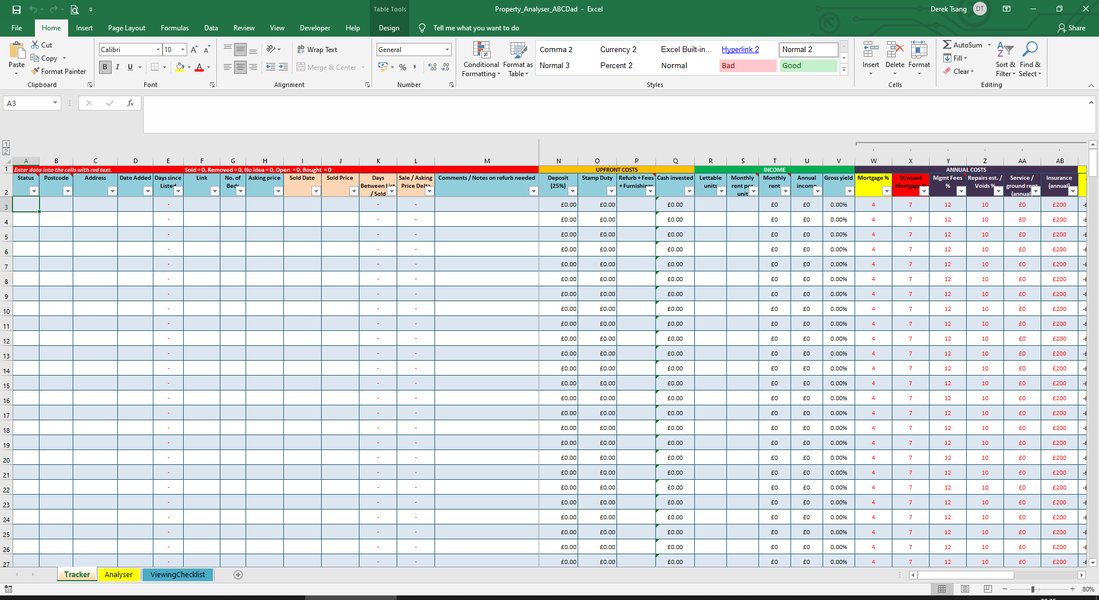
Example of how scraped data might look once organized in a spreadsheet for analysis.
Recommended Tools Summary
Here's a quick reference table summarizing some of the tools discussed:
| Tool/Library | Type | Best For | Handles Dynamic Content? | Output Formats |
|---|---|---|---|---|
| Python + Requests + BeautifulSoup | Code Library | Static websites, high customization | No (Natively) | CSV, Excel, JSON, Database, etc. (via Pandas/other libs) |
| Python + Selenium/Playwright | Code Library | Dynamic (JavaScript) websites, complex interactions | Yes | CSV, Excel, JSON, Database, etc. (via Pandas/other libs) |
| Scrapy (Python) | Code Framework | Large-scale, complex scraping projects, asynchronous requests | Via middleware (e.g., scrapy-selenium) | CSV, JSON, XML, etc. (Built-in exporters) |
| HomeHarvest (Python) | Code Library | Specifically scraping property data from major US portals | Depends on underlying mechanism | Pandas DataFrame (exportable) |
| Octoparse | No-Code Platform | User-friendly scraping, visual workflow, scheduled tasks | Yes | Excel, CSV, JSON, Database |
| Apify | No-Code/Low-Code Platform | Pre-built scrapers (e.g., for Zillow), cloud execution, APIs | Yes | Excel, CSV, JSON, API |
| Oxylabs Real Estate Scraper API | Commercial API | Enterprise-level scraping, bypassing blocks, structured data delivery | Yes | JSON, Structured Data |
| Redfin Data Center | Data Source | Downloading aggregated market data (not individual listings) | N/A | CSV |
Helpful Video Resource
Learning how to use specific libraries can accelerate your project. This video demonstrates using the HomeHarvest Python library, which is designed for scraping real estate data, potentially offering a more direct route if your target site is supported.
This video provides a practical demonstration of using a Python library specifically tailored for real estate data extraction, showing how code can be applied to gather information like property details and prices for free, which aligns well with your objective.
Frequently Asked Questions (FAQ)
Is web scraping real estate data legal?
The legality of web scraping is complex and depends on several factors, including the website's Terms of Service, the nature of the data (public vs. private/copyrighted), and how the scraping is performed. Scraping publicly available data like property listings is generally considered legal, but violating a website's Terms of Service (which often prohibit scraping) can lead to being blocked or potential legal challenges (e.g., under the Computer Fraud and Abuse Act - CFAA, though recent rulings have narrowed its scope regarding public data). Always check the site's robots.txt file and Terms of Service, and scrape responsibly to avoid causing harm to the website.
How can I avoid getting blocked while scraping?
Websites employ anti-scraping measures to prevent automated access. To minimize blocks:
- Slow Down: Implement delays (e.g., `time.sleep()` in Python) between requests to mimic human browsing speed.
- Rotate User Agents: Change the User-Agent string in your request headers to appear as different browsers/devices.
- Use Proxies: Route your requests through different IP addresses (rotating proxies, residential proxies) to avoid blocks based on IP frequency. Services like Oxylabs, Bright Data, or ScraperAPI offer proxy solutions.
- Handle CAPTCHAs: Some sites use CAPTCHAs. Solving them automatically requires specialized services or libraries, often adding complexity and cost.
- Respect `robots.txt`: Avoid scraping disallowed paths.
What if the data is loaded with JavaScript?
If data isn't present in the initial HTML source code (viewable via "View Page Source") but appears after the page loads, it's likely loaded dynamically using JavaScript. Standard tools like Python's `requests` + `BeautifulSoup` won't capture this data. You need tools that can execute JavaScript:
- Browser Automation: Libraries like Selenium or Playwright control a real web browser (like Chrome or Firefox, often in "headless" mode without a visible window) to load the page fully, including executing JavaScript, before you extract the data.
- No-Code Tools: Many no-code platforms (like Octoparse, Apify) have built-in capabilities to render JavaScript automatically.
- Analyze Network Requests: Sometimes, the JavaScript makes background requests (APIs) to fetch the data. You can use browser developer tools (Network tab) to find these API calls and potentially request the data directly from the API endpoint, which is often faster and more reliable than browser automation.
What's the best tool for a beginner?
For beginners with limited coding experience, starting with a No-Code Scraping Platform like Octoparse, Apify, or Axiom.ai is generally recommended. These tools offer visual interfaces, pre-built templates (sometimes specific to real estate sites like Zillow), handle many technical challenges automatically (like JavaScript rendering), and allow easy export to formats like Excel or CSV. They provide a gentler learning curve to understand the principles of web scraping before potentially moving to code-based solutions if more customization is needed later.
Recommended Further Exploration
- How can I automatically handle pagination when scraping search results across many pages?
- What are the pros and cons of using Python with Selenium versus Playwright for scraping dynamic websites?
- What are the best practices for cleaning and standardizing scraped real estate data before analysis?
- When should I consider using rotating residential proxies for large-scale web scraping projects?
References
Last updated May 4, 2025