
Unlocking Code Insights: How SonarQube Transforms Raw Data into Powerful Statistics
Dive into SonarQube's statistical capabilities to measure, track, and elevate your code quality with actionable data.
Key Highlights: SonarQube & Code Statistics
- Comprehensive Metrics: SonarQube offers a wide array of statistics covering code quality, security vulnerabilities, maintainability issues, reliability, test coverage, and more, providing a holistic view of your codebase.
- Actionable Insights & Reporting: It translates complex code analysis data into understandable statistics, accessible via dashboards, APIs, and exportable reports, enabling data-driven decision-making for development teams and management.
- Continuous Improvement Engine: By tracking statistics over time and integrating with CI/CD pipelines, SonarQube facilitates continuous monitoring and improvement of code standards, helping to reduce technical debt and enhance software security.
Understanding SonarQube's Role in Code Analysis
SonarQube is a powerful open-source platform designed for continuous inspection of code quality. It automatically reviews code to detect bugs, vulnerabilities, and "code smells" across a multitude of programming languages, including Java, C#, Python, JavaScript, and more. Its primary goal is to empower developers and organizations to write cleaner, safer, and more maintainable code by providing detailed statistical feedback at every stage of the development lifecycle.
SonarQube as a Statistical Powerhouse: Core Metric Categories
SonarQube excels at transforming raw code analysis data into meaningful statistics. These metrics provide deep insights into various aspects of your codebase's health. Below is a table summarizing the key categories of statistics you can derive from SonarQube:
| Metric Category | Examples | Importance |
|---|---|---|
| Security | Vulnerabilities (e.g., SQL Injection, XSS), Security Hotspots, Security Rating (A-E) | Identifies potential security weaknesses and exploitable flaws that could compromise your application. |
| Maintainability | Code Smells, Technical Debt (estimated time to fix), Duplicated Lines/Blocks, Cognitive Complexity | Reflects how easy it is to understand, modify, and extend the code. High maintainability reduces future development costs. |
| Reliability | Bugs (e.g., NullPointerExceptions, resource leaks), Reliability Rating (A-E) | Indicates the likelihood of the software performing without failure under specified conditions for a stated period. |
| Coverage | Line Coverage (%), Condition Coverage (%), Branch Coverage (%) | Measures the percentage of your code that is executed by automated tests, indicating test suite thoroughness. |
| Size & Complexity | Lines of Code (LOC), Comment Lines (%), Cyclomatic Complexity, Number of Files/Classes | Provides insights into the scale and intricacy of the codebase, which can affect maintainability and testability. |
| Issues | Aggregated counts of Bugs, Vulnerabilities, and Code Smells, categorized by severity. | Offers an overall snapshot of problems requiring attention, helping prioritize remediation efforts. |
| Activity & SCM (Source Control Management) | Commits per author, commits per day/week/month (often via plugins like SCM Stats) | Tracks development activity and code evolution, offering insights into team contributions and project momentum. |
These statistics are crucial for understanding the current state of your projects and for tracking improvements over time.
How SonarQube Collects Statistical Data
SonarQube gathers data primarily through static code analysis. Here's a simplified overview of the process:
- Scanners: SonarQube uses scanners (e.g., SonarScanner for MSBuild, Maven, Gradle, CLI) to analyze your source code. These scanners can be integrated into your build process or CI/CD pipelines.
- Analysis Execution: During a scan, the code is analyzed against a predefined set of rules (Quality Profile) for the specific programming language.
- Data Import: Scanners also import results from external tools, such as test coverage reports (from JaCoCo, Cobertura, etc.) and third-party linting tools.
- Server Processing: The collected data is sent to the SonarQube server, which processes it, stores it in a database, and calculates various metrics and statistics.
- Plugin Extensibility: Community and commercial plugins can extend SonarQube's data collection capabilities, for instance, by fetching SCM statistics or integrating with other developer tools.
Visualizing and Utilizing SonarQube Statistics
SonarQube provides several ways to access and interpret the statistical data it collects, making it easier for teams to act on the findings.
Interactive Dashboards
The most common way to interact with SonarQube statistics is through its web-based interface. Each project has a dashboard that provides an overview of its quality status, including key metrics, issue breakdowns, and recent activity. Users can drill down from high-level summaries to specific issues within individual files and lines of code.
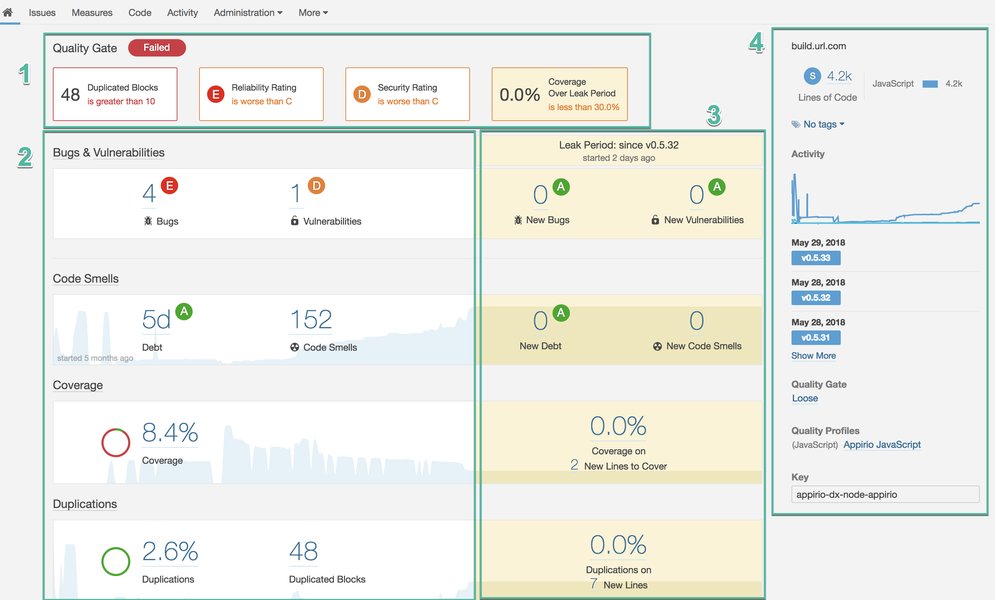
A typical SonarQube project dashboard providing an overview of code quality metrics.
Programmatic Access via APIs
SonarQube offers a comprehensive Web API that allows programmatic access to nearly all data available in the UI. This is extremely useful for:
- Custom reporting and dashboards using BI tools (e.g., Power BI, Tableau).
- Integrating SonarQube data into other systems (e.g., data warehouses like Snowflake).
- Automating tasks, such as extracting specific metrics for compliance audits.
- Creating custom notifications or alerts based on statistical thresholds.
Developers often use scripting languages like Python or shell scripts to interact with the API for bulk data extraction or specific queries.
Generating Reports
While SonarQube's UI is interactive, sometimes formal reports are needed. SonarQube supports:
- PDF Reports (built-in for some editions): SonarQube can generate PDF reports summarizing project or portfolio quality, useful for management updates or archival.
- Plugin-based Reporting: Several community and commercial plugins (e.g., sonar-cnes-report, Report Plugin for SonarQube) extend reporting capabilities, allowing export to formats like CSV, XLSX, DOCX, or Markdown. These plugins often offer more customization options for the content and layout of reports.
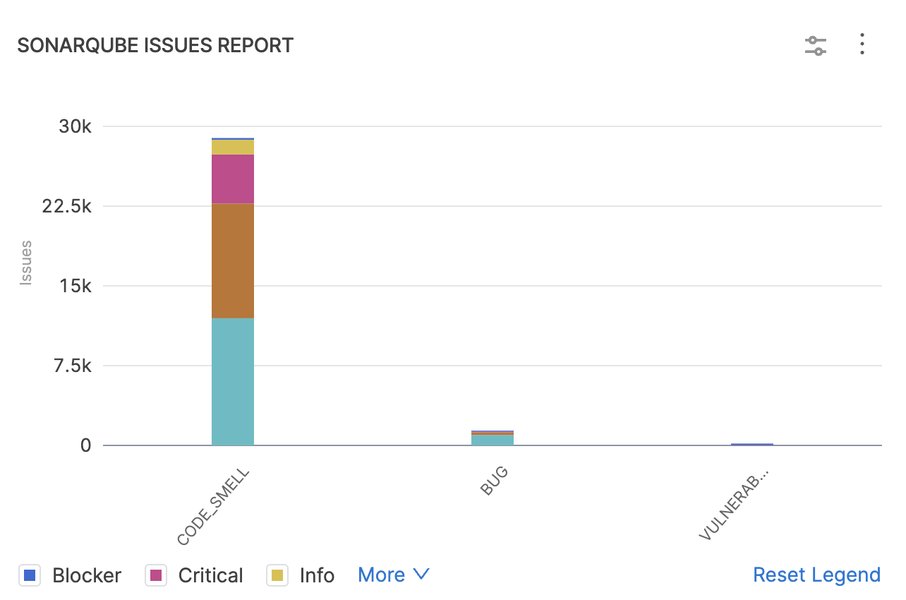
Example of an issues report generated or visualized from SonarQube data.
Comparing SonarQube's Statistical Dimensions: A Visual Overview
SonarQube offers multifaceted statistical capabilities. The radar chart below provides an opinionated comparison of different ways to access and utilize these statistics, rated across several dimensions. This chart illustrates how different approaches (Built-in Dashboards, API-driven Stats, and Plugin-enhanced Stats) cater to various needs in terms of accessibility, detail, and flexibility.
This visualization helps in understanding that while built-in dashboards offer great ease of access, APIs provide maximum granularity and customization, and plugins offer a balanced enhancement.
Advanced Applications of SonarQube Statistics
Beyond basic reporting, SonarQube's statistical data fuels several advanced practices for maintaining and improving code quality.
Quality Gates: Enforcing Standards
Quality Gates are a cornerstone feature of SonarQube. They are a set of conditions based on statistical thresholds (e.g., "New code must have >80% coverage," "No new critical vulnerabilities allowed") that a project must meet to be considered releasable. If a Quality Gate fails, it can, for example, prevent a code merge in a CI/CD pipeline, thus enforcing quality standards proactively.
Trend Analysis for Continuous Improvement
SonarQube stores historical data for all analyses. This allows teams to track trends in metrics over time. Are bugs decreasing? Is technical debt growing? Is test coverage improving? Analyzing these trends helps identify areas of consistent improvement or recurring problems, informing strategic decisions about training, refactoring efforts, or process changes.
Integrating with the Broader Developer Ecosystem
SonarQube statistics become even more powerful when integrated into the broader development ecosystem:
- CI/CD Pipelines (e.g., Jenkins, GitLab CI, GitHub Actions, Buddy): Automate analysis on every commit or build, get immediate feedback, and use Quality Gates to control promotions.
- IDEs (e.g., IntelliJ IDEA, VS Code, Eclipse): Plugins like SonarLint allow developers to get real-time statistical feedback and issue detection directly in their Integrated Development Environment, before committing code.
- Business Intelligence (BI) Tools and Data Warehouses: Exporting SonarQube data to these platforms enables sophisticated cross-project analysis, correlation with other business metrics, and creation of custom enterprise-level dashboards.
Mapping SonarQube's Statistical Landscape
To better understand the interconnected components of SonarQube's statistical capabilities, the following mindmap illustrates the key areas, from core metrics to how they are collected, utilized, and integrated.
This mindmap provides a bird's-eye view of how various elements contribute to SonarQube's function as a comprehensive platform for code statistics.
Leveraging SonarQube for Deeper Insights: A Video Guide
Visualizing how SonarQube dashboards present statistical information can be very insightful. The video below provides a walkthrough of SonarQube dashboard features, offering a practical look at how these statistics are displayed and can be interpreted for effective code quality management. Understanding the dashboard is key to unlocking the value of the collected stats.
A tutorial on SonarQube dashboard features, demonstrating how metrics and statistics are presented.
This video can help you understand how to navigate the SonarQube interface to find the statistics most relevant to your needs, from overall project health to specific code issues.
Monitoring SonarQube Instance Health for Reliable Stats
The accuracy and availability of SonarQube statistics depend on the health and performance of the SonarQube server itself. SonarQube provides mechanisms for monitoring its own operations:
- JMX MBeans: SonarQube exposes JMX (Java Management Extensions) MBeans that provide read-only information about the Compute Engine, Database connections, and the SonarQube application itself. This is useful for detailed internal monitoring.
- Prometheus Integration: SonarQube can expose metrics in a format compatible with Prometheus, a popular open-source monitoring and alerting toolkit. This allows for tracking operational metrics like system performance, analysis queue length, and database connectivity, ensuring the platform delivering the statistics is itself reliable.
Monitoring the SonarQube instance ensures that the statistics you rely on are consistently and accurately generated, especially in large-scale deployments with many projects and users.
Frequently Asked Questions (FAQ)
Recommended Further Exploration
- How can I configure SonarQube Quality Gates to ensure optimal code quality in my projects?
- What are the best practices for using the SonarQube API to extract custom code quality reports for multiple projects?
- How do I effectively integrate SonarQube with a Jenkins CI/CD pipeline for fully automated code analysis and feedback?
- Which SonarQube plugins are most recommended for enhancing statistical analysis and generating advanced custom reports?
References
Last updated May 12, 2025