
Unlock Your Data Potential: A Comprehensive SQL Practice Roadmap
Navigate the journey from SQL novice to master with this structured guide to hands-on practice.
Structured Query Language (SQL) is the backbone of data management and analysis, a critical skill for roles ranging from software development and database administration to data analysis and data science. Mastering SQL requires a systematic approach, blending theoretical understanding with extensive practical application. This roadmap is designed to guide you through a progressive learning journey, ensuring you build a strong foundation and advance to complex query writing and real-world problem-solving.
Key Takeaways for SQL Mastery
- Progressive Learning: Start with fundamental SQL syntax and gradually advance to complex topics like joins, subqueries, window functions, and Common Table Expressions (CTEs).
- Hands-On Practice: Consistent practice on interactive platforms like SQLBolt, W3Schools, LeetCode, HackerRank, and StrataScratch is crucial for solidifying concepts and building problem-solving skills.
- Real-World Application: Apply your SQL knowledge to practical projects, analyze real datasets from platforms like Kaggle, and tackle interview-style questions to prepare for professional challenges.
The Foundational Phase: Building Your SQL Core
Your journey begins with understanding the fundamental concepts of databases and the basic syntax of SQL. This phase is about establishing a solid groundwork before moving on to more intricate operations.
Understanding Database Fundamentals
Before writing queries, it's essential to grasp what databases are, how they are structured, and the relationships between different data elements. This includes:
- Relational Database Management Systems (RDBMS): Understanding how data is organized into tables, rows, and columns.
- Tables and Relationships: Learning about primary keys, foreign keys, and how they define relationships between tables to maintain data integrity.
- Data Types: Familiarizing yourself with various data types (e.g., integers, strings, dates, booleans) and their appropriate use.
Mastering Basic SQL Syntax (Weeks 1-2)
The initial weeks should be dedicated to the most common SQL commands used for retrieving and manipulating data from single tables. Consistent daily practice is key here.
SELECT: The cornerstone of SQL, used to retrieve data from one or more tables.FROM: Specifies the table(s) from which data is to be retrieved.WHERE: Filters records based on specified conditions, allowing you to retrieve only relevant data.ORDER BY: Sorts the result set in ascending or descending order.LIMIT/TOP: Restricts the number of rows returned in the result set, useful for quick previews or pagination.INSERT: Adds new rows of data into a table.UPDATE: Modifies existing data within a table.DELETE: Removes rows from a table based on specified conditions.
Practice Strategy: Begin with interactive online tutorials like SQLBolt or W3Schools, which provide immediate feedback on your queries. Aim to write and execute at least 10-15 simple queries daily, focusing on single-table operations and basic filtering. Quizzes and short exercises will help reinforce your understanding.
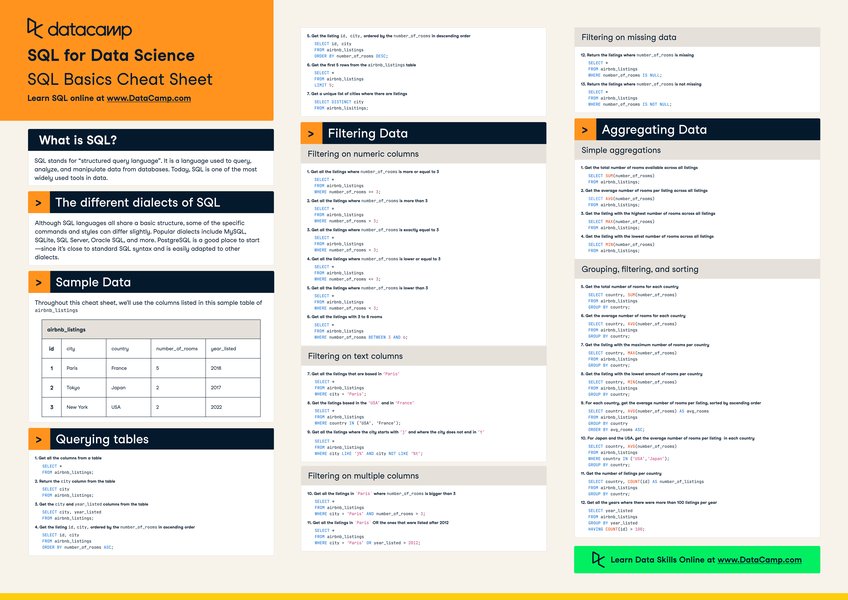
An example of a SQL basics cheat sheet, highlighting fundamental commands.
The Intermediate Dive: Complex Data Manipulation and Joins
Once you're comfortable with basic commands, the next phase introduces more powerful SQL features for data aggregation and combining information from multiple tables.
Aggregating Data with Functions and Grouping (Week 3)
Aggregate functions perform calculations on a set of rows and return a single summary value, crucial for reporting and analysis.
COUNT(): Counts the number of rows or non-NULL values in a column.SUM(): Calculates the sum of a numeric column.AVG(): Computes the average value of a numeric column.MIN()andMAX(): Find the minimum and maximum values in a column, respectively.GROUP BY: Used with aggregate functions to group rows that have the same values in specified columns into summary rows.HAVING: Filters groups based on conditions, similar toWHEREbut applied afterGROUP BY.
Mastering Relational Databases and Joins (Week 4)
A critical aspect of SQL is combining data from different tables based on their relationships. Understanding various join types is paramount for effective data retrieval.
INNER JOIN: Returns rows when there is a match in both tables.LEFT JOIN(orLEFT OUTER JOIN): Returns all rows from the left table, and the matched rows from the right table. If there is no match, NULLs are returned for the right table's columns.RIGHT JOIN(orRIGHT OUTER JOIN): Returns all rows from the right table, and the matched rows from the left table. If there is no match, NULLs are returned for the left table's columns.FULL JOIN(orFULL OUTER JOIN): Returns all rows when there is a match in one of the tables. If there is no match, NULLs are returned for columns from the unmatched table.- Subqueries (Nested Queries): Queries embedded within another SQL query, allowing for more complex data retrieval where the result of one query is used as input for another.
Practice Strategy: Platforms like Mode Analytics and SQLZoo offer excellent exercises for joins and aggregations. Work through problems that require combining data from multiple tables and generating summary reports. Dedicate time to understanding the logical flow of subqueries and how they can simplify complex problems.
Visual representation of various SQL join types, illustrating how data from different tables can be combined.
The Advanced Tier: Optimization and Real-World Application
This stage focuses on advanced SQL techniques, performance optimization, and applying your skills to real-world scenarios and projects.
Advanced Querying Techniques (Weeks 5-6)
To handle more sophisticated analytical tasks and improve query efficiency, explore advanced functions and structures.
- Window Functions: Perform calculations across a set of table rows that are related to the current row, without grouping them into a single output row. Examples include
ROW_NUMBER(),RANK(),LEAD(), andLAG(). - Common Table Expressions (CTEs): Named temporary result sets that you can reference within a single SQL statement. They improve query readability, organization, and reusability, especially for complex, multi-step logic.
- Data Manipulation Language (DML) Beyond Basics: Deep dive into
INSERT,UPDATE, andDELETEwith more complex conditions and scenarios. - Data Definition Language (DDL) and Database Objects: Understand how to create and manage databases, tables, views, indexes, and stored procedures.
Performance Optimization
Writing efficient SQL queries is crucial, especially when dealing with large datasets. Understanding query execution order and optimization techniques can significantly improve performance.
- Indexing: Learn how indexes speed up data retrieval operations.
- Query Execution Plans: Understand how SQL databases execute queries and identify bottlenecks.
- Optimization Strategies: Techniques like avoiding
SELECT *, using appropriate join types, and optimizing subqueries.
Project-Based Practice and Interview Preparation
The culmination of your learning should be applying your skills to real-world problems and preparing for professional roles.
- Real-World Datasets: Utilize platforms like Kaggle or data.world to find diverse datasets (e.g., sales data, movie databases, social network data) and practice extracting insights.
- Simulated Business Scenarios: Design small database schemas and write queries to simulate business reporting, inventory management, or customer analysis.
- Interview Questions: Practice common SQL interview questions from platforms like LeetCode, HackerRank, and StrataScratch, focusing on varied difficulty levels and common SQL patterns.
Practice Strategy: Engage with advanced challenges on platforms like StrataScratch, which offer real-world data problems. Dedicate time to personal projects, even simple ones, to apply integrated knowledge. Participate in timed exercises to simulate interview conditions and get comfortable with optimizing your queries for speed and efficiency.
A mindmap illustrating the comprehensive SQL mastery roadmap, from foundational concepts to advanced applications and ongoing practice.
Recommended Platforms and Resources for Practice
A blend of interactive tutorials, coding challenge sites, and real-world dataset repositories will provide the most effective practice environment.
| Platform/Resource | Focus Area | Key Benefits for Practice |
|---|---|---|
| SQLBolt | Beginner Interactive Tutorials | Step-by-step lessons with immediate exercises, excellent for fundamental syntax. |
| W3Schools SQL Tutorial | Beginner to Intermediate | Free, accessible, offers an online SQL editor, comprehensive examples. |
| Mode Analytics SQL Tutorial | Data Analysis Focused | Hands-on exercises with real datasets, strong for intermediate concepts. |
| SQLZoo | Interactive Lessons | Covers a wide range of SQL concepts from basics to joins and subqueries with quizzes. |
| LeetCode / HackerRank | Coding Problems & Interview Prep | Challenges of varying difficulty, useful for algorithmic thinking and interview preparation. |
| StrataScratch | Real-World Data Problems | Practice with industry-like datasets and business questions, simulating professional scenarios. |
| Kaggle / data.world | Datasets for Project Practice | Diverse datasets available for personal projects, enabling application of SQL in practical contexts. |
| SQL-Practice.com | Online SQL Terminal | Provides an online terminal for writing and testing queries without local setup. |
| GeeksforGeeks (SQL section) | Comprehensive Tutorials & Roadmaps | Offers detailed guides, 30-day roadmaps, and practice sets from basic to advanced levels. |
| Codecademy: Learn SQL | Structured Learning Paths | Interactive courses covering SQL execution order and managing large datasets, good for foundational understanding. |
Visualizing Your SQL Skill Progression
To better understand your progress and identify areas for further development, consider the following radar chart. This chart helps you visualize your perceived proficiency across key SQL skill areas, serving as a self-assessment tool as you advance through the roadmap.
This radar chart visualizes proficiency across different SQL skill areas. The inner line represents your current estimated proficiency, while the outer line shows a target proficiency level. This can help you identify strengths and areas requiring more focus as you progress.
Enhance Your SQL Journey with Video Tutorials
Visual learning can significantly accelerate your understanding of SQL concepts. Below is a highly recommended video that offers a comprehensive introduction to SQL, perfect for beginners looking to grasp the basics quickly.
This video, "SQL Tutorial for Beginners [Ultimate Full Course] - From Zero...", provides a detailed, multi-hour course that covers SQL from the ground up. It's an excellent resource for visual learners, offering clear explanations and practical examples that complement the roadmap's structured learning path. It simplifies complex topics, making them accessible even to those with no prior database experience.
Effective Practice Strategies
- Practice Daily: Consistency is paramount. Even short, daily practice sessions are more effective than sporadic long ones.
- Balance Theory and Practice: Always apply new concepts immediately through hands-on exercises to solidify your understanding.
- Use Real Data: Working with diverse, real-world datasets helps you understand the practical applications of SQL and prepares you for complex scenarios.
- Experiment with Different Databases: While SQL syntax is largely standardized, minor differences exist across database management systems (e.g., MySQL, PostgreSQL, SQL Server). Experimenting with a few can broaden your expertise.
- Review and Optimize: Regularly review your queries. Understand how they execute and explore ways to optimize them for better performance, especially on large datasets.
- Join a Learning Community: Engaging with online forums (like Reddit's r/SQL or Stack Overflow) or local meetups allows you to discuss challenges, share solutions, and learn from others' experiences.
- Set Measurable Goals: For instance, aim to solve a certain number of problems weekly or complete a small project every few weeks. Track your progress to stay motivated.
Frequently Asked Questions (FAQ)
What is the best way to start learning SQL?
How long does it take to become proficient in SQL?
Are there free resources for practicing SQL?
What kind of projects can I do to practice SQL?
Conclusion
Mastering SQL is a journey that demands consistent effort and a structured approach. By diligently following this roadmap, combining theoretical learning with extensive hands-on practice, and applying your skills to real-world challenges, you will build robust SQL proficiency. This expertise is invaluable across numerous data-driven roles, empowering you to effectively manage, analyze, and extract insights from relational databases.
Recommended Further Exploration
- How can I optimize my SQL queries for large datasets?
- What are SQL window functions and how are they used in data analytics?
- What is a specialized SQL roadmap for data science?
- What are the best practices for designing an efficient database schema?