
Unveiling Subdomain Enumeration Tools for macOS: Beyond Linux Subfinder
Explore Powerful Alternatives and Techniques for Comprehensive Reconnaissance on Your Mac
Key Insights into Subdomain Enumeration on macOS
- Subfinder's Cross-Platform Compatibility: Subfinder, a popular passive subdomain enumeration tool, is written in Golang, allowing for native compilation across various operating systems, including macOS. This means you can often directly install and use Subfinder on your MacBook.
- Diverse Toolset Availability: Beyond Subfinder, macOS users have access to a rich ecosystem of subdomain enumeration tools. These range from powerful open-source projects like OWASP Amass and Sublist3r to built-in network utilities and specialized command-line tools.
- Strategic Importance in Cybersecurity: Subdomain enumeration is a critical first step in reconnaissance for cybersecurity professionals, penetration testers, and bug bounty hunters. It helps in mapping an organization's attack surface, identifying hidden assets, and uncovering potential vulnerabilities.
Subdomain enumeration is a fundamental technique in cybersecurity, focusing on uncovering all subdomains associated with a primary domain. This process is crucial for expanding the scope of a target during reconnaissance, as subdomains often host crucial information, development environments, or misconfigured services that could lead to vulnerabilities. While tools like Subfinder are highly regarded in the Linux ecosystem for their efficiency in passive subdomain discovery, macOS users have several excellent options to achieve similar, if not superior, results.
Subfinder on macOS: A Direct Approach
Native Installation and Usage
Subfinder, developed by ProjectDiscovery, is a fast passive subdomain enumeration tool. Its core strength lies in its ability to return valid subdomains by leveraging various passive online sources. Because Subfinder is written in Golang, it benefits from Go's cross-compilation capabilities, making it readily available for macOS users.
To install Subfinder on macOS, the most common and recommended method is via Homebrew, the missing package manager for macOS:
brew install subfinderOnce installed, you can use Subfinder from your terminal. Subfinder's modular architecture and optimization for speed make it a go-to for many security professionals. It's built for one thing—passive subdomain enumeration—and it performs that task very well. For advanced usage, you can configure API keys for various sources (like VirusTotal) in the ~/.config/subfinder/provider-config.yaml file to enhance its discovery capabilities.
./subfinder -d example.comThis command will initiate the subdomain discovery process for "example.com", leveraging configured sources to find associated subdomains.
Top Alternatives to Subfinder for macOS
Comprehensive Subdomain Enumeration Toolkit
While Subfinder is highly effective, the cybersecurity landscape offers a plethora of tools that provide diverse functionalities for subdomain enumeration. Many of these are also cross-platform compatible or have macOS-specific versions, ensuring that MacBook users are well-equipped for their reconnaissance efforts.
OWASP Amass: The Gold Standard
OWASP Amass is widely considered one of the most powerful and comprehensive tools for network mapping and external asset discovery. It combines open-source information gathering with active reconnaissance techniques, offering a broader and deeper scope than many passive-only tools. Amass is free and open-source, and like Subfinder, it's also written in Go, making it easily installable on macOS.
brew install amassAmass is known for finding a significantly higher number of valid subdomains compared to many other tools, though it can be slower due to its extensive methodology. Its capabilities include brute-forcing, reverse DNS lookups, and integration with numerous data sources.
How to Use Amass Efficiently by @jeff_foley #NahamCon2020: A deep dive into the capabilities and effective usage of OWASP Amass.
Sublist3r: A Python Powerhouse
Sublist3r is another popular open-source tool for subdomain enumeration, written in Python. It's designed to enumerate subdomains of websites using various OSINT (Open Source Intelligence) techniques. Sublist3r leverages search engines like Google, Yahoo, Bing, Baidu, and Ask, as well as services like Netcraft, VirusTotal, and DNSdumpster. While it might not find as many subdomains as Amass in some cases, it's generally faster than Amass and provides a good balance between speed and coverage.
git clone https://github.com/aboul3la/Sublist3r.git
cd Sublist3r
pip install -r requirements.txt
python3 sublist3r.py -d example.com
Findomain: Fast and Feature-Rich
Findomain is a rapid and complete solution for domain recognition. It supports screenshotting, port scanning, HTTP checks, and even subdomain monitoring. Findomain is known for its speed and its ability to gather data from multiple sources efficiently. It's available as a command-line tool and also offers a monitoring service for more integrated solutions.
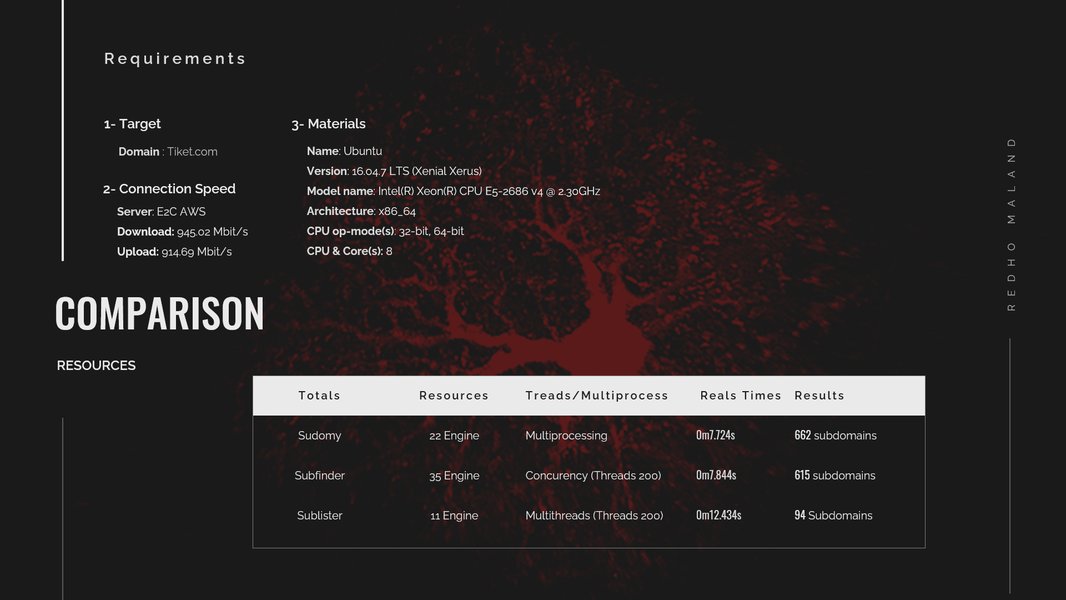
Sudomy: An automated subdomain enumeration tool, demonstrating its interface and capabilities.
DNSRecon: In-depth DNS Analysis
DNSRecon is a powerful DNS enumeration tool often used by security professionals for comprehensive information gathering. It can enumerate various DNS records (A, AAAA, NS, SOA, MX, SRV, TXT, SPF, DMARC, AXFR, PTR, etc.), conduct dictionary-based subdomain enumeration, and perform zone transfer checks. DNSRecon is written in Python and is easily installable on macOS.
pip install dnsrecon
dnsrecon -d example.com -t std
AssetFinder: Focused on Assets
AssetFinder is an open-source project by TomNomNom specifically designed to simplify information gathering for subdomains and domains of an organization. It's a solid tool for passive reconnaissance and is often used in conjunction with other tools. AssetFinder is also written in Go.
go install github.com/tomnomnom/assetfinder@latest
~/go/bin/assetfinder --subs-only example.com
Understanding Subdomain Enumeration Techniques
Methods Employed by Modern Tools
Effective subdomain enumeration tools employ a combination of techniques, categorized broadly into passive and active methods. Many tools mentioned above leverage multiple techniques to provide a comprehensive list of subdomains.
Passive Enumeration Techniques
- Certificate Transparency Logs (CT Logs): These publicly auditable logs record all SSL/TLS certificates issued by Certificate Authorities. Since certificates often list domain names and their subdomains, CT logs like crt.sh are a rich source for passive subdomain discovery.
- Search Engine Dorking: Using advanced search queries (e.g.,
site:*.example.com -www) on search engines like Google, Bing, and Yahoo can reveal indexed subdomains. - DNS Records and Public Databases: Querying public DNS records (e.g., A, CNAME, NS, MX records) and public databases like VirusTotal, Netcraft, and DNSdumpster can provide valuable subdomain information without direct interaction with the target.
- Archived Data: Websites like Wayback Machine (archive.org) store historical versions of websites, which can reveal subdomains that were once active but might now be hidden.
Active Enumeration Techniques
- Brute-Forcing: This involves trying to resolve common subdomain prefixes (e.g.,
dev,test,admin) against a target domain using a predefined wordlist. Tools like Sublist3r and KnockPy can incorporate brute-forcing. - DNS Zone Transfer: An attempt to request a copy of the DNS database from a nameserver. If unprotected, this can reveal all subdomains and DNS records for a given zone. While rarely successful on well-configured servers, it's a critical check.
- Reverse DNS Lookups: If a company owns a range of IP addresses, attackers can perform reverse DNS lookups on those IPs to discover associated domain names and subdomains.
Comparative Analysis of Subdomain Enumeration Tools
Strengths and Weaknesses for macOS Users
To help you choose the best tool for your specific needs on macOS, here's a comparative analysis of some prominent subdomain enumerators:
| Tool Name | Primary Method | Key Features | Pros for macOS Users | Cons for macOS Users |
|---|---|---|---|---|
| Subfinder | Passive | Fast, modular, integrates with API keys, Golang-native. | Easy Homebrew installation, excellent speed, reliable passive discovery. | Relies heavily on configured API keys for comprehensive results. |
| OWASP Amass | Passive & Active | Comprehensive attack surface mapping, extensive data sources, highly customizable. | Very powerful, finds many subdomains, robust for large engagements. | Can be slower due to extensive analysis, higher resource consumption. |
| Sublist3r | Passive & Brute-Force | OSINT-focused, uses multiple search engines and public services. | Python-based, relatively fast, good balance of passive and active. | May not find as many subdomains as Amass, requires Python environment. |
| Findomain | Passive & Active | Fast, screenshotting, port scanning, subdomain monitoring. | High speed, additional features beyond just enumeration. | Features like monitoring may require paid service. |
| DNSRecon | Active (DNS queries) | Detailed DNS record enumeration, zone transfer checks, dictionary attacks. | Excellent for in-depth DNS analysis, built-in on Kali (Python on Mac). | Can be noisy (active), less focused on passive collection. |
| AssetFinder | Passive | Simple, fast, focuses on asset discovery. | Very lightweight, quick for initial passive scans. | Less comprehensive than Amass, purely passive. |
| KnockPy | Brute-Force & DNS | Dictionary-based subdomain enumeration, checks for zone transfers. | Good for targeted brute-force, Python-based. | Primarily active, effectiveness depends on wordlists. |
Performance and Feature Comparison Radar Chart
Visualizing Tool Capabilities
To provide a clearer picture of how these tools compare across various crucial attributes, here's a radar chart. This chart evaluates each tool based on its speed, comprehensiveness of results, ease of use on macOS, and passive vs. active enumeration capabilities.
Built-in macOS Tools and Network Utilities
Leveraging Native Functionality
While dedicated subdomain enumeration tools offer extensive features, macOS also provides several command-line utilities that can be used for basic DNS queries and network reconnaissance:
nslookup: This command-line tool is available on macOS, Windows, and Linux. It allows you to query DNS records for a domain, including A, MX, NS, and CNAME records, which can sometimes reveal subdomains.
nslookup example.comdig (Domain Information Groper): A more powerful and flexible command-line tool for querying DNS name servers. It provides detailed information about DNS records and is widely used for troubleshooting DNS issues.dig example.com ANYhost: A simple utility for performing DNS lookups. It provides a more concise output than dig for quick queries.host example.comThese native tools are useful for quick checks and understanding DNS infrastructure, but they lack the automated, comprehensive enumeration capabilities of specialized subdomain finders.

A screenshot demonstrating how to query macOS DNS resolver from the Terminal.
Integrating Tools for Enhanced Reconnaissance
A Synergistic Approach
The most effective subdomain enumeration often involves combining multiple tools and techniques. For example, you might start with a passive tool like Subfinder or Amass to get a broad initial list, then refine it with active tools like DNSRecon for deeper analysis or use specialized tools for specific checks (e.g., port scanning discovered subdomains).
Many advanced users also create custom scripts that chain these tools together, automating the process of gathering, filtering, and analyzing subdomain data. This not only saves time but also ensures a consistent and thorough approach to reconnaissance.
Frequently Asked Questions
What is subdomain enumeration?
Why is subdomain enumeration important?
Are there free subdomain enumeration tools for macOS?
Can I use Subfinder on my MacBook?
What is the difference between passive and active subdomain enumeration?
Conclusion
While Subfinder is a highly efficient tool for passive subdomain enumeration and is readily available for macOS, the ecosystem of cybersecurity tools extends far beyond it. macOS users have access to a robust suite of alternatives, including the comprehensive OWASP Amass, the Python-based Sublist3r, the fast Findomain, and the in-depth DNSRecon, among others. By understanding the strengths of each tool and the various enumeration techniques, you can effectively map an organization's digital footprint and uncover potential vulnerabilities. The key to successful reconnaissance on macOS, as with any platform, lies in combining these powerful tools and techniques to achieve the most thorough and accurate results.
Recommended Further Exploration
- How can I leverage advanced OWASP Amass techniques for deeper network mapping?
- What are the best practices for integrating multiple subdomain enumeration tools for bug bounty hunting?
- How can understanding Certificate Transparency logs enhance my reconnaissance efforts?
- What are effective ways to automate reconnaissance workflows on macOS using scripting?