
Overview of Asynchronous Calls in Python
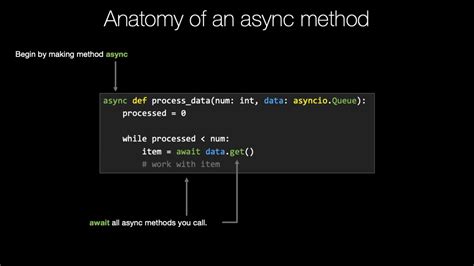
Asynchronous programming in Python has revolutionized the way developers handle concurrent operations, especially I/O-bound tasks. By enabling multiple tasks to run seemingly in parallel without blocking the main execution thread, asynchronous programming enhances the efficiency and responsiveness of applications. This comprehensive overview delves into the core concepts, key components, practical examples, and best practices of asynchronous programming in Python, with a focus on the asyncio library.
Core Concepts of Asynchronous Programming
Coroutines
Coroutines are the backbone of asynchronous programming in Python. Defined using the async def syntax, coroutines are special functions that can pause and resume their execution, allowing other operations to run in the meantime. This non-blocking behavior is facilitated by the await keyword, which suspends the coroutine until the awaited task completes.
import asyncio

async def my_coroutine():
    print("Coroutine started")
    await asyncio.sleep(1)
    print("Coroutine finished")
async/await Syntax
The async and await keywords are fundamental to writing asynchronous code in Python. The async keyword defines a coroutine, while await is used to call other coroutines or awaitable objects, effectively yielding control back to the event loop until the awaited operation completes.
async def fetch_data():
    data = await get_data_from_api()
    return data
Event Loop
The event loop is the core mechanism that manages and schedules the execution of coroutines. It continuously runs, executing tasks, handling I/O operations, and switching between tasks to ensure efficient concurrency. Python's asyncio library provides the event loop, which can be started and managed using functions like asyncio.run().
async def main():
    await fetch_data()

asyncio.run(main())
Tasks and Futures
Tasks are wrappers around coroutines that allow them to be scheduled and run concurrently within the event loop. Futures represent a placeholder for a result that may not yet be available. Tasks are a subclass of Futures, enabling asynchronous execution and result retrieval.
async def task1():
    await asyncio.sleep(2)
    return "Task 1 Completed"

async def task2():
    await asyncio.sleep(1)
    return "Task 2 Completed"

async def main():
    t1 = asyncio.create_task(task1())
    t2 = asyncio.create_task(task2())
    results = await asyncio.gather(t1, t2)
    print(results)

asyncio.run(main())
The asyncio Library
asyncio is Python's standard library for writing asynchronous code. It provides the foundation for asynchronous applications, offering tools for managing the event loop, scheduling tasks, handling I/O operations, and more. Key components of the asyncio library include:
- Event Loop Management: Functions like
asyncio.run()andasyncio.get_event_loop()initiate and control the event loop. - I/O Handling: Supports asynchronous I/O operations such as TCP, UDP, and SSL connections.
- High-level APIs: Includes functions like
asyncio.create_task(),asyncio.gather(), and synchronization primitives for managing concurrent tasks.
Making Asynchronous API Calls
One of the most common applications of asynchronous programming is making multiple API calls concurrently. This approach significantly reduces the total execution time compared to making synchronous calls sequentially.
import asyncio
import aiohttp

async def fetch_url(session, url):
    async with session.get(url) as response:
        return await response.text()

async def main():
    urls = [
        'https://api.example.com/endpoint1',
        'https://api.example.com/endpoint2',
        'https://api.example.com/endpoint3'
    ]
    async with aiohttp.ClientSession() as session:
        tasks = [fetch_url(session, url) for url in urls]
        results = await asyncio.gather(*tasks)
        for result in results:
            print(result)

asyncio.run(main())
In this example, the fetch_url coroutine asynchronously fetches data from multiple URLs using the aiohttp library. The asyncio.gather() function runs all the tasks concurrently, allowing for efficient data retrieval.
Concurrency and Execution
Asynchronous programming enables concurrent execution of multiple tasks, optimizing the utilization of system resources. By overlapping I/O-bound operations, applications can achieve higher throughput and lower latency.
Concurrent Execution Example
import asyncio

async def func1():
    print("Function 1 started")
    await asyncio.sleep(2)
    print("Function 1 ended")

async def func2():
    print("Function 2 started")
    await asyncio.sleep(3)
    print("Function 2 ended")

async def func3():
    print("Function 3 started")
    await asyncio.sleep(1)
    print("Function 3 ended")

async def main():
    await asyncio.gather(func1(), func2(), func3())

asyncio.run(main())
This example demonstrates how multiple coroutines can run concurrently. The total execution time is approximately 3 seconds, as the longest task determines the overall duration.
Comparing Asynchronous Programming with Multithreading
While both asynchronous programming and multithreading aim to achieve concurrency, they differ in their approaches and suitable use cases.
| Aspect | Asynchronous Programming | Multithreading |
|---|---|---|
| Concurrency Model | Cooperative multitasking using coroutines and event loops | Preemptive multitasking with OS-managed threads |
| Best For | I/O-bound tasks like network requests and file I/O | Both I/O-bound and CPU-bound tasks |
| Resource Overhead | Lower, as coroutines are lightweight | Higher, due to memory and context switching overhead |
| Complexity | Requires understanding of async/await and event loops | Requires handling of thread safety and synchronization |
| Potential Issues | Async code can be harder to debug and maintain | Issues like race conditions, deadlocks, and thread contention |
When to Use:
-
Asynchronous Programming: Ideal for applications with numerous I/O-bound operations, such as web servers, chat applications, and real-time data processing.
-
Multithreading: Suitable for CPU-bound tasks that can benefit from parallel execution across multiple CPU cores.
Best Practices
-
Use
asyncio.run()for the Main Coroutine: This function manages the event loop, sets it up, runs the main coroutine, and closes the loop automatically.async def main(): # Your async code here asyncio.run(main()) -
Limit Blocking Operations: Avoid using synchronous blocking calls like
time.sleep()or blocking I/O within coroutines. Instead, use their asynchronous counterparts likeasyncio.sleep()to prevent blocking the event loop. -
Handle Exceptions Properly: Implement robust exception handling within coroutines using
try/exceptblocks to prevent unhandled exceptions from crashing the event loop.async def safe_task(): try: await some_coroutine() except Exception as e: print(f"Error: {e}") -
Leverage Async Libraries: Utilize libraries designed for asynchronous use, such as
aiohttpfor HTTP requests orasyncpgfor PostgreSQL interactions. -
Prefer
asyncio.gatherfor Concurrent Execution: When running multiple coroutines, useasyncio.gather()to manage and execute them concurrently.results = await asyncio.gather(coro1(), coro2(), coro3()) -
Understand the Event Loop: Gain a solid understanding of how the event loop schedules and manages tasks to write efficient asynchronous code.
Common Pitfalls
-
Mixing Synchronous and Asynchronous Code: Incorporating blocking calls within coroutines can negate the benefits of asynchronous programming.
Solution: Always use non-blocking, asynchronous counterparts.
-
Not Awaiting Coroutines: Forgetting to use
awaitcan lead to coroutines not executing as intended.# Incorrect async def main(): fetch_data() # Missing await # Correct async def main(): await fetch_data() -
Improper Exception Handling: Unhandled exceptions in coroutines can silently fail or crash the event loop.
Solution: Implement proper exception handling within coroutines.
-
Blocking the Event Loop: Performing CPU-intensive tasks without offloading can block the event loop, causing delays.
Solution: Use thread or process pools with
run_in_executorfor CPU-bound tasks.import asyncio import time def blocking_task(): time.sleep(5) return "Done" async def main(): loop = asyncio.get_running_loop() result = await loop.run_in_executor(None, blocking_task) print(result) asyncio.run(main()) -
Overusing Global Variables: Shared mutable state can lead to concurrency issues.
Solution: Use synchronization primitives or design the code to minimize shared state.
Applications of Asynchronous Programming
- Web Scraping: Tools like
aiohttpenable scraping multiple URLs simultaneously, increasing efficiency. - Web Servers: Frameworks such as
FastAPIandSanicutilize asynchronous programming to support high-concurrency web services. - Real-Time Applications: Ideal for chat applications, notifications, and real-time data updates.
- Database Operations: Libraries like
asyncpgallow asynchronous interactions with databases, improving performance.
Conclusion
Asynchronous programming in Python offers a robust framework for writing efficient, concurrent code, particularly suited for I/O-bound and high-latency operations. By leveraging coroutines, the async/await syntax, and the asyncio library, developers can build scalable and responsive applications that handle multiple tasks gracefully without the overhead associated with traditional multithreading.
However, the asynchronous paradigm introduces its own set of challenges, including increased complexity and the need for a deep understanding of its core concepts. Adhering to best practices and being aware of common pitfalls can mitigate these challenges, enabling developers to harness the full potential of asynchronous programming in Python.
For further reading and advanced topics, consider exploring resources such as Getting Started With Async Features in Python - Real Python and the official Python asyncio Documentation.
Last updated January 8, 2025