
Mastering Asynchronous JavaScript: Tackling Tough Promise Challenges
Unraveling Complex Scenarios with Promises, Async/Await, and Error Handling
JavaScript Promises are fundamental for managing asynchronous operations, offering a cleaner and more structured approach compared to traditional callbacks. While the basics of creating and consuming promises are relatively straightforward, complex scenarios involving chaining, concurrent execution, error handling, and the nuances of the event loop can pose significant challenges. This document explores some of the toughest promise-based problems encountered in JavaScript, providing insights and approaches to conquer them.
Key Insights into Challenging Promise Problems
- Concurrency Control: Managing the number of promises running simultaneously is a common challenge, especially when dealing with resource-intensive tasks like network requests.
- Complex Chaining and Dependencies: Scenarios where the execution of one promise depends on the outcome of another, or where multiple promises need to complete before proceeding, require careful structuring.
- Robust Error Handling: Ensuring that errors are caught and handled appropriately across complex promise chains and concurrent operations is crucial for building resilient applications.
Understanding the Foundations: Why Promises Can Be Tricky
Before diving into complex problems, it's important to understand the core concepts of JavaScript Promises and the environment in which they operate. JavaScript is single-threaded, and asynchronous operations are handled through the event loop, callback queue, and microtask queue. Promises interact with the microtask queue, which has implications for the order of execution.
A Promise represents the eventual result of an asynchronous operation. It can be in one of three states:
- Pending: The initial state; the operation has not yet completed.
- Fulfilled (Resolved): The operation completed successfully, and the promise has a resulting value.
- Rejected: The operation failed, and the promise has a reason for the failure (an error).
The .then() method is used to handle the fulfilled state, while .catch() handles the rejected state. .finally() executes regardless of the promise's outcome.
One source of difficulty arises from the fact that the promise executor function runs synchronously, while the .then() handlers are always executed asynchronously, even if the promise is already resolved. This is a crucial distinction that can lead to unexpected behavior if not fully understood.
Consider this example:
let executorRun = false;
new Promise(function executor() {
  executorRun = true;
});
console.log(executorRun); // Output: true
The executor function runs immediately when the promise is created. However, any code within a .then() callback would be placed in the microtask queue and executed later.
Challenging Scenarios and Their Solutions
Problem 1: Managing Concurrent Asynchronous Tasks with Limited Resources
A common tough problem involves executing a large number of asynchronous tasks, such as fetching data from multiple URLs, while limiting the number of tasks running concurrently. Directly using Promise.all() with a large array of promises can overwhelm the system or hit API rate limits.
The Challenge: How to process a list of items asynchronously with a maximum number of concurrent operations?
Approach: Implement a queue-based system or use libraries designed for this purpose. A manual approach involves maintaining a pool of currently running promises and adding new promises from the list as others complete.
Manual Concurrency Control Example:
async function limitedConcurrency(tasks, limit) {
  const results = [];
  const running = [];

  for (const task of tasks) {
    const p = Promise.resolve().then(() => task());
    results.push(p);

    if (limit < tasks.length) {
      const e = p.then(() => running.splice(running.indexOf(e), 1));
      running.push(e);
      if (running.length >= limit) {
        await Promise.race(running);
      }
    }
  }

  return Promise.all(results);
}

// Example usage:
const myTasks = Array.from({ length: 10 }, (_, i) => () =>
  new Promise(resolve =>
    setTimeout(() => {
      console.log(<code>Task ${i} finished);
      resolve(i);
    }, Math.random() * 1000)
  )
);

limitedConcurrency(myTasks, 3)
  .then(results => console.log("All tasks finished:", results));
This manual implementation demonstrates the concept of managing a running pool. As each promise resolves, it's removed from the running array, allowing a new task to be started if the limit hasn't been reached. Promise.race(running) is used to wait for at least one promise in the running pool to complete before potentially adding another.
Libraries like p-limit or async provide more robust and feature-rich solutions for managing concurrency.
Problem 2: Intricate Promise Chaining with Conditional Logic
Building complex workflows where the next asynchronous step depends on the outcome of the previous one, and incorporating conditional logic within the chain, can become difficult to read and maintain.
The Challenge: Execute a series of asynchronous operations where the sequence or parameters of subsequent operations depend on the results of preceding ones.
Approach: Chain promises using .then(), returning a new promise from each .then() callback. Use conditional statements within the .then() callbacks to determine the next step.
Conditional Chaining Example:
function step1(data) {
  return new Promise(resolve => {
    setTimeout(() => {
      console.log("Step 1 finished with:", data);
      resolve(data * 2);
    }, 500);
  });
}

function step2(data) {
  return new Promise(resolve => {
    setTimeout(() => {
      console.log("Step 2 finished with:", data);
      resolve(data + 10);
    }, 700);
  });
}

function step3(data) {
  return new Promise(resolve => {
    setTimeout(() => {
      console.log("Step 3 finished with:", data);
      resolve(data / 2);
    }, 300);
  });
}

let initialData = 5;

step1(initialData)
  .then(result1 => {
    if (result1 > 10) {
      console.log("Condition met, proceeding to step 2");
      return step2(result1);
    } else {
      console.log("Condition not met, skipping step 2 and 3");
      return result1; // Pass the result directly
    }
  })
  .then(result2 => {
    if (typeof result2 === 'number' && result2 > 20) {
       console.log("Condition met for step 3");
       return step3(result2);
    } else if (typeof result2 === 'number') {
       console.log("Condition not met for step 3");
       return result2; // Pass the result directly
    }
    // If result2 was the skipped value from step 1, just pass it through
    return result2;
  })
  .then(finalResult => {
    console.log("Final result:", finalResult);
  })
  .catch(error => {
    console.error("An error occurred:", error);
  });
This example demonstrates how to conditionally execute or skip steps within a promise chain. Returning a new promise from a .then() callback ensures that the chain waits for that promise to resolve before proceeding.
Problem 3: Handling Errors Effectively in Complex Asynchronous Flows
Propagating and handling errors correctly across multiple promises, especially when dealing with both sequential and concurrent operations, is critical but can be complex. Uncaught errors can lead to unexpected application behavior.
The Challenge: Ensure that errors in any part of a complex asynchronous operation are caught and managed gracefully without halting the entire process or causing unhandled promise rejections.
Approach: Use .catch() at appropriate points in the promise chain. A single .catch() at the end of a chain can catch errors from any preceding promise in that chain. For concurrent operations with Promise.all(), note that it fails fast (rejects immediately if any promise rejects). Promise.allSettled() is useful when you need to know the outcome of all promises, regardless of whether they fulfilled or rejected.
Error Handling Example with .catch():
function mightFail(value) {
  return new Promise((resolve, reject) => {
    setTimeout(() => {
      if (Math.random() > 0.5) {
        console.log("Success:", value);
        resolve(value + 1);
      } else {
        console.error("Failure:", value);
        reject(new Error(<code>Failed at value: ${value}));
      }
    }, 400);
  });
}

mightFail(1)
  .then(result1 => mightFail(result1))
  .then(result2 => mightFail(result2))
  .then(finalResult => console.log("Chain successful, final result:", finalResult))
  .catch(error => console.error("Caught an error in the chain:", error));
Using Promise.allSettled() for Concurrent Operations:
const promises = [
  mightFail(10),
  mightFail(20),
  mightFail(30)
];

Promise.allSettled(promises)
  .then(results => {
    results.forEach((result, index) => {
      if (result.status === 'fulfilled') {
        console.log(<code>Promise ${index} fulfilled with value:, result.value);
      } else {
        console.error(Promise ${index} rejected with reason:, result.reason);
      }
    });
  });
.catch() is the standard way to handle errors in a promise chain. Promise.allSettled() provides a way to handle the outcome of multiple promises independently, which is often necessary when some operations might fail without stopping others.
Video discussing the potential dangers of using Promise.all() and suggesting Promise.allSettled() as an alternative in certain scenarios.
Problem 4: Understanding and Debugging the Microtask Queue
The interaction between promises and the microtask queue can lead to non-intuitive execution order, making debugging challenging. Code that appears sequential might not execute in that order due to the asynchronous nature of .then() and the event loop.
The Challenge: Predict and debug the execution order of code involving promises, setTimeout, and other asynchronous operations.
Approach: Develop a strong understanding of the JavaScript event loop, the microtask queue, and the macrotask queue (where setTimeout callbacks reside). Promises' .then() callbacks are added to the microtask queue, which is processed after the current script finishes but before the next task from the macrotask queue is handled.
Microtask vs Macrotask Example:
console.log("Start");

setTimeout(() => {
  console.log("setTimeout callback");
}, 0);

Promise.resolve()
  .then(() => {
    console.log("Promise.resolve then");
  });

console.log("End");
Expected Output:
Start
End
Promise.resolve then
setTimeout callback
Explanation: The synchronous code ("Start" and "End") executes first. The Promise.resolve().then() callback is placed in the microtask queue. The setTimeout callback is placed in the macrotask queue. The event loop prioritizes the microtask queue, so the promise callback runs before the timeout callback, even with a 0ms delay for setTimeout.
Leveraging Async/Await for Cleaner Asynchronous Code
Async/await syntax, built on top of promises, provides a more synchronous-looking way to write asynchronous code, often making complex promise-based logic easier to read and understand.
An async function always returns a promise. The await keyword can be used inside an async function to pause execution until a promise resolves, and then resumes with the resolved value. This significantly simplifies writing code that involves waiting for asynchronous operations.
Here's the conditional chaining example rewritten using async/await:
async function complexAsyncWorkflow(initialData) {
  try {
    const result1 = await step1(initialData);

    let result2 = result1;
    if (result1 > 10) {
      console.log("Condition met, proceeding to step 2 (async/await)");
      result2 = await step2(result1);
    } else {
      console.log("Condition not met, skipping step 2 and 3 (async/await)");
    }

    let finalResult = result2;
    if (typeof result2 === 'number' && result2 > 20) {
      console.log("Condition met for step 3 (async/await)");
      finalResult = await step3(result2);
    } else if (typeof result2 === 'number') {
       console.log("Condition not met for step 3 (async/await)");
    }


    console.log("Final result (async/await):", finalResult);
    return finalResult;

  } catch (error) {
    console.error("An error occurred (async/await):", error);
    throw error; // Re-throw the error if needed
  }
}

complexAsyncWorkflow(5);
complexAsyncWorkflow(15);
Using async/await makes the flow of control much clearer, especially with conditional logic. Error handling is done using standard try...catch blocks.
Advanced Promise Patterns and Methods
Beyond basic chaining and error handling, several advanced patterns and static methods on the Promise object are essential for tackling complex scenarios:
Promise.all()
Takes an iterable of promises and returns a single promise that resolves when all of the input promises have resolved, or rejects if any of the input promises reject. The resolved value is an array of the resolved values in the same order as the input promises.
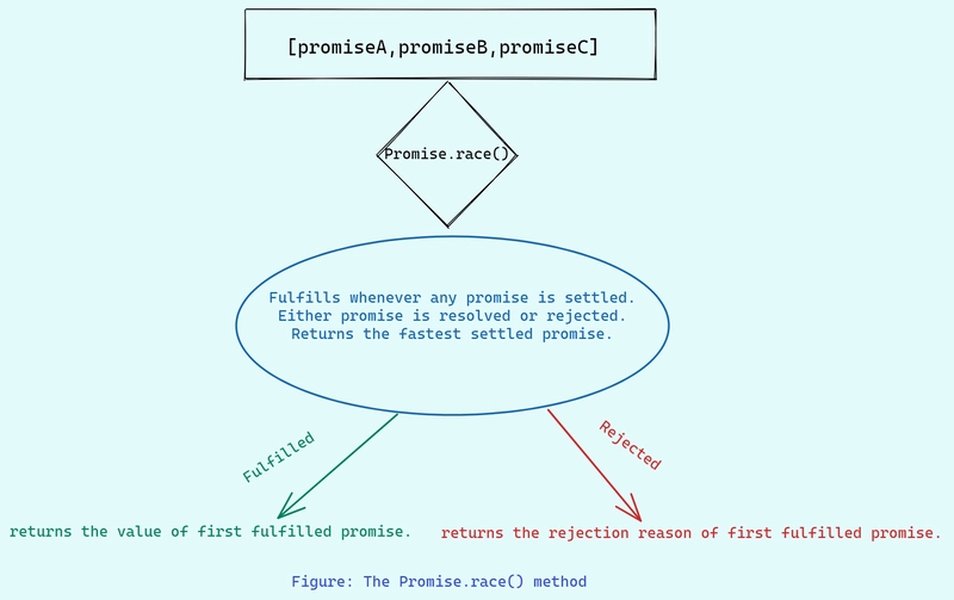
Diagram illustrating the behavior of Promise.all().
Promise.race()
Takes an iterable of promises and returns a single promise that settles (resolves or rejects) as soon as one of the input promises settles. The settled value or reason is the same as the first settling promise.
Promise.allSettled()
Takes an iterable of promises and returns a single promise that resolves when all of the input promises have settled (either fulfilled or rejected). The resolved value is an array of objects, each describing the outcome of a promise (status and value or reason).
Promise.any()
Takes an iterable of promises and returns a single promise that resolves as soon as one of the input promises fulfills. If all of the input promises reject, it rejects with an AggregateError containing the rejection reasons.
Sequential Execution
While chaining with .then() handles sequential execution, you might encounter scenarios where you have an array of asynchronous functions that need to run one after another. This can be achieved using techniques like iterating with async/await or using the reduce method on an array of promises.
Sequential Execution Example with async/await:
async function runSequentially(tasks) {
  for (const task of tasks) {
    await task();
  }
}

const sequentialTasks = [
  () => new Promise(resolve => setTimeout(() => { console.log("Task 1"); resolve(); }, 300)),
  () => new Promise(resolve => setTimeout(() => { console.log("Task 2"); resolve(); }, 200)),
  () => new Promise(resolve => setTimeout(() => { console.log("Task 3"); resolve(); }, 100)),
];

runSequentially(sequentialTasks);
Common Pitfalls and How to Avoid Them
Even with a good understanding of promises, certain patterns can lead to unexpected issues:
-
Forgetting to return a promise from a
.then(): If you perform an asynchronous operation inside a.then()but don't return the promise, the chain won't wait for that operation to complete. -
Mixing async/await and
.then()inconsistently: While you can mix them, it can sometimes make the control flow harder to follow. Choose the approach that makes the code clearest for a given scenario. -
Not handling errors in concurrent operations: Using
Promise.all()without a subsequent.catch()means that if any promise rejects, the entire operation will fail, and the error might be unhandled. UsePromise.allSettled()if you need to process results even if some operations fail. -
Misunderstanding the microtask queue: Assuming that code after a promise resolution will run immediately can lead to subtle bugs. Remember that
.then()callbacks are asynchronous.
Table of Key Promise Methods
Here's a summary of essential static methods available on the Promise object:
| Method | Description | Behavior on Rejection |
|---|---|---|
Promise.all(iterable) |
Waits for all promises in the iterable to resolve. | Rejects immediately if any promise rejects. |
Promise.race(iterable) |
Settles as soon as one promise in the iterable settles. | Rejects immediately if the first settling promise rejects. |
Promise.allSettled(iterable) |
Waits for all promises in the iterable to settle (fulfill or reject). | Resolves with an array of outcome objects, regardless of individual promise outcomes. |
Promise.any(iterable) |
Resolves as soon as one promise in the iterable fulfills. | Rejects with an AggregateError if all promises reject. |
Promise.resolve(value) |
Returns a promise that is resolved with the given value. | N/A |
Promise.reject(reason) |
Returns a promise that is rejected with the given reason. | N/A |
Practice and Further Learning
Mastering JavaScript promises and asynchronous programming requires practice. Working through exercises that involve chaining, concurrent execution, and error handling in various scenarios is highly recommended.
Numerous resources are available for practicing promise-based problems, including online coding challenges and interactive tutorials. Focus on understanding the flow of control and how promises interact with the JavaScript event loop.
Frequently Asked Questions About JavaScript Promises
What are the three states of a Promise?
A Promise can be in one of three states: Pending (initial state), Fulfilled (operation completed successfully), or Rejected (operation failed).
How do you handle errors in a promise chain?
Errors in a promise chain are typically handled using the .catch() method. A single .catch() at the end of a chain will catch errors from any promise in that chain.
What is the difference between Promise.all() and Promise.allSettled()?
Promise.all() resolves only if all promises in the iterable resolve, and it rejects immediately if any promise rejects. Promise.allSettled() waits for all promises to settle (either fulfill or reject) and returns an array describing the outcome of each promise.
How does async/await relate to Promises?
Async/await is syntax sugar built on top of Promises. An async function always returns a promise, and the await keyword pauses the execution of an async function until a promise resolves, returning its resolved value.
Are .then() callbacks executed synchronously or asynchronously?
.then() callbacks are always executed asynchronously. They are placed in the microtask queue and run after the current synchronous code finishes but before the next task from the macrotask queue.
References
Last updated May 4, 2025