
Unveiling the Ubuntu 2024 Boot Process: A Deep Dive
Explore the intricate steps from power-on to user login in Ubuntu
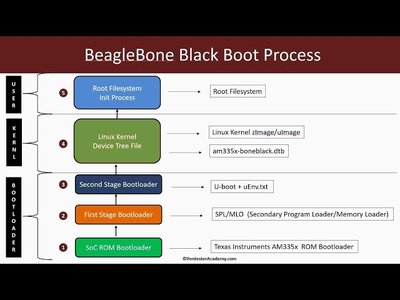
Key Highlights
- BIOS/UEFI Initialization: Hardware checks, POST, and boot device selection form the first crucial stage.
- Bootloader and Kernel Loading: GRUB governs the selection and loading of the Linux kernel and initramfs.
- System and Service Initialization: Systemd manages the activation of system services leading to a complete user interface setup.
Understanding the Ubuntu 2024 Boot Process
1. BIOS/UEFI Initialization
The boot process begins the moment you power on your Ubuntu machine. The Basic Input/Output System (BIOS) or the more modern Unified Extensible Firmware Interface (UEFI) is responsible for initiating this process. During this initial stage, the firmware performs a Power-On Self-Test (POST) to check hardware components such as the CPU, memory, and storage devices. It then detects connected peripherals, determines available boot devices, and selects the appropriate one based on the configured boot order.
In UEFI systems, additional security measures like Secure Boot may be enabled or disabled to ensure that only trusted software is loaded during startup. This phase essentially sets up the stage by ensuring that all underlying hardware components are functional and ready for the operating system.
2. The Bootloader Stage: GRUB in Action
Once the firmware successfully initializes the hardware, the control transfers to the bootloader, typically GRUB (Grand Unified Bootloader) in Ubuntu systems. GRUB is crucial for managing multiple operating systems on a single machine, as it provides a menu for selecting the desired OS, especially in dual-boot configurations.
GRUB also plays a pivotal role in loading the Linux kernel into memory along with the initial RAM filesystem (initramfs). The initramfs serves as a temporary file system providing necessary drivers and scripts needed to initiate the kernel before the actual root file system is mounted. Importantly, GRUB allows users to access additional boot options like recovery mode, which can be essential for troubleshooting boot issues.
3. Kernel Loading and Hardware Initialization
With GRUB’s assistance, the Linux kernel is loaded into the system’s memory. The kernel is the heart of the operating system, responsible for managing hardware interactions, process handling, memory management, and much more. As soon as it is loaded, the kernel begins the process of hardware initialization; this includes loading hardware drivers that communicate with system components like GPUs, network cards, and storage devices.
A critical component during this phase is the initramfs, which holds necessary modules and scripts executed before mounting the root filesystem. This sequence ensures that the root file system, which houses the core Ubuntu files, is properly identified and mounted.
4. Systemd and the Init Process
In modern Ubuntu systems, after the kernel completes its initialization, the first user-space process started is typically systemd. As the system and service manager, systemd carries a multitude of responsibilities:
-
Service Management:
Systemd initiates various services and daemons concurrently, optimizing boot times and managing dependencies between different service units.
-
Filesystem Mounting:
It mounts essential filesystems, including the root file system, often using the standard Linux mount command internally.
-
Target Activation:
Systemd activates specific target units (similar to runlevels in older systems), such as graphical.target for desktop environments or multi-user.target for servers, ensuring the appropriate services and configurations are loaded.
This structured approach permits efficient booting while allowing administrators and advanced users to diagnose and troubleshoot the boot process effectively. If any step in this chain fails, systemd’s logging and diagnostic tools help isolate and pinpoint the issue.
5. User Interface and Final User Interactions
Once systemd has executed the necessary services, the final stage of the boot process involves the initiation of a display manager, such as GDM (GNOME Display Manager) or LightDM. This display manager is responsible for providing the graphical login screen which allows the user to sign in.
After a successful login, the system transitions into a complete user environment, starting the desktop environment (for example, GNOME in Ubuntu) or launching a command line interface in server configurations. The entire process ensures that the user has a fully functional session where all required applications and services are pre-loaded and ready for routine operations.
Visual Overview of the Boot Process
| Stage | Description | Key Components |
|---|---|---|
| BIOS/UEFI Initialization | Hardware check, POST, and boot device selection; ensures system readiness. | BIOS/UEFI, POST, Secure Boot, Boot Order |
| Bootloader Execution | GRUB loads; offers OS selection and loads the Linux kernel and initramfs. | GRUB, Boot Menu, Recovery Mode |
| Kernel Loading | Kernel and initramfs are loaded into memory; driver initialization occurs. | Linux Kernel, Drivers, Initramfs |
| Systemd and Init Process | Systemd becomes the central process; mounts filesystems and manages services. | Systemd, Unit Files, Target Units |
| User Interface Setup | Display manager launches to display a graphical login; desktop environment is initialized. | Display Manager (e.g., GDM), Desktop Environment |
Exploring Technical Nuances and Troubleshooting
Potential Issues and Their Diagnoses
Although the Ubuntu boot process is highly robust, occasional issues might arise. For instance, a slow boot time or failure to reach the login screen can indicate errors in driver initialization, misconfigured GRUB settings, or problems with systemd service units. Administrators often use tools such as systemd-analyze blame to identify services that require longer start-up times. If the boot process halts, booting in recovery mode via GRUB’s "Advanced Options" can provide access to root privileges for repairs or modifications.
Additionally, logs generated by systemd and kernel messages provide insight into what might be going wrong. Understanding these logs is pivotal for effective troubleshooting; commands like journalctl allow users to review the boot history and identify problematic stages.
Secure Boot and Modern Hardware Interactions
With the evolving landscape of security, Ubuntu leverages modern UEFI firmware functions such as Secure Boot. Secure Boot ensures that only digitally signed, verified software is loaded, thus minimizing the risk of boot-level malware. While this feature enhances security, it may sometimes impede the installation of custom drivers or alternative operating systems. Users might need to temporarily disable Secure Boot to solve compatibility issues during installation phases.
Furthermore, modern hardware requires complex interactions. The kernel’s role in hardware detection ensures that contextual drivers are loaded flexibly. As a result, Ubuntu's boot process remains adaptive and capable of handling a variety of hardware configurations, from standard desktops to advanced servers.
Deep Dive: Systemd’s Role in Orchestrating Boot
Systemd’s Boot Sequence and Service Management
Systemd is a modern initialization system and service manager used in Ubuntu 2024. Once initiated, it takes over the orchestration of services and system processes that lead to a fully operational system. Its responsibilities include:
-
Parallel Service Initialization:
Systemd optimizes start-up time by launching service units concurrently rather than sequentially. This approach significantly reduces boot times compared to traditional init systems.
-
Dependency Management:
It effectively manages dependencies between services, ensuring that services which rely on others are started in the correct order.
-
Target-Based Initialization:
Through the use of target units, systemd groups related services, such as the network target or the graphical target, to reach a desired system state prepared for user interaction.
The structure provided by systemd not only improves performance but also simplifies troubleshooting. Its centralized logging with journalctl captures detailed event logs from the boot process, assisting system administrators in identifying and correcting issues at early stages of system startup.
In-Depth Analysis of Boot Phases
From Firmware to Desktop Environment: A Sequential Overview
To provide a clear picture, let’s break down each phase sequentially:
-
BIOS/UEFI Stage:
Hardware perform tests and firmware selects boot device and prepares the system environment.
-
GRUB Bootloader Stage:
GRUB loads the Linux kernel and initramfs, provides the boot menu, and allows alternative boot options.
-
Kernel Initialization Stage:
Once loaded, the kernel configures hardware, loads necessary drivers, and prepares for mounting the filesystem.
-
Systemd and Init Process Stage:
Systemd takes the reins with parallel service initialization, dependency handling, and activating target units, forming the backbone of system readiness.
-
User Interface Stage:
The display manager launches a graphical login interface, leading to the desktop environment or command line session.
This sequential and layered approach to the boot process illustrates how Ubuntu manages to achieve both speed and stability, ensuring that every piece of software required for a smooth experience is properly initialized.
Reference Materials and Advanced Guides
For those seeking further exploration into the intricate details of the Ubuntu boot process, numerous resources outline specific nuances and troubleshooting tips. These materials extend into areas such as secure boot configurations, custom GRUB setups, and advanced systemd management.
Notable Downloads and Documentation
Comprehensive documentation is available on several prominent platforms that provide tutorials, step-by-step guides, and community-based solutions for common boot issues. Reviewing these guides can enhance the understanding of how the boot process interacts with modern hardware architectures and security protocols.
References
- How to Install Ubuntu 24.04 Desktop [Step by Step Guide] - UbuntuHandbook
- Understanding the Ubuntu Boot Process | Know IT Like Pro
- Linux — Ubuntu Boot Sequence Explanation - Medium
- Ubuntu 24.04 Booting Process Stopped to Work - Ask Ubuntu
- Booting - Ubuntu Wiki
Recommended Related Queries
Last updated March 26, 2025