
Unlock Peak Performance: Designing Your Ultimate Productivity & Life Management Suite
Discover the essential building blocks for software that integrates time, tasks, goals, and systems for unparalleled efficiency.
Essential Insights
- Comprehensive Integration is Key: The most effective suite seamlessly combines task management, scheduling, time tracking, goal setting, and knowledge management into one ecosystem.
- Automation & AI Supercharge Efficiency: Leverage artificial intelligence for smart suggestions, workflow automation, and insightful analytics to minimize manual effort and optimize performance.
- Personalization Drives Adoption: Flexibility through customizable dashboards, workflows, and feature selection allows users to tailor the suite to their unique needs and preferences.
Blueprint for the Ultimate Productivity Ecosystem
Imagine a software suite meticulously crafted to harmonize every aspect of your productive life, from minute-by-minute time management to ambitious long-term goals. Building such a system requires a thoughtful integration of diverse components, drawing inspiration from the best features available in 2025. Here’s a detailed look at the essential elements:
I. Core Foundational Modules
A. Unified Task & Project Management Hub
This module acts as the central nervous system for getting things done. It needs to be robust yet intuitive, accommodating both simple to-do lists and complex projects.
- Hierarchical Structure: Organize work logically with projects, tasks, and subtasks. Support for task dependencies is crucial for managing complex workflows.
- Smart Prioritization Tools: Integrate proven frameworks like the Eisenhower Matrix (Urgent/Important) or Action Priority Matrix to help users focus on what matters most. Allow for custom tagging and filtering.
- Flexible Views: Offer multiple ways to visualize work, including lists, Kanban boards, Gantt charts, and calendar views, catering to different preferences and project types.
- Recurring Tasks & Templates: Automate the setup of routine tasks and projects with customizable recurrence options and templates.
- Deadline Management: Clear due dates, reminders, and notifications are essential to keep work on track.
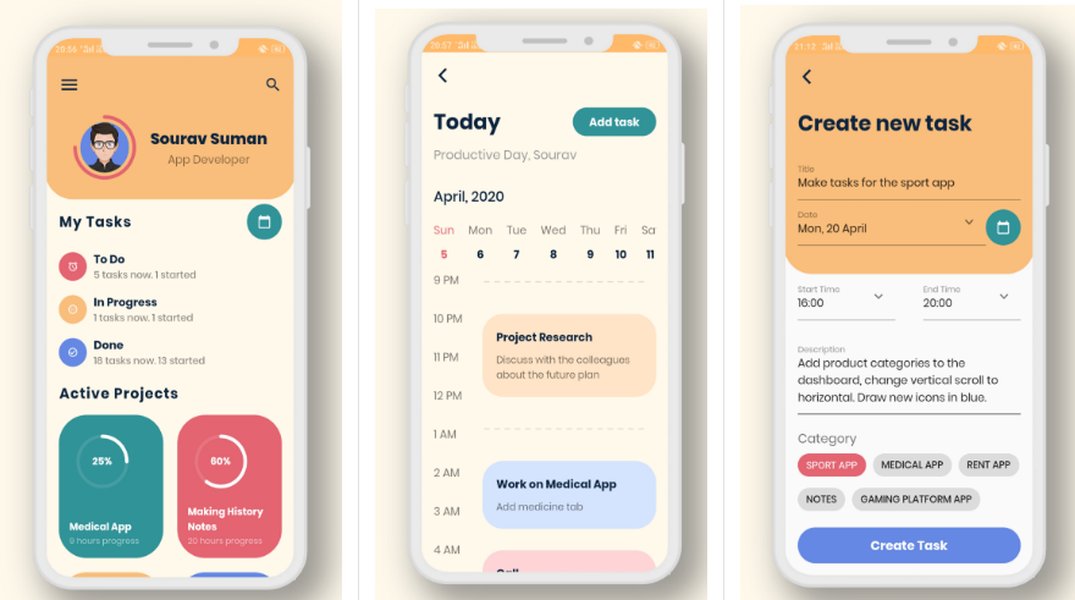
A clean interface for task planning helps users visualize and manage their workload effectively.
B. Intelligent Time Management & Scheduling
Understanding and controlling time is fundamental to productivity. This module provides the tools to track, analyze, and allocate time effectively.
- Integrated Calendar: Sync seamlessly with popular calendar services (Google, Microsoft 365). Allow scheduling tasks directly onto the calendar.
- Time Blocking Capabilities: Enable users to dedicate specific blocks of time for focused work, meetings, or personal activities, visually represented on the calendar.
- Time Tracking: Offer both manual and automatic time tracking options linked to tasks and projects. Generate reports to analyze time usage patterns and identify bottlenecks.
- Pomodoro Timer & Focus Aids: Include built-in timers based on techniques like Pomodoro to encourage focused work sprints and regular breaks. Consider "Do Not Disturb" modes to minimize distractions.
- AI-Powered Scheduling: Utilize AI to suggest optimal times for tasks based on deadlines, priorities, and the user's energy levels or historical work patterns. Flag potentially unproductive meetings.

Integrated calendars allow for seamless scheduling and time blocking.
C. Holistic Life Planning & Goal Setting
True productivity extends beyond daily tasks to encompass long-term aspirations and personal growth. This module supports users in defining and pursuing their life goals.
- Goal Hierarchy & Vision Boards: Allow users to define long-term visions and break them down into actionable quarterly, monthly, or weekly goals and linked tasks. Visual tools like vision boards can aid motivation.
- Habit Tracking & Routine Building: Integrate tools to establish and monitor positive habits, track streaks, and provide gentle nudges based on behavioral science principles.
- Progress Dashboards: Visualize progress towards both short-term objectives and long-term life goals, providing motivation and clarity.
- Journaling & Reflection Space: Offer a dedicated space for users to reflect on their progress, capture insights, and plan future actions, fostering self-awareness.
D. Knowledge Management & Note-Taking
Capturing and organizing information is crucial for efficiency. This module serves as a digital brain, connecting ideas to actions.
- Rich Text Notes: Support for versatile note-taking with formatting options, checklists, embedding media, and linking.
- Hierarchical & Tag-Based Organization: Allow users to structure notes in folders or hierarchies, complemented by powerful tagging and search capabilities.
- Bi-directional Linking: Connect notes to relevant tasks, projects, calendar events, and other notes, creating a web of knowledge.
- Information Capture: Integrate tools like web clippers or email forwarding to easily capture information from external sources.
E. Communication & Collaboration Hub
For teams or individuals collaborating with others, seamless communication integrated within the workflow is vital.
- Contextual Communication: Allow comments and discussions directly on tasks, projects, or documents.
- Team Dashboards & Shared Views: Provide shared project boards, calendars, and task lists with clear assignments and progress visibility.
- Real-Time Collaboration: Enable simultaneous editing of documents or notes with version history.
- Integration with External Tools: Connect with popular communication platforms like Slack or Microsoft Teams for streamlined notifications and information sharing.
- File Sharing & Management: Integrate with cloud storage services (Google Drive, OneDrive, Dropbox) for easy access and sharing of project files.
Enhancing the Suite: Advanced Features & Integrations
II. Intelligence and Automation Layer
A. AI-Powered Assistance & Automation
Leveraging AI can significantly reduce cognitive load and automate repetitive actions.
- Smart Suggestions: AI recommends task priorities, suggests optimal schedules, identifies potential conflicts, and even proposes steps to break down complex goals.
- Workflow Automation Engine: Allow users to create custom automation rules (IFTTT-style) to streamline repetitive processes (e.g., "If task status changes to 'Complete', notify stakeholder X").
- Natural Language Processing: Enable task creation and scheduling using natural language input (e.g., "Remind me to call John next Tuesday at 2 PM").
- Enterprise AI Search: Implement powerful search capabilities that can find information across all modules (tasks, notes, files, calendar events) quickly.
B. Insightful Analytics & Reporting
Data-driven insights help users understand their work patterns and optimize their productivity.
- Productivity Dashboards: Customizable dashboards visualizing key metrics like task completion rates, time spent per project/category, focus time vs. distraction time, and progress towards goals.
- Time Audit Reports: Detailed breakdowns of how time is allocated, helping identify time sinks and areas for improvement.
- Productivity Heatmaps: Visual representations of focus patterns throughout the day or week.
- AI Coaching: Provide personalized suggestions based on analytics to improve workflows, manage time better, or maintain work-life balance.
III. Foundational Elements
A. Customization & Personalization
A one-size-fits-all approach rarely works for productivity. The suite must be adaptable.
- Modular Design: Allow users to enable or disable specific modules or features based on their needs.
- Customizable Interface: Offer options for themes, layouts, and dashboard widgets to create a personalized workspace.
- Flexible Workflows: Support the creation of custom workflows and task statuses beyond default settings.
B. Seamless Integration Ecosystem
The suite should work harmoniously with other tools users rely on.
- Third-Party App Connections: Offer robust integrations with email clients, CRM systems, development tools (like Jira), cloud storage, and other essential business applications.
- API & Webhooks: Provide APIs and webhooks for advanced users and developers to build custom integrations.
C. Cross-Platform Accessibility & Security
Access and data protection are non-negotiable.
- Multi-Device Sync: Ensure seamless real-time synchronization across web, desktop (Windows, Mac), and mobile (iOS, Android) applications.
- Offline Mode: Allow users to work offline with data syncing automatically once reconnected.
- Robust Security: Implement enterprise-grade security measures, including end-to-end encryption (where applicable), role-based access controls, and compliance with data privacy regulations (e.g., GDPR).
Visualizing the Suite's Capabilities
To illustrate the balance of features in this ideal software suite, the following chart evaluates key aspects based on their desired level of sophistication and integration. High scores indicate robust, well-integrated, and intelligent functionality.
This chart highlights the ambition for a suite excelling in core task/time management and leveraging AI/automation, while also providing strong support for life planning, knowledge management, and collaboration, all built on a highly customizable and integrated platform.
Structuring the Productivity Ecosystem
A mindmap helps visualize how these diverse components interconnect to form a cohesive whole. The central idea branches out into the core modules, which further divide into specific features, demonstrating the integrated nature of the proposed suite.
This structure ensures that users can manage detailed tasks, track their time, plan their long-term goals, organize information, and collaborate effectively, all enhanced by intelligent automation and analytics within a secure, customizable, and integrated environment.
Supporting Diverse Productivity Methodologies
A truly versatile suite should accommodate various popular productivity techniques. The integrated features allow users to implement methodologies that resonate with their working style. Here’s how the suite supports some well-known approaches:
| Methodology | Description | Supported By Suite Features |
|---|---|---|
| Getting Things Done (GTD) | A system for capturing, clarifying, organizing, reflecting on, and engaging with tasks and information. | Task capture (inbox), hierarchical task breakdown (projects/subtasks), context tagging, regular review prompts, note-taking integration. |
| Eisenhower Matrix | Prioritizing tasks based on Urgency and Importance into four quadrants (Do, Decide, Delegate, Delete). | Smart prioritization tools, custom tags/fields for urgency/importance, filtering and sorting options. |
| Pomodoro Technique | Working in focused 25-minute intervals separated by short breaks to maintain concentration and prevent burnout. | Built-in Pomodoro timer, focus mode activation during sprints, break reminders, time tracking per task/session. |
| Time Blocking | Scheduling specific blocks of time for specific tasks or types of work directly on the calendar. | Integrated calendar, drag-and-drop task scheduling, visual time blocks, reminders for block transitions. |
| Kanban | Visualizing workflow using columns (e.g., To Do, In Progress, Done) and moving tasks across them. | Kanban board view within Task & Project Management module, customizable columns/workflows, drag-and-drop interface. |
| Action Priority Matrix | Prioritizing tasks based on Effort and Impact into four quadrants (Quick Wins, Major Projects, Fill-Ins, Thankless Tasks). | Custom fields/tags for effort/impact, visual matrix representation (potentially via custom dashboards or views), prioritization assistance. |
By providing flexible features rather than rigidly enforcing one method, the suite empowers users to mix and match techniques or fully adopt a system that works best for them.
Productivity Software Landscape Overview
Understanding the context of productivity software helps appreciate the integration challenge. This video provides a general overview of different categories of software commonly used in productivity workflows, setting the stage for why an integrated suite offers significant advantages over using disparate tools.
The video touches upon word processors, spreadsheets, presentation software, and potentially communication tools – elements often found in traditional office suites. An advanced productivity suite, as outlined here, goes much further by deeply integrating task management, time tracking, goal setting, and AI-driven optimization, creating a more holistic and powerful system for managing both work and life.
Frequently Asked Questions (FAQs)
What's the main advantage of an integrated suite over using separate apps?
The primary advantage is seamless workflow integration and data consistency. An integrated suite eliminates the friction of switching between multiple applications, reduces data silos, and allows for powerful cross-module features like linking tasks to notes, scheduling tasks directly on the calendar, and generating holistic analytics. Automation also becomes more powerful when it can orchestrate actions across different functional areas (e.g., completing a project task automatically updates a long-term goal's progress).
How important is AI in a modern productivity suite?
AI is becoming increasingly important. It transforms the suite from a passive tool for organizing information into an active assistant that helps optimize workflows. AI can automate repetitive tasks, provide intelligent suggestions for prioritization and scheduling, analyze productivity patterns to offer personalized coaching, and power advanced search capabilities. While not strictly essential for basic functionality, AI significantly enhances efficiency and user experience.
Can such a comprehensive suite be overwhelming for new users?
It can be, which is why usability, onboarding, and modularity are critical design considerations. The suite should offer a clean, intuitive interface with sensible defaults. Good onboarding tutorials and templates can help users get started. The modular design allows users to begin with core features (like task and calendar management) and gradually explore more advanced modules (like automation or detailed analytics) as they become comfortable.
How does this suite balance work productivity and personal life planning?
The suite achieves balance by integrating dedicated modules for both professional tasks/projects and personal life goals/habits. Features like goal hierarchy allow users to connect daily tasks to long-term aspirations. Time management tools can be used for both work scheduling and personal appointments. Analytics can provide insights into work-life balance. Importantly, strong privacy controls and the ability to compartmentalize or link work and personal data as needed are essential for user comfort and effectiveness.
Recommended Reading
Explore these related topics for deeper insights:
- How can AI automate time management and scheduling?
- Compare Getting Things Done vs Eisenhower Matrix for task prioritization.
- What are the key features of effective knowledge management systems?
- Examples of using habit tracking for personal development goals.
References
Last updated May 5, 2025