
Unlock Your Visual Learning Superpowers: Insider Strategies for Academic Success
Discover potent study techniques tailored for visual learners to transform how you absorb and retain information.
If you find yourself drawn to images, diagrams, and spatial arrangements when trying to understand new concepts, you're likely a visual learner. This learning preference means your brain is wired to process information best when it's presented in a visual format. Understanding and leveraging this strength can dramatically enhance your study effectiveness and academic performance. Let's delve into some powerful, often underutilized, strategies designed specifically for you.
Key Highlights: Mastering Visual Study
- Transform Information: Learn to convert text and auditory information into vibrant visual formats like mind maps, diagrams, and color-coded notes to boost comprehension and recall.
- Engage Actively with Visuals: Go beyond passively looking at images; actively create, manipulate, and interact with visual aids to deepen your understanding and memory retention.
- Optimize Your Environment: Create a study space that is not only organized but also visually stimulating, catering to your need for clear, engaging visual input and minimizing distractions.
Harnessing the Power of Visual Note-Taking
More Than Just Words: Crafting Notes That Speak to Your Eyes
For visual learners, standard linear note-taking can be inefficient. The key is to transform lectures and readings into a visual tapestry of information.
Strategic Color-Coding
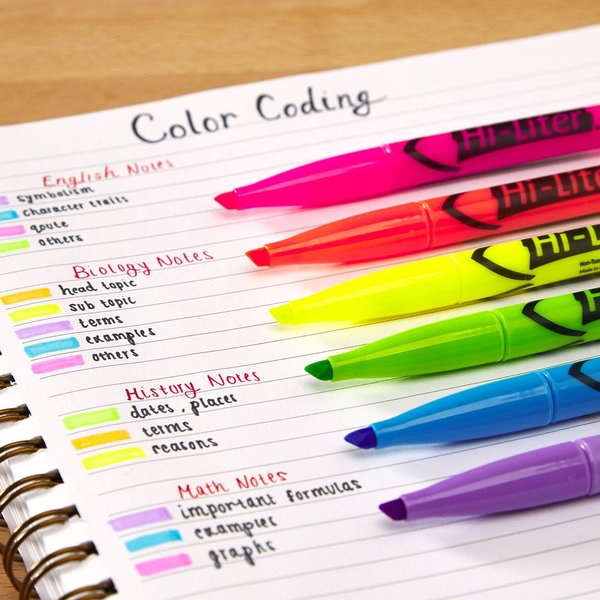
Assign distinct colors to different themes, concepts, keywords, dates, or levels of importance within your notes. This not only makes your notes more engaging but also creates visual cues that aid in information retrieval. For example, you could use blue for main topics, green for supporting details, and red for critical definitions or formulas. This systematic approach turns your notes into an organized, easily navigable visual database.
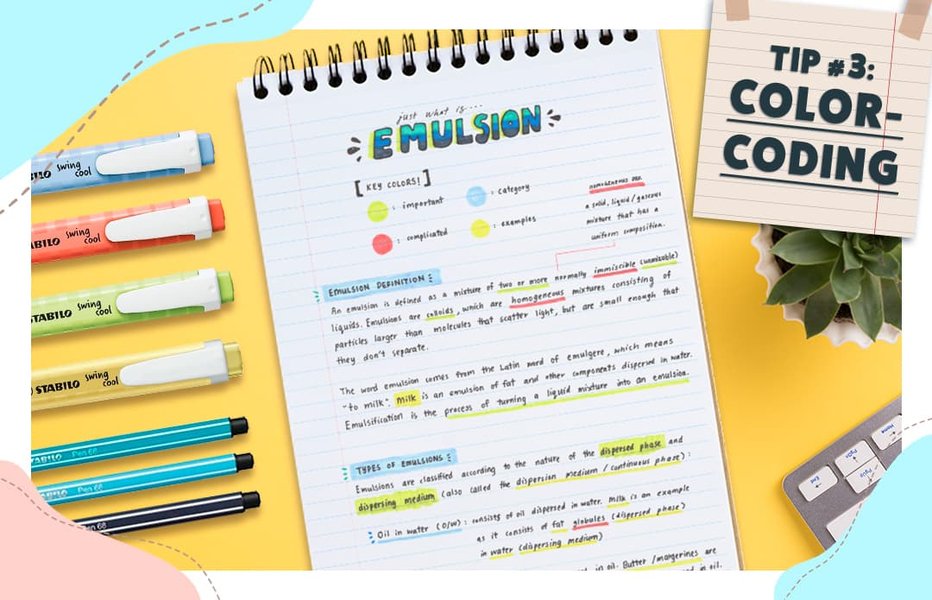
Example of color-coding used effectively in notes to differentiate information.
Incorporating Symbols and Sketches
Don't be afraid to draw! Simple sketches, icons, symbols (like stars for important points or question marks for areas needing clarification), arrows to show relationships, and boxes to highlight key information can make your notes much more dynamic and memorable. Even if you don't consider yourself artistic, basic shapes and stick figures can convey complex ideas more effectively than words alone for a visual learner.
Spatial Organization and White Space
The layout of your notes matters. Use ample white space to avoid visual clutter. Arrange information spatially, perhaps using a Cornell note-taking style adapted with more diagrams, or by structuring notes in a way that reflects hierarchies and connections. This conscious use of space helps in segmenting information and improving readability and recall.
Mind Maps & Concept Diagrams: Visualizing Connections
Weaving a Web of Knowledge
Mind maps and concept maps are powerhouse tools for visual learners, allowing you to see the "big picture" and the intricate connections between different pieces of information. They transform linear information into a radial, hierarchical, and interconnected visual structure that mirrors how your brain might naturally link ideas.
Creating Effective Mind Maps
Start with a central topic or idea in the middle of your page. From this core, branch out with main themes, and then further subdivide these into smaller details, using keywords, short phrases, colors, and images on each branch. This method is excellent for brainstorming, summarizing complex subjects, outlining essays, or studying for exams where understanding relationships is key.
A concept map visually organizing ideas and their connections.
The Power of Concept Mapping
Similar to mind maps, concept maps focus on showing relationships between concepts, often using linking phrases on the lines connecting ideas to define those relationships (e.g., "leads to," "is part of," "contributes to"). They are particularly useful for understanding complex systems or processes in subjects like science, history, or literature.
The following mindmap illustrates key strategies and concepts beneficial for visual learners, providing a quick overview of how different elements interconnect to support your learning style.
This mindmap serves as a visual guide, summarizing the multifaceted approach to optimizing study habits for visual learners. Each branch represents a crucial area to focus on, from foundational understanding to specific techniques and tools.
The Impact of Visual Aids: Charts, Diagrams, and More
Making Abstract Concepts Concrete
Visual aids are a visual learner's best friend. They transform dense text or abstract ideas into more digestible and memorable formats.
- Diagrams and Flowcharts: Use these to break down processes, systems, or hierarchical structures. Drawing your own versions can significantly deepen understanding.
- Charts and Graphs: Convert statistical data or comparisons into bar graphs, pie charts, or line graphs. This visual representation makes trends and relationships immediately apparent.
- Timelines: Essential for history or any subject requiring understanding of chronological order. Visually mapping events helps solidify their sequence and context.
- Infographics: These combine data, text, and graphics to present information in a compelling, easy-to-understand visual narrative. Seek them out or try creating your own simple versions.

Visual aids like charts and diagrams are crucial for effective visual learning.
Comparative Effectiveness of Visual Learning Techniques
Choosing Your Most Potent Tools
Different visual learning strategies offer varying benefits depending on the learning goal. The radar chart below provides a subjective comparison of common visual learning techniques across four dimensions: Impact on Comprehension, Ease of Implementation, Time Investment (lower score means less time), and Long-term Retention. This can help you prioritize which methods to explore further based on your needs and resources. The scores are on a scale of 3 to 10, where 10 represents the highest positive impact or ease, and for Time Investment, a lower score indicates less time required (making it more efficient).
As the chart illustrates, techniques like Mind Mapping and creating Diagrams/Charts score highly on comprehension and retention, though they might require a bit more time to implement effectively. Color Coding is quick and easy, while Video Learning offers high ease of access. Experiment with these to find your optimal mix.
Leveraging Technology and Environment
Digital Tools and Your Ideal Study Sanctuary
Embrace Digital Visual Tools
The digital age offers a plethora of tools perfect for visual learners:
- Mind Mapping Software: Apps like Miro, Lucidchart, or Excalidraw allow for dynamic creation and easy editing of mind maps and diagrams.
- Digital Flashcards: Platforms like Anki or Quizlet let you incorporate images and even short video clips into your flashcards, enhancing visual recall. Many also support spaced repetition systems.
- Educational Videos: Websites like Khan Academy and countless YouTube channels provide visual explanations of complex topics through animations, demonstrations, and lectures with visual aids.
- Interactive Whiteboards and Note-Taking Apps: Tools like Notion, OneNote, or Google Jamboard allow for flexible note-taking with easy integration of images, drawings, and multimedia.
Crafting a Visually Stimulating Study Environment
Your physical surroundings significantly impact your ability to focus and learn.
- Good Lighting and Minimal Clutter: A well-lit, organized desk reduces eye strain and cognitive load, allowing you to focus on the visual information you're processing.
- Visually Appealing Elements: While minimizing distractions is key, incorporating some visually pleasing elements like organized study tools, motivational posters (if they don't distract), or a whiteboard for sketching ideas can make the space more inviting.
- Quiet for Focus: Most visual learners concentrate best when studying alone in a quiet environment, as auditory distractions can interfere with visual processing.

An ideal study space for a visual learner is well-lit, organized, and free from clutter.
Active Visualization and Memory Techniques
Seeing It in Your Mind's Eye
Internal Visualization
Practice actively visualizing the concepts you're learning. After reading a passage or listening to an explanation, close your eyes and try to "see" the information as a diagram, a flowchart, or a mental movie. The more vivid the mental image, the better you'll retain it.
The Loci Method (Memory Palace)
This ancient mnemonic technique involves associating pieces of information with specific locations in a familiar physical space (like rooms in your house). As you mentally "walk" through this space, you "see" the items you've placed, triggering recall. This is particularly powerful for visual learners as it leverages spatial memory.
Watching Demonstrations and Using Analogies
Whenever possible, watch videos or live demonstrations of processes or concepts. Seeing something in action can be incredibly insightful. Analogies that create a visual comparison can also be very effective. The video below offers some great insights into study habits that work well for visual learners, including the power of analogies.
This video provides practical study tips tailored for visual learners, emphasizing techniques that capitalize on visual strengths.
The video highlights several strategies, such as using visual analogies to connect new information to familiar concepts, which can make abstract ideas more concrete and memorable. It also reinforces the importance of transforming information into visual formats that resonate with your learning style.
Summary Table of Visual Learning Techniques
Quick Reference Guide to Key Strategies
To consolidate these powerful strategies, here's a table summarizing key visual learning techniques, their descriptions, core benefits, and practical examples:
| Technique | Description | Key Benefits | Example Application |
|---|---|---|---|
| Visual Note-Taking | Employing colors, symbols, drawings, and varied spatial layouts within notes. | Boosts recall, structures information visually, enhances engagement. | Color-coding different historical periods; using icons for recurring themes. |
| Mind Mapping | Creating radial diagrams that link ideas hierarchically around a central concept using keywords and images. | Illustrates relationships, aids brainstorming, provides a holistic overview. | Mapping out the characters and plot points of a novel. |
| Color Coding | Systematically assigning specific colors to different information types, topics, or priorities. | Improves organization, facilitates quick identification and association. | Using green for solved math problems, yellow for those in progress, red for difficult ones. |
| Diagrams & Charts | Graphically representing data, processes, or complex systems (e.g., flowcharts, bar graphs). | Simplifies complexity, clarifies relationships, makes data intuitive. | Creating a flowchart for a scientific experiment's methodology. |
| Image-Based Flashcards | Incorporating pictures, symbols, or diagrams on flashcards, often alongside minimal text. | Strengthens visual memory triggers, makes review more engaging. | Flashcards with an image of a plant cell on one side and labels on the other. |
| Educational Videos | Learning through videos that visually explain concepts, demonstrate processes, or use animations. | Offers dynamic learning, clarifies abstract ideas, shows concepts in action. | Watching a Khan Academy video to understand a physics concept. |
| Interactive Digital Tools | Utilizing software for creating mind maps, digital flashcards, virtual whiteboards, or simulations. | Engages multiple senses, allows manipulation and exploration, facilitates collaboration. | Using an app like Miro for collaborative mind mapping on a group project. |
| Active Visualization | Consciously creating detailed mental images of the information being studied. | Enhances encoding into long-term memory, improves understanding. | Mentally picturing the steps of a historical event as a movie scene. |
By integrating these techniques into your study routine, you can leverage your natural visual strengths to learn more effectively and efficiently.
Frequently Asked Questions (FAQ)
What defines a visual learner?
A visual learner primarily processes and retains information best when it is presented in a visual format. They tend to remember what they see, such as images, diagrams, charts, videos, colors, and spatial arrangements. They often prefer reading, observing, and using visual aids over purely auditory or kinesthetic methods. Visual learners may think in pictures and find it easier to understand and recall information when it's graphically represented.
Why is color-coding so effective for visual learners?
Color-coding is highly effective for visual learners because it leverages their natural strength in processing visual cues. Colors can help to:
- Organize Information: Assigning different colors to categories or themes helps structure complex information visually.
- Enhance Recall: Colors act as strong memory triggers, making it easier to recall associated information.
- Improve Focus: Visually engaging notes with color can make the study process more interesting and less monotonous, aiding concentration.
- Highlight Key Points: Colors draw attention to important details, ensuring they are not overlooked.
How can I make my study space better for visual learning?
To optimize your study space for visual learning:
- Ensure Good Lighting: Bright, adequate lighting reduces eye strain and improves visibility.
- Keep it Organized and Clutter-Free: A tidy space minimizes visual distractions and helps maintain focus. Use organizers for pens, papers, and books.
- Use Visual Tools: Have a whiteboard or large sticky notes readily available for jotting down ideas, sketching diagrams, or posting visual reminders.
- Personalize with Purpose: You can include visually appealing elements like charts, maps, or motivational images related to your studies, but ensure they aid focus rather than cause distraction.
- Minimize Auditory Distractions: Visual learners often concentrate best in quiet environments. Consider noise-canceling headphones if needed.
Are there specific subjects where visual learning techniques are most beneficial?
While visual learning techniques can be applied to almost any subject, they are particularly beneficial in:
- Sciences (Biology, Chemistry, Physics): Understanding complex processes, structures (e.g., cells, molecules), and relationships often requires diagrams, models, and flowcharts.
- Mathematics: Graphs, geometric shapes, and visualizing problems can make abstract concepts more concrete.
- History and Social Studies: Timelines, maps, and visual representations of events or societal structures can greatly aid comprehension.
- Geography: Maps, charts, and visual data are inherent to this subject.
- Anatomy and Medicine: Visualizing body systems, organs, and medical procedures is crucial.
- Engineering and Architecture: These fields heavily rely on diagrams, blueprints, and 3D models.
What if I'm not good at drawing? Can I still use visual techniques?
Absolutely! You don't need to be an artist to benefit from visual learning techniques. The goal is clarity and personal understanding, not creating masterpieces.
- Simple Shapes and Symbols: Use basic shapes (squares, circles, arrows), stick figures, and simple symbols. Consistency is more important than artistic skill.
- Focus on Layout and Color: Strategic use of color, spacing, and organization can make notes visually effective even without complex drawings.
- Use Digital Tools: Many apps and software provide pre-made icons, shapes, and templates for creating diagrams and mind maps, eliminating the need for manual drawing.
- Find Existing Visuals: You can incorporate images, charts, and diagrams from textbooks, online resources, or educational videos into your notes.
Recommended Further Exploration
Dive Deeper into Visual Learning Mastery
- How can I use technology to enhance my visual learning strategies?
- What are the best mind mapping software options for students who are visual learners?
- Can visual learning techniques improve memory for abstract concepts in advanced subjects?
- How do I combine visual learning with other learning styles for maximum effectiveness?
References
Sources for Further Reading
Last updated May 8, 2025