
Decoding Android Development: Crafting Apps for Billions
Explore the essentials of building applications for the world's most popular mobile operating system.
Android development is the process of creating software applications specifically designed to run on devices powered by the Android operating system. This vast ecosystem encompasses not only smartphones and tablets but also smart TVs, wearables (like smartwatches), automotive systems, and various embedded devices. It's a dynamic field that involves designing user interfaces, writing code, testing functionality, and deploying applications to reach a global audience numbering in the billions.
Key Highlights of Android Development
- Kotlin First: While Java remains relevant for legacy systems, Kotlin is the officially preferred language by Google for modern Android development, offering concise syntax and enhanced safety features.
- Jetpack Compose for UI: The modern approach to building native user interfaces is Jetpack Compose, a declarative UI toolkit that simplifies and accelerates UI development compared to traditional XML layouts.
- Android Studio is Central: The official Integrated Development Environment (IDE), Android Studio, provides a comprehensive suite of tools for coding, debugging, testing, and performance profiling, essential for developers.
Understanding the Core Concepts
To effectively develop Android applications, understanding the underlying platform, tools, and architectural principles is crucial. Here’s a breakdown of the fundamental elements:
The Android Platform
Operating System Basics
Android is an open-source operating system based on the Linux kernel, primarily developed and maintained by Google. Its open nature has led to widespread adoption across a diverse range of hardware manufacturers and device types. Applications run within the Android Runtime (ART), an environment optimized for mobile performance and battery life.
App Components
Android applications are built using several fundamental components, each serving a distinct purpose and having a specific lifecycle:
- Activities: Represent a single screen with a user interface. An app usually consists of multiple activities linked together.
- Services: Perform long-running operations in the background without a user interface, such as playing music or fetching network data.
- Broadcast Receivers: Respond to system-wide broadcast announcements, like low battery warnings, screen turning off, or network changes.
- Content Providers: Manage a shared set of application data, allowing apps to store data privately or share it securely with other applications.
Understanding how these components interact and are managed by the Android system is essential for building robust and efficient applications.

A developer's workspace, often involving multiple screens for coding, designing, and testing Android applications.
Programming Languages and UI Design
Kotlin: The Modern Choice
Since Google announced official support in 2017 and designated it the preferred language in 2019, Kotlin has become the mainstay for new Android development. Its advantages include:
- Conciseness: Requires less boilerplate code compared to Java.
- Null Safety: Built-in features help prevent null pointer exceptions, a common source of crashes.
- Interoperability: Works seamlessly with existing Java codebases.
- Coroutines: Provides excellent support for asynchronous programming, simplifying background tasks.
Java: The Legacy Language
Java was the original language for Android development and remains widely used, especially in older, established projects. While still fully supported, most new development efforts favor Kotlin for its modern features and productivity benefits.
User Interface (UI) Development
- Jetpack Compose: This is Google's modern, declarative toolkit for building native Android UIs. It allows developers to describe their UI using Kotlin functions, leading to less code, powerful tools, and intuitive development. Its adoption is rapidly growing.
- XML Layouts: The traditional method involves defining UI layouts using XML files. While still necessary for maintaining legacy projects, understanding XML is becoming less critical for new projects focused on Compose.
- Material Design: Google provides Material Design guidelines (currently Material Design 3) to help developers create visually appealing, consistent, and intuitive user experiences across the Android platform.
Essential Tools: Android Studio and SDK
The cornerstone of the Android development toolkit is Android Studio, the official IDE provided by Google. Built on IntelliJ IDEA, it offers a comprehensive environment for:
- Code Editing: Intelligent code completion, refactoring, and analysis for Kotlin, Java, and XML.
- Debugging: Powerful tools for identifying and fixing bugs, including breakpoints, logging, and variable inspection.
- Testing: Frameworks for unit, integration, and UI testing.
- Profiling: Tools to analyze CPU, memory, network usage, and battery consumption to optimize app performance.
- Emulators: Virtual devices to test apps on various screen sizes, resolutions, and Android versions.
- Build System: Integration with Gradle for managing dependencies and automating the build process.
The Android Software Development Kit (SDK) is bundled with Android Studio and includes the necessary libraries, system images for emulators, and other tools required to build, test, and debug applications.
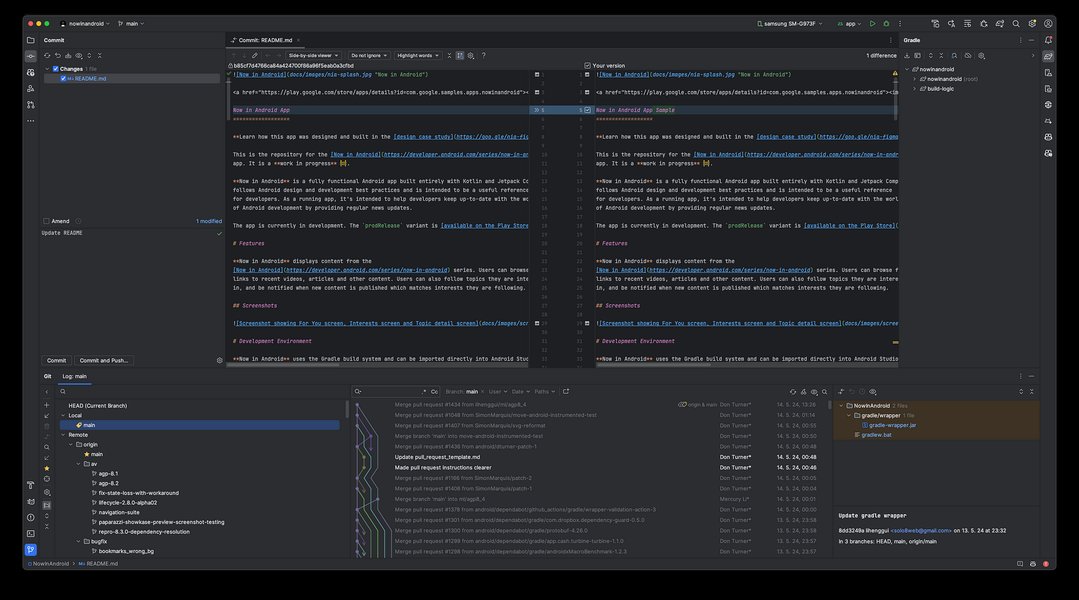
The Android Studio IDE provides a comprehensive suite of tools for developers.
Modern App Architecture
Google advocates for structured application architecture to build scalable, maintainable, and testable apps. Key concepts include:
- Separation of Concerns: Dividing the app into distinct layers (e.g., UI, Domain, Data).
- UI Layer: Manages UI elements and interacts with the ViewModel. Often built with Jetpack Compose.
- ViewModel: Holds UI-related data in a lifecycle-conscious way, surviving configuration changes. Part of the Android Jetpack libraries.
- Repository Pattern: Mediates between different data sources (network, local database) and the rest of the app, providing a clean API for data access.
- Data Sources: Handles communication with databases (e.g., using Room persistence library) or network APIs (e.g., using Retrofit).
- Dependency Injection: Frameworks like Hilt simplify managing dependencies between different parts of the application.
- Concurrency: Using Kotlin Coroutines for managing background threads efficiently and avoiding blocking the main thread.
The Android Development Lifecycle
Creating an Android app typically follows these stages:
- Planning & Design: Define the app's purpose, target audience, features, and design the user interface (UI) and user experience (UX), often using wireframes and mockups.
- Setup: Install Android Studio and the necessary SDK components. Create a new project.
- Development: Write the application code in Kotlin or Java, build the UI using Jetpack Compose or XML, and integrate necessary libraries and APIs.
- Testing: Rigorously test the application on various devices (emulators and physical hardware) and Android versions to identify bugs, performance issues, and usability problems. Utilize automated testing frameworks.
- Debugging & Optimization: Fix identified bugs and optimize the app for performance, memory usage, and battery consumption using Android Studio's profiling tools.
- Building & Packaging: Compile the code and resources into an APK (Android Package Kit) or AAB (Android App Bundle) file. Sign the app for release.
- Deployment: Publish the application to the Google Play Store or other distribution platforms.
- Maintenance: Update the app regularly with new features, bug fixes, and compatibility adjustments for new Android versions and devices.
Visualizing the Android Ecosystem
The world of Android development encompasses various interconnected concepts, tools, and technologies. This mindmap provides a visual overview of the key areas involved:
Key Skill Areas in Modern Android Development
Success in Android development requires proficiency across several domains. The following chart illustrates the relative importance of key skill areas for developers focusing on building modern applications versus those primarily maintaining legacy systems. The scale represents importance, with higher values indicating greater significance for the respective development focus.
As the chart illustrates, while foundational skills like performance optimization and security remain crucial across the board, modern development heavily emphasizes Kotlin and Jetpack Compose. Conversely, maintaining older applications requires stronger expertise in Java and XML layouts.
Essential Technologies and Tools Summary
Here's a quick reference table summarizing the primary tools and technologies used in contemporary Android development:
| Category | Technology/Tool | Description |
|---|---|---|
| IDE | Android Studio | The official Integrated Development Environment for Android app development. |
| Primary Language | Kotlin | The modern, preferred language offering safety, conciseness, and coroutine support. |
| Legacy Language | Java | The original language, still used in many existing projects. |
| Modern UI Toolkit | Jetpack Compose | Declarative UI framework for building native Android UIs with Kotlin. |
| Traditional UI | XML Layouts | The older, view-based system for defining user interfaces. |
| Architecture Pattern | MVVM (Model-View-ViewModel) | A common pattern recommended by Google for structuring app logic. |
| Core Libraries | Android Jetpack | A suite of libraries to help follow best practices, reduce boilerplate code, and write code that works consistently across Android versions. |
| Build System | Gradle | An automation tool used for building apps, managing dependencies, and customizing the build process. |
| Asynchronous Programming | Kotlin Coroutines | The recommended approach for managing background tasks and asynchronous operations. |
Emerging Trends in 2025
The Android development landscape is constantly evolving. As of 2025, several key trends are shaping the future of app creation:
- AI and Machine Learning (ML): Increased integration of AI/ML directly into apps for personalized user experiences, predictive features, enhanced capabilities (like advanced image recognition), and smarter automation using tools like TensorFlow Lite.
- Leveraging 5G: Developers are building apps that take advantage of 5G's high speed and low latency for richer experiences like seamless AR/VR, high-definition streaming, and real-time multiplayer gaming.
- Focus on Security and Privacy: With growing cyber threats, there's a heightened emphasis on robust security measures like end-to-end encryption, secure data storage, biometric authentication, and stricter adherence to privacy regulations (e.g., GDPR).
- Cross-Platform Development: While native development offers peak performance and feature access, frameworks like Kotlin Multiplatform (KMP) are gaining traction for sharing business logic across Android and iOS, potentially reducing development time for certain app types. However, native expertise remains crucial.
- Refined User Experiences: Continued adoption of Material Design 3 for consistent and modern UIs, along with widespread support for features like Dark Mode and adaptive layouts for various screen sizes (including foldables).
- Sustainability: Growing awareness around optimizing apps for energy efficiency to minimize battery drain and contribute to more eco-friendly software.
Getting Started with Android Development
For beginners interested in learning Android development, numerous resources are available:
- Official Android Developers Website: Google provides extensive documentation, tutorials, code samples, and training courses (like "Android Basics with Compose").
- Online Learning Platforms: Websites like Coursera, Udemy, Udacity, and Codecademy offer structured courses ranging from beginner to advanced levels.
- Community Forums: Platforms like Stack Overflow and Reddit (r/androiddev) offer spaces to ask questions, share knowledge, and connect with other developers.
- Practice Projects: Building small, simple applications (like a calculator, to-do list, or weather app) is a practical way to learn by doing.
This comprehensive beginner's course provides a starting point for learning Android development from scratch.
Starting typically involves learning the basics of Kotlin, setting up Android Studio, understanding fundamental components and UI design, and gradually tackling more complex features and architectures.
Frequently Asked Questions (FAQ)
What is the difference between Kotlin and Java for Android development?
Both Kotlin and Java are official languages for Android development. Java was the original language, while Kotlin became officially supported later and is now Google's preferred language. Kotlin offers advantages like null safety (reducing crashes), more concise code, coroutines for easier asynchronous programming, and full interoperability with Java. Most new development uses Kotlin, but Java knowledge is still valuable for maintaining older apps.
What is Jetpack Compose?
Jetpack Compose is Android's modern, native UI toolkit for building user interfaces. It uses a declarative approach, meaning you describe *what* the UI should look like based on the current state, rather than manually manipulating UI elements (the imperative approach used with XML layouts). Compose is written in Kotlin and aims to simplify and accelerate UI development, leading to less code and more powerful, dynamic interfaces.
What is the Android SDK?
The Android SDK (Software Development Kit) is a collection of software development tools and libraries required to build Android applications. It includes components like the Android platform tools (adb, fastboot), build tools, system images for the emulator, and the core Android libraries that allow your app to interact with the device's hardware and the Android operating system. It's typically managed and installed via Android Studio.
Is Android development difficult to learn?
The difficulty depends on your prior programming experience. If you have a background in object-oriented programming (like Java), learning Kotlin and Android concepts will be easier. For complete beginners, there's a learning curve involving programming fundamentals, the Android framework, specific tools like Android Studio, and design principles. However, abundant resources, tutorials, and supportive communities make it accessible for dedicated learners. Starting with basics and building simple projects is key.
Recommended Further Exploration
- How can I get started learning Kotlin specifically for Android development?
- What are the current best practices for structuring a modern Android application?
- Explore a detailed comparison between using Jetpack Compose and traditional XML layouts for UI design.
- Discover the potential career paths and salary expectations for Android developers in 2025.
References
Last updated May 4, 2025