
Unlocking Seamless Automation: Mastering Zapier and CustomGPT API Integration
Elevate your workflows by expertly connecting Zapier's automation prowess with CustomGPT's intelligent capabilities. Discover the essential best practices.
Integrating Zapier API endpoints with CustomGPT API endpoints allows for powerful, automated workflows that leverage sophisticated AI. To ensure these integrations are efficient, secure, and reliable, adhering to a set of best practices is crucial. This guide provides a comprehensive overview of these practices, helping you build robust connections between these two dynamic platforms.
Key Integration Highlights
- Prioritize Robust Security: Safeguard your API keys meticulously and consistently use secure authentication protocols and HTTPS for all communications between Zapier and CustomGPT.
- Design for Peak Efficiency: Optimize your API calls by thoroughly understanding the functionalities of each endpoint, leveraging webhooks effectively, and managing data flow with precision to minimize load and latency.
- Ensure Unwavering Reliability: Implement comprehensive error handling mechanisms, conduct thorough testing in staging environments, and establish continuous monitoring to maintain resilient and dependable integrations.
Understanding the API Landscapes: Zapier and CustomGPT
Before diving into integration, a foundational understanding of both Zapier's and CustomGPT's API capabilities is essential. This knowledge will inform how you structure your automated workflows and API calls.
CustomGPT API: Tailored AI Power
CustomGPT.ai specializes in creating bespoke chatbots using your specific content. Its API, often a Retrieval Augmented Generation (RAG) API, allows developers to programmatically interact with these custom AI models. Key aspects include:
- RAG API Endpoints: These enable sending prompts or queries to your custom AI agent and receiving generated responses. Common operations include creating sessions, sending messages, and managing knowledge sources.
- Request/Response System: Interactions are typically based on a standard HTTP request-response model, often using JSON for data exchange.
- Authentication: Access is usually controlled via API keys, which must be included in your requests.
- Flexibility: CustomGPT APIs are designed to be integrated into various applications and support multiple programming languages.
Zapier API Ecosystem: The Automation Hub
Zapier acts as an intermediary, connecting thousands of web applications through automated workflows called "Zaps." When using Zapier API endpoints, or more commonly, using Zapier to call external APIs like CustomGPT's, consider:
- Triggers and Actions: Zaps are built on triggers (events that start a workflow) and actions (tasks performed in response to a trigger). You can use Zapier to trigger actions on the CustomGPT API or use CustomGPT events (if supported via webhooks) as triggers.
- Webhooks by Zapier: This powerful feature allows you to send or receive data from any service with an API, even if it doesn't have a dedicated Zapier app. You can make POST, GET, PUT, and other HTTP requests.
- Built-in Integrations: If CustomGPT has a native Zapier app, it simplifies connection. Otherwise, Webhooks by Zapier or Code by Zapier (for JavaScript/Python) are your primary tools.
- Zapier Platform: For developers looking to build a public or private Zapier integration for CustomGPT, the Zapier Developer Platform offers tools for defining authentication, triggers, and actions.
Fortifying Your Integration: Security First
Security is paramount when dealing with API integrations, especially when transmitting potentially sensitive data or granting access to powerful AI models.
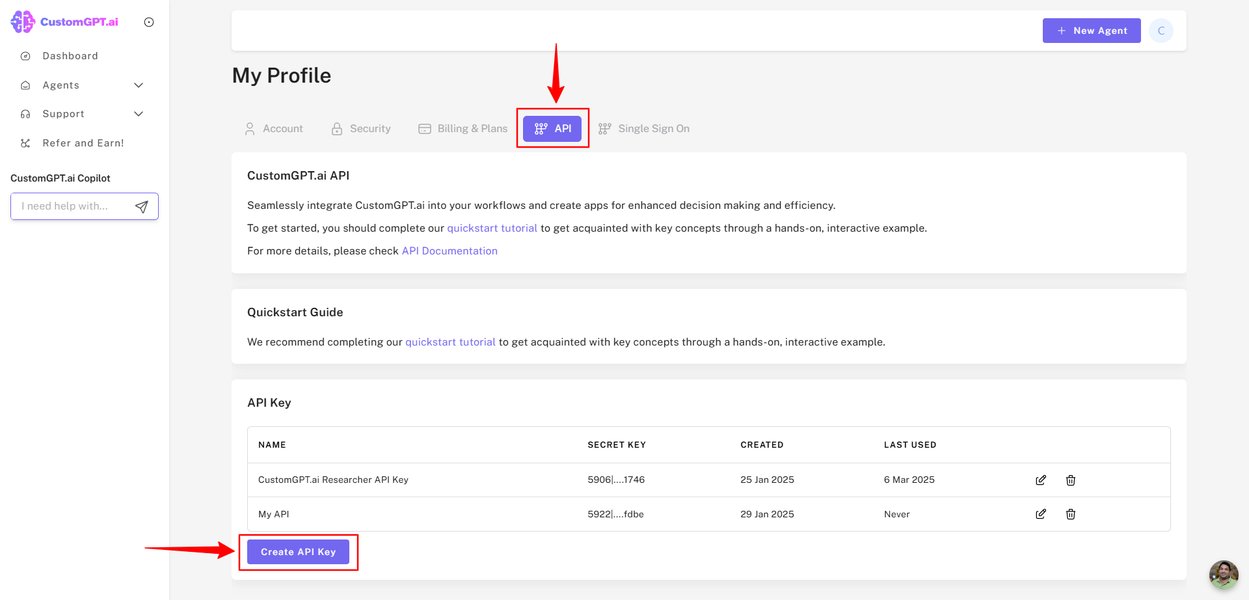
API keys are critical credentials for accessing services like CustomGPT.
API Key Management
Secure Storage and Handling
Treat API keys for both Zapier (if applicable for management APIs) and CustomGPT as confidential as passwords.
- Avoid Hardcoding: Never embed API keys directly in client-side code or publicly accessible scripts.
- Zapier's Authentication Features: When setting up API calls in Zapier (e.g., via Webhooks by Zapier), use its built-in mechanisms for securely storing and referencing API keys or other authentication credentials. For instance, you can often add headers for
Authorization(likeBearer YOUR_API_KEY) within the Zapier interface. - Environment Variables: If using Code by Zapier, consider environment variables for storing sensitive keys rather than plain text in the code.
- Regular Rotation: Implement a policy for regularly rotating API keys to limit the window of opportunity should a key be compromised.
Secure Communication
HTTPS Everywhere
Always use HTTPS (SSL/TLS) for all API requests between Zapier and CustomGPT endpoints. This encrypts data in transit, protecting it from eavesdropping and man-in-the-middle attacks.
Access Control
If your CustomGPT API endpoint is self-hosted or offers such features, consider restricting access to specific IP addresses, such as Zapier's egress IP range, if feasible and documented by Zapier. This adds an extra layer of security.
Designing for Efficiency and Reliability
An efficiently designed integration performs better, consumes fewer resources, and is more resilient to failures.
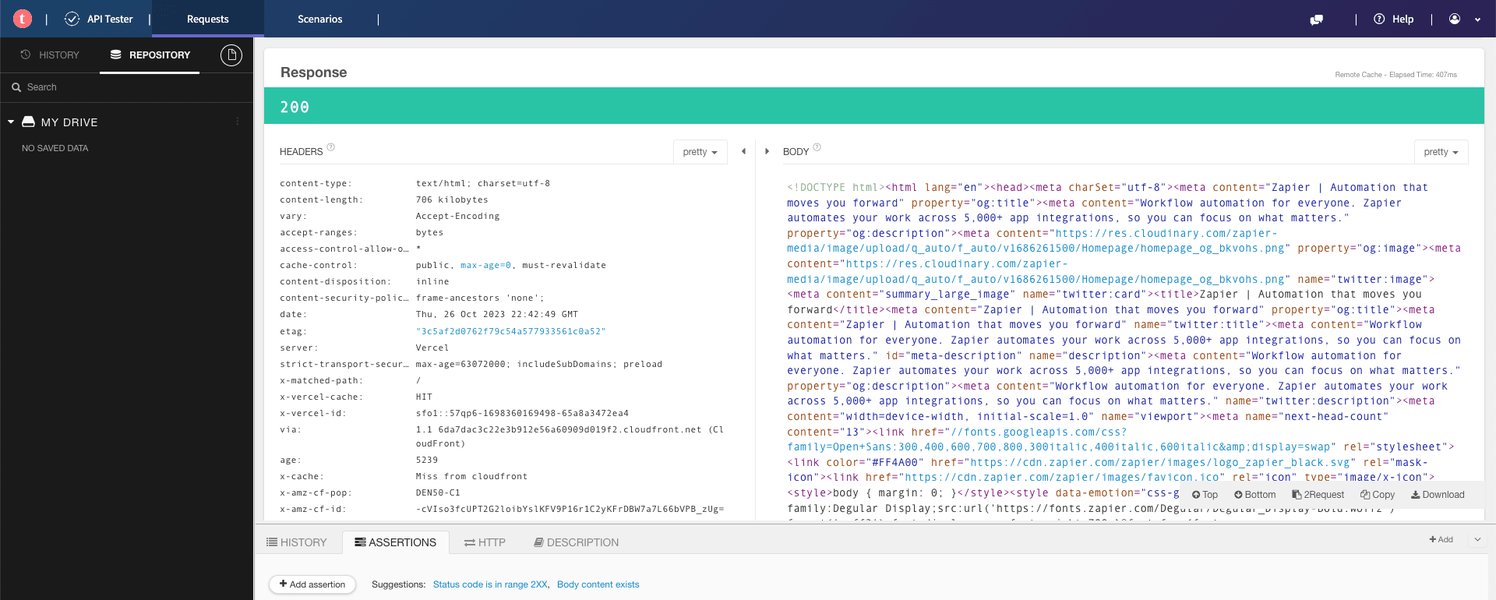
Effective API implementation involves careful design of requests and responses.
Strategic Endpoint Usage
- Understand Endpoint Functionality: Thoroughly review the API documentation for both Zapier (specifically Webhooks or any relevant app's API capabilities) and CustomGPT. Choose the most appropriate endpoints for the specific tasks in your workflow.
- RESTful Principles: When interacting with CustomGPT's REST API, adhere to standard HTTP methods (GET for retrieval, POST for creation/sending data, PUT for updates, DELETE for removal).
- API Versioning: If CustomGPT versions its API (e.g.,
https://api.customgpt.ai/v1/...), always use the latest stable version and plan for updates to avoid disruptions from deprecated endpoints.
Optimizing API Calls
- Idempotency: Design API calls to be idempotent where possible. An idempotent request can be made multiple times while producing the same result as if it were made only once. This is crucial for retries after transient network errors. CustomGPT APIs should ideally support this for operations like creating resources.
- Reduce Chattiness: Minimize the number of API calls. If possible, batch operations or retrieve all necessary data in a single call rather than multiple smaller calls.
- Zapier's Dehydration: Zapier's platform features like "dehydration" can help reduce redundant API requests by caching results within a polling cycle, especially relevant for polling triggers.
Data Handling and Payload Formatting
- Clear Data Mapping: Precisely map data fields from your Zapier trigger or previous steps to the CustomGPT API request parameters. Ensure data types match.
- JSON Payloads: Most modern APIs, including CustomGPT, use JSON for request and response payloads. Structure your JSON correctly in Zapier's Webhook action.
- Data Validation: Before sending data to CustomGPT, validate it within your Zap (e.g., using Formatter by Zapier or a Code step) to prevent errors due to malformed or missing data.
- Payload Size: Be mindful of API payload size limits. For large data transfers, check if the CustomGPT API supports chunking or pagination.
Visualizing Integration Priorities: A Comparative Look
When integrating Zapier with CustomGPT, various factors contribute to a successful setup. The radar chart below offers a conceptual visualization of the relative importance and interplay of key best practice areas. While "CustomGPT API Aspects" reflects how well a robust CustomGPT API should support these facets, "Zapier Workflow Configuration" indicates how effectively Zapier can be configured to leverage them. Higher values suggest greater importance or capability.
This chart underscores that robust security and efficient endpoint usage are critical from both the API provider (CustomGPT) and the integration platform (Zapier) perspectives. Scalability and maintenance also depend heavily on how well both sides are designed and configured.
Ensuring Robustness: Error Handling and Resilience
Integrations can fail for various reasons—network issues, API rate limits, invalid data, or temporary service outages. A resilient integration handles these gracefully.
Proactive Error Management
- Check HTTP Status Codes: Always check the HTTP status codes returned by the CustomGPT API. Codes like 200/201 indicate success, 4xx codes (e.g., 400 Bad Request, 401 Unauthorized, 429 Too Many Requests) signal client-side errors, and 5xx codes point to server-side issues.
- Implement Retry Logic: For transient errors (like 503 Service Unavailable or 429 Rate Limit Exceeded), implement retry mechanisms in Zapier. Zapier's built-in error handling can sometimes auto-retry, or you can use Paths or Code steps for custom retry logic with exponential backoff.
- Graceful Failure and Notifications: If an API call fails permanently after retries, ensure your Zap handles this gracefully. This might involve logging the error to a spreadsheet, sending a notification (email, Slack), or stopping the Zap to prevent further issues.
Logging and Monitoring
- Zapier Task History: Regularly review Zapier's Task History. It provides detailed logs of Zap runs, including data in/out of each step and any errors encountered. This is invaluable for debugging.
- CustomGPT API Logs: If CustomGPT provides logging on its end, use these logs to correlate issues and get more detailed error information from the API server's perspective.
- Rate Limit Awareness: Understand and respect the API rate limits imposed by CustomGPT. Design your Zaps to stay within these limits. If you anticipate high volume, discuss options with CustomGPT support.
Orchestrating Workflows: A Mindmap of Integration Practices
The mindmap below outlines the interconnected best practices critical for a successful Zapier and CustomGPT API integration. It visually structures the key areas of focus, from initial understanding and security to ongoing maintenance and optimization.
This visual guide helps ensure all critical aspects are considered when planning and implementing your integration, leading to a more robust and maintainable automated solution.
Leveraging Zapier's Strengths for CustomGPT Integration
Zapier offers several features that can simplify and enhance your CustomGPT API integrations.
Understanding how to make API calls using Zapier's Webhooks is fundamental for integrating with services like CustomGPT that have a REST API.
The video above, "How to Write API Calls in Zapier | Webhooks by Zapier and ...", provides a practical guide on using Zapier's Webhooks. This is highly relevant as it directly addresses the mechanism you'd most likely use to send data to and receive data from CustomGPT API endpoints if a dedicated Zapier app for CustomGPT isn't available or doesn't cover specific needs. Key takeaways from such tutorials often include:
- Setting up POST requests to send data (e.g., a user query) to a CustomGPT endpoint.
- Configuring request headers, such as
Content-Type: application/jsonandAuthorizationfor API keys. - Structuring the request body (payload) in JSON format as expected by the CustomGPT API.
- Handling the response from CustomGPT, parsing the JSON data, and using it in subsequent Zapier steps (e.g., sending the AI's answer to an email or a spreadsheet).
- Using GET requests to retrieve information if needed.
Mastering Zapier's Webhooks or API Request actions is essential for unlocking the full potential of integrating with any custom API, including the advanced AI capabilities offered by CustomGPT.
Testing, Monitoring, and Long-Term Maintenance
- Thorough Testing: Test your Zaps extensively with various scenarios, including valid data, invalid data, and potential edge cases. Use Zapier's testing features within the editor. Consider a staging CustomGPT agent if available.
- Iterative Development: API integration is often an iterative process. Start with a simple workflow, test it, and then add more complexity.
- Documentation: Document your Zap setup, including the CustomGPT endpoints used, data mappings, and any custom logic. This is vital for future troubleshooting and maintenance by yourself or your team.
- API Changes and Backwards Compatibility: APIs evolve. Stay informed about any changes or deprecations to the CustomGPT API. Aim to use API versions that ensure backward compatibility, or be prepared to update your Zaps. Zapier itself also updates, so occasionally review your Zaps for optimal performance.
Summary of Key Integration Actions
The following table summarizes crucial actions to take within Zapier and considerations for your CustomGPT API setup to foster a successful integration:
| Best Practice Category | Key Actions for Zapier | Key Considerations for CustomGPT API Side |
|---|---|---|
| Security & Authentication | Securely store CustomGPT API keys using Zapier's authentication fields in Webhook actions. Ensure "Code by Zapier" steps don't expose keys. | Provide clear API key generation and management. Enforce HTTPS. Offer granular permissions if possible. |
| API Design & Endpoint Usage | Use appropriate Zapier actions (Webhook, API Request). Carefully configure HTTP methods, URLs, and headers. | Offer well-documented, RESTful, and versioned endpoints. Provide clear request/response schemas. |
| Data Handling & Formatting | Map fields meticulously. Use Formatter by Zapier for data transformation and validation. Ensure correct JSON structure for payloads. | Clearly define expected data formats (JSON), required fields, and data type constraints. Provide informative error messages for data issues. |
| Error Management & Resilience | Utilize Zapier's error handling (e.g., stop Zap, send notification). Implement custom retry logic with Paths or Code for specific errors. Check Task History for diagnostics. | Return standard HTTP error codes (4xx, 5xx) with descriptive JSON error messages. Document rate limits and common error scenarios. |
| Efficiency & Performance | Minimize calls per Zap run. Use Zapier's dehydration for polling triggers if applicable. Be mindful of Zap execution time limits. | Optimize API response times. Offer mechanisms for batch operations or filtering to reduce data transfer if feasible. Clearly state rate limits. |
| Testing & Monitoring | Test Zaps with diverse data. Monitor Task History for errors and performance. Set up Zapier Manager notifications for critical Zap failures. | Provide a sandbox or test environment. Offer access to API usage logs and metrics if possible. |
| Documentation & Maintenance | Internally document Zap configurations, data flows, and logic. Regularly review and update Zaps as connected apps or APIs change. | Maintain comprehensive, up-to-date API documentation. Clearly communicate API updates, new versions, and deprecation schedules. |
Frequently Asked Questions (FAQ)
► How do I securely pass my CustomGPT API key in Zapier?
When using Zapier's "Webhooks by Zapier" action (or similar API request actions), you typically pass the API key in the request headers. For example, you might add a header like Authorization with the value Bearer YOUR_CUSTOMGPT_API_KEY or a custom header like X-API-Key with your key. Zapier stores these configurations securely. Avoid hardcoding keys directly into Code steps if possible; use Zapier's built-in credential management or environment variables provided in the Code step interface if available.
► What's the best way to handle potential errors from the CustomGPT API in my Zap?
First, ensure your CustomGPT API calls in Zapier are set to "Continue on Error" only if appropriate, or use Zapier's Paths to create different workflows based on success or failure. Check the HTTP status code returned by the API. For transient errors (e.g., rate limits like 429, server issues like 503), you can implement a delay and retry logic, perhaps using a Loop or a Code step with a delay. For persistent errors, log the details (e.g., to a Google Sheet or a logging service) and send a notification to an administrator. Zapier's built-in error handling will also alert you to failing Zaps.
► How can I test my Zapier integration with CustomGPT API before going live?
Zapier allows you to test each step as you build your Zap. Use sample data that mimics real-world scenarios. If CustomGPT offers a sandbox or development environment with separate API keys, use that for initial testing to avoid impacting production data or consuming production API quotas. Test various inputs, including edge cases and potential error conditions, to see how your Zap and the CustomGPT API respond. Review the data in/out for each step in Zapier's test results.
► What should I do if the CustomGPT API changes or updates?
Subscribe to developer updates or newsletters from CustomGPT to stay informed about API changes, new versions, or deprecations. If a breaking change is announced, review your Zaps that use the CustomGPT API. Test them against the new API version in a staging environment if possible. Update your Zap's API calls (endpoints, parameters, authentication methods) as required. Prioritize using versioned API endpoints (e.g., `/v1/`, `/v2/`) if CustomGPT offers them, as this provides more stability and control over upgrades.
Recommended Next Steps
To further deepen your understanding and enhance your integration capabilities, consider exploring these related queries:
- How can I implement OAuth 2.0 authentication in Zapier for custom APIs?
- What are advanced error handling techniques for multi-step Zaps involving external APIs?
- How do I manage API rate limits effectively when using Zapier with high-volume services?
- What are strategies for versioning and maintaining Zapier integrations as underlying APIs evolve?
References
Last updated May 6, 2025