
Unleash Your Vision: Crafting AI Videos from Simple Scripts
Transforming Text into Engaging Visual Narratives with Advanced AI Tools
Key Insights into AI Video Creation
- Effortless Transformation: AI video generators can convert your written scripts into compelling videos in minutes, eliminating the need for complex editing skills or extensive resources.
- Rich Customization: Modern AI tools offer a wide array of features, including AI avatars, natural-sounding voiceovers, diverse visual assets, and customizable templates, allowing for highly personalized and professional output.
- Versatile Applications: From marketing content and educational videos to social media shorts and internal training materials, AI video generation streamlines production across various industries and use cases.
The landscape of content creation is being revolutionized by artificial intelligence, particularly in video production. Gone are the days when creating high-quality videos required extensive technical skills, expensive equipment, or a large production team. Today, AI video generators enable users to transform a simple script or text prompt into a complete, engaging video with surprising ease and speed. This capability is not just about automation; it's about democratizing video creation, allowing individuals and businesses alike to produce professional-grade content efficiently and cost-effectively.
The core concept behind these tools is the ability to interpret written input and automatically generate corresponding visual elements, voiceovers, background music, and even subtitles. This process leverages sophisticated AI models that understand context, tone, and visual requirements to piece together a coherent narrative. Whether you have a detailed script, a concise text prompt, or even a URL to a blog post, AI video generators can convert your ideas into dynamic visual stories.
The Mechanism Behind Script-to-Video AI
From Text to Dynamic Visuals: How AI Makes it Happen
At its heart, an AI script-to-video generator works by processing your text input through several AI-powered modules, each responsible for a different aspect of video creation. This multi-step process ensures a holistic transformation of your written content into a visually and audibly rich video.
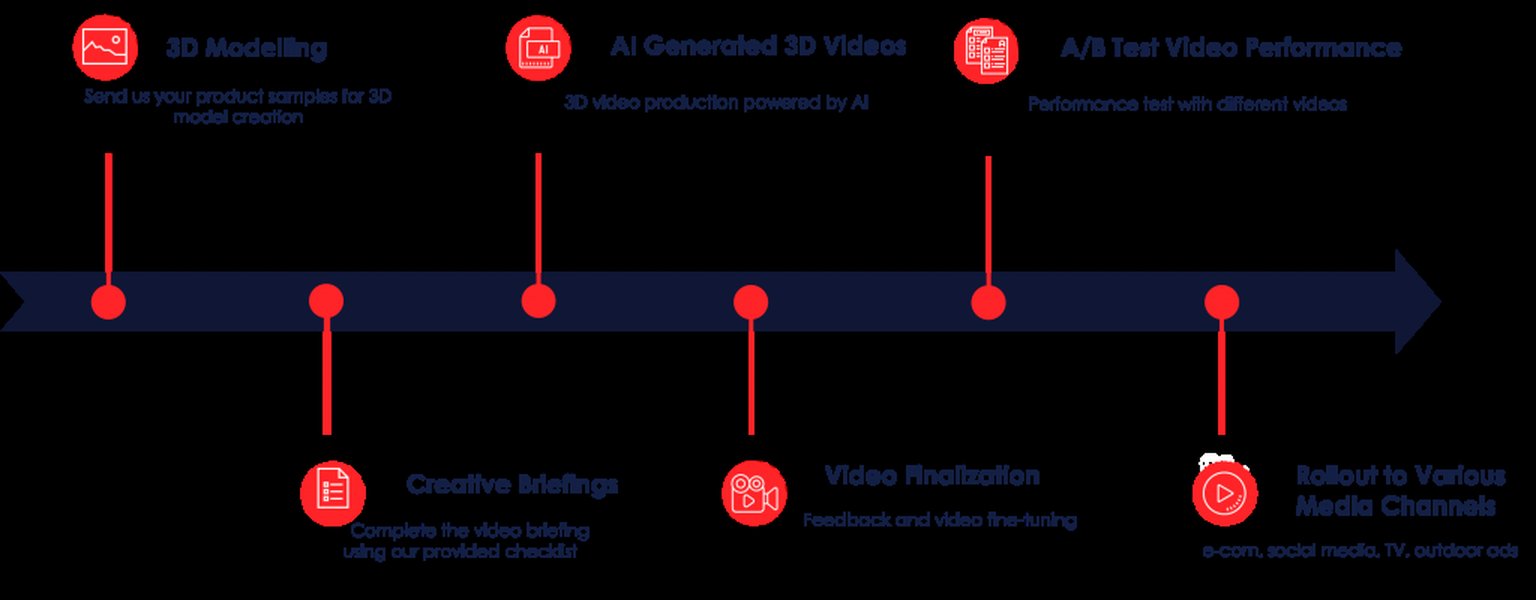
Visualizing the AI Video Generation Workflow
Input and Script Analysis
The journey begins with your script or text prompt. This can range from a few descriptive sentences to a comprehensive narrative, a PowerPoint presentation, a PDF, a Word document, or even content from a website URL. The AI analyzes this input to understand the core message, key themes, and emotional tone. Some tools even include an AI script generator that can assist in crafting or refining your script based on a given topic, ensuring it is structured and engaging from the outset.
Visual Selection and Generation
Once the script is understood, the AI taps into vast libraries of royalty-free stock footage, images, and graphics. It intelligently matches scenes and visuals to the text, aiming for relevance and impact. Advanced platforms like Invideo AI and Kapwing can even generate new images and video clips using AI, allowing for truly unique and tailored visuals. Some tools, such as DeepAI, also offer image-to-video conversion, letting you animate static images.
Voiceover and Audio Integration
A crucial component of AI video generation is the ability to create natural-sounding voiceovers. Users can often select from hundreds of AI voices with various accents, tones, and languages (some tools support over 140 languages). Many platforms also offer voice cloning technology, allowing you to create a digital replica of your own voice for narration. Alongside voiceovers, AI integrates suitable background music and sound effects, adjusting them to complement the video's mood and pacing.
Avatar and Presenter Integration
For a more human touch, many AI video generators allow you to incorporate AI avatars or "talking heads." These can range from stock avatars to custom digital twins of real people. Tools like Synthesia offer a wide variety of diverse and expressive AI avatars, enabling professional-looking presentations without needing human actors. These avatars can lip-sync to the AI-generated voiceover, making the video feel more personalized and engaging.
Customization and Editing
While AI handles much of the heavy lifting, most platforms provide robust editing capabilities to refine the generated video. You can often adjust the script, change the tone of voice, swap visuals, modify subtitle styles, and even add custom assets. Tools like CapCut offer multi-track editors, allowing for detailed layering of media, while others like Kapwing enable branding elements like custom colors and fonts to be applied. This ensures that the AI-generated content aligns perfectly with your brand identity and creative vision.
Leading AI Video Generators for Script-to-Video Conversion
Exploring Top Platforms and Their Unique Strengths
The market for AI video generators is rapidly evolving, with new tools emerging and existing ones continually improving. Here’s a look at some of the prominent platforms that excel at transforming scripts into videos:
| Platform Name | Key Features for Script-to-Video | Strengths/Unique Selling Points | Considerations |
|---|---|---|---|
| Synthesia | AI avatars (300+), 140+ languages, voice cloning, script generator, professional templates. | High-quality, studio-like videos; excellent for corporate training and multilingual content. | Often requires a paid subscription for full features; some learning curve. |
| Invideo AI | Generates scripts, media, music, voiceovers, SFX; AI-generated images & videos; no downloads needed. | Revolutionizes editing with text prompts instead of timelines; creates stories from prompts. | Focus on text-based editing might be different for traditional video editors. |
| Kapwing | AI Script to Video Generator, B-roll generation, auto subtitles, over 50 voiceover options, optimized for social media. | Free tier available; full control over edits; strong for short-form content and quick generation. | Free version may have limitations; longer videos might be paid. |
| Steve.AI | Converts prompt, text/script, blog, voice, or URL to video; +5 video output styles (Animation, Generative AI, TalkingHead); 4K quality. | Versatile input options; good for educational videos, kids' storybooks, and custom animated characters. | Interface might take some getting used to; 4K output might be premium. |
| Canva (with HeyGen App) | Text-to-video, script-to-video with talking head avatars, Magic Write for script assistance, Magic Media for visuals. | User-friendly interface, integrates with Canva's design ecosystem, good for quick, branded content. | HeyGen app integration might require separate access or subscription. |
| Pictory | Automatically selects summary sentences and visuals; 3M+ royalty-free visuals; "ReelFast" technology for quick generation. | Ideal for converting long-form text (articles, blogs) into concise video summaries. | Best for informational content rather than highly creative or cinematic videos. |
| VEED.IO | Text-to-video, AI script generator, text-to-speech avatars, customizable formats, broad browser/device compatibility. | Completely free for basic script generation; robust editing suite post-generation; good for various video types. | Free version might have watermarks or feature limitations. |
| FlexClip | Text-to-video tool, automatic subtitles, narration, stunning visuals, multi-language support. | Simplifies video creation; provides engaging scripts; ideal for global marketing and education. | May require exploring templates to find the best fit. |
| Visla | Automatically generates voiceovers, matches scenes to script, AI drafts videos, screen step recorder for SOPs. | Excellent for automating video creation from diverse text inputs (storyboards, blog posts). | Focus on efficiency might limit advanced creative control compared to dedicated editors. |
Each of these tools offers a distinct set of features, catering to different user needs and content types. From simple text-to-video conversions to sophisticated productions with custom avatars and intricate visual effects, the options are plentiful.
Navigating the Landscape of AI Video Generation
Choosing the Right Tool and Maximizing Your Output
With so many AI video generators available, selecting the best one for your specific needs requires considering several factors, including features, ease of use, output quality, and cost.
Key Considerations for Tool Selection
- Input Flexibility: Do you primarily have text prompts, full scripts, or blog URLs? Ensure the tool supports your preferred input method.
- Output Quality: Look for tools that produce high-resolution clips with clear visuals, minimal artifacts, and realistic motion. Kling and Runway are often cited for their visual realism and smooth motion.
- Customization Options: Assess the availability of AI avatars, voice styles, music libraries, and editing tools to ensure you can tailor the video to your brand and message.
- Ease of Use: While AI simplifies the process, some interfaces are more intuitive than others. Tools like Canva are known for their user-friendly design, while others might require a steeper learning curve.
- Cost and Plans: Many tools offer free trials or limited free versions. Understand the pricing models, credit systems, and what features are locked behind paid subscriptions.
- Specific Features: If you need features like AI B-roll generation, automatic subtitle creation, or multi-language support, prioritize tools that specialize in these areas.
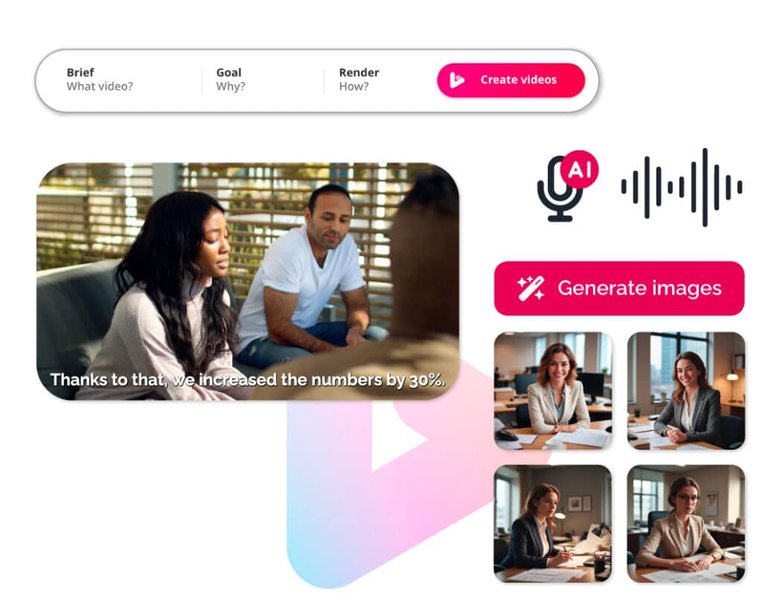
Diverse AI Features Enhancing Video Creation
Practical Steps for Creating Your AI Video
The general workflow for creating an AI video from a script is fairly consistent across platforms:
- Choose Your Platform: Select an AI video generator that aligns with your project's requirements and budget.
- Input Your Script/Prompt: Paste your written content into the designated text box. Be as clear and descriptive as possible to guide the AI. If the tool offers a script generator, use it to refine your narrative.
- Select Video Style and Preferences: Choose from available templates, video formats (e.g., square, vertical, widescreen), and presentation styles (e.g., animated, live-action, talking head).
- Customize Voice and Visuals: Pick an AI voice, adjust its tone, and select or generate visuals. If using avatars, choose one that fits your content. Most tools allow you to preview these elements.
- Generate Video: Click the "Generate" or "Create Video" button. The AI will then process your input and assemble the video. This process can take anywhere from seconds to minutes, depending on the complexity and length of your video.
- Review and Edit: Once the initial video is generated, review it carefully. Make any necessary edits to the script, visuals, audio, or transitions. This is where you can truly refine the AI's output to match your vision.
- Export and Share: Download your finished video in the desired resolution (e.g., HD, 4K) and share it across your chosen platforms, whether it's YouTube, TikTok, Instagram, or a corporate LMS.
Advantages and Future of AI Video Generation
The Transformative Impact on Content Creation
The rise of AI video generators brings numerous advantages to content creators, businesses, and educators:
- Speed and Efficiency: What once took days or even weeks can now be accomplished in minutes. This dramatically accelerates content pipelines.
- Cost-Effectiveness: AI tools reduce the need for expensive equipment, studio rentals, actors, and professional video editors, making high-quality video accessible to a wider audience.
- Scalability: Businesses can produce a high volume of personalized videos for marketing campaigns, customer support, or internal communications with minimal effort.
- Accessibility: Individuals without prior video editing experience can create polished content, democratizing video production.
- Localization: With support for numerous languages and accents, AI video generators facilitate global reach and content localization.
The capabilities of AI video generation are rapidly advancing. Google's Veo 3, for instance, is already pushing the boundaries with high-quality video generation from text prompts and native audio integration. Other models like Kling and LTX Studio are focusing on enhanced control over clips, higher resolution output, and comprehensive narrative development. As AI models become more sophisticated, we can anticipate even more realistic visuals, longer video durations, advanced editing capabilities, and seamless integration with other AI tools.
The radar chart above provides an opinionated comparative analysis of several leading AI video generators based on key performance indicators relevant to script-to-video conversion. The scores, ranging from 5 to 9, reflect a subjective assessment of each tool's strengths and weaknesses in areas such as ease of use, overall output quality, depth of customization options, speed of video generation, cost-effectiveness, and the breadth of advanced features like AI avatars and voice cloning. This visual allows for a quick understanding of where each platform excels and helps guide users in selecting a tool that best fits their specific needs.
Real-World Application and Impact
Transforming Industries with AI-Powered Video
The utility of AI video generators extends across numerous sectors, proving invaluable for a diverse range of applications. Their ability to quickly produce engaging and professional content is transforming how organizations communicate and operate.
Marketing and Advertising
AI video generators are a game-changer for marketing teams. They can rapidly create product launch videos, promotional clips, social media ads, and campaign teasers. The efficiency allows for A/B testing of various video creatives, optimizing for engagement and conversion rates. Brands can easily produce personalized video content to target specific audience segments, enhancing their outreach strategies.
An insightful tutorial demonstrating how to generate videos using InVideo AI, highlighting its capabilities in transforming prompts into complete video productions. This video is relevant as it showcases a practical, step-by-step approach to leveraging an AI video generator, emphasizing its user-friendly interface and comprehensive features for creating dynamic content from simple text or ideas.
Education and Training
For educators and corporate trainers, AI video tools streamline the creation of instructional videos, e-learning modules, and standard operating procedures (SOPs). Institutions like Zoom have reported cutting video generation time by 90%, from days to hours, by adopting AI. This leads to more engaging learning experiences and improved knowledge retention compared to traditional text-based materials.
Content Creation for Social Media
YouTube creators, TikTokers, and other social media influencers benefit immensely from AI video generators. They can quickly produce B-roll footage, animated shorts, or talking head videos from scripts. The ability to generate viral content swiftly and without watermarks (in some cases) empowers creators to maintain a consistent posting schedule and explore new content formats effortlessly.
News and Journalism
AI can assist in generating news videos, transforming written articles into broadcast-ready clips with narration and visuals. This capability can speed up reporting and enable smaller news outlets to produce video content without extensive resources.
Customer Service and Internal Communications
Businesses can use AI to create explainer videos for customer FAQs, onboarding guides for new employees, and internal communication updates. This ensures consistent messaging and provides employees with easily digestible visual information.
Frequently Asked Questions (FAQ)
What is an AI video generator?
Can I create a video from just a script?
Do I need video editing skills to use these tools?
Are AI-generated videos truly professional quality?
Can I customize the AI-generated videos?
Are there free AI video generators available?
Conclusion
The ability to create compelling videos from a simple script or text prompt is a testament to the remarkable advancements in artificial intelligence. AI video generators have democratized video production, making it faster, more affordable, and more accessible than ever before. From generating dynamic marketing content and engaging educational materials to producing quick social media shorts, these tools empower individuals and organizations to bring their ideas to life with unprecedented ease. As AI continues to evolve, we can expect even more sophisticated features, higher fidelity outputs, and deeper integration into various creative workflows, further solidifying its role as an indispensable asset in the world of content creation.
Recommended Further Exploration
- Which AI video generators are best for short-form social media content?
- How does AI voice cloning enhance video narration, and which tools offer it?
- What are the emerging trends and future capabilities in AI video generation technology?
- How can businesses effectively integrate AI-generated videos into their overall marketing strategy?