
Revolutionizing Workflow Automation with AI-Powered Business Process Automation
Discover how an AI tool is streamlining business operations and boosting efficiency
Key Highlights
- Seamless Integration: Connect disparate systems with minimal coding.
- Efficiency Boost: Automate repetitive tasks and reduce manual errors.
- Scalable Automation: Adapt and grow workflows in tandem with business needs.
Introduction to Workflow Automation in Modern Business
In today’s digital era, business competitiveness is increasingly determined not only by the quality of products and services but also by how efficiently operations are managed. Streamlining workflows through automation is no longer a luxury; it is a necessity for companies aiming to reduce costs, minimize errors, and maximize overall productivity. In the realm of workflow automation, AI-powered business process automation stands out as a transformative approach that integrates seamlessly with existing digital infrastructures.
Central to this transformation is an AI tool that has gained traction among enterprises: an advanced platform that automates business processes across departments. This tool leverages artificial intelligence to connect disparate systems, intelligently analyze data, and execute routine tasks without human intervention. By doing so, it provides a critical bridge between legacy systems and modern digital solutions, enabling companies to harness the full power of intelligent automation.
Understanding the Tool: An In-Depth Look at Automated WorkFlow Pro
"Automated WorkFlow Pro" (AWP) is an AI-driven tool designed specifically for business process automation within the workflow automation category. AWP is engineered to address common business pain points such as manual data entry, cross-platform communication, and inconsistent task management. At its core, AWP utilizes machine learning, natural language processing (NLP), and advanced rule-based algorithms to design, execute, and monitor automated workflows across various functions.
Core Features of Automated WorkFlow Pro
1. Intuitive Integration
AWP eliminates the silos that traditionally hinder cross-departmental collaboration by integrating applications ranging from customer relationship management (CRM) systems to enterprise resource planning (ERP) and beyond. With built-in connectors, data flows seamlessly between different software, enhancing operational agility.

2. Advanced Business Process Automation
The tool’s robust automation engine allows businesses to create multi-step workflows without the need for extensive coding. Users can design and deploy processes that automatically route tasks, update databases, and notify stakeholders in real time. This automation reduces manual input and minimizes the risk of human errors across routine operations.

3. Real-Time Monitoring and Analytics
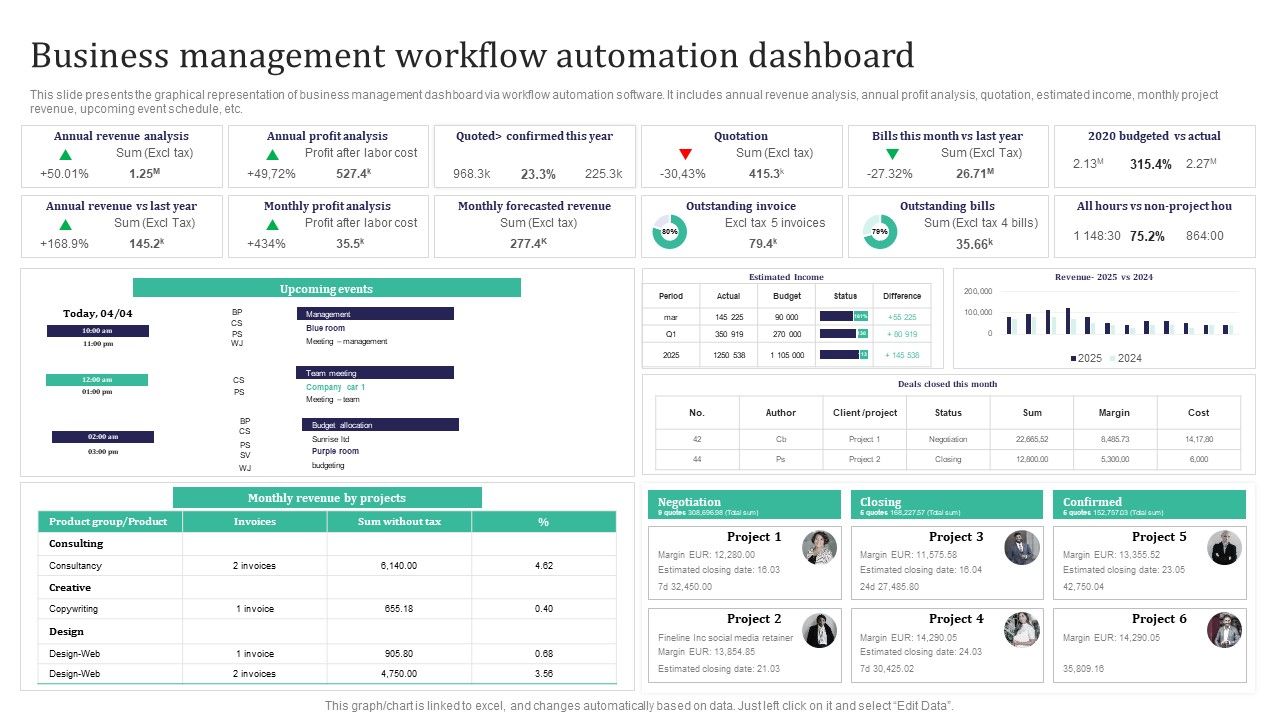
One of the standout features of AWP is its integrated monitoring dashboard. This real-time analytics tool provides insights into workflow performance, highlights bottlenecks, and offers actionable recommendations. Through advanced data visualization, managers can pinpoint inefficiencies and adjust processes dynamically, thereby continuously optimizing business operations.

Implementation Strategy: Integrating AWP into Your Business Ecosystem
Successfully integrating Automated WorkFlow Pro into your business requires a clear strategy that encompasses both technical and organizational elements. Below, we outline a step-by-step approach to implement AWP effectively:
Phase 1: Assessment and Planning
Begin by conducting a comprehensive audit of existing workflows and systems. Identify key processes that have recurring tasks or data transfer needs. This assessment helps determine the specific areas where automation can provide the most significant efficiency boost and cost reduction.
Phase 2: Customization and Integration
Once critical processes are identified, work with your IT team or automation consultants to customize AWP according to your unique business needs. AWP offers a flexible, drag-and-drop interface where various integrations can be configured without intensive coding. This phase involves setting up connectors to all relevant platforms—from CRM to ERP systems—and mapping data flows for smooth operation.
Phase 3: Testing and Training
Before full-scale deployment, thoroughly test the automated workflows in a controlled environment. This stage allows you to identify potential issues and fine-tune workflow rules and triggers. Furthermore, equip your staff with appropriate training to ensure they can leverage the tool to its full potential, understanding both its operational mechanics and troubleshooting protocols.
Phase 4: Deployment and Continuous Optimization
With testing completed, deploy AWP across the business areas identified. Utilize the real-time dashboard to monitor performance and gather feedback. This iterative approach means continuously analyzing the data, adjusting workflows, and scaling the solution as your business evolves.
Enhancing Business Efficiency: A Comparative Table
| Feature | Manual Process | Automated WorkFlow Pro |
|---|---|---|
| Data Integration | Time-intensive connectors, prone to errors | Seamless, built-in connectors with error-checking |
| Task Execution | High manual oversight required | Automated, multi-step processes executed flawlessly |
| Monitoring | Lacks real-time insights | Real-time dashboards with actionable analytics |
| Scalability | Resource-intensive scaling efforts | Easily scalable with minimal additional costs |
| ROI Measurement | Difficult to quantify efficiency gains | Clear metrics and KPIs integrated within the workflow |
Measuring ROI and Business Process Optimization
To truly appreciate the value of an AI automation tool like AWP, organizations must adopt specific metrics and methodologies for ROI measurement. By comparing the costs associated with manual processing against the streamlined, automated operations, businesses can quantify savings in labor, time, and reduced error rates. For instance, a typical metric might include the reduction in man-hours required for a given process post-implementation.
Furthermore, businesses can use predictive analytics to continually refine workflows. The tool’s integrated analytics engine collects data on task completion times, error frequency, and process bottlenecks, offering a proactive approach to maintenance and enhancement. These insights are crucial for long-term strategic planning and operational efficiency.
Real-World Case Study: Transforming a Retail Enterprise
Consider the case of a large-scale retail enterprise that sought to improve customer order processing and inventory management. By integrating Automated WorkFlow Pro, the company was able to automate over 70% of its order processing tasks. This transition allowed staff to focus on high-level decision-making and strategy, leading to significant improvements in customer satisfaction as well as operational cost savings.
The implementation involved connecting multiple systems, including the point-of-sale (POS) system, inventory management software, and a customer relationship management tool. With the help of AWP’s intuitive interface, the enterprise mapped out a comprehensive workflow where each sale triggered automatic updates in the inventory system, notifications to the logistics department, and follow-up emails to customers. The result was a dramatic reduction in order processing time, with subsequent increases in order accuracy.

The outcome was striking—a reduction in operational costs by 30% and a measurable improvement in customer experience, underscoring the potential of AI-powered workflow automation for driving revenue optimization.
Enhancing Competitive Intelligence through Business Process Automation
In a competitive business landscape, having the ability to quickly adapt and optimize is essential. Business process automation not only increases internal efficiency but also provides a strategic advantage by enabling rapid scaling and agile responses to market dynamics. Advanced tools like AWP provide a level of competitive intelligence rarely observed in traditional systems—empowering organizations to pivot their operations based on real-time data insights and performance metrics.
As more businesses adopt AI tools to streamline internal workflows, the ability to integrate these systems across the enterprise becomes a key differentiator. Companies that invest in such systems are positioned to leverage data-driven strategies, ensuring better customer insights and market responsiveness.

References
- Best AI Tools for Business - ThinkStack
- 10 Best AI Business Tools - Aitechtonic
- Top AI Tools for Successful Business - The Media Ant
- Best AI Tools for Business - Product School
- Best AI Solutions for Business - Elfsight
Further Exploration
Last updated March 24, 2025