
Angular 实现缓存路由的全面指南
通过自定义 RouteReuseStrategy 提升应用性能与用户体验
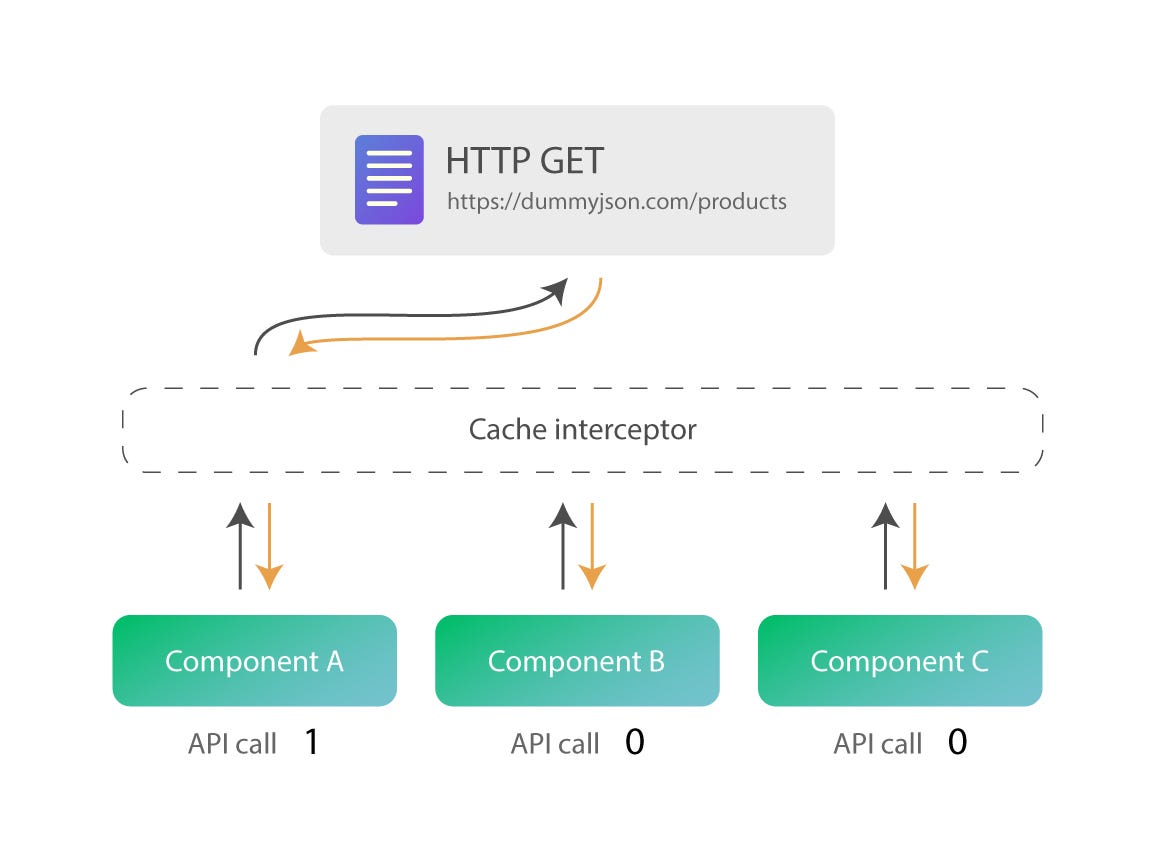
主要收获
- 自定义 RouteReuseStrategy 接口实现高效路由缓存
- 在模块中注册并配置自定义路由重用策略
- 通过路由数据属性精确控制缓存行为
引言
在现代 Web 应用中,性能优化是提升用户体验的关键因素之一。对于使用 Angular 框架构建的应用,路由管理是应用性能优化的重要组成部分。默认情况下,Angular 在路由切换时会销毁当前组件并加载新的组件,这可能导致额外的性能开销,尤其是在需要频繁切换的复杂页面中。为了解决这一问题,Angular 提供了 RouteReuseStrategy 接口,使开发者可以自定义路由的重用和缓存策略,从而提升应用性能。
实现步骤
1. 创建自定义的 RouteReuseStrategy 类
首先,需要创建一个类来实现 RouteReuseStrategy 接口。通过覆盖其中的关键方法,可以定义路由缓存的逻辑。
步骤详解
在 Angular 项目中,通常在 src/app/ 目录下创建一个新的文件,例如 custom-route-reuse-strategy.ts。以下是一个自定义策略的示例:
import { Injectable } from '@angular/core';
import { RouteReuseStrategy, DetachedRouteHandle, ActivatedRouteSnapshot } from '@angular/router';

@Injectable({
  providedIn: 'root'
})
export class CustomRouteReuseStrategy implements RouteReuseStrategy {
  private storedRoutes = new Map<string, DetachedRouteHandle>();

  shouldDetach(route: ActivatedRouteSnapshot): boolean {
    // 决定是否缓存该路由
    return route.data['reuse'] === true;
  }

  store(route: ActivatedRouteSnapshot, handle: DetachedRouteHandle): void {
    // 缓存路由组件的句柄
    const key = this.getRouteKey(route);
    this.storedRoutes.set(key, handle);
  }

  shouldAttach(route: ActivatedRouteSnapshot): boolean {
    // 判断是否有缓存可用
    const key = this.getRouteKey(route);
    return this.storedRoutes.has(key);
  }

  retrieve(route: ActivatedRouteSnapshot): DetachedRouteHandle | null {
    // 返回缓存的路由组件句柄
    const key = this.getRouteKey(route);
    return this.storedRoutes.get(key) || null;
  }

  shouldReuseRoute(future: ActivatedRouteSnapshot, current: ActivatedRouteSnapshot): boolean {
    // 判断是否复用当前路由
    return future.routeConfig === current.routeConfig;
  }

  private getRouteKey(route: ActivatedRouteSnapshot): string {
    // 生成路由的唯一键
    return route.routeConfig ? route.routeConfig.path || '' : '';
  }
}
上述代码中,自定义的 CustomRouteReuseStrategy 类实现了五个关键方法:
shouldDetach: 决定是否应当缓存当前路由。store: 将路由句柄存储在缓存中。shouldAttach: 判断是否有可用的缓存以恢复路由。retrieve: 获取缓存的路由句柄。shouldReuseRoute: 判断是否应当复用当前路由。
2. 在模块中注册自定义的 RouteReuseStrategy
创建完自定义的策略类后,下一步是在 Angular 模块中注册该策略。通常在 AppModule 中进行配置。
注册步骤
import { NgModule } from '@angular/core';
import { BrowserModule } from '@angular/platform-browser';
import { RouterModule, RouteReuseStrategy } from '@angular/router';
import { AppComponent } from './app.component';
import { CustomRouteReuseStrategy } from './custom-route-reuse-strategy';
import { HomeComponent } from './home/home.component';
import { AboutComponent } from './about/about.component';

@NgModule({
  declarations: [AppComponent, HomeComponent, AboutComponent],
  imports: [
    BrowserModule,
    RouterModule.forRoot([
      { path: 'home', component: HomeComponent, data: { reuse: true } },
      { path: 'about', component: AboutComponent },
      // 其他路由配置
    ])
  ],
  providers: [
    { provide: RouteReuseStrategy, useClass: CustomRouteReuseStrategy }
  ],
  bootstrap: [AppComponent]
})
export class AppModule {}
在上述代码中,providers 数组中通过 provide 和 useClass 配置了自定义的 RouteReuseStrategy。
3. 配置路由数据属性以控制缓存行为
为了更精确地控制哪些路由需要被缓存,可以在路由配置中添加自定义的数据属性。例如,通过在需要缓存的路由上添加 data: { reuse: true } 来标识该路由应被缓存。
路由配置示例
const routes: Routes = [
  {
    path: 'home',
    component: HomeComponent,
    data: { reuse: true } // 启用缓存
  },
  {
    path: 'about',
    component: AboutComponent
    // 不缓存该路由
  },
  // 其他路由配置
];
通过这种方式,可以灵活地控制应用中不同路由的缓存行为,确保仅在必要时缓存路由,从而优化内存使用和应用性能。
4. 可选的缓存管理
在某些情况下,可能需要动态地清理或管理缓存。例如,可以在服务中添加方法来手动清除特定路由的缓存。
缓存清理示例
// 在 CustomRouteReuseStrategy 类中添加清理方法
public clearStoredRoute(routePath: string): void {
  this.storedRoutes.delete(routePath);
}
通过调用此方法,可以根据需要动态地清理缓存,避免缓存无限增长,从而管理内存使用。
代码示例与详细解读
完整的 CustomRouteReuseStrategy 实现
以下是一个完整的自定义路由重用策略实现示例:
import { Injectable } from '@angular/core';
import { RouteReuseStrategy, DetachedRouteHandle, ActivatedRouteSnapshot } from '@angular/router';

@Injectable({
  providedIn: 'root'
})
export class CustomRouteReuseStrategy implements RouteReuseStrategy {
  private storedRoutes = new Map<string, DetachedRouteHandle>();

  shouldDetach(route: ActivatedRouteSnapshot): boolean {
    // 判断路由是否应当被缓存
    return route.data['reuse'] === true;
  }

  store(route: ActivatedRouteSnapshot, handle: DetachedRouteHandle): void {
    // 存储路由句柄
    const key = this.getRouteKey(route);
    this.storedRoutes.set(key, handle);
  }

  shouldAttach(route: ActivatedRouteSnapshot): boolean {
    // 判断是否应当恢复缓存
    const key = this.getRouteKey(route);
    return this.storedRoutes.has(key);
  }

  retrieve(route: ActivatedRouteSnapshot): DetachedRouteHandle | null {
    // 恢复缓存的路由句柄
    const key = this.getRouteKey(route);
    return this.storedRoutes.get(key) || null;
  }

  shouldReuseRoute(future: ActivatedRouteSnapshot, current: ActivatedRouteSnapshot): boolean {
    // 判断是否复用路由
    return future.routeConfig === current.routeConfig;
  }

  private getRouteKey(route: ActivatedRouteSnapshot): string {
    // 生成路由唯一键
    return route.routeConfig && route.routeConfig.path ? route.routeConfig.path : '';
  }

  // 可选的清理方法
  public clearStoredRoute(routePath: string): void {
    this.storedRoutes.delete(routePath);
  }
}
在上述实现中,storedRoutes 是一个存储缓存路由的 Map 对象,通过路由的路径作为键来管理各个缓存。
在 AppModule 中注册自定义策略
确保在 Angular 模块中正确注册自定义的 RouteReuseStrategy,以使其在应用中生效。
import { NgModule } from '@angular/core';
import { BrowserModule } from '@angular/platform-browser';
import { RouterModule, RouteReuseStrategy } from '@angular/router';
import { AppComponent } from './app.component';
import { CustomRouteReuseStrategy } from './custom-route-reuse-strategy';
import { HomeComponent } from './home/home.component';
import { AboutComponent } from './about/about.component';

@NgModule({
  declarations: [AppComponent, HomeComponent, AboutComponent],
  imports: [
    BrowserModule,
    RouterModule.forRoot([
      { path: 'home', component: HomeComponent, data: { reuse: true } },
      { path: 'about', component: AboutComponent },
      // 其他路由配置
    ])
  ],
  providers: [
    { provide: RouteReuseStrategy, useClass: CustomRouteReuseStrategy }
  ],
  bootstrap: [AppComponent]
})
export class AppModule {}
通过上述配置,Angular 应用将在路由切换时遵循自定义的缓存策略。
在组件中使用缓存策略
在需要缓存状态的组件中,可以通过订阅组件的生命周期钩子来管理缓存数据。例如,在表单组件中,可以保存用户输入的数据,以便在返回时恢复状态。
import { Component, OnInit } from '@angular/core';
import { CacheService } from './cache.service';

@Component({
  selector: 'app-home',
  templateUrl: './home.component.html',
  styleUrls: ['./home.component.css']
})
export class HomeComponent implements OnInit {
  formData: any = {};

  constructor(private cacheService: CacheService) {}

  ngOnInit(): void {
    // 恢复缓存数据
    this.cacheService.getCacheData().subscribe(data => {
      if (data) {
        this.formData = data;
      }
    });
  }

  onFormChange(): void {
    // 更新缓存数据
    this.cacheService.setCacheData(this.formData);
  }

  ngOnDestroy(): void {
    // 可选:清理缓存
    // this.cacheService.clearCache();
  }
}
在上述示例中,CacheService 用于管理组件的数据缓存,通过订阅和更新数据,确保组件在被恢复时能够保持之前的状态。
实现动态缓存管理
为了实现更灵活的缓存管理,可以为缓存策略添加动态控制功能。例如,基于用户操作或特定条件来决定是否缓存某个路由。
// 在 CustomRouteReuseStrategy 类中添加动态清理方法
public clearStoredRoute(routePath: string): void {
  this.storedRoutes.delete(routePath);
}
通过调用 clearStoredRoute 方法,可以在应用的不同部分动态地管理缓存,确保缓存的有效性和内存管理。
注意事项
- 缓存的选择性:确保仅缓存需要频繁访问且状态保持重要的路由,避免无谓地占用内存。
- 内存管理:对于内存敏感的应用,需监控缓存的增长,必要时清理不再需要的缓存。
- 数据同步:如果缓存的组件依赖于动态数据(如通过 Resolver 获取的数据),需确保在恢复组件时手动同步或更新数据。
- SEO 和可访问性:缓存策略不应影响应用的 SEO 优化或可访问性,需确保路由缓存不会阻碍搜索引擎的正常抓取。
通过合理地管理路由缓存,可以在提升应用性能的同时,避免潜在的内存泄漏和数据同步问题。
适用场景
路由缓存策略在以下场景中尤为有效:
- 频繁切换的标签页:应用中存在多个标签页,用户在它们之间频繁切换时,缓存各标签页的状态可以大幅提升用户体验。
- 复杂的表单或数据输入页面:用户在表单中输入数据后切换到其他页面,再返回时能够保持之前输入的内容。
- 搜索或筛选结果页面:用户执行搜索或筛选操作后,可以通过缓存保留结果,避免重复加载。
- 多步骤的流程页面:如注册流程、多步骤提交表单等,通过缓存每一步的状态,提升流程的流畅性。
在这些场景中,适当的缓存策略不仅能提升应用的性能,还能增强用户的交互体验,避免不必要的加载等待。
示例参考
为了更好地理解和实现路由缓存策略,以下是一些有用的参考资源:
- 如何在 Angular 中为路由组件启用缓存 - Medium
- 使用 Angular RouteReuseStrategy 缓存组件 - ITNEXT
- 通过 RouteReuseStrategy 提升 Angular 应用性能 - Medium
- 如何缓存 Angular 组件 - Stack Overflow
- Angular RouteReuseStrategy 示例 - GitHub
这些资源提供了详细的实现步骤、代码示例和优化建议,能够帮助开发者更深入地理解和应用路由缓存策略。
结论
通过自定义 RouteReuseStrategy 接口,Angular 开发者可以有效地实现路由缓存策略,从而优化应用性能和提升用户体验。合理的缓存策略不仅能减少不必要的组件重建和数据重新加载,还能在复杂的应用场景中保持组件状态,避免用户数据的丢失。结合具体的业务需求和应用场景,开发者应谨慎设计和管理缓存策略,确保应用在性能与资源消耗之间达到最佳平衡。
参考资料
通过综合参考这些资料,开发者可以获得更全面的理解和实践指南,顺利实现 Angular 路由缓存策略。
Last updated January 24, 2025