
Unlocking Universal Access: Integrating Accessibility Standards into Your Development Lifecycle
Building inclusive software from the ground up ensures broader reach, legal compliance, and a superior user experience for all.
Key Insights into Accessibility Integration
- Early Integration is Paramount: Embedding accessibility from the initial planning stages of the Software Development Lifecycle (SDLC) is crucial. This proactive "shift-left" approach prevents costly reworks and ensures inclusivity is a foundational element, not an afterthought.
- Adherence to Global Standards: The Web Content Accessibility Guidelines (WCAG) are the international benchmark, particularly WCAG 2.1 or 2.2 AA. Alongside, understanding regional legal frameworks like the Americans with Disabilities Act (ADA) and Section 508 in the U.S., or EN 301 549 in Europe, is vital for compliance.
- User-Centered Design and Continuous Testing: Actively involving users with disabilities in the design and testing phases provides invaluable real-world feedback. Combining automated testing tools with manual checks, including screen reader and keyboard navigation testing, ensures comprehensive validation and ongoing maintenance of accessibility.
Applying accessibility standards in the software development process is a fundamental commitment to creating digital products that are usable by everyone, including individuals with visual, auditory, motor, cognitive, or neurological disabilities. This proactive integration transforms software from a tool for some into a universally accessible platform, significantly enhancing user experience, expanding market reach, and ensuring compliance with evolving legal and ethical requirements. By weaving accessibility into every phase of the development lifecycle—from planning and design through development, testing, and ongoing maintenance—organizations can build truly inclusive digital solutions.

An individual engaging with a laptop, symbolizing the practical use of accessible software and assistive technologies in daily life.
The Foundational Pillars of Accessibility
Accessibility is built upon a framework of internationally recognized standards and legal mandates, ensuring a consistent approach to inclusive design. The primary guidelines and acts governing digital accessibility are:
Web Content Accessibility Guidelines (WCAG)
WCAG, developed by the World Wide Web Consortium's (W3C) Web Accessibility Initiative (WAI), is the global standard for web accessibility. It provides a comprehensive set of guidelines organized under four core principles:
- Perceivable: Information and user interface components must be presentable to users in ways they can perceive. This includes providing text alternatives for non-text content, captions for multimedia, and content that can be presented in different ways without losing information or structure.
- Operable: User interface components and navigation must be operable. This mandates keyboard accessibility for all interactive elements, sufficient time for users to interact with content, and avoidance of content that causes seizures or physical reactions.
- Understandable: Information and the operation of user interface must be understandable. This encompasses making text readable and understandable, ensuring content appears and operates in predictable ways, and helping users avoid and correct mistakes.
- Robust: Content must be robust enough that it can be interpreted reliably by a wide variety of user agents, including assistive technologies. This means using semantic HTML, ARIA roles, and ensuring compatibility with current and future technologies.
WCAG defines three levels of conformance: A (lowest), AA, and AAA (highest). Most legal regulations, including those for U.S. state and municipal governments, typically require WCAG 2.1 AA compliance as a baseline for websites, applications, kiosks, and digital content.
Americans with Disabilities Act (ADA)
The ADA is a U.S. federal civil rights law that prohibits discrimination against individuals with disabilities. While it doesn't specify technical web accessibility standards for private businesses, it acknowledges WCAG and Section 508 Standards as helpful guidance. Recent updates from the Department of Justice (DOJ) mandate that U.S. state and municipal governments adhere to WCAG 2.1 A and AA.
Section 508 Standards
Part of the U.S. Rehabilitation Act, Section 508 requires federal agencies to ensure their Information and Communication Technology (ICT) is accessible to people with disabilities. Section508.gov serves as the official government resource for compliance, offering guidance and tools.
Beyond these, other important W3C standards include the Authoring Tool Accessibility Guidelines (ATAG) for accessible authoring tools and User Agent Accessibility Guidelines (UAAG) for accessible web browsers.
Integrating Accessibility Across the Software Development Lifecycle (SDLC)
Effective accessibility implementation is not a one-time task but a continuous process embedded throughout the SDLC. This phased approach ensures that accessibility is a core requirement from conception to deployment and maintenance.
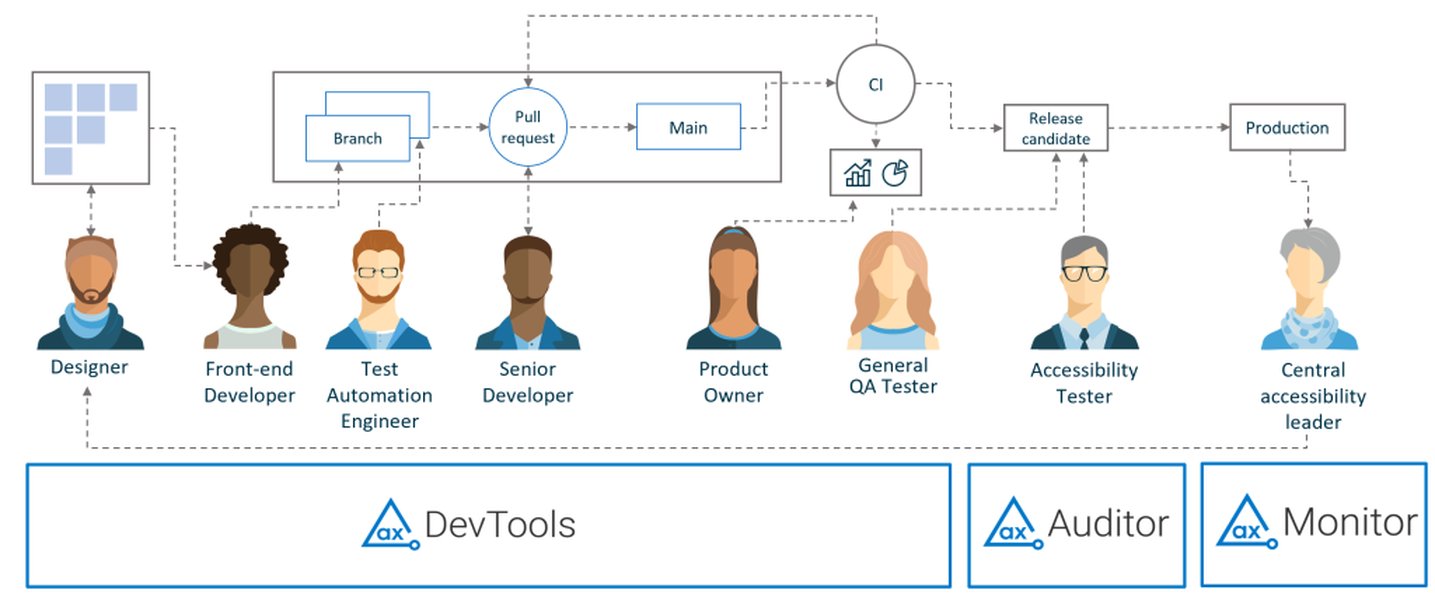
A visual representation of embedding accessibility tools and practices throughout the software development and testing lifecycle.
1. Planning Phase: Setting the Inclusive Foundation
Defining Clear Accessibility Goals
At the project's outset, define clear accessibility goals aligned with relevant standards like WCAG 2.1 AA. Incorporate accessibility into the project's "definition of done."
Incorporating User Stories and Requirements
Create user stories that explicitly include scenarios involving people with disabilities. Engage users with disabilities through interviews or focus groups to identify potential barriers and ensure their needs are considered early in project documentation and specifications.
Legal Compliance Review
Review and integrate legal standards such as the ADA and Section 508 into your project plan to proactively avoid non-compliance.
2. Design Phase: Crafting Universally Usable Interfaces
Inclusive Design Principles
Develop inclusive design mockups that prioritize color contrast (e.g., a minimum 4.5:1 ratio for text), legible font sizes, and accessible interactive elements. Ensure designs accommodate screen readers and keyboard navigation. Provide text alternatives for non-text content (images, multimedia).
Collaboration with Accessibility Specialists
Collaborate with accessibility specialists to validate designs against guidelines. Tools like design system accessibility checklists and accessible UI pattern libraries can guide consistent accessible design.
Prototyping and Early Feedback
Test prototypes with assistive technologies to identify design-level accessibility issues before development begins. Ensure logical reading order and navigation in design flows.
3. Development Phase: Building Accessible Code
Semantic HTML and ARIA
Use semantic HTML to structure content, which helps assistive technologies interpret the page correctly. For custom components or dynamic content, use ARIA (Accessible Rich Internet Applications) roles and attributes judiciously to provide programmatic labels and information on function and state to assistive technologies.
Keyboard Accessibility and Focus Management
Implement full keyboard navigability for all interactive elements, ensuring users can navigate using only the tab key and other keyboard shortcuts. Ensure the reading order in the code matches the visual order and manage focus appropriately.
Alternative Text and Form Handling
Associate labels with form controls and provide alternative text for images (even if empty for decorative images). Provide clear, understandable error messages and guidance to help users avoid and correct mistakes in forms.
Language Identification and Multimedia Support
Identify the page language and any changes in language within the content. For audio and video content, provide closed captioning, mono sound, live call transcription, and video transcripts.
4. Testing Phase: Validating Accessibility Compliance
Automated and Manual Testing
Conduct both automated and manual accessibility testing. Automated tools can catch common issues like missing alt text or insufficient color contrast. However, manual testing, preferably involving users with disabilities, is essential to evaluate real-world usability and catch nuanced problems related to logical navigation flows or cognitive load.
Assistive Technology Compatibility Testing
Test keyboard navigation, screen reader compatibility (e.g., NVDA, JAWS), and other assistive technologies. Validate against WCAG criteria regularly, not just pre-release.
Code Reviews and Regression Testing
Include accessibility as part of code reviews and pair programming sessions. Incorporate accessibility regression tests into your CI/CD pipelines to prevent new changes from introducing accessibility barriers.
This radar chart illustrates the perceived emphasis and maturity of accessibility integration across different phases of the software development lifecycle, based on typical industry practices. Each axis represents a key phase, and the data points indicate the relative strength of accessibility focus within that phase. A higher value suggests more robust integration and proactive measures. For example, "Early Planning" and "Dedicated Testing" often show stronger emphasis compared to "Ongoing Maintenance" if not systematically managed.
5. Deployment and Maintenance Phase: Ensuring Ongoing Accessibility
Continuous Monitoring and Feedback
Monitor accessibility continuously post-launch and remain responsive to user feedback. Establish feedback mechanisms to gather input from users with disabilities.
Iterative Improvements and Updates
Incorporate iterative improvements in future development cycles to enhance accessibility. Regularly update software to align with the latest standards, such as WCAG 2.2, and retest features upon updates to prevent regression.
Key Strategies and Best Practices for Developers
Beyond the SDLC phases, certain strategies and best practices are universally applicable to ensure robust accessibility.
Shared Responsibility and Training
Accessibility is a shared responsibility. All developers should familiarize themselves with basic accessibility principles and guidelines. Provide ongoing training for developers, designers, content writers, and testers to cultivate a shared understanding and encourage accessibility champions.
Tools and Resources
Leverage various tools throughout the development process:
- Browser Developer Tools: Most modern browsers support inspecting the accessibility tree and displaying properties like color contrast.
- Automated Accessibility Testing Tools: Tools like MS Accessibility Insights and Axe can detect common issues early.
- Assistive Technology Simulators: Use screen reader simulators (though real screen readers are better for comprehensive testing), magnifiers, and voice command tools.
- Accessibility Linters and Plugins: Integrate these into your IDE or build process for real-time feedback.
Accessibility Documentation
Maintain clear documentation of accessibility decisions, known issues, and workarounds. Ensure software documentation, user guides, and training materials are available in various accessible formats (e.g., plain text, accessible PDFs).
This mindmap illustrates the comprehensive approach to applying accessibility standards, breaking down the process into sequential SDLC phases and highlighting overarching strategies crucial for successful integration. Each node represents a key aspect, demonstrating the interconnectedness of accessible development.
Essential Accessibility Guidelines and Features
Implementing accessibility requires attention to specific design and development features that cater to diverse needs:
| Accessibility Guideline/Feature | Description and Importance | WCAG Principle(s) Addressed |
|---|---|---|
| Keyboard Accessibility | Ensures all interactive elements (buttons, links, forms) can be navigated and operated using only a keyboard (Tab key, arrow keys, Enter key). Crucial for users who cannot use a mouse. | Operable |
| Alternative Text (Alt Text) | Provides textual descriptions for all non-text content (images, charts, graphs, videos). This allows screen readers to convey visual information to users with visual impairments. Decorative images should have empty alt attributes. | Perceivable |
| Color Contrast | Maintains a minimum acceptable contrast ratio (e.g., 4.5:1 for normal text, 3:1 for large text) between foreground text/elements and background colors. Essential for users with low vision or color blindness to distinguish content. | Perceivable |
| Semantic HTML & ARIA | Using appropriate HTML elements (e.g., <button>, <nav>) provides inherent meaning and structure. ARIA (Accessible Rich Internet Applications) attributes provide additional semantic meaning and states for custom or dynamic UI components that native HTML doesn't fully support, enhancing screen reader interpretation. | Robust, Operable |
| Clear Form Labels & Error Handling | All form input fields must have clearly associated labels. Error messages should be descriptive, easy to understand, and provide clear instructions for correction, helping users avoid and fix mistakes. | Understandable |
| Captions & Transcripts | For audio and video content, provide synchronized captions for the deaf and hard of hearing, and full text transcripts for both auditory and visual impairments. | Perceivable |
| Logical Reading Order | The sequence in which content is presented (visually and through assistive technologies) should be logical and intuitive. This ensures users can understand the flow of information. | Perceivable, Understandable |
| Focus Management | Ensuring that interactive elements clearly indicate when they have keyboard focus (e.g., with a visible outline) and that focus moves predictably when interacting with dynamic content. | Operable |
| Text Resizing & Responsiveness | Allowing users to resize text up to 200% without loss of content or functionality. Designing for responsiveness ensures the software works across various devices, screen sizes, and orientations. | Perceivable, Operable |
Video Deep Dive: The Importance of Accessibility in Software Development
To further understand the nuances and benefits of incorporating accessibility into software, the following video offers valuable insights. It explains why accessibility is crucial and how it supports individuals with disabilities by ensuring technology tools enhance their quality of life.
This video, titled "Accessibility in Software Development and Testing," explores how accessible software and technology tools support the quality of life for individuals with disabilities. It highlights the crucial role of software accessibility in enabling all users to access and benefit from digital products. Understanding this perspective is vital for developers to grasp the real-world impact of their work and why embedding accessibility is not just a compliance task but a profound act of social responsibility.
Frequently Asked Questions (FAQ)
What is the primary benefit of applying accessibility standards?
What are the most important accessibility standards for web development?
Is accessibility testing only done at the end of the development cycle?
What is "semantic HTML" in the context of accessibility?
<button> tag for a button rather than a <div> with click functionality. This provides inherent meaning that assistive technologies can interpret correctly, improving navigability and understanding for users with disabilities.Conclusion
Applying accessibility standards in the software development process is more than a compliance checklist; it is a strategic imperative that fosters innovation, expands market reach, and cultivates a truly inclusive digital ecosystem. By embedding accessibility from the foundational planning stages, through thoughtful design, robust development, rigorous testing, and continuous maintenance, organizations can create digital products that are not only legally compliant but also genuinely equitable and usable for every individual. This proactive approach ensures that technology serves all of humanity, breaking down barriers and building bridges in the digital world.
Recommended Search Queries
- Accessibility best practices for mobile app development
- How to conduct manual accessibility testing with screen readers
- Benefits of inclusive design in software development
- Latest updates to WCAG 2.2 and their impact