
Comparing AVERAGEX() in DAX and the OVER() Clause in SQL
Understanding the nuances of calculating averages across data sets in Power BI and SQL Server.
When working with data analysis, calculating averages is a fundamental operation. However, the methods and contexts for calculating averages can differ significantly depending on the tools and languages you are using. This is particularly true when comparing Data Analysis Expressions (DAX) in Power BI with SQL, especially when considering the AVERAGEX() function in DAX and the OVER() clause in SQL.
Key Differences at a Glance
- Execution Context:
AVERAGEX()in DAX operates within a row context, evaluating an expression for each row of a specified table. TheOVER()clause in SQL, on the other hand, defines a window of rows around the current row for a window function to operate on. - Iteration vs. Windowing:
AVERAGEX()explicitly iterates over a table, performing a calculation for each row before averaging the results. TheOVER()clause defines a set of rows (the window) over which an aggregate function (likeAVG()) is applied, without necessarily iterating row by row in the same manner asAVERAGEX(). - Language and Environment:
AVERAGEX()is a DAX function specifically designed for tabular models in Power BI, Analysis Services, and Excel. TheOVER()clause is a standard SQL construct used with window functions in various relational database systems like SQL Server, MySQL, and PostgreSQL.
Delving into AVERAGEX() in DAX
The AVERAGEX() function in DAX is a powerful iterator function. This means it evaluates an expression for each row of a table and then calculates the average of those evaluated results. Its primary use case is to calculate the average of a measure or an expression that cannot be directly averaged across a column using the simpler AVERAGE() function.
How AVERAGEX() Works
The syntax of AVERAGEX() is straightforward:
AVERAGEX( <Table>, <Expression> )The first argument is the table over which the function will iterate. The second argument is the expression that will be evaluated for each row of the specified table. The results of this expression evaluation for each row are then collected, and the average of these results is calculated.
Example Usage of AVERAGEX()
Consider a sales table with columns for 'Quantity' and 'Price'. If you want to calculate the average sales amount per transaction (Quantity * Price), you would use AVERAGEX() because the sales amount needs to be calculated for each individual transaction before averaging.
Average Sales Amount = AVERAGEX( Sales, Sales[Quantity] * Sales[Price] )In this example, AVERAGEX() iterates through each row in the 'Sales' table, calculates the product of 'Quantity' and 'Price' for that row, and then averages all these calculated sales amounts.
Key Characteristics of AVERAGEX()
- Row Context:
AVERAGEX()inherently creates a row context, allowing the expression to refer to values in the current row during iteration. - Expression Evaluation: It is designed to average the results of expressions, not just the values in a single column. This makes it highly flexible for complex calculations.
- Handling Blanks:
AVERAGEX()ignores blank values returned by the expression during the averaging process.
AVERAGEX() is particularly useful in scenarios like calculating weighted averages, evaluating expressions based on multiple columns, or performing calculations on filtered subsets of data within a measure.
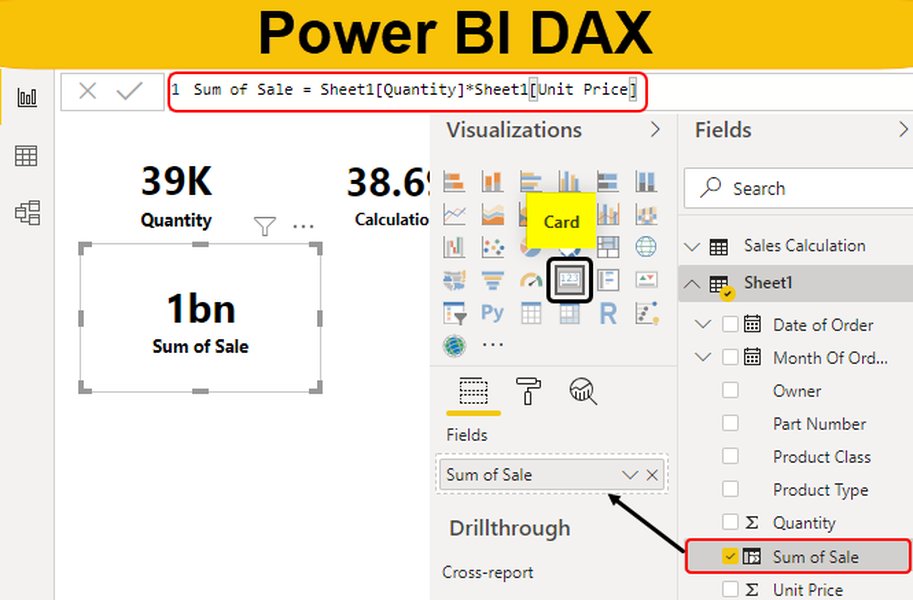
Understanding the AVERAGEX function in Power BI DAX.
Exploring the OVER() Clause in SQL
The OVER() clause in SQL is used to define a "window" or a set of rows within a query result set. This window is then used by a window function to perform a calculation across those rows. Unlike standard aggregate functions that collapse rows into a single result per group (requiring a GROUP BY clause), window functions with the OVER() clause return a result for each row in the original result set.
How the OVER() Clause Works
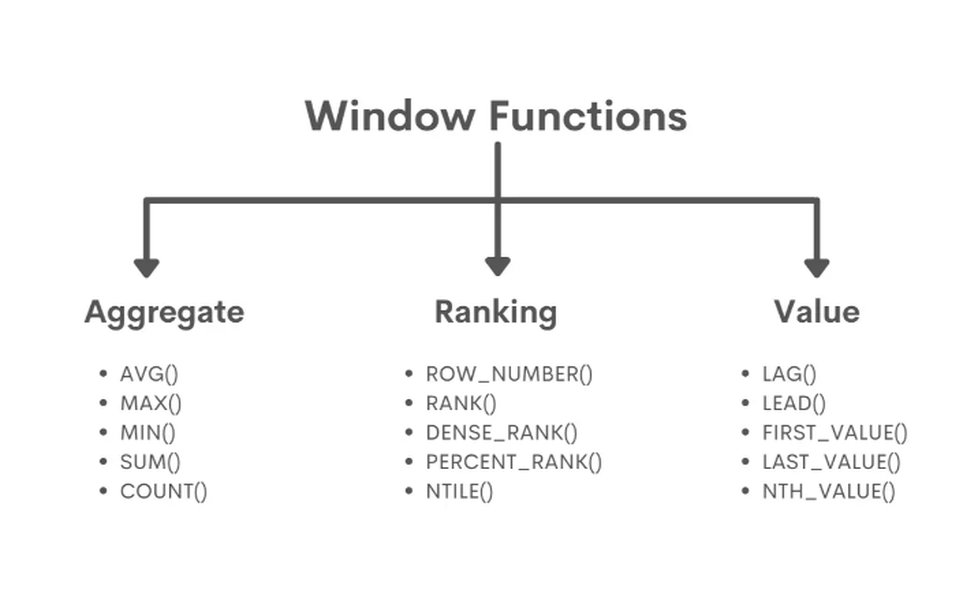
The OVER() clause is typically used in conjunction with aggregate functions (like AVG(), SUM(), COUNT(), MIN(), MAX()) or ranking functions (like ROW_NUMBER(), RANK(), DENSE_RANK(), NTILE()).
The basic structure with an aggregate function is:
Aggregate_Function() OVER ( [PARTITION BY column_list] [ORDER BY order_list] [ROWS or RANGE window_frame] )- PARTITION BY: This divides the rows into partitions, and the window function is applied independently to each partition. It's similar to a
GROUP BYbut doesn't collapse the rows. - ORDER BY: This specifies the logical order of rows within each partition or the entire result set. This is crucial for functions that depend on order, like running totals or moving averages.
- ROWS or RANGE window_frame: This further refines the window by specifying the rows relative to the current row that are included in the window (e.g.,
ROWS BETWEEN 1 PRECEDING AND 1 FOLLOWINGfor a moving average). If omitted, the default window frame is often the entire partition or the entire result set if noPARTITION BYis used.
Example Usage of AVG() with OVER()
To calculate the average salary across all employees in a table using the OVER() clause:
SELECT name, salary, AVG(salary) OVER () AS avg_salary FROM employees;Here, AVG(salary) OVER () calculates the average salary over the entire result set (the default window when no PARTITION BY is specified) and adds this overall average as a new column to each row.
To calculate the average salary per department:
SELECT name, department, salary, AVG(salary) OVER (PARTITION BY department) AS avg_department_salary FROM employees;In this case, PARTITION BY department divides the employees into groups by department, and the AVG() function calculates the average salary independently for each department.
Visualizing SQL Window Functions with the OVER clause.
Key Characteristics of the OVER() Clause
- Window Definition: Defines a specific set of rows (the window) for a function to operate on.
- Non-Aggregating Row Output: While used with aggregate functions, it returns a result for each original row, maintaining the original row structure.
- Partitioning and Ordering: Allows for partitioning the data and ordering within partitions, enabling calculations like averages within groups or running calculations.
Comparing AVERAGEX() and AVG() OVER()
While both AVERAGEX() in DAX and AVG() with the OVER() clause in SQL are used for calculating averages, their fundamental operational mechanisms and contexts are different.
Core Conceptual Difference: Iteration vs. Windowing
The most significant difference lies in their approach. AVERAGEX() is an iterator. It works by stepping through each row of a specified table, evaluating an expression for that row, and then aggregating the results. This row-by-row evaluation is central to its functionality, especially when the expression involves calculations across multiple columns or measures within the context of each row.
The OVER() clause, on the other hand, defines a window of rows. The aggregate function (like AVG()) is then applied to this defined window. It doesn't necessarily imply a row-by-row iteration in the same way DAX iterators do. Instead, it operates on the set of rows defined by the window, which can be the entire result set, a partition, or a sliding frame within a partition.
Practical Implications and Use Cases
AVERAGEX() in DAX:
- Ideal for calculating averages of expressions or measures in Power BI's tabular model.
- Useful for scenarios where the average needs to be calculated based on complex row-level calculations.
- Often used in measures to provide dynamic calculations based on the current filter context.
- Can be combined with other DAX functions like
FILTERorCALCULATEto modify the table or context over which the average is calculated.
AVG() with OVER() in SQL:
- Used for calculating averages over a defined set of rows without collapsing the result set.
- Excellent for comparing individual row values to an average of a group or the entire dataset.
- Enables calculations like moving averages, running averages, or averages within specific partitions (e.g., by department, region, or date).
- Part of standard SQL and applicable in various relational database environments.
Syntax and Environment
The syntax reflects their environments. DAX has a functional syntax designed for tabular models, while SQL uses a declarative syntax with the OVER() clause modifying the behavior of aggregate functions within a query.
Here is a table summarizing the key differences:
| Feature | AVERAGEX() (DAX) | AVG() OVER() (SQL) |
|---|---|---|
| Primary Mechanism | Iterates row by row, evaluates expression, then averages results. | Defines a window of rows, applies aggregate function to the window. |
| Context | Row context for expression evaluation. | Window context defined by OVER() clause. |
| Function Type | Iterator function. | Aggregate function used with a windowing clause. |
| Result Output | Returns a single scalar value (when used in a measure) or a column of averaged values (when used in a calculated column). | Returns a value for each original row in the result set. |
| Environment | Power BI, Analysis Services, Power Pivot (Excel). | Relational databases (SQL Server, MySQL, PostgreSQL, etc.). |
| Flexibility with Expressions | Designed to average the results of complex expressions evaluated row-by-row. | Applies aggregate function to a column within the window. Expressions within the aggregate function are limited. |
| Partitioning/Grouping | Achieved through iterating over a filtered or modified table. | Explicitly defined using the PARTITION BY clause within OVER(). |
When to Use Which
Choosing between AVERAGEX() and AVG() with OVER() depends entirely on the context and the tool you are using.
-
Use
AVERAGEX()when you are working within the Power BI/DAX environment and need to calculate the average of an expression that requires evaluation for each row of a table. This is common for calculating averages of calculated measures or complex row-level metrics. -
Use
AVG()with theOVER()clause when you are writing SQL queries and need to calculate averages over a defined set of rows without grouping the result set. This is ideal for analytical queries where you want to compare individual rows to group or overall averages, or calculate moving averages and running totals.
While both functions serve the purpose of calculating averages, their underlying mechanisms and the environments in which they operate dictate their specific use cases.
Further Exploration
For a deeper understanding of AVERAGEX() and its applications in Power BI, consider exploring video tutorials that walk through practical examples.
A tutorial on how to use the AVERAGEX function in Power BI DAX. This video demonstrates practical applications and helps visualize its behavior.
Understanding both functions is crucial for anyone working with data in both Power BI and SQL databases, as they represent different paradigms for achieving similar analytical goals within their respective ecosystems.
Frequently Asked Questions
Can I use AVERAGEX() in SQL?
No, AVERAGEX() is a DAX function and is only available in environments that support DAX, such as Power BI, Analysis Services, and Power Pivot in Excel. It cannot be directly used in SQL queries.
Can I use the OVER() clause in DAX?
No, the OVER() clause is a SQL construct used with window functions. DAX has its own set of functions and concepts, like iterators (e.g., SUMX, AVERAGEX) and context transitions, to handle similar analytical scenarios.
Is AVERAGEX() always slower than the equivalent SQL calculation?
Not necessarily. While iterator functions like AVERAGEX() can sometimes be resource-intensive on very large datasets compared to highly optimized SQL operations, performance depends on various factors including data model design, filter contexts, and the complexity of the expression being evaluated. In many Power BI scenarios, AVERAGEX() is efficient and necessary for the required calculation.
What is the difference between AVERAGE() and AVERAGEX() in DAX?
AVERAGE() calculates the average of values in a single column. It ignores text and logical values. AVERAGEX() is an iterator that calculates the average of an expression evaluated for each row of a table. It is more versatile for averaging results of calculations rather than just column values.
What is a window function in SQL?
A window function in SQL performs a calculation across a set of table rows that are somehow related to the current row. This set of rows is called a "window," and it's defined by the OVER() clause. Window functions include aggregate functions used in a window context (like AVG(), SUM()) and ranking functions (like ROW_NUMBER()).
References
Last updated May 8, 2025