
Unlock Kubernetes Mastery: Your Comprehensive 2025 Roadmap
Navigate the path from foundational knowledge to expert-level Kubernetes skills with this structured guide.
Key Steps to Kubernetes Expertise
- Build a Strong Foundation: Master containerization (Docker) and Linux basics before diving into Kubernetes architecture and core components like Pods, Services, and Nodes.
- Embrace Hands-On Practice: Set up local environments (Minikube, k3s) and deploy real applications to solidify understanding of deployments, scaling, networking, and storage.
- Advance and Specialize: Explore advanced topics such as security best practices, CI/CD integration, monitoring, Helm, service meshes, and consider pursuing industry-recognized certifications (CKA, CKAD, CKS).
Embarking on Your Kubernetes Journey
Kubernetes (often abbreviated as K8s) has become the de facto standard for container orchestration, automating the deployment, scaling, and management of containerized applications. Achieving expertise in this powerful platform requires a structured approach, blending theoretical understanding with extensive hands-on experience. This guide provides a comprehensive roadmap, leveraging current best practices and resources as of May 2025, to help you navigate from novice to expert.
Laying the Groundwork: Essential Prerequisites
Before immersing yourself in Kubernetes, ensure you have a solid grasp of the following foundational areas:
Containerization Concepts (Docker)
Kubernetes orchestrates containers, so understanding container technology, particularly Docker, is crucial. Familiarize yourself with building Docker images, running containers, managing their lifecycle, and understanding Docker's architecture.
Linux Fundamentals
Since Kubernetes primarily runs on Linux nodes, proficiency with the Linux command line, file systems, networking, and basic system administration is essential for managing and troubleshooting clusters effectively.
Understanding Kubernetes Core Concepts
A deep understanding of Kubernetes architecture and its fundamental objects is non-negotiable for expertise.
Kubernetes Architecture Explained
Kubernetes operates on a cluster model. Familiarize yourself with the key components:
- Control Plane: The brain of the cluster, consisting of components like the API Server (the front end for Kubernetes), etcd (consistent and highly-available key-value store for cluster data), Scheduler (assigns pods to nodes), Controller Manager (runs controller processes), and Cloud Controller Manager (integrates with cloud provider APIs).
- Worker Nodes: Machines (VMs or physical servers) where your applications run. Each node runs a Kubelet (agent that communicates with the control plane), Kube-proxy (maintains network rules), and a Container Runtime (like Docker or containerd).
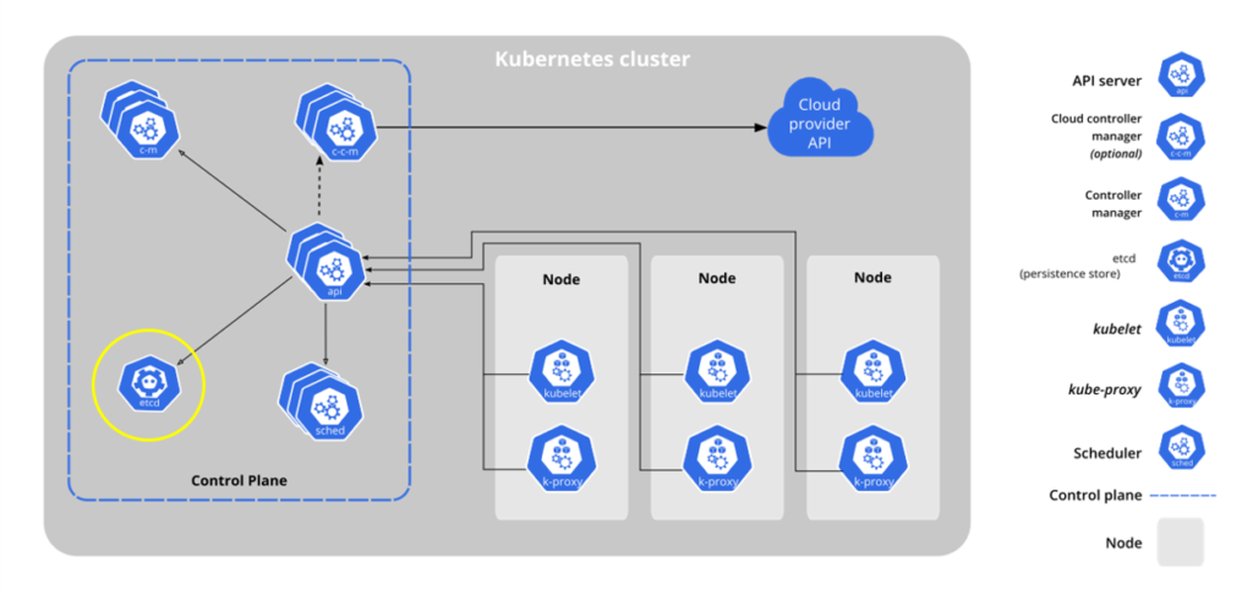
Overview of Kubernetes Control Plane and Worker Node Components
Essential Kubernetes Objects
Master the building blocks used to define, deploy, and manage applications:
- Pods: The smallest deployable units in Kubernetes, representing a group of one or more containers sharing storage and network resources.
- Services: An abstraction defining a logical set of Pods and a policy to access them, enabling stable network endpoints.
- Volumes: Mechanisms for persistent storage, allowing data to survive container restarts and be shared among containers.
- Namespaces: Virtual clusters within a physical cluster, used for organizing resources and isolating environments.
- Deployments: Declaratively manage Pods and ReplicaSets, facilitating rolling updates and rollbacks.
- StatefulSets: Manage stateful applications, providing stable network identifiers and persistent storage per Pod.
- DaemonSets: Ensure that all (or some) Nodes run a copy of a Pod, useful for cluster-level agents like monitoring or logging collectors.
- Jobs & CronJobs: Manage batch processing and scheduled tasks.
- ConfigMaps & Secrets: Decouple configuration and sensitive information from container images.
- Labels & Selectors: Key-value pairs attached to objects, used for organizing and selecting subsets of resources. Understanding best practices for labels is crucial for management, troubleshooting, and cost allocation.
Gaining Practical Experience: Hands-On Learning
Theoretical knowledge must be complemented by practical application. Setting up environments and working through real-world scenarios is key to building expertise.
Setting Up Your Learning Environment
Start experimenting with local Kubernetes distributions. These provide lightweight, single-node or multi-node clusters suitable for learning and testing:
- Minikube: Runs a single-node Kubernetes cluster inside a VM on your local machine.
- kind (Kubernetes in Docker): Uses Docker containers as "nodes" to run local clusters.
- k3s: A lightweight, certified Kubernetes distribution ideal for edge, IoT, and CI.
- Docker Desktop: Includes an option to enable a single-node Kubernetes cluster.
- Rancher Desktop: Provides container management and Kubernetes on the desktop.
Setting up a home lab using these tools is an excellent way to explore features, test configurations, and build practical skills without incurring cloud costs.
Essential Practical Skills
Mastering kubectl
The `kubectl` command-line tool is your primary interface for interacting with Kubernetes clusters. Master commands for inspecting resources (`get`, `describe`), creating and updating objects (`apply`, `create`, `edit`), debugging (`logs`, `exec`), and monitoring resource usage (`top node`, `top pod`).
Deploying and Managing Applications
Practice deploying stateless and stateful applications using Deployments and StatefulSets. Learn to configure services for network access, manage application configuration with ConfigMaps and Secrets, and handle persistent storage with Volumes.
Troubleshooting
Develop debugging skills by investigating issues with Pods, Nodes, and network connectivity. Learn to use `kubectl` commands to diagnose problems and understand Kubernetes events.
Advancing Your Kubernetes Knowledge
Once comfortable with the fundamentals, delve into more complex topics to round out your expertise.
Advanced Networking
Explore Kubernetes networking in depth, including:
- Ingress Controllers: Manage external access to services in the cluster, typically HTTP/S.
- Network Policies: Secure pod communication by defining rules for network traffic flow. Learn tools like Calico for advanced policy implementation.
- Service Mesh: Understand technologies like Istio or Linkerd for managing complex microservice communication, providing observability, security, and traffic control.
Security Best Practices
Security is paramount. Focus on:
- RBAC (Role-Based Access Control): Configure permissions for users and service accounts.
- Security Contexts: Define privilege and access control settings for Pods and Containers.
- Secrets Management: Securely handle sensitive information like API keys and passwords.
- Network Policies: Isolate workloads and restrict network access.
- Cluster Hardening: Implement security best practices for the control plane and worker nodes.
Extensibility and Automation
- Custom Resource Definitions (CRDs) & Operators: Learn how to extend the Kubernetes API with custom resources and automate operational tasks using the Operator pattern.
- Helm: Master Helm, the package manager for Kubernetes, to define, install, and upgrade complex applications using charts.
Monitoring, Logging, and Observability
Implement robust monitoring and logging solutions using tools like:
- Prometheus: For metrics collection and alerting.
- Grafana: For visualizing metrics dashboards.
- EFK/ELK Stack (Elasticsearch, Fluentd/Logstash, Kibana): For centralized logging.
CI/CD Integration
Understand how to integrate Kubernetes into Continuous Integration and Continuous Delivery (CI/CD) pipelines for automated building, testing, and deployment. Explore tools like Jenkins X, Argo CD, or GitLab CI/CD.
Cloud Provider Services
Gain familiarity with managed Kubernetes offerings from major cloud providers, such as Amazon EKS, Google GKE, and Azure AKS, understanding their specific features and integrations.
Visualizing the Kubernetes Learning Path
The journey to Kubernetes expertise involves mastering various interconnected domains. This mindmap provides a visual overview of the key areas to focus on, from foundational concepts to advanced specializations.
(Control Plane, Nodes)"] id2b["Core Objects
(Pods, Services, Volumes,
Namespaces)"] id2c["Workload Resources
(Deployments, StatefulSets,
DaemonSets, Jobs)"] id2d["Configuration
(ConfigMaps, Secrets)"] id2e["Labels & Selectors"] id3["3. Hands-On Practice"] id3a["Local Setup
(Minikube, kind, k3s)"] id3b["kubectl Mastery"] id3c["Deploying Apps"] id3d["Troubleshooting"] id4["4. Advanced Topics"] id4a["Advanced Networking
(Ingress, Network Policies)"] id4b["Security
(RBAC, Security Contexts,
Policies)"] id4c["Storage
(Persistent Volumes,
Storage Classes)"] id4d["Monitoring & Logging
(Prometheus, Grafana, EFK)"] id4e["Extensibility
(CRDs, Operators)"] id5["5. Ecosystem & Tooling"] id5a["Helm"] id5b["CI/CD Integration
(Argo CD, Jenkins X)"] id5c["Service Mesh
(Istio, Linkerd)"] id5d["Cloud Provider K8s
(EKS, GKE, AKS)"] id6["6. Continuous Learning"] id6a["Certifications
(CKA, CKAD, CKS)"] id6b["Community Engagement"] id6c["Stay Updated"] id6d["Contribute"]
Assessing Key Kubernetes Skill Areas
Becoming a well-rounded Kubernetes expert requires proficiency across multiple domains. The following radar chart visualizes the relative importance and typical learning curve associated with key skill areas. Note that 'Importance' reflects relevance in typical production environments, and 'Learning Curve' indicates the general effort required to gain proficiency beyond the basics.
Leveraging Learning Resources
Accelerate your learning by utilizing a variety of high-quality resources:
Official Documentation and Tutorials
The official Kubernetes documentation (kubernetes.io/docs) is the definitive source. Start with the interactive tutorials and explore the comprehensive guides.
Online Courses and Platforms
Numerous platforms offer structured learning paths:
- Coursera, Udemy, edX: Offer courses ranging from beginner to advanced specializations, often from industry leaders or universities.
- KodeKloud, A Cloud Guru: Provide hands-on labs specifically geared towards practical skills and certification preparation.
- Kube by Example, Katacoda: Offer interactive scenarios and browser-based labs.
- Learnk8s: Provides detailed instructor-led training.
Recommended Kubernetes Video Tutorial
Visual learning can be highly effective. This comprehensive tutorial covers Kubernetes from the ground up, making it a valuable resource for beginners aiming to build a strong foundation.
Kubernetes Tutorial for Beginners [FULL COURSE in 4 Hours]
Essential Books
Supplement online learning with in-depth books. Highly recommended titles for 2025 include:
- The Kubernetes Book by Nigel Poulton
- Kubernetes in Action by Marko Luksa
- Cloud Native DevOps with Kubernetes by Justin Domingus & John Arundel
- Docker and Kubernetes: The Practical Guide [2025 Edition]
Community and Collaboration
Engage with the vibrant Kubernetes community:
- CNCF Slack & Kubernetes Forums: Ask questions and interact with other users and experts.
- Reddit (r/kubernetes): Follow discussions and news.
- GitHub: Explore Kubernetes projects, contribute, and find helpful resources like CKA preparation guides.
- Blogs and Conferences: Stay updated through technical blogs and attend events like KubeCon.
Validating Your Expertise: Kubernetes Certifications
Certifications offered by the Cloud Native Computing Foundation (CNCF) and The Linux Foundation are highly respected industry benchmarks that validate your skills.
Key Certifications
- Kubernetes and Cloud Native Associate (KCNA): Foundational certification covering the broader cloud-native ecosystem.
- Kubernetes and Cloud Native Security Associate (KCSA): Foundational security certification.
- Certified Kubernetes Application Developer (CKAD): Focuses on designing, building, configuring, and exposing cloud-native applications for Kubernetes.
- Certified Kubernetes Administrator (CKA): Focuses on the skills required to operate and manage Kubernetes clusters (installation, configuration, troubleshooting). This is often recommended for those starting or switching careers.
- Certified Kubernetes Security Specialist (CKS): An advanced certification focusing on securing container-based applications and Kubernetes platforms during build, deployment, and runtime. Requires CKA first.
Preparation typically involves hands-on labs and practice exams, as certifications like CKA and CKAD are performance-based. Achieving multiple certifications, particularly CKA, CKAD, and CKS, is a strong indicator of expertise and recognized by programs like the CNCF's Kubestronaut initiative.
Kubernetes Expertise in the Industry
Kubernetes skills are highly sought after across various technical roles. Understanding where these skills fit can help tailor your learning path. The table below highlights common roles requiring Kubernetes expertise and their typical responsibilities.
| Role | Key Kubernetes Responsibilities | Focus Areas |
|---|---|---|
| DevOps Engineer | Implementing CI/CD pipelines, automating deployments, managing cluster infrastructure, monitoring, troubleshooting. | Automation, Infrastructure as Code (IaC), CI/CD Tools, Monitoring, Scripting. |
| Cloud Architect | Designing scalable and resilient cloud-native solutions using Kubernetes, selecting appropriate cloud services, ensuring security and compliance. | System Design, Cloud Provider Services (EKS, GKE, AKS), Networking, Security Architecture. |
| Site Reliability Engineer (SRE) | Ensuring reliability, scalability, and performance of applications on Kubernetes, incident response, automation of operational tasks. | Observability (Monitoring, Logging, Tracing), Performance Tuning, Automation, Incident Management. |
| Application Developer | Designing, building, and deploying containerized applications on Kubernetes, writing Dockerfiles and Kubernetes manifests (YAML), debugging applications within the cluster. | Application Design, Microservices, Docker, Kubernetes Manifests (Deployments, Services), Debugging. |
| Security Engineer | Securing Kubernetes clusters and applications, implementing security policies (Network Policies, Pod Security Policies), vulnerability scanning, compliance. | Kubernetes Security Features (RBAC, Secrets), Network Security, Container Security, Compliance Frameworks. |
Continuous Learning and Staying Current
Kubernetes is a rapidly evolving ecosystem. Expertise requires ongoing learning:
- Follow Release Notes: Keep up with new features, changes, and deprecations in Kubernetes releases.
- Experiment: Try out new features and tools in your lab environment.
- Contribute: Engage with the open-source community by contributing to Kubernetes or related projects.
- Attend Events: Participate in webinars, meetups, and conferences (like KubeCon) to learn from others and stay informed.
Frequently Asked Questions (FAQ)
Do I need to learn Docker before Kubernetes?
Yes, absolutely. Kubernetes is a container orchestrator. Having a solid understanding of containerization concepts and practical experience with a container runtime like Docker is a fundamental prerequisite. You need to know how to build, run, and manage containers before you can effectively orchestrate them.
How long does it take to become proficient in Kubernetes?
This varies greatly depending on your background (especially in Linux, networking, and containers) and the time you dedicate. Gaining basic proficiency might take a few weeks to a couple of months of consistent learning and practice. Achieving deep expertise and passing advanced certifications like CKA or CKS typically requires several months to a year or more of focused effort and real-world experience.
Which certification should I start with?
If you are new to the cloud-native landscape, the Kubernetes and Cloud Native Associate (KCNA) is a good starting point for foundational concepts. For hands-on technical roles, the Certified Kubernetes Application Developer (CKAD) is often recommended if your focus is on deploying and managing applications, while the Certified Kubernetes Administrator (CKA) is better if your focus is on cluster operations and administration. Many pursue both CKAD and CKA.
What's the best way to get hands-on practice?
Set up a local Kubernetes environment using tools like Minikube, kind, or k3s. Follow tutorials, deploy sample applications, break things intentionally and learn to fix them, experiment with different resource types (Deployments, Services, StatefulSets, etc.), configure networking and storage, and work through practice scenarios found in certification guides or platforms like KodeKloud or Katacoda.
Recommended Next Steps
- Compare local Kubernetes environments: Minikube vs. kind vs. k3s.
- Explore best practices for securing Kubernetes clusters in production environments.
- Find detailed guides on preparing for the Certified Kubernetes Administrator (CKA) exam.
- Take a deep dive into Kubernetes networking concepts and CNI plugins like Calico or Cilium.
References
Last updated May 5, 2025