
Crafting Your Ideal Blogger Theme: A Comprehensive Guide to SEO, Usability, and Visual Appeal
Designing a high-performing and engaging blog for your audience on Blogger.
Key Highlights for Your Blogger Theme
- Prioritize SEO-Friendly Templates: Opt for themes specifically designed with SEO best practices in mind, focusing on fast loading speeds, mobile responsiveness, and clean code to boost your search engine rankings.
- Embrace Simplicity for User Experience: A clean, intuitive design with easy navigation enhances user engagement and readability, making your content more accessible and enjoyable for your audience.
- Strategic HTML Integration for Customization and Ads: Learn to effectively use Blogger's HTML editing features to embed custom code, integrate visual elements, and ensure proper ad placement for monetization.
Creating a successful blog on Blogger involves a strategic blend of aesthetics, functionality, and search engine optimization (SEO). Your theme serves as the foundation for your content, influencing everything from how quickly your pages load to how easily readers can navigate your site. This guide will walk you through selecting an SEO-friendly and user-friendly theme, integrating visual elements like color animations, and understanding how to properly embed HTML for both content and advertising.
The Foundation: Choosing an SEO-Friendly and User-Friendly Blogger Template
The choice of your Blogger template is paramount. It directly impacts your blog's performance, user experience, and visibility in search engines. While Blogger offers basic themes, leveraging third-party templates often provides advanced features and better optimization.
Why SEO-Friendly Templates Matter
Search Engine Optimization (SEO) is the process of optimizing your website to rank higher in search engine results. For Blogger, this means selecting a theme that inherently supports good SEO practices. Key aspects include:
- Fast Loading Speed: Google prioritizes websites that load quickly. SEO-friendly themes are built with clean, minimal code and optimized assets to ensure rapid page load times. This is crucial as mobile users often abandon sites that take more than three seconds to load.
- Mobile Responsiveness: A significant portion of internet users access content via mobile devices. A responsive theme automatically adjusts its layout to fit various screen sizes (desktops, laptops, tablets, smartphones), providing an optimal viewing experience across all devices. This also impacts your SEO score, as Google favors mobile-friendly sites.
- Clean Code and Structure: Well-coded themes allow search engine crawlers to easily understand and index your content. They often include proper HTML semantic tags, optimized heading structures, and minimal unnecessary code that could slow down indexing.
- Schema Markup Support: Some advanced SEO-friendly templates may include built-in support for schema markup, which helps search engines better understand the content on your pages, potentially leading to rich snippets in search results.
Enhancing User Experience (UX) with Template Design
An intuitive and visually appealing theme keeps visitors engaged and encourages them to explore more of your content. User-friendly design elements include:
- Minimalist Design: Simple designs with few graphics and unnecessary visual effects highlight your content, making it easier to read and digest. They reduce clutter and improve overall readability.
- Clear Navigation: Easy-to-understand menus, breadcrumbs, and internal linking structures help users find what they're looking for quickly. This reduces bounce rates and increases time spent on your site.
- Readability: Themes that use easy-to-read typography, balanced line spacing, and appropriate font sizes enhance the reading experience. Many simple themes focus on clean typography to improve readability.
- AdSense Friendliness: If you plan to monetize with ads, a well-designed simple theme often allows for better ad placements without disrupting the user experience, potentially leading to higher click-through rates.
Recommended SEO-Friendly and Simple Blogger Templates for 2025:
Many templates are designed with both SEO and user-friendliness in mind. Here's a brief overview of features to look for:
- Neomax: Known for ultra-fast loading and SEO optimization, ideal for media-rich content.
- Kinsley: A modern, stylish theme best for minimalists and content creators, praised for its speed and SEO friendliness.
- Camille: Designed for personal blogs with a clean, fresh look, SEO-optimized, and mobile-friendly.
- SEO Next: A magazine-type template that is fully SEO and AdSense-friendly, offering fast rendering speed.
- Sora SEO Friendly: Often cited for its clean, minimalistic design and SEO optimization.
- TezzBlog: Praised for Core Web Vitals support and overall SEO features.
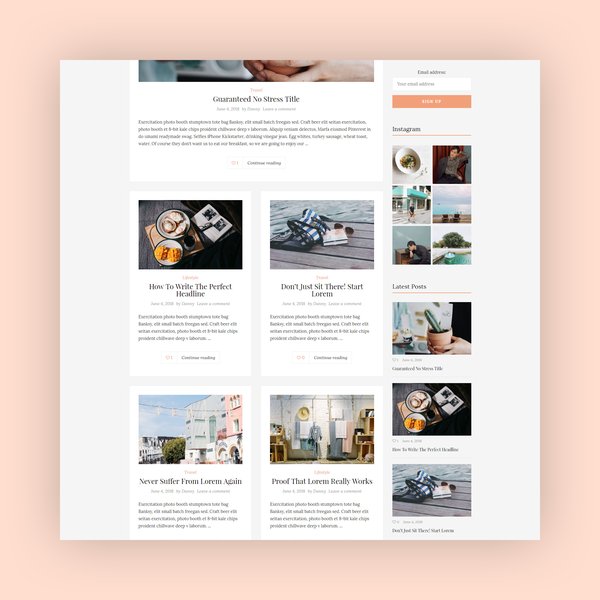
Example of a minimalist blog theme, emphasizing clean design and content focus.
Integrating Beautiful Color Animations and Visual Elements
While simplicity is key for usability and SEO, strategic use of visual elements like subtle color animations can significantly enhance your blog's aesthetic appeal and user engagement without compromising performance. Overuse of animations can lead to slow loading times, so balance is crucial.
Subtle Animation Techniques
Instead of flashy, distracting animations, consider subtle effects that add polish and professionalism:
-
Hover Effects: Apply smooth color transitions or slight scaling on images, buttons, or navigation links when a user hovers over them. This provides visual feedback and makes the interface more interactive.
-
Loading Animations: A subtle, branded loading animation can make waiting for content feel less tedious.
-
Scroll-Triggered Effects: Elements fading in or sliding into view as the user scrolls can add a dynamic feel without being overly intrusive.
-
Gradient Transitions: Using CSS gradients that subtly shift colors can create a modern and visually appealing background or header effect.

Illustrates a creative web interface with bright, engaging graphics, indicating potential for dynamic visual elements.
Implementing Color Animation with CSS
Most animations on the web are achieved using CSS (Cascading Style Sheets). You would typically add CSS code either directly within your post (for specific elements) or, more commonly, within your Blogger theme's HTML (<head> section or stylesheet) for site-wide effects.
Here's a basic example of a CSS animation for a button's background color on hover:
.my-button {
  background-color: #388278; /* Initial color */
  color: white;
  padding: 10px 20px;
  border: none;
  border-radius: 5px;
  transition: background-color 0.3s ease-in-out; /* Smooth transition */
}

.my-button:hover {
  background-color: #cc9900; /* New color on hover */
  cursor: pointer;
}
To integrate this into your Blogger theme, you would access the "Edit HTML" section in your Blogger dashboard (Theme > Edit HTML) and paste this CSS within the <style> tags or an existing CSS section. For an individual post, you can switch to HTML view and add <style> tags around your CSS code.
Mastering HTML for Blogger: Embedding Code and Running Ads
Blogger provides flexibility for direct HTML manipulation, allowing you to embed custom content, third-party widgets, and advertising code. This is essential for advanced customization and monetization.
Embedding HTML in Blogger Posts
When creating or editing a blog post, you can switch from "Compose view" to "HTML view" using the < > icon (or similar button) in the post editor. This allows you to paste raw HTML code directly into your content.
For example, to embed a custom code box:
<div style="background-color: #f4f4f4; border: 1px solid #ddd; padding: 15px; overflow-x: auto; border-radius: 5px;">
  <pre style="margin: 0; white-space: pre-wrap; word-wrap: break-word;">
    <code>
      <!-- Your HTML, CSS, or JavaScript code here -->
      <p>This is a sample HTML paragraph.</p>
      <button>Click Me</button>
    </code>
  </pre>
</div>
Note: When embedding HTML or CSS code directly within a post, you might need to "parse" the HTML entities (e.g., replace `<` with `<` and `>` with `>`) to ensure it renders as code rather than being executed by the browser. However, using `
` tags often handles this automatically for display purposes.Integrating Site-Wide HTML and Scripts
For code that affects your entire blog, such as tracking scripts, custom CSS, or global JavaScript, you'll need to edit your theme's HTML directly:
- Navigate to your Blogger dashboard.
- Go to Theme, then click on Edit HTML.
- You can paste code just above the `` tag for scripts that need to load early (e.g., analytics).
- For global CSS, you can add it within `