
Unlock Your Blog's Potential: Design a Stunning, SEO-Smart Blogger Theme with Animations & Ads!
Craft a captivating, user-friendly, and profitable Blogger presence with this comprehensive HTML guide.
Creating an exceptional Blogger theme involves more than just aesthetics. It's about blending user experience, search engine optimization (SEO), engaging visuals like color animations, and effective monetization through ads. This guide provides you with the HTML foundation and insights to build a theme that excels in all these areas, making your blog both inviting to readers and discoverable by search engines.
Key Highlights for Your Upgraded Blogger Theme
- SEO-Optimized Structure: Built with semantic HTML and best practices to help your blog rank higher in search results.
- Engaging User Experience: Features a responsive design, clear navigation, and beautiful color animations for enhanced visitor engagement.
- Monetization Ready: Includes designated placeholders and guidance for integrating Google AdSense or other advertisements seamlessly.
The Blueprint for an Outstanding Blogger Theme
A successful Blogger theme is a harmonious blend of several key components. It needs to be discoverable, enjoyable to navigate, visually appealing, and capable of generating revenue if desired. Let's explore these foundational elements.
Core Pillars of an Effective Theme
To truly make an impact, your Blogger theme should be built upon the following pillars:
- Search Engine Friendliness: This is paramount for organic growth. It involves using clean code, ensuring fast loading speeds, implementing responsive design so it looks great on all devices, and utilizing semantic HTML tags that search engines can easily understand.
- User-Centric Design: Your visitors' experience is key. A theme should offer intuitive navigation, excellent readability with well-chosen fonts and contrasts, and be accessible to all users, including those with disabilities.
- Visual Appeal & Engagement: A visually striking theme captures attention. This includes a thoughtful layout, appropriate typography, and dynamic elements like subtle color animations that enhance the user experience without being distracting.
- Monetization Capabilities: For many bloggers, ads are an important income stream. Your theme should support easy integration of ad networks like Google AdSense, with strategically placed ad slots that don't detract from the content.
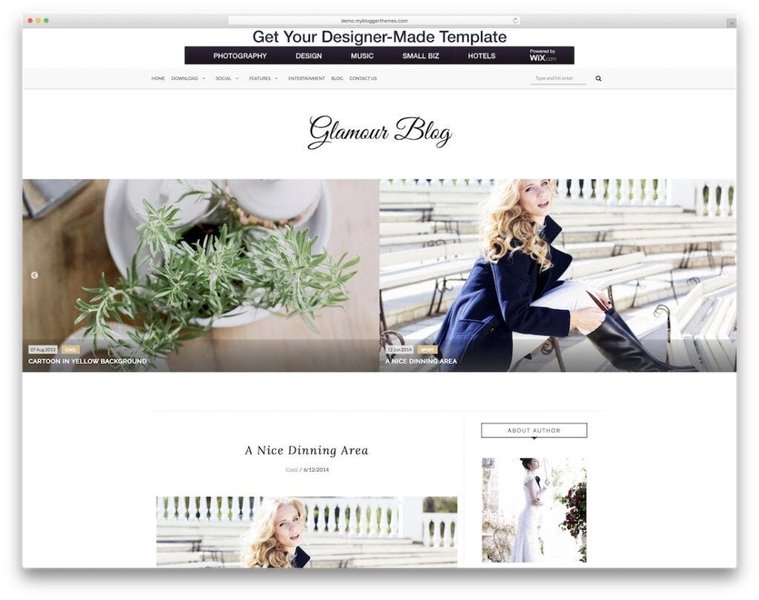
A well-structured and visually appealing blog layout enhances user engagement.
Interactive Theme Feature Analysis
A well-designed theme significantly outperforms a basic template across several key metrics. The radar chart below visualizes a comparative analysis between a standard, out-of-the-box Blogger template and the kind of enhanced, custom theme this guide helps you conceptualize. The "Enhanced Theme" scores higher in areas crucial for blog success, such as SEO friendliness, user experience (UX), animation quality, ease of ad integration, overall customizability, and performance.
This visualization underscores the value of investing time in a theme that is thoughtfully constructed for aesthetics, functionality, and growth.
Crafting Your Blogger Theme: The HTML & CSS Foundation
Below is a sample HTML structure incorporating SEO best practices, placeholders for AdSense, and CSS for a responsive layout with a beautiful background color animation. This code serves as a starting point for your custom Blogger theme. Remember, for full dynamic Blogger functionality (like displaying actual posts), you'd integrate Blogger's specific XML tags (e.g., <data:post.body/>, <b:section>, <b:widget>) within this structure when editing your theme in Blogger's HTML editor.
<!DOCTYPE html>
<html lang="en">
<head>
<meta charset="UTF-8" />
<meta name="viewport" content="width=device-width, initial-scale=1.0" />
<meta name="description" content="Welcome to [Your Blog Name] - Discover interesting articles on [Your Topics]." />
<meta name="keywords" content="blog, [your keyword 1], [your keyword 2], [your keyword 3]" />
<meta name="author" content="[Your Name]" />
<title>[Your Blog Title] - [Your Tagline]</title>
<!-- SEO Friendly canonical URL (Blogger often handles this, but good for static concept) -->
<link rel="canonical" href="https://yourblog.blogspot.com" />
<style>
/* Reset & Basic Styling */
* {
box-sizing: border-box;
margin: 0;
padding: 0;
}
body {
font-family: 'Segoe UI', Tahoma, Geneva, Verdana, sans-serif;
line-height: 1.6;
color: #333; /* Dark grey for text for readability */
background: linear-gradient(-45deg, #ee7752, #e73c7e, #23a6d5, #23d5ab);
background-size: 400% 400%;
animation: gradientBG 18s ease infinite;
min-height: 100vh;
display: flex;
flex-direction: column;
}
@keyframes gradientBG {
0% { background-position: 0% 50%; }
50% { background-position: 100% 50%; }
100% { background-position: 0% 50%; }
}
/* Header Styling */
header {
background: rgba(255, 255, 255, 0.9); /* Semi-transparent white */
padding: 1.5em 2em;
text-align: center;
box-shadow: 0 2px 5px rgba(0,0,0,0.1);
position: sticky; /* Sticky header */
top: 0;
z-index: 1000;
}
header h1 {
font-size: 2.2rem;
color: #2c3e50; /* Dark blue */
text-transform: uppercase;
letter-spacing: 1px;
margin-bottom: 0.2em;
}
header p.tagline {
font-size: 1rem;
color: #7f8c8d; /* Grey for tagline */
}
/* Navigation Styling */
nav {
margin-top: 0.8em;
}
nav a {
color: #3498db; /* Bright blue for links */
margin: 0 12px;
text-decoration: none;
font-weight: 600;
padding: 5px 10px;
border-radius: 4px;
transition: color 0.3s ease, background-color 0.3s ease;
}
nav a:hover, nav a:focus {
color: #2980b9; /* Darker blue on hover */
background-color: rgba(52, 152, 219, 0.1);
text-decoration: none;
}
/* Main Content Area */
main {
flex-grow: 1;
max-width: 960px; /* Standard width for content */
margin: 2em auto;
background: rgba(255, 255, 255, 0.98); /* Slightly more opaque for content readability */
padding: 2em;
border-radius: 8px;
box-shadow: 0 8px 18px rgba(0, 0, 0, 0.1);
}
/* Article/Post Styling */
article {
margin-bottom: 2.5em;
padding-bottom: 1.5em;
border-bottom: 1px solid #ecf0f1; /* Light separator */
}
article:last-child {
border-bottom: none;
}
article h2 {
color: #e74c3c; /* Accent color for post titles */
font-weight: 700;
margin-top: 0;
margin-bottom: 0.5em;
}
article h2 a {
color: inherit;
text-decoration: none;
}
article h2 a:hover {
color: #c0392b; /* Darker accent on hover */
}
article p {
font-size: 1.05em;
color: #555; /* Slightly lighter grey for paragraph text */
margin-bottom: 1em;
}
.post-meta {
font-size: 0.9em;
color: #95a5a6; /* Meta information color */
margin-bottom: 1em;
}
/* Ad Container Styling */
.ad-container {
margin: 2em auto;
padding: 1em;
text-align: center;
background-color: #f9f9f9; /* Light background for ad area */
border: 1px dashed #ddd;
border-radius: 4px;
max-width: 728px; /* Common ad width */
}
.ad-container p.ad-label {
font-size: 0.8em;
color: #aaa;
margin-bottom: 5px;
}
/* Footer Styling */
footer {
background: rgba(44, 62, 80, 0.95); /* Dark blue-grey for footer */
text-align: center;
padding: 1.5em;
font-size: 0.9em;
color: #ecf0f1; /* Light text for footer */
box-shadow: 0 -2px 5px rgba(0,0,0,0.1);
}
footer a {
color: #3498db;
text-decoration: none;
}
footer a:hover {
color: #5dade2;
}
/* Responsive Design Adjustments */
@media (max-width: 768px) {
main {
margin: 1em;
padding: 1.5em;
}
header h1 {
font-size: 1.8rem;
}
nav a {
display: block;
margin: 8px 0;
}
}
@media (max-width: 480px) {
header h1 {
font-size: 1.5rem;
}
article p {
font-size: 1em;
}
}
</style>
</head>
<body>
<header>
<h1>[Your Blog Title]</h1>
<p class="tagline">[Your Awesome Tagline Here!]</p>
<nav aria-label="Primary navigation">
<a href="#home" tabindex="0">Home</a>
<a href="#about" tabindex="0">About</a>
<a href="#categories" tabindex="0">Categories</a>
<a href="#contact" tabindex="0">Contact</a>
</nav>
</header>
<main>
<!-- AdSense Ad Placeholder: Top of Content -->
<div class="ad-container" aria-label="Advertisement">
<p class="ad-label">Advertisement</p>
<!-- Replace with your actual AdSense code -->
<ins class="adsbygoogle"
style="display:block; text-align:center;"
data-ad-client="ca-pub-YOUR_ADSENSE_PUBLISHER_ID"
data-ad-slot="YOUR_AD_SLOT_ID"
data-ad-format="auto"
data-full-width-responsive="true"></ins>
<script>
(adsbygoogle = window.adsbygoogle || []).push({});
</script>
<!-- End AdSense code -->
</div>
<article>
<h2><a href="#">Sample Post: Mastering SEO for Your Blog</a></h2>
<p class="post-meta">Published on May 23, 2025 by [Your Name]</p>
<p>This is a sample blog post demonstrating the theme's structure. Content should be engaging, well-structured, and optimized with relevant keywords. The captivating background animation adds a modern touch without compromising readability. Remember to replace this static text with dynamic content from your Blogger posts using Blogger's template tags.</p>
<p>Further discussion on the topic, including tips and tricks for improving your blog's visibility on search engines...</p>
</article>
<article>
<h2><a href="#">The Art of Web Design: Colors and Animations</a></h2>
<p class="post-meta">Published on May 20, 2025 by [Your Name]</p>
<p>This post could explore how subtle animations and a well-chosen color palette can significantly enhance user experience. Good design makes content more enjoyable to consume.</p>
</article>
<!-- AdSense Ad Placeholder: Between Posts or End of Content -->
<div class="ad-container" aria-label="Advertisement">
<p class="ad-label">Advertisement</p>
<!-- Replace with your actual AdSense code -->
<ins class="adsbygoogle"
style="display:block; text-align:center;"
data-ad-client="ca-pub-YOUR_ADSENSE_PUBLISHER_ID"
data-ad-slot="ANOTHER_AD_SLOT_ID"
data-ad-format="auto"
data-full-width-responsive="true"></ins>
<script>
(adsbygoogle = window.adsbygoogle || []).push({});
</script>
<!-- End AdSense code -->
</div>
</main>
<footer>
<p>© 2025 [Your Blog Name]. All Rights Reserved. Theme by [Your Name/Brand].</p>
<p><a href="#privacy">Privacy Policy</a> | <a href="#terms">Terms of Service</a></p>
</footer>
<!-- Google AdSense Core Script (place before closing </body> tag for better performance) -->
<script async src="https://pagead2.googlesyndication.com/pagead/js/adsbygoogle.js?client=ca-pub-YOUR_ADSENSE_PUBLISHER_ID"
crossorigin="anonymous"></script>
</body>
</html>
Implementing in Blogger
To use this code in Blogger:
- Go to your Blogger Dashboard → Theme.
- Click the three dots (or arrow) next to "Customize" and select "Edit HTML."
- Backup your existing theme first! This is crucial.
- Replace the existing HTML with the code provided above.
- Replace placeholders like
[Your Blog Title],ca-pub-YOUR_ADSENSE_PUBLISHER_ID, andYOUR_AD_SLOT_IDwith your actual information. - For dynamic content (like your blog posts), you'll need to learn about Blogger's specific tags (e.g.,
<b:loop values='data:posts' var='post'> ... <data:post.body/> ... </b:loop>) and integrate them into the<main>section where the sample articles are. - Save and preview your theme.
Visualizing Your Theme's Architecture
A mindmap can help visualize the interconnected components of an effective Blogger theme. This diagram illustrates how various elements contribute to the overall success of your blog, from SEO foundations to user engagement strategies and monetization.
This mindmap highlights that a great theme isn't just about one feature, but the synergy of many well-executed elements.
Deep Dive into Blogger Theme Creation
For those looking to understand the intricacies of creating a Blogger template from the ground up, including the specific XML structure and Blogger data tags, the following video offers a comprehensive full course. It covers converting a design into a functional Blogger theme.
Full course on creating a Blogger template from scratch.
This video provides valuable insights into the more advanced aspects of Blogger theme development, which go beyond the static HTML example provided earlier and delve into making your theme truly dynamic with Blogger's platform features.
Key SEO Practices for Your Blogger Theme
Ensuring your theme is SEO-friendly from the ground up is crucial for visibility. The table below summarizes essential SEO practices and their relevance to your Blogger theme's design and structure.
| Practice | Description | Impact on Blogger Theme |
|---|---|---|
| Responsive Design | Ensures your blog adapts seamlessly to all screen sizes (desktops, tablets, mobiles). | Crucial for user experience (UX) and Google's mobile-first indexing. A core theme requirement. |
| Fast Loading Speed | Achieved through optimized images, minified CSS/JavaScript, and efficient code. | Reduces bounce rates and is a significant ranking factor. Lightweight themes perform better. |
| Semantic HTML | Correct usage of HTML5 tags like <header>, <nav>, <main>, <article>, <aside>, and <footer> to structure content. |
Helps search engines understand the content's hierarchy and context on your pages. |
| Meta Tags | Unique and descriptive title tags and meta descriptions for each page/post. | Provides context to search engines and influences click-through rates from search results. Blogger often handles these dynamically. |
| Image SEO (Alt Text) | Providing descriptive alt text for all images. | Improves accessibility for visually impaired users and helps search engines index your images. |
| Clean and Valid Code | Well-organized, error-free HTML and CSS that adheres to web standards. | Enhances crawlability for search engine bots and improves theme maintainability. |
| Clear Navigation | Intuitive menu structure and internal linking. | Improves user engagement and helps distribute link equity throughout your blog. |
| Mobile-Friendliness | Ensuring touch elements are appropriately sized, text is readable without zooming on small screens. | Essential for mobile search rankings and overall user satisfaction. |
By integrating these SEO practices directly into your theme's design and code, you lay a strong foundation for your blog's online visibility and success.
Frequently Asked Questions (FAQ)
How do I make my Blogger theme truly responsive?
@media rules) to adjust styles for different screen sizes. The provided HTML template includes a basic viewport meta tag and some media queries as a starting point.What's the best way to add color animations without slowing down my blog?
@keyframes) and transitions (transition property) as they are generally more performant than JavaScript-based animations for simple effects. Animate properties that are cheap to render, like transform and opacity. The background gradient animation in the sample code is a CSS-only effect designed to be visually appealing yet relatively lightweight. Avoid overly complex or numerous animations.How can I ensure my AdSense ads display correctly and don't ruin the user experience?
Is it difficult to integrate Blogger's dynamic tags (like post content) into this HTML structure?
<data:post.body/>, <b:widget id='Blog1' type='Blog'>). You would typically replace the static content in the sample HTML (like the sample <article> sections) with Blogger's loop structures and data tags within the Blogger Theme HTML editor. The embedded YouTube video provides a good starting point for learning this.How important are semantic HTML tags for SEO on Blogger?
<header>, <nav>, <main>, <article>, <aside>, and <footer> give structural meaning to your content. This helps search engines understand the organization and importance of different parts of your page, which can positively impact your SEO rankings. The provided HTML template uses these tags.Conclusion
Developing a Blogger theme that is public-friendly, SEO-optimized, features beautiful color animations, and supports advertisements is a rewarding endeavor. By focusing on clean HTML, thoughtful CSS, responsive design, and strategic ad placement, you can create a blog that not only looks fantastic but also performs exceptionally well. The provided HTML code and guidelines offer a solid foundation. Remember to adapt it to Blogger's specific XML structure for full dynamic functionality, and always prioritize user experience and SEO best practices. With these tools, you're well on your way to crafting a truly outstanding Blogger presence.
Recommended Further Exploration
- Learn how to optimize images for faster loading on Blogger themes to improve performance and SEO.
- Discover advanced CSS animation techniques that can be applied to web design for more sophisticated visual effects.
- Explore the best practices for Google AdSense placement to maximize revenue while maintaining a positive user experience.
- Find a step-by-step guide on converting general HTML/CSS templates into fully functional Blogger XML themes.
Referenced Search Results
 wordpress.com