
Unraveling Cisco's Spanning Tree Protocol: Your Key to Loop-Free Networks
Discover how STP safeguards your network integrity by preventing disastrous loops and ensuring robust redundancy.
The Spanning Tree Protocol (STP) is a fundamental Layer 2 link management protocol designed to prevent broadcast storms and other detrimental effects of network loops in Ethernet networks with redundant paths. Cisco Systems, a leading provider of networking equipment, has implemented and enhanced STP in various ways to ensure stable, resilient, and efficient network operations. Understanding Cisco's Spanning Tree implementations is crucial for any network professional.
Key Highlights of Cisco STP
- Loop Prevention is Paramount: STP's primary role is to create a single, loop-free logical path through a switched network by blocking redundant links, thus preventing broadcast storms and MAC address table instability.
- Redundancy and Resilience: While preventing active loops, STP allows for physical redundancy. If an active path fails, STP automatically unblocks a previously blocked path to restore connectivity.
- Cisco's Enhancements: Cisco offers several STP variants, with Rapid Per-VLAN Spanning Tree Plus (Rapid PVST+) being a common default. These variants provide faster convergence times and per-VLAN spanning tree instances for greater flexibility and control.
- Strategic Configuration: Proper configuration, including the deliberate election of a root bridge and the use of features like PortFast and BPDU Guard, is essential for an optimized and secure STP deployment.
The Genesis of Spanning Tree: Combating Network Loops
The Problem: The Peril of Redundant Paths
In switched Ethernet networks, redundancy is often built in by connecting switches with multiple links. While this enhances fault tolerance, it can also create Layer 2 loops if not managed. When loops exist without a control mechanism like STP:
- Broadcast Storms: Broadcast frames (and unknown unicast or multicast frames) are forwarded out of all ports except the one they arrived on. In a loop, these frames circulate endlessly, consuming bandwidth and switch CPU resources, potentially crippling the network.
- MAC Address Table Instability: A switch learns MAC addresses based on the source MAC address of incoming frames. If a frame from a host arrives on different ports due to a loop, the switch keeps re-learning the MAC address on alternating ports, leading to instability.
- Multiple Frame Transmissions: End devices may receive multiple copies of the same frame, causing application-level problems.
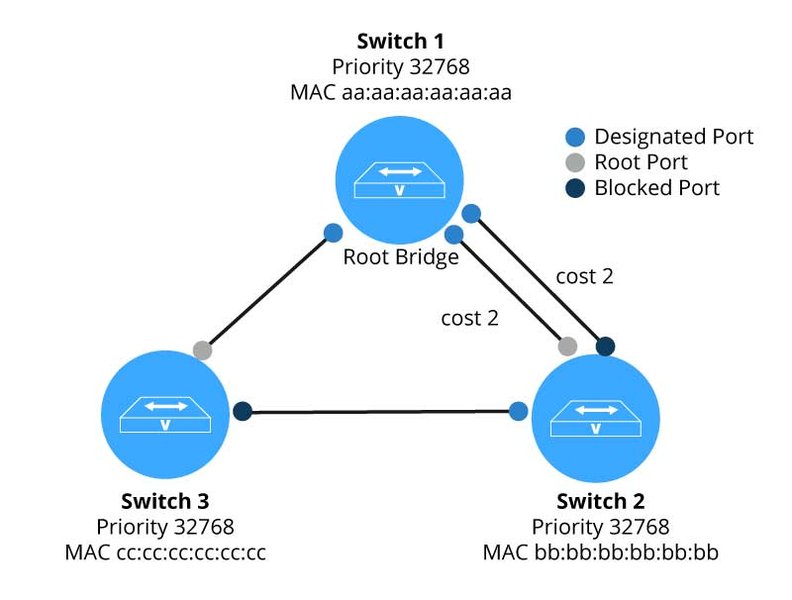
STP creates a loop-free topology by logically blocking redundant paths.
The Solution: STP's Loop-Free Logical Topology
STP addresses these issues by creating a tree structure (a spanning tree) that reaches all switches in a Layer 2 domain. It does this by intelligently selecting which switch ports should forward traffic and which should be put into a blocked state to break any potential loops, while still allowing for redundant paths to be available in case of a primary path failure.
How STP Achieves This
STP operates through a series of calculations and message exchanges:
- Electing a Root Bridge: One switch in the network is elected as the "root bridge." This switch serves as the reference point for all path calculations.
- Determining Best Paths: Each non-root switch determines the single best path to reach the root bridge. The port on this path is called the "Root Port."
- Selecting Designated Ports: On each network segment, one switch port is elected as the "Designated Port." This port is responsible for forwarding traffic onto that segment towards the root bridge.
- Blocking Redundant Paths: All other ports that could create a loop are placed in a "Blocking" state. These ports do not forward user data frames but will listen to STP messages (BPDUs).
Core Components and Concepts of STP
To understand STP's operation, several key components and concepts must be grasped:
Bridge Protocol Data Units (BPDUs)
BPDUs are special frames exchanged between switches to share information about the STP topology. They contain crucial data like Bridge IDs and path costs, enabling switches to collaboratively build the spanning tree. Configuration BPDUs are sent by the root bridge and propagated through the network, while Topology Change Notification (TCN) BPDUs are used to signal network changes.
Bridge ID (BID)
The Bridge ID is a unique identifier for each switch participating in STP. It's an 8-byte value consisting of two parts:
- Bridge Priority (2 bytes): A configurable value (0-61440, in increments of 4096, default is 32768). A lower numerical value indicates a higher priority.
- MAC Address (6 bytes): A unique MAC address of the switch. If priorities are equal, the switch with the lowest MAC address wins.
The switch with the numerically lowest BID becomes the root bridge.
Path Cost
STP assigns a cost to each link (port) based typically on its bandwidth. Higher bandwidth links have lower costs. The total path cost to the root bridge is the sum of the costs of all links along that path. Switches use these costs to determine the shortest path to the root bridge.
Common default path costs (short mode):
- 10 Mbps: Cost 100
- 100 Mbps: Cost 19
- 1 Gbps: Cost 4
- 10 Gbps: Cost 2
STP Port States
Switch ports in an STP environment transition through several states. The original IEEE 802.1D STP defines the following states:
| State | Description | Forwards Data? | Learns MACs? | Listens to BPDUs? | Sends BPDUs? |
|---|---|---|---|---|---|
| Disabled | Port is administratively down or faulty. Does not participate in STP. | No | No | No | No |
| Blocking | Port is blocked to prevent a loop. It can only receive BPDUs. | No | No | Yes | No |
| Listening | Transitional state after blocking. The port processes BPDUs and prepares to forward, ensuring no loops are created before it starts learning MAC addresses. Lasts for the Forward Delay timer (default 15s). | No | No | Yes | Yes |
| Learning | Transitional state. The port processes BPDUs and builds its MAC address table but does not forward user frames. Lasts for the Forward Delay timer (default 15s). | No | Yes | Yes | Yes |
| Forwarding | Port is fully operational, forwarding user frames and processing BPDUs. | Yes | Yes | Yes | Yes |
Rapid Spanning Tree Protocol (RSTP) simplifies these states into Discarding, Learning, and Forwarding for faster convergence.
STP Port Roles
STP assigns roles to ports to build the loop-free topology:
- Root Port (RP): On a non-root switch, this is the single port with the lowest path cost to the root bridge. It forwards traffic towards the root.
- Designated Port (DP): For each network segment (link), one port is elected as the designated port. This port forwards traffic onto that segment from the direction of the root bridge. The root bridge's ports are all designated ports.
- Non-Designated Port (NDP) / Blocked Port: Ports that are neither Root Ports nor Designated Ports are put into a blocking state to prevent loops. In RSTP, these are further refined into Alternate Ports (backup path to root bridge) and Backup Ports (backup path for a segment).
Cisco's Diverse STP Implementations
Cisco supports the standard STP versions and has also developed proprietary enhancements. Understanding these variants is key to leveraging STP effectively in Cisco environments.
Classic STP (IEEE 802.1D)
The original Spanning Tree Protocol. While foundational, its convergence time (30-50 seconds) after a topology change is considered slow for modern networks.
Rapid STP (RSTP - IEEE 802.1w)
An evolution of STP that significantly reduces convergence time, often to sub-second levels. RSTP achieves this through optimized BPDU handling, defined port roles (Root, Designated, Alternate, Backup), and faster state transitions.
Per-VLAN Spanning Tree Plus (PVST+)
A Cisco proprietary enhancement that runs a separate STP instance for each VLAN. This allows for more granular traffic engineering and load balancing, as different VLANs can have different root bridges and paths. PVST+ is an enhancement of PVST to support IEEE 802.1Q VLAN trunking.
Rapid PVST+
Combines the benefits of RSTP's fast convergence with PVST+'s per-VLAN operation. This is the default STP mode on many modern Cisco Catalyst switches and is generally recommended for most Cisco enterprise networks.
Multiple Spanning Tree Protocol (MSTP - IEEE 802.1s)
An IEEE standard that allows multiple VLANs to be mapped to a smaller number of spanning tree instances. This reduces the CPU and memory overhead on switches compared to running one instance per VLAN (as in PVST+), especially in networks with a large number of VLANs, while still providing load balancing capabilities. MSTP requires careful planning of MST regions, where switches share a common MST configuration (name, revision number, and VLAN-to-instance mapping).
Comparing STP Variants
The choice of STP variant depends on network requirements, vendor interoperability, and desired features. The radar chart below offers a comparative overview of key characteristics. "Resource Efficiency" indicates lower CPU/memory usage, "Ease of Configuration" suggests simpler setup, and higher values are generally better for each dimension.
Configuring STP on Cisco Switches: A Practical Guide
Configuring STP on Cisco switches is primarily done through the Command Line Interface (CLI). Proper configuration is vital for network stability and performance.
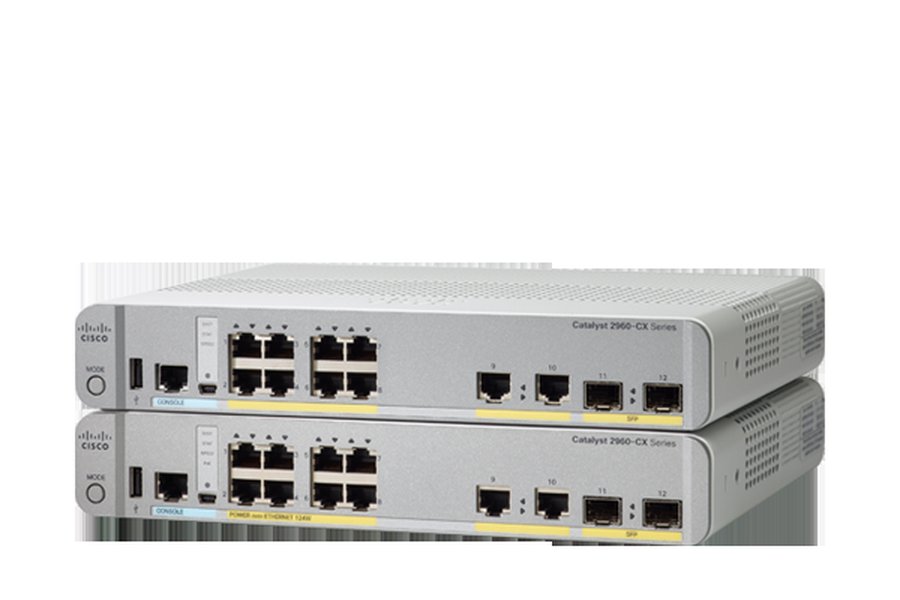
Cisco Catalyst switches offer robust STP capabilities.
Accessing the Switch and Entering Configuration Mode
First, connect to the switch console or use SSH/Telnet. Then, enter privileged EXEC mode and global configuration mode:
Switch> enable
Switch# configure terminal
Switch(config)#
Setting the STP Mode
Cisco switches support various STP modes. Rapid PVST+ is often the default and recommended mode for many deployments.
Switch(config)# spanning-tree mode rapid-pvstOther modes include pvst (for PVST+), mst (for MSTP), or rstp (for standard RSTP, though less common on Cisco devices than Rapid PVST+).
Influencing Root Bridge Election
It's best practice to deterministically choose your root bridge(s) rather than letting the election happen by default. Typically, a powerful core or distribution switch is chosen.
Setting Bridge Priority
You can set the bridge priority for specific VLANs (if using PVST+ or Rapid PVST+). Lower values are more preferred.
Switch(config)# spanning-tree vlan 10 priority 4096Priority values must be in increments of 4096 (e.g., 0, 4096, 8192, ..., 61440).
Using Root Primary/Secondary Macros
Cisco provides convenient macros to set a switch as the primary or secondary root bridge for a VLAN. The primary command sets a low priority (e.g., 24576 if current root has default 32768), and secondary sets a slightly higher priority (e.g., 28672), serving as a backup.
Switch(config)# spanning-tree vlan 10 root primary
Switch(config)# spanning-tree vlan 20 root secondary
Configuring Port-Level STP Features
Several interface-level commands can optimize STP behavior.
Switch(config)# interface GigabitEthernet0/1PortFast
For ports connected to end devices (like PCs, servers, printers) that will never connect to another switch, PortFast allows the port to bypass the Listening and Learning states and transition directly to Forwarding. This speeds up device connectivity.
Switch(config-if)# spanning-tree portfastCaution: Only enable PortFast on access ports. Enabling it on a port connected to another switch can create temporary loops.
BPDU Guard
Often used with PortFast, BPDU Guard disables a PortFast-enabled port if it receives any BPDUs. This protects against misconfigurations or unauthorized switches being connected to edge ports.
Switch(config-if)# spanning-tree bpduguard enableAlternatively, BPDU Guard can be enabled globally on all PortFast-enabled ports:
Switch(config)# spanning-tree portfast bpduguard defaultRoot Guard
Root Guard is enabled on ports where you never expect to see a superior BPDU (i.e., you don't want a switch connected to this port to become the root bridge). If a superior BPDU is received, Root Guard puts the port into a "root-inconsistent" (effectively blocking) state to protect the current root bridge's supremacy.
Switch(config-if)# spanning-tree guard rootAdjusting Port Cost and Priority (Optional)
You can manually influence path selection by adjusting port costs or port priorities for specific VLANs.
Switch(config-if)# spanning-tree vlan 10 cost 10
Switch(config-if)# spanning-tree vlan 10 port-priority 64
Lower port cost is preferred. For port priority (0-240, default 128, in increments of 16), a lower value makes the port more likely to become a designated port if path costs are equal.
Verifying Your STP Configuration
After configuration, always verify the STP status to ensure it's operating as expected.
Switch# show spanning-tree
Switch# show spanning-tree vlan [vlan-id]
Switch# show spanning-tree summary
Switch# show spanning-tree interface [interface-id] detail
These commands provide information about the root bridge, local bridge ID, port states, roles, costs, and timers.
Understanding STP Timers
STP relies on several timers, especially in its classic 802.1D form. While RSTP makes some of these less critical for convergence, they are still part of the protocol.
- Hello Time: The interval between configuration BPDUs sent by the root bridge (default: 2 seconds).
- Forward Delay: The time a port spends in the Listening and Learning states (default: 15 seconds each, total 30 seconds).
- Max Age (Maximum Age): The maximum time a switch port will store BPDU information before discarding it if no new BPDUs are received (default: 20 seconds). If a switch doesn't hear BPDUs from the root for Max Age, it assumes the root is down and initiates a reconvergence.
These timers are typically left at their default values unless there's a specific design reason to change them, and any changes must be made consistently across the STP domain.
Visualizing STP Core Concepts: A Mindmap
The following mindmap provides a hierarchical view of the core concepts surrounding Spanning Tree Protocol, helping to illustrate its purpose, key components, operational processes, and the common variants found in Cisco environments. This visual representation can aid in understanding how these elements interrelate to achieve a loop-free and redundant network.
Priority + MAC"] id2c["BPDUs
Configuration & TCN"] id2d["Path Cost"] id2e["Port States
Blocking, Listening,
Learning, Forwarding"] id2f["Port Roles
Root, Designated, Blocked"] id3["Operational Process"] id3a["Root Bridge Election
Lowest BID"] id3b["Root Port Selection
Lowest Path Cost to Root"] id3c["Designated Port Selection
Lowest Path Cost on Segment"] id3d["Blocking Redundant Paths"] id4["Cisco STP Variants"] id4a["STP (802.1D)"] id4b["RSTP (802.1w)"] id4c["PVST+"] id4d["Rapid PVST+
(Common Default)"] id4e["MSTP (802.1s)"] id5["Key Configuration Areas"] id5a["Mode Selection (e.g., Rapid PVST+)"] id5b["Root Bridge Placement (Priority/Macros)"] id5c["Port Features
PortFast, BPDU Guard, Root Guard"]
This mindmap encapsulates the essential aspects of STP, from its fundamental goal of preventing network loops to the specific mechanisms and Cisco variants used in modern networks. Each branch represents a critical area of knowledge for effectively deploying and managing STP.
Enhancing Your Understanding: STP Video Tutorial
For a visual and auditory explanation of Spanning Tree Protocol concepts, the following video provides an excellent introduction suitable for beginners. It covers the "why" and "how" of STP, explaining its variations and benefits in a clear, concise manner. Watching this can help solidify your understanding of the topics discussed.
This Cisco Tech Talk delves into the distinct features and benefits of each Spanning Tree Protocol variation, making it a valuable resource for anyone looking to grasp the fundamentals of STP as implemented by Cisco.
Frequently Asked Questions (FAQ) about Cisco STP
What happens if STP is disabled in a network?
If STP is disabled in a network with redundant physical links between switches, Layer 2 loops can form. This typically leads to severe network degradation due to:
- Broadcast storms: Broadcast frames endlessly circulate and multiply, consuming all available bandwidth and switch CPU resources.
- MAC address table instability: Switches continuously update MAC address entries as frames from the same source arrive on different ports, leading to incorrect forwarding decisions.
- Multiple frame copies: End devices may receive multiple copies of the same unicast frames, causing application errors.
How does STP handle link failures?
STP is designed to provide path redundancy. When an active link in the spanning tree fails, switches detect this topology change (e.g., by missing expected BPDUs). STP then recalculates the topology. A previously blocked port on a redundant path may transition to the forwarding state to restore connectivity.
In classic STP (802.1D), this reconvergence can take 30-50 seconds. With Rapid STP (RSTP) or Cisco's Rapid PVST+, convergence is much faster, often sub-second, because alternate paths are pre-calculated and can transition to forwarding almost immediately.
Can STP work across different switch vendors?
Yes, the IEEE standard versions of STP are designed for interoperability:
- IEEE 802.1D (Classic STP)
- IEEE 802.1w (Rapid STP - RSTP)
- IEEE 802.1s (Multiple STP - MSTP)
However, Cisco's proprietary versions like PVST+ and Rapid PVST+ might have compatibility issues or limited functionality when interacting with non-Cisco switches. For instance, PVST+ sends BPDUs on a per-VLAN basis using a specific multicast address that other vendors might not understand, or they might only participate in the Common Spanning Tree (CST) on VLAN 1.
What is the main difference between PVST+ and Rapid PVST+?
Both PVST+ and Rapid PVST+ are Cisco proprietary protocols that run a separate spanning tree instance for each VLAN. The primary difference lies in their underlying STP standard and convergence speed:
- PVST+ is based on the original IEEE 802.1D STP. Its convergence time after a network topology change is slow, typically 30 to 50 seconds (due to Max Age and Forward Delay timers).
- Rapid PVST+ is based on the IEEE 802.1w RSTP standard. It offers significantly faster network reconvergence, often within a few seconds or even sub-second. This is achieved through mechanisms like alternate ports, backup ports, and direct negotiation between switches.
Why is a low Bridge ID preferred for the Root Bridge?
The switch with the numerically lowest Bridge ID (BID) in the network is elected as the Root Bridge. The BID is a combination of a configurable Bridge Priority and the switch's MAC address.
- A lower numerical Bridge Priority value indicates a higher preference to become the root.
- If priorities are equal, the switch with the lowest MAC address becomes the root.
Recommended Further Exploration
- How can I troubleshoot common Spanning Tree Protocol issues in Cisco networks?
- What are the security implications of Spanning Tree Protocol and how can they be mitigated with features like BPDU Guard and Root Guard?
- Can you compare and contrast MSTP with Rapid PVST+ for large enterprise networks?
- Could you explain the detailed BPDU format and the exchange process specifically within Rapid Spanning Tree Protocol (RSTP)?
References
Last updated May 12, 2025