
Unlocking Connectivity: Cloudflare Workers and Service Integrations
Seamlessly Connecting Your Edge Logic to Cloudflare's Ecosystem
Key Highlights of Cloudflare Workers Integrations
- Edge-Native Performance: Cloudflare Workers deploy serverless code globally, minimizing latency and providing near-instant responses by executing code at the edge of Cloudflare's network, close to users.
- Extensive Service Ecosystem: Workers integrate natively with a broad range of Cloudflare services like KV, Durable Objects, R2, D1, and AI, offering powerful building blocks for full-stack applications.
- Flexible Connectivity: Beyond Cloudflare's internal services, Workers can connect to external APIs and databases via HTTP fetch, new TCP sockets, and secure credential management, enabling diverse application architectures.
Cloudflare Workers offer a powerful serverless platform that allows developers to deploy JavaScript, TypeScript, and even Python code directly onto Cloudflare's global network. This edge-native execution provides significant advantages in performance, reliability, and scalability. A core strength of Cloudflare Workers lies in their ability to seamlessly integrate with other Cloudflare services and external platforms, enabling developers to build complex, full-stack applications with ease. This comprehensive guide explores how Cloudflare Workers connect to various Cloudflare services and other third-party integrations, offering practical insights and code examples.
The Power of Cloudflare Workers at the Edge
Why Edge Computing with Workers Matters
Cloudflare Workers operate as a JavaScript edge runtime on Cloudflare's Content Delivery Network (CDN). This means your code runs within milliseconds of your users worldwide, significantly reducing latency and eliminating cold starts often associated with traditional serverless platforms. The design is inspired by browser Service Workers, allowing for interception, modification, or direct response to web requests before they even hit an origin server.
The immediate deployment and global reach of Workers make them ideal for a wide array of use cases, from simple static sites to complex full-stack applications. This architecture provides exceptional performance and reliability, as the code executes closest to the end-user, leveraging Cloudflare's vast network of data centers.
Core Principles of Workers Integration
Integrations are a key feature of Cloudflare Workers. They allow Workers to connect to various services, enabling rich functionality with just a few lines of code. This is primarily achieved through "Bindings," which expose external services like databases, APIs, and storage directly to your Worker code.
When integrating with Cloudflare services, developers can expect automated handling of connection strings and secure credential management. For third-party services, Workers facilitate connections via standard HTTP requests using the fetch API, and more recently, through direct TCP socket connections for database and other TCP-based service interactions.
Integrating with Cloudflare Services
Cloudflare Workers are designed to work harmoniously with other Cloudflare products, providing a cohesive ecosystem for building powerful applications. These integrations are often simplified through "Bindings," which allow Workers to access these services directly.
KV Storage: Key-Value Pair Persistence
Cloudflare KV (Key-Value) is a highly distributed key-value store designed for extremely low-latency reads. It's ideal for caching frequently accessed data or storing configuration information. Connecting a Worker to KV is straightforward using bindings.
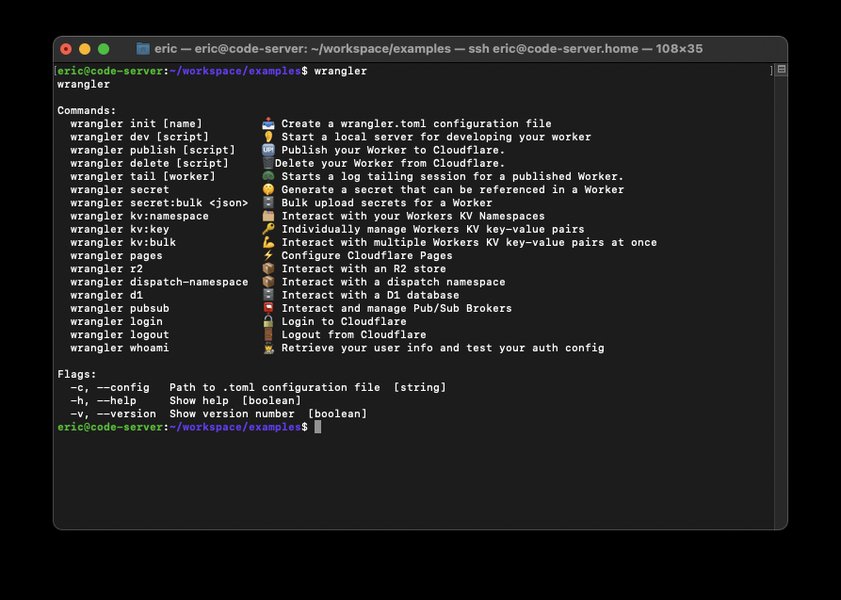
Wrangler commands facilitate local development and deployment, including KV bindings.
To integrate, you first define a KV namespace in your wrangler.toml file and then bind it to your Worker. Here's a concise example of a Worker interacting with KV:
// wrangler.toml
// [[kv_namespaces]]
// binding = "MY_KV_NAMESPACE"
// id = "<YOUR_KV_NAMESPACE_ID>"

// src/index.js
export default {
  async fetch(request, env) {
    const key = "myKey";
    const value = "Hello from Cloudflare KV!";

    // Write to KV
    await env.MY_KV_NAMESPACE.put(key, value);

    // Read from KV
    const storedValue = await env.MY_KV_NAMESPACE.get(key);

    return new Response(<code>Stored and retrieved: ${storedValue});
  },
};
Durable Objects: Stateful Serverless
Durable Objects provide strongly consistent storage and coordination for your Workers. They enable you to build real-time, stateful applications at the edge. Each Durable Object has a globally unique ID and manages its own state.
Integrating with Durable Objects involves declaring them in your wrangler.toml and then accessing them from your Worker using bindings:
// wrangler.toml
// [[durable_objects.bindings]]
// name = "MY_DO"
// class_name = "MyDurableObject"

// src/index.js (Worker)
export default {
  async fetch(request, env) {
    let id = env.MY_DO.idFromName("my-unique-object");
    let obj = env.MY_DO.get(id);
    let response = await obj.fetch(request.url);
    return response;
  },
};

// src/durableobject.js (Durable Object class)
export class MyDurableObject {
  constructor(state, env) {
    this.state = state;
  }

  async fetch(request) {
    // Implement your Durable Object logic here
    let count = (await this.state.storage.get("count")) || 0;
    count++;
    await this.state.storage.put("count", count);
    return new Response(<code>This object has been accessed ${count} times.);
  }
}
R2: Object Storage for the Edge
Cloudflare R2 offers S3-compatible object storage without egress fees. It's designed for global scale and high performance, making it an excellent choice for storing static assets, user-generated content, and more. R2 integrates seamlessly with Workers, allowing developers to handle authentication, manage request routing, and deploy edge functions across Cloudflare's vast network.
// wrangler.toml
// [[r2_buckets]]
// binding = "MY_R2_BUCKET"
// bucket_name = "my-unique-bucket"

// src/index.js
export default {
  async fetch(request, env) {
    const key = "my-file.txt";
    const content = "This is a file stored in R2.";

    // Write to R2
    await env.MY_R2_BUCKET.put(key, content);

    // Read from R2
    const object = await env.MY_R2_BUCKET.get(key);
    const retrievedContent = await object.text();

    return new Response(<code>Retrieved from R2: ${retrievedContent});
  },
};
D1: Serverless SQL Database
Cloudflare D1 is a serverless SQL-based database built on SQLite, optimized for global access from Workers. It simplifies the process of building data-driven applications at the edge. Cloudflare automatically handles connection strings and adds them as secrets to your Worker via Database Integrations.
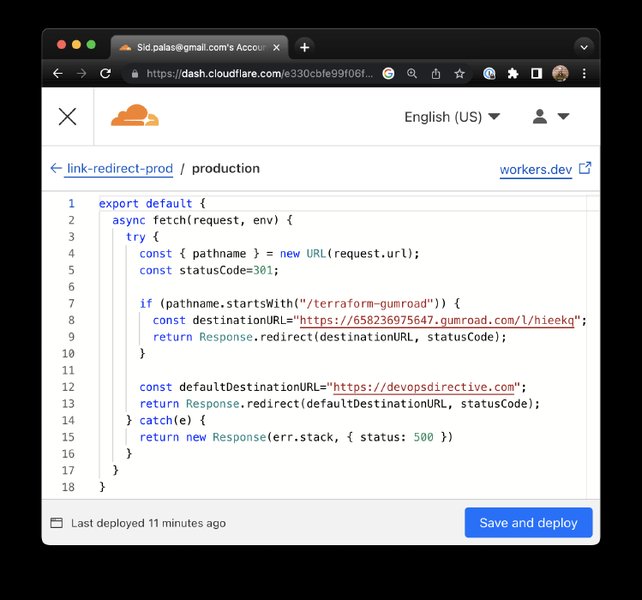
The Cloudflare dashboard provides a streamlined interface for managing Workers and their integrations.
// wrangler.toml
// [[d1_databases]]
// binding = "DB"
// database_name = "my-database"
// database_id = "<YOUR_DATABASE_ID>"

// src/index.js
export default {
  async fetch(request, env) {
    const { pathname } = new URL(request.url);

    if (pathname === "/insert") {
      await env.DB.prepare("INSERT INTO users (name) VALUES (?)")
        .bind("Alice")
        .run();
      return new Response("User 'Alice' inserted.");
    } else if (pathname === "/query") {
      const { results } = await env.DB.prepare("SELECT * FROM users").all();
      return new Response(JSON.stringify(results), {
        headers: { "Content-Type": "application/json" },
      });
    }

    return new Response("Hello Cloudflare D1!");
  },
};
Workers AI: AI Inference at the Edge
Workers AI allows you to run large language models (LLMs), generate images, and perform other AI inference tasks directly on Cloudflare's global network. This brings AI capabilities closer to your users, reducing latency and cost.
Here’s a basic example of using Workers AI to perform text generation:
// src/index.js
import { Ai } from "@cloudflare/ai";

export default {
  async fetch(request, env) {
    const ai = new Ai(env.AI);
    const response = await ai.run(
      "@cf/meta/llama-2-7b-chat-int8",
      {
        prompt: "What is the capital of France?",
      }
    );

    return new Response(JSON.stringify(response), {
      headers: { "Content-Type": "application/json" },
    });
  },
};
Service Bindings: Worker-to-Worker Communication
Service bindings enable one Worker to call into another without going through a publicly accessible URL. This allows for building composable, distributed applications where different Workers handle specific functionalities (microservices architecture). This eliminates the need for HTTP requests between internal Workers, reducing latency and simplifying internal communication.
// wrangler.toml (Worker A)
// [[service_bindings]]
// name = "SERVICE_B"
// service = "my-service-b"

// src/worker-a.js
export default {
  async fetch(request, env) {
    const response = await env.SERVICE_B.fetch("https://service-b.example.com/greet");
    const text = await response.text();
    return new Response(<code>Worker A received: ${text});
  },
};

// src/worker-b.js (This would be deployed as 'my-service-b')
export default {
  async fetch(request) {
    return new Response("Hello from Service B!");
  },
};
Connecting to External Services and Databases
Beyond Cloudflare's native services, Workers provide robust mechanisms for connecting to external APIs, databases, and other third-party services.
External APIs via Fetch API
The standard Fetch API is the primary way Workers interact with external HTTP endpoints. This allows integration with payment gateways, authentication providers, weather APIs, and virtually any web service.
// src/index.js
export default {
  async fetch(request) {
    const response = await fetch("https://api.example.com/data", {
      headers: {
        "Authorization": "Bearer YOUR_API_KEY", // Use Wrangler secrets for production
      },
    });
    const data = await response.json();
    return new Response(JSON.stringify(data), {
      headers: { "Content-Type": "application/json" },
    });
  },
};
It's crucial to use Wrangler secrets to securely store sensitive credentials like API keys, rather than hardcoding them into your Worker code.
TCP Sockets for Direct Database Connections
A significant advancement in Cloudflare Workers is the connect() API, which enables the creation of outbound TCP sockets. This allows Workers to connect directly to any TCP-based service, including traditional SQL and NoSQL databases like PostgreSQL, MySQL, MongoDB, and Redis that require direct TCP connections.
While many serverless databases offer HTTP APIs that bypass the need for TCP sockets, the connect() API bridges the gap for traditional database systems. For PostgreSQL specifically, Cloudflare recommends using Hyperdrive, which provides connection pooling and query caching over TCP sockets to optimize performance.
// This example is illustrative and requires a specific client library for the database
// src/index.js
export default {
  async fetch(request, env) {
    try {
      // Example: Connecting to a PostgreSQL database via TCP socket (requires a driver)
      // This is a simplified example; actual implementation would use a PostgreSQL client library
      // For PostgreSQL, Hyperdrive is recommended for connection pooling
      const socket = await env.YOUR_TCP_BINDING.connect({ hostname: "your-db-host", port: 5432 });

      // In a real application, you'd use a database client library
      // to send queries and receive results over this socket.
      // For instance, for PostgreSQL, you might use a lightweight client
      // that supports TCP connections.

      // Example of basic write/read to the socket (highly simplified)
      const encoder = new TextEncoder();
      const writer = socket.writable.getWriter();
      await writer.write(encoder.encode("Hello from Worker via TCP!"));
      writer.releaseLock();

      const decoder = new TextDecoder();
      const reader = socket.readable.getReader();
      const { value, done } = await reader.read();
      reader.releaseLock();

      const response = decoder.decode(value);
      socket.close(); // Close the socket when done

      return new Response(<code>TCP Socket Interaction: ${response});
    } catch (error) {
      return new Response(Error connecting via TCP: ${error.message}, { status: 500 });
    }
  },
};
The connect() function returns a TCP socket with both readable and writable streams, allowing for ongoing data exchange. Cloudflare is also working on features like custom certificates and TLS configuration options for TCP connections, further enhancing security and flexibility.
Comparison of Integration Approaches
Understanding the different ways Cloudflare Workers can integrate with services is crucial for choosing the right approach for your application. The table below summarizes the primary integration methods and their typical use cases.
| Integration Method | Description | Typical Use Cases | Advantages | Considerations |
|---|---|---|---|---|
| Cloudflare Bindings (KV, D1, R2, DO, AI) | Direct, optimized connections to other Cloudflare services via environment variables (env object). |
Caching, serverless SQL, object storage, stateful applications, AI inference. | Optimized performance, managed credentials, seamless integration. | Limited to Cloudflare's own services. |
| Fetch API (HTTP/HTTPS) | Standard HTTP requests to external REST APIs or any web endpoint. | Third-party integrations (payment gateways, authentication, external data sources), server-side rendering, proxying. | Universal compatibility with web services, widely understood. | Latency depends on external service location and response times. |
TCP Sockets (connect() API) |
Direct, raw TCP connections to any TCP-based service. | Traditional databases (PostgreSQL, MySQL, Redis), custom network protocols. | Enables connection to services previously inaccessible to Workers, raw data control. | Requires handling low-level protocol details, client libraries needed for databases. |
| Service Bindings | Worker-to-Worker communication without public URL exposure. | Building microservices architectures within Workers, inter-service calls. | Reduced latency for internal calls, simplified dependency management. | Limited to communication between Workers on the same Cloudflare account. |
Understanding Performance and Connectivity Profiles
Cloudflare Workers' ability to connect to various services comes with different performance and complexity profiles. The following radar chart provides an opinionated view of how different integration types stack up across key metrics:
This radar chart illustrates the trade-offs and strengths of each integration method. Cloudflare Bindings and Service Bindings excel in latency and scalability due to their tight integration within Cloudflare's network. The Fetch API offers high flexibility for external services. TCP Sockets unlock new possibilities for direct database connections, though with potentially higher complexity and security considerations for managing credentials and connections. Security is generally high across all methods, particularly when leveraging Wrangler's secret management.
Developing and Deploying Workers
Getting Started with Wrangler CLI
The primary tool for developing, testing, and deploying Cloudflare Workers is Wrangler, the Cloudflare Developer Platform CLI. Wrangler simplifies the entire development lifecycle, from project creation to global deployment. You can create a new Worker project using the create-cloudflare-cli (C3) tool, which installs Wrangler by default.
npm create cloudflare@latest my-worker-project
cd my-worker-project
wrangler dev // Start a local development server
For deployment, simply run wrangler deploy, and your Worker will be live on a *.workers.dev subdomain or a custom domain. Cloudflare Workers also support continuous integration/continuous deployment (CI/CD) pipelines by connecting your project to GitHub or GitLab repositories for automatic builds and deployments.
Building Full-Stack Applications
Cloudflare Workers have evolved to support full-stack application development. You can now host client-side JavaScript, HTML, CSS, fonts, and images directly within a single Worker project. This eliminates the need to choose between Cloudflare Pages for static assets and Workers for backend logic, enabling a unified deployment approach. By configuring your project, you can build and deploy your entire site with a simple wrangler deploy command.
Practical Example: Building a Simple API with Cloudflare Workers
To demonstrate the practical application of Cloudflare Workers and their integration capabilities, let's look at how to build a simple API. This video provides a great hands-on introduction to this process:
This video, "Build a Simple API with Cloudflare Workers," serves as an excellent starting point for beginners. It walks through the process of setting up a basic API using Cloudflare Workers, showcasing their serverless capabilities. The video demonstrates how easily you can get a functional API running on Cloudflare's edge network, highlighting the rapid deployment and global reach that Workers offer. This practical example lays the groundwork for understanding how Workers can act as the backend for various applications, leveraging their ability to connect to other services and respond to requests at the edge.
Frequently Asked Questions (FAQ)
What programming languages can I use with Cloudflare Workers?
Are Cloudflare Workers suitable for heavy computation tasks?
How do Cloudflare Workers handle secrets and sensitive data?
Can Cloudflare Workers replace a traditional backend server?
What are the limitations of Cloudflare Workers?
Conclusion
Cloudflare Workers offer a robust and flexible platform for building high-performance, globally distributed applications. Their native integration with Cloudflare's diverse ecosystem, including KV, Durable Objects, R2, D1, and Workers AI, provides powerful building blocks for complex architectures. Furthermore, the ability to connect to external APIs via standard HTTP requests and, crucially, to traditional databases via the new TCP socket API, significantly expands their utility. By leveraging these integration capabilities, developers can create sophisticated, full-stack solutions that benefit from the speed, reliability, and scalability of Cloudflare's edge network, pushing logic closer to users and enhancing overall application performance.
Recommended Further Exploration
- Explore how to build full-stack applications entirely on Cloudflare Workers.
- Dive into advanced architectural patterns for Cloudflare Workers.
- Learn strategies for optimizing database interactions from Cloudflare Workers.
- Discover how to leverage Cloudflare Workers AI for edge-based AI inference.
References
Last updated May 21, 2025