
Comprehensive Guide to Data Analysis from Tables
Unlocking Insights through Structured Data Examination
Key Takeaways
- Structured Approach: Effective data analysis involves systematic steps including data loading, cleaning, manipulation, visualization, and statistical analysis.
- Versatile Tools: A variety of tools ranging from spreadsheet software to advanced programming languages and visualization platforms enhance data analysis capabilities.
- Actionable Insights: Through thorough analysis, patterns, trends, and correlations are identified, enabling informed decision-making and strategic planning.
Introduction to Data Analysis from Tables
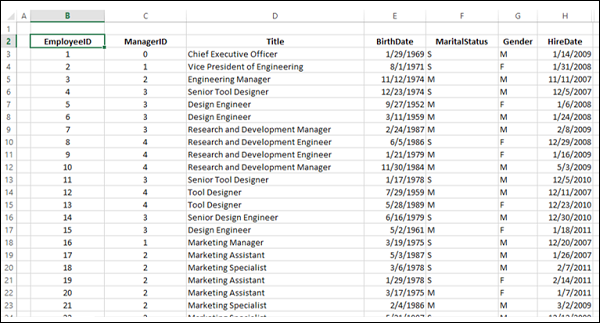
Data analysis from tables is a fundamental process in various fields such as business, finance, research, and more. It involves extracting meaningful insights from structured data organized in rows and columns. By systematically examining this data, analysts can uncover patterns, identify trends, and make data-driven decisions that drive organizational success.
Key Steps in Data Analysis from Tables
1. Data Loading
Data loading is the initial phase where raw data is imported into an analysis environment. Depending on the data source, this can be done using various tools:
- Spreadsheet Software: Microsoft Excel and Google Sheets are commonly used for loading and managing data tables.
- Programming Languages: Languages like Python (using libraries such as Pandas) and R offer robust methods for importing data from various formats.
- Databases: SQL-based systems like MySQL and PostgreSQL enable the importation of large datasets directly from database tables.
2. Data Cleaning
Data cleaning ensures the integrity and quality of the dataset by addressing issues such as:
- Missing Values: Handling incomplete data by methods like imputation, removal, or interpolation.
- Duplicates: Identifying and removing duplicate entries to prevent skewed analysis.
- Inconsistencies: Standardizing data formats and correcting discrepancies to ensure uniformity.
3. Data Manipulation
Data manipulation involves transforming and organizing the data to facilitate meaningful analysis:
- Filtering: Selecting subsets of data that meet specific criteria.
- Sorting: Ordering data based on one or more variables to identify trends or outliers.
- Grouping: Categorizing data into groups for comparative analysis.
- Aggregating: Summarizing data through operations like sum, average, count, or median.
4. Data Visualization
Visualization transforms data into graphical representations, making it easier to comprehend complex information:
- Charts and Graphs: Bar charts, line graphs, scatter plots, and pie charts are commonly used to depict data relationships.
- Dashboards: Interactive platforms like Tableau and Power BI integrate multiple visualizations for comprehensive data insight.
- Highlighting Anomalies: Visual tools help in identifying outliers and unusual patterns within the dataset.
5. Statistical Analysis
Applying statistical methods to data tables uncovers deeper insights:
- Descriptive Statistics: Calculating measures such as mean, median, mode, standard deviation, and variance.
- Inferential Statistics: Determining correlations, regressions, and performing hypothesis testing to infer relationships between variables.
- Trend Analysis: Identifying and forecasting patterns over time.
- Advanced Analytics: Utilizing machine learning techniques like clustering and regression for predictive insights.
6. Reporting
The final step involves compiling the analysis into a coherent report that communicates findings effectively:
- Summarizing Findings: Presenting key insights and statistical results.
- Actionable Recommendations: Providing strategic suggestions based on the data analysis.
- Visual Aids: Incorporating charts, graphs, and tables to support the narrative.
Tools and Techniques for Data Analysis
Spreadsheet Software
Spreadsheet applications are widely used for their accessibility and ease of use:
- Microsoft Excel: Offers a range of functions, pivot tables, data tables, and visualization tools.
- Google Sheets: Provides collaborative features and integrates with other Google services for seamless data management.
Programming Languages
Programming languages offer advanced data manipulation and analysis capabilities:
- Python: With libraries like Pandas, NumPy, and Matplotlib, Python is powerful for data cleaning, analysis, and visualization.
- R: Specifically designed for statistical analysis and visualization, R is favored in research and academia.
Databases
Databases handle large volumes of data efficiently:
- SQL Databases: Systems like MySQL and PostgreSQL allow for complex querying and data manipulation using SQL.
- NoSQL Databases: Offer flexibility in handling unstructured data, accommodating various data types.
Data Visualization Tools
Specialized tools enhance the creation of insightful visual representations:
- Tableau: Enables the creation of interactive and shareable dashboards.
- Power BI: Integrates with Microsoft products and offers robust data visualization capabilities.
- Matplotlib: A Python library for creating static, animated, and interactive visualizations.
Pivot Tables and Data Tables
Within spreadsheet software, pivot tables and data tables are essential for data summarization and analysis:
| Feature | Pivot Tables | Data Tables |
|---|---|---|
| Purpose | Summarize, group, and filter large datasets efficiently. | Perform What-If analysis by varying one or two input variables to see their effect on output. |
| Use Cases | Financial reporting, sales analysis, demographic studies. | Scenario planning, sensitivity analysis, forecasting models. |
| Complexity | Moderate to high, depending on data structure and desired output. | Generally lower, focused on specific variable manipulation. |
| Interactivity | Highly interactive with drag-and-drop functionalities. | Interactive in terms of input variables, but less so in data manipulation. |
Methods and Best Practices
Sorting and Filtering
Organizing data is crucial for clarity and effective analysis:
- Sorting: Arrange data in ascending or descending order based on one or multiple columns to identify trends or outliers.
- Filtering: Extract specific subsets of data that meet predefined criteria, facilitating focused analysis.
Summarization and Aggregation
Summarizing data helps in distilling large datasets into meaningful insights:
- Aggregation: Computing summary statistics like totals, averages, counts, and percentages for grouped data.
- Descriptive Statistics: Providing a summary of the central tendency, dispersion, and shape of the dataset’s distribution.
Trend and Pattern Identification
Identifying trends and patterns is essential for forecasting and strategic planning:
- Time-Series Analysis: Examining data points collected or recorded at specific time intervals to identify trends over periods.
- Pattern Recognition: Detecting recurring patterns or anomalies that can indicate significant insights or issues.
Comparing Data
Comparative analysis enables the evaluation of differences and similarities within the data:
- Segment Comparison: Analyzing different groups or categories to understand varying behaviors or characteristics.
- Benchmarking: Comparing performance against standards or competitors to identify strengths and weaknesses.
Advanced Analytics
For deeper insights, advanced analytical techniques are employed:
- Regression Analysis: Understanding the relationship between dependent and independent variables.
- Cluster Analysis: Grouping data points based on similarities to identify distinct segments.
- Machine Learning: Utilizing algorithms to predict outcomes and automate decision-making processes.
Data Visualization Techniques
Types of Charts and Their Uses
Choosing the right type of chart is pivotal for effective data communication:
- Bar Charts: Ideal for comparing quantities across different categories.
- Line Graphs: Suitable for displaying trends over time.
- Scatter Plots: Useful for identifying relationships between two variables.
- Pie Charts: Best for showing proportions and percentages of a whole.
Creating Effective Dashboards
Dashboards integrate multiple visualizations to provide a comprehensive overview of data:
- Interactive Elements: Allow users to filter and drill down into specific data points for detailed analysis.
- Real-Time Data: Incorporate live data feeds to ensure up-to-date information is always available.
- Clear Layout: Organize visual elements logically to facilitate easy navigation and interpretation.
Practical Use Cases
Financial Analysis
In finance, data analysis from tables is used to evaluate revenue, expenses, profits, and other financial metrics:
- Budgeting: Analyzing budget allocations and expenditures to ensure financial stability.
- Forecasting: Predicting future financial performance based on historical data trends.
- Risk Assessment: Identifying potential financial risks through trend analysis and scenario planning.
Customer Data Analysis
Understanding customer behavior is critical for businesses aiming to enhance customer satisfaction and loyalty:
- Segmentation: Dividing customers into distinct groups based on demographics, purchasing behavior, or preferences.
- Lifetime Value: Calculating the projected revenue a customer will generate over their relationship with the company.
- Churn Analysis: Identifying factors that contribute to customer attrition and developing strategies to retain them.
Scientific Research
Researchers utilize data analysis to validate hypotheses, explore relationships, and uncover new knowledge:
- Experimental Data Analysis: Processing data from experiments to determine the significance of results.
- Epidemiological Studies: Analyzing health data to track disease patterns and outcomes.
- Environmental Monitoring: Assessing data related to environmental factors to study ecological impacts.
Best Practices in Data Analysis
Ensure Data Quality
High-quality data is the foundation of reliable analysis:
- Accuracy: Verify that the data correctly represents the real-world scenarios it intends to model.
- Completeness: Ensure that all necessary data points are present to avoid biased conclusions.
- Consistency: Maintain uniform data formats and standards across the dataset.
Document the Analysis Process
Maintaining thorough documentation enhances reproducibility and transparency:
- Methodology: Record the steps and techniques used during the analysis for future reference.
- Assumptions: Clearly state any assumptions made to contextualize the findings.
- Results: Document the outcomes and insights derived from the data.
Utilize Automation and Scripting
Leveraging automation streamlines repetitive tasks and enhances efficiency:
- Macros in Excel: Automate routine operations to save time and reduce manual errors.
- Scripting in Python or R: Write scripts to handle complex data manipulation and analysis tasks.
- Workflow Integration: Integrate various tools and processes to create seamless data analysis pipelines.
Advanced Analytical Techniques
Regression Analysis
Regression analysis evaluates the relationship between dependent and independent variables, enabling prediction and forecasting:
- Linear Regression: Models the linear relationship between variables to predict outcomes.
- Multiple Regression: Extends linear regression by incorporating multiple predictors to enhance accuracy.
Cluster Analysis
Cluster analysis groups data points based on similarities, uncovering hidden patterns and groupings:
- K-Means Clustering: Divides data into a predefined number of clusters based on distance metrics.
- Hierarchical Clustering: Creates a tree-like structure of clusters, allowing for nested groupings.
Machine Learning
Machine learning algorithms learn from data to make predictions and automate decision-making:
-
Supervised Learning: Trains models using labeled data to predict outcomes.
-
Unsupervised Learning: Identifies patterns and structures in unlabeled data.
-
Predictive Modeling: Uses historical data to forecast future events and behaviors.
Conclusion
Data analysis from tables is an indispensable practice for extracting valuable insights from structured data. By following a systematic approach that includes data loading, cleaning, manipulation, visualization, and statistical analysis, individuals and organizations can make informed decisions that drive success. Utilizing a diverse set of tools and adhering to best practices ensures that the analysis is accurate, efficient, and impactful.
References
Last updated January 27, 2025