
How to Convert Arabic Text from Pictures to Editable Text
Transform your images into precise Arabic text effortlessly using OCR technology.
Key Takeaways
- Choose the Right OCR Tool: Select an OCR tool that robustly supports Arabic language recognition and offers multiple output formats.
- Ensure High-Quality Images: High-resolution and well-contrasted images significantly enhance text extraction accuracy.
- Post-Processing is Essential: Always proofread the extracted text to correct any OCR-related errors, especially in similar-looking Arabic letters.
Introduction
Converting Arabic text from pictures into editable digital text has become increasingly essential in today's digital world. Whether for academic purposes, business documentation, or personal use, transforming static images of Arabic script into editable text enables easier manipulation, sharing, and storage of information. This process is primarily achieved through Optical Character Recognition (OCR) technology, which interprets and digitizes text from images.
Steps to Convert Arabic Text from an Image
1. Choose an OCR Tool
Selecting the appropriate OCR tool is the first critical step in accurately converting Arabic text from images. The chosen tool should support the Arabic language comprehensively, including right-to-left script recognition, and offer various output formats such as Word, PDF, or plain text. Additionally, features like AI-powered text recognition can enhance accuracy, especially with complex layouts or cursive writing.
2. Upload the Image
After selecting an OCR tool, the next step involves uploading the image containing Arabic text. Ensure that the image is in a supported format such as JPEG, PNG, or PDF. Most OCR platforms provide a straightforward upload interface where users can drag and drop their images or browse their local directories to select the desired file.
3. Extract the Text
Once the image is uploaded, the OCR tool processes the image to recognize and extract the Arabic text. The accuracy of this extraction heavily depends on the quality of the image and the sophistication of the OCR technology employed. Modern OCR tools utilize advanced algorithms and machine learning techniques to improve recognition rates, even with challenging scripts.
4. Edit and Save
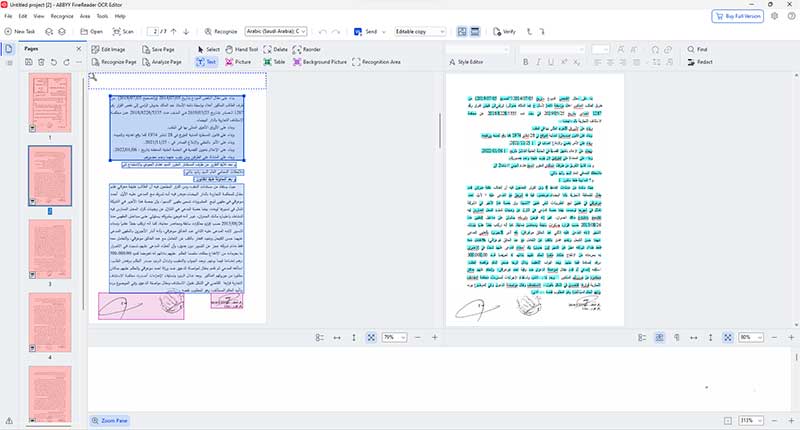
After extraction, the tool typically presents the recognized text, allowing users to edit any discrepancies or errors. This step is crucial to ensure the accuracy of the converted text. Once satisfied with the edits, users can save the text in their preferred format, facilitating easy integration into other documents or digital platforms.
Recommended OCR Tools for Arabic Text
Several OCR tools stand out for their effectiveness in handling Arabic text. Below is a comparison of some of the top-performing tools available:
| Tool Name | Features | Pros | Cons | Website |
|---|---|---|---|---|
| i2OCR | Free online OCR, supports multiple languages including Arabic, various output formats. | Easy to use, no registration required, quick processing. | Limited advanced features, dependent on internet connection. | Visit i2OCR |
| UPDF AI | AI-powered text extraction, ChatGPT-4 integration, high accuracy. | Advanced AI capabilities, supports complex layouts, multiple output options. | May require subscription for full features, higher learning curve. | Visit UPDF AI |
| Sanad.ai | AI-powered Arabic OCR, high precision, supports various formats. | Exceptional accuracy, handles cursive and complex scripts well. | Possibly higher cost, may require user registration. | Visit Sanad.ai |
| Convertio | Supports image and PDF uploads, multiple output formats, cloud integration. | Versatile file support, integrates with cloud services, user-friendly interface. | Free version has limits on file size and number of conversions. | Visit Convertio |
| ABBYY FineReader | Robust OCR capabilities, supports Arabic, advanced editing tools. | High accuracy, supports batch processing, excellent for professional use. | Premium pricing, software installation required. | Visit ABBYY FineReader |
| Google Drive | Built-in OCR for images and PDFs, integrates with Google Docs. | Free with Google account, easy to use, widely accessible. | Requires internet connection, limited advanced features. | Visit Google Drive |
Best Practices for Optimal Results
1. Ensure High-Quality Images
The quality of the input image plays a pivotal role in the accuracy of OCR. High-resolution images with clear and sharp text are more likely to yield precise results. Avoid images with low resolution, blurriness, or significant shadows, as these can impede text recognition.
2. Maintain Good Contrast
A strong contrast between the text and the background enhances the OCR tool's ability to distinguish characters accurately. Dark text on a light background or vice versa is ideal. Avoid images where the text color closely blends with the background.
3. Preprocess Images
Before uploading, consider preprocessing images to improve OCR accuracy. This can include cropping unnecessary parts, adjusting brightness and contrast, and ensuring that the text is properly aligned. Some OCR tools offer built-in preprocessing features to assist with this.
4. Proofread Extracted Text
Despite advancements in OCR technology, errors can still occur, especially with complex scripts like Arabic. Carefully review the extracted text to identify and correct any mistakes, ensuring the final document's accuracy and reliability.
5. Utilize Advanced Features
Leverage the advanced features offered by premium OCR tools, such as batch processing, layout retention, and integration with other software. These features can significantly streamline the text extraction process, especially for large volumes of documents.
Challenges in OCR for Arabic Text
1. Similar-Looking Letters
Arabic script contains letters that are visually similar, which can lead to recognition errors. For instance, letters like س (sin) and ص (sad) or ح (ha) and خ (kha) can be easily confused by OCR tools. Ensuring high-quality images and using advanced OCR technology can mitigate some of these issues.
2. Handwritten and Cursive Text
Handwritten and cursive Arabic text presents a significant challenge for OCR tools. The fluid nature of handwriting and the varying styles can reduce recognition accuracy. While some advanced AI-powered OCR tools have improved in this area, perfect accuracy is still not guaranteed.
3. Complex Layouts
Documents with intricate layouts, such as multiple columns, tables, or embedded images, can complicate the OCR process. Maintaining the original formatting and accurately extracting text from such layouts requires sophisticated OCR capabilities.
4. Limited Support in Some Tools
Not all OCR tools offer comprehensive support for Arabic. Some may lack the necessary language recognition capabilities or fail to handle specific nuances of Arabic script, leading to lower accuracy rates.
Advanced Features and Additional Tools
1. AI-Powered OCR Tools
AI-powered OCR tools like UPDF AI and Sanad.ai utilize machine learning algorithms to enhance text recognition accuracy. These tools are particularly adept at handling complex scripts and improving recognition rates for challenging text layouts.
2. Integration with Other Services
Many modern OCR tools offer integration with popular cloud services, such as Google Drive, Dropbox, and Microsoft OneDrive. This integration facilitates seamless document management and sharing, streamlining workflows for users who frequently work with digital documents.
3. Batch Processing Capabilities
For users dealing with large volumes of images, batch processing capabilities are invaluable. Tools that support batch OCR allow users to convert multiple images simultaneously, significantly reducing the time and effort required for text extraction.
4. Enhanced Editing and Formatting Features
Advanced OCR tools often come equipped with comprehensive editing and formatting features. These allow users to refine the extracted text, apply formatting styles, and ensure that the final document adheres to desired standards and aesthetics.
Conclusion
Converting Arabic text from pictures into editable formats is a streamlined process thanks to the advancements in Optical Character Recognition (OCR) technology. By selecting the right OCR tool, ensuring high-quality image inputs, and meticulously proofreading the extracted text, users can achieve accurate and efficient text conversion. Despite challenges such as similar-looking letters and complex scripts, leveraging advanced AI-powered OCR tools and adhering to best practices can significantly enhance the quality and reliability of the conversion process. Whether for personal, academic, or professional use, mastering the art of converting Arabic text from images opens up a realm of possibilities for better information management and accessibility.
References
Last updated February 11, 2025