
Unlock the Anatomy of an ANZ Statement: Crafting a Mock Example with a $18,500 Balance
Discover how bank statements are structured and the crucial difference between official documents and illustrative templates.
Understanding how an ANZ bank statement is structured, including how balances are calculated and displayed, can be useful for various purposes, such as financial planning or educational exercises. While you cannot generate an *official* ANZ bank statement with a fabricated balance, you can create a mock statement for illustrative purposes using templates that mimic the format.
This guide explains the components of an ANZ statement, how to obtain official copies, and how you might structure a sample statement reflecting a closing balance of $18,500.00 using commonly available templates. Crucially, this information is for educational or personal planning use only. Using fabricated bank statements for official purposes (like loan applications or legal matters) is illegal and carries serious consequences.
Key Insights at a Glance
- Official vs. Mock Statements: Official ANZ statements reflect your actual account activity and balance, obtainable only through ANZ's secure channels (Internet Banking, ANZ App, Branch). Mock statements can be created using templates but are not legally valid documents.
- Statement Components: A typical statement includes account details, statement period, opening balance, a list of transactions (deposits, withdrawals, fees), and the closing balance.
- Ethical Use Only: Creating mock statements should only be for personal understanding, budgeting practice, or illustrative examples. Never use them for fraudulent purposes.
Understanding Official ANZ Bank Statements
How Real Statements Work
An official ANZ bank statement is a formal record generated directly by Australia and New Zealand Banking Group Limited (ANZ). It provides a definitive summary of all financial activity within a specific account over a set period (usually monthly). These documents are crucial for financial tracking, verification, and record-keeping.
Core Components of an Official Statement
Based on information from ANZ and examples found online, official statements typically contain:
- Bank & Account Holder Information: ANZ branding, your name, address, and account number.
- Statement Details: Statement number, the period it covers (e.g., 01 April 2025 – 30 April 2025), and the date it was issued.
- Account Summary: Often includes the opening balance (balance at the start of the period), total amounts deposited, total amounts withdrawn, any fees charged, interest earned (if applicable), and the closing balance (balance at the end of the period).
- Transaction History: A chronological list detailing each transaction (date, description, amount debited or credited, and sometimes a running balance after each transaction).
- Important Notices: Information about contacting the bank, dispute resolution processes, changes to terms, or security advice.
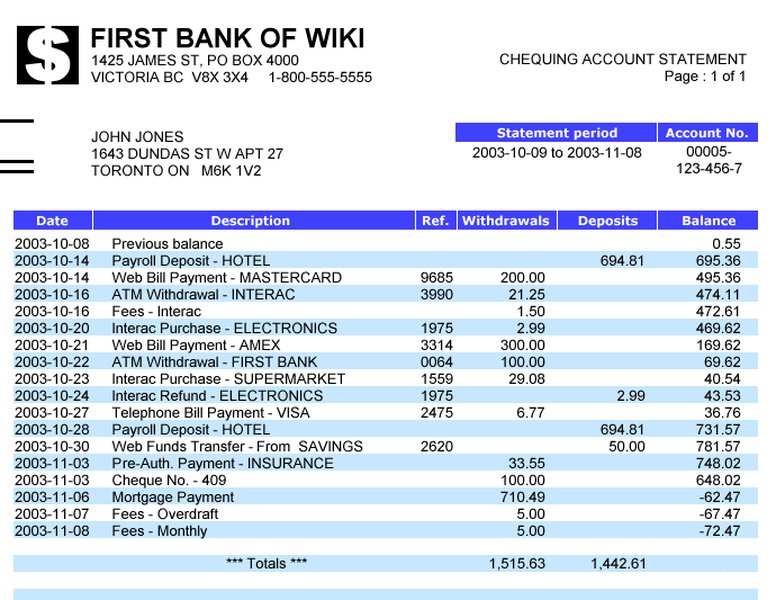
Generic example illustrating the layout and components typically found in a bank statement.
Creating a Mock Statement with a $18,500 Balance Using Templates
For Illustrative Purposes Only
If your goal is to create a statement showing an $18,500.00 balance for non-official use (like personal budgeting practice or understanding financial flows), you can utilize editable templates available online. Several sources mention free or editable templates (often in PDF or Word format) designed to look like ANZ statements.
Steps to Create a Sample Statement:
- Find a Template: Search for "ANZ bank statement template" online. Sources like FreeStatements.net, Scribd, or DocHub might offer downloadable files. Choose one that closely resembles an actual statement layout.
- Gather Information (Sample Data):
- Account Details: Use placeholder names and numbers (e.g., Account Name: Jane Smith, Account Number: 987-654-321).
- Statement Period: Define a period (e.g., April 1, 2025 – April 30, 2025).
- Opening Balance: Choose a starting balance.
- Transactions: Create a list of deposits and withdrawals that logically result in your target closing balance of $18,500.00.
- Edit the Template: Open the template file in compatible software (like Adobe Acrobat, Microsoft Word, or an online editor). Fill in the placeholder information and your sample transaction data. Ensure the calculations are correct:
Opening Balance + Total Deposits - Total Withdrawals = $18,500.00. - Review and Finalize: Double-check all entries for consistency and ensure the layout looks plausible.
Example Transaction Calculation
To reach a closing balance of $18,500.00, you could structure the transactions as follows:
- Opening Balance (e.g., April 1): $15,000.00
- Total Deposits during April: $8,000.00
- Total Withdrawals during April: $4,500.00
- Calculation: $15,000.00 + $8,000.00 - $4,500.00 = $18,500.00
- Closing Balance (April 30): $18,500.00
Sample Transaction Table (Illustrative)
Here's how the transaction section of your mock statement might look:
| Date | Description | Withdrawals (-) | Deposits (+) | Balance |
|---|---|---|---|---|
| 01/04/2025 | Opening Balance | $15,000.00 | ||
| 05/04/2025 | Salary Payment | $5,500.00 | $20,500.00 | |
| 10/04/2025 | Rent Payment - EFT | $2,200.00 | $18,300.00 | |
| 15/04/2025 | Grocery Store - Card Purchase | $350.00 | $17,950.00 | |
| 20/04/2025 | Client Payment Received | $2,500.00 | $20,450.00 | |
| 25/04/2025 | ATM Withdrawal | $450.00 | $20,000.00 | |
| 28/04/2025 | Electricity Bill - Direct Debit | $1,500.00 | $18,500.00 | |
| 30/04/2025 | Closing Balance | $18,500.00 |
Note: This table provides a simplified example. Real statements may have more complex descriptions or additional columns.
Considerations When Working with Statement Templates
Accuracy, Legality, and Purpose
While templates offer a way to visualize financial data, it's vital to understand the limitations and potential pitfalls. The following radar chart highlights key factors to consider when dealing with bank statement representations, comparing official documents with mock templates.
Radar chart comparing Official ANZ Statements vs. Mock Templates based on key attributes.
As the chart illustrates, official statements score high on validity, accuracy, and suitability for official use, while mock templates score high on ease of creating a custom balance and educational value but extremely low on legitimacy and carry a high risk of misuse.
Visualizing Bank Statement Concepts
Mindmap Overview
This mindmap summarizes the key elements related to ANZ bank statements, covering both official documents and the concept of using templates for illustration.
(Verification, Records, Loans)"] id1e["Legally Valid Document"] id2["Mock/Template Statements"] id2a["Source: Online Templates
(Scribd, FreeStatements.net, etc.)"] id2b["Content: Sample/Editable Data"] id2b1["Custom Balances Possible
(e.g., $18,500.00)"] id2b2["Requires Manual Calculation"] id2c["Creation: Editing Templates
(PDF, Word, Online Tools)"] id2d["Purpose: Illustrative Use
(Education, Budgeting Practice)"] id2e["NOT Legally Valid"] id2f["High Risk of Fraudulent Use"] id3["Key Components (Both Types)"] id3a["Account Details (Name, Number)"] id3b["Statement Period & Number"] id3c["Opening & Closing Balances"] id3d["Transaction List
(Date, Description, Amount)"] id3e["Bank Information & Notices"]
This visual representation helps differentiate between the legitimate process of obtaining official statements and the practice of creating mock-ups using templates, highlighting their distinct characteristics and appropriate uses.
Accessing Your Official ANZ Statements
Using ANZ's Secure Platforms
For genuine financial needs, always rely on official statements obtained directly from ANZ. The bank provides secure and convenient ways to access your transaction history and formal statements.
How to Download or View Official Statements:
- ANZ Internet Banking: Log in to your account online, select the relevant account, and look for options like "View statements" or "Download statements." You can typically access statements for several years.
- ANZ App: The mobile app usually has a dedicated section for statements (often under account details or a specific 'Statements' tab). You can view recent statements and sometimes generate transaction reports.
- Visit a Branch: You can request printed copies of your statements at any ANZ branch.
- Contact ANZ: For statements related to closed accounts or older periods not available online, you may need to contact ANZ customer service directly.
Video Guide: Viewing Statements in the ANZ App
The following video demonstrates how to access your statements using the official ANZ mobile application, highlighting the ease and security of using legitimate channels:
Using the app or internet banking ensures you receive accurate, official documents reflecting your true financial position, which are necessary for any formal requirements.
⚠️ Critical Warning: Legal and Ethical Implications
The Risks of Fabricated Documents
It cannot be stressed enough: Creating or using a bank statement with false information (including a fabricated balance) for any official purpose is illegal and constitutes fraud. This includes, but is not limited to:
- Applying for loans or credit cards.
- Visa or immigration applications.
- Rental applications.
- Audits or legal proceedings.
- Proof of income or financial standing.
Financial institutions, government agencies, and other organizations have sophisticated methods for detecting fraudulent documents. The consequences of being caught can include loan rejection, legal action, fines, damage to your credit history, and even criminal charges.
Always use official bank statements obtained directly from ANZ for any purpose requiring financial verification. If you are using templates, ensure it is solely for personal educational or planning exercises where no third party relies on the document's authenticity.
Frequently Asked Questions (FAQ)
Can I make an official ANZ statement show a balance I don't actually have?
No. Official ANZ bank statements are generated from the bank's systems and accurately reflect your real account balance and transaction history. You cannot alter an official statement or request ANZ to create one with a false balance. Attempting to modify or create a fake official statement is fraudulent.
Where can I get my real ANZ bank statements?
You can access your official ANZ statements through:
- ANZ Internet Banking: Log in online to view and download PDF statements.
- ANZ App: Use the mobile app to view recent statements.
- ANZ Branch: Request printed statements in person.
- Phone Banking: Contact ANZ support for assistance, especially for older statements or closed accounts.
What are ANZ statement templates useful for?
Templates that mimic the layout of an ANZ statement can be useful for:
- Educational Purposes: Understanding how financial transactions are recorded.
- Personal Budgeting Practice: Creating mock scenarios to practice financial tracking.
- Illustrative Examples: Showing a sample statement format (without implying authenticity).
They should never be used as a substitute for official documents in any formal context.
Is it illegal to edit a bank statement template?
Editing a template for purely personal, non-official, and non-deceptive use (like learning or budgeting practice) is generally not illegal in itself. However, it becomes illegal fraud the moment you attempt to pass off the edited template as a genuine, official bank statement to deceive a third party (e.g., for a loan, visa, or rental application).
Recommended Reading
Explore related topics for a deeper understanding:
- How can I securely download my official ANZ bank statements through Internet Banking?
- What are the essential pieces of information typically found on any bank statement?
- What specific legal risks and penalties are associated with submitting fraudulent bank documents?
- Can you provide tips for effectively reading and interpreting the transaction details on my ANZ statement?
References
Last updated May 4, 2025