
Creating REST APIs with Node.js
A Comprehensive Guide to Building RESTful Services Using Node.js
Key Highlights for Building REST APIs with Node.js
- Express.js: Utilizing Express.js simplifies the creation of REST APIs by providing a robust framework for routing and middleware management.
- HTTP Methods: Understanding and implementing different HTTP methods (GET, POST, PUT, DELETE) is crucial for handling various API operations.
- Data Handling: Efficiently handling request and response data, including validation and serialization, is essential for building robust APIs.
Setting Up Your Node.js Environment
To begin creating REST APIs with Node.js, setting up your environment correctly is essential. Here's a step-by-step guide to get you started:
Install Node.js and NPM
First, you need to install Node.js and its package manager, NPM (Node Package Manager). NPM is included with Node.js, so installing Node.js will automatically install NPM as well. You can download the latest version of Node.js from the official website.
Create a New Project Folder
Create a new directory for your project. This folder will house all the files related to your API.
  mkdir my-rest-api
  cd my-rest-api
Initialize a New Node.js Application
Navigate into your project folder and initialize a new Node.js application using NPM. This will create a package.json file, which will manage your project's dependencies.
npm init -y
Leveraging Express.js for REST API Development
Express.js is a lightweight and flexible Node.js web application framework that provides a robust set of features for building web and mobile applications. It simplifies the process of creating REST APIs by offering functionalities like routing, middleware support, and request-response handling.
Installing Express.js
Install Express.js as a project dependency using NPM:
npm install express
Creating an Express Application
Create a main application file, such as app.js or index.js, and set up a basic Express server:
  const express = require('express');
  const app = express();
  const port = 3000;

  app.get('/', (req, res) => {
    res.send('Hello World!');
  });

  app.listen(port, () => {
    console.log(`Server listening at http://localhost:${port}`);
  });
This code initializes an Express application, defines a route for the root path (/), and starts the server on port 3000.
Defining API Endpoints and HTTP Methods
REST APIs are built around resources, and each resource can be manipulated using standard HTTP methods. Understanding these methods is crucial for designing a RESTful API.
Common HTTP Methods
- GET: Retrieves a resource.
- POST: Creates a new resource.
- PUT: Updates an existing resource.
- DELETE: Deletes a resource.
Implementing API Endpoints with Express.js
Define API endpoints using Express.js routes. Each route corresponds to a specific HTTP method and URL path.
  // GET request
  app.get('/api/items', (req, res) => {
    res.json({ message: 'GET request successful' });
  });

  // POST request
  app.post('/api/items', (req, res) => {
    res.json({ message: 'POST request successful' });
  });

  // PUT request
  app.put('/api/items/:id', (req, res) => {
    const itemId = req.params.id;
    res.json({ message: `PUT request successful for item ${itemId}` });
  });

  // DELETE request
  app.delete('/api/items/:id', (req, res) => {
    const itemId = req.params.id;
    res.json({ message: `DELETE request successful for item ${itemId}` });
  });
In these examples, each route handles a different HTTP method for the /api/items endpoint. The :id parameter in the PUT and DELETE requests allows you to target specific resources.
Handling Request and Response Data
Efficiently handling request and response data is crucial for building robust APIs. This involves parsing request bodies, validating data, and sending appropriate responses.
Parsing Request Bodies
To handle POST and PUT requests, you need to parse the request body. Express.js provides middleware for parsing JSON and URL-encoded data.
  app.use(express.json()); // for parsing application/json
  app.use(express.urlencoded({ extended: true })); // for parsing application/x-www-form-urlencoded
These middleware functions parse incoming requests with JSON payloads and URL-encoded data, making it available in the req.body object.
Validating Data
Validating incoming data is essential to ensure that your API receives the expected data format and content. You can use middleware or validation libraries to validate data.
  app.post('/api/items', (req, res) => {
    const { name, description } = req.body;

    if (!name || !description) {
      return res.status(400).json({ error: 'Name and description are required' });
    }

    // Process the data
    res.status(201).json({ message: 'Item created successfully', data: { name, description } });
  });
This example checks if the name and description fields are present in the request body. If not, it returns a 400 Bad Request error.
Sending Responses
Sending appropriate responses is crucial for providing feedback to the client. Use the res object to send responses with appropriate status codes and data.
  res.status(200).json({ message: 'Success', data: {} });
  res.status(201).json({ message: 'Created', data: {} });
  res.status(400).json({ error: 'Bad Request' });
  res.status(500).json({ error: 'Internal Server Error' });
- 200 OK: The request was successful.
- 201 Created: The resource was successfully created.
- 400 Bad Request: The request was invalid.
- 500 Internal Server Error: An unexpected error occurred on the server.
Securing Your REST API
Securing your REST API is crucial to protect it from unauthorized access and potential security threats.
Authentication and Authorization
Implement authentication and authorization mechanisms to ensure that only authorized users can access your API. Common methods include:
- API Keys: Simple keys that clients must provide with each request.
- JWT (JSON Web Tokens): Tokens that clients can use to authenticate and authorize requests.
- OAuth: A more complex authorization framework that allows users to grant limited access to their resources.
HTTPS
Use HTTPS to encrypt communication between the client and the server. This prevents eavesdropping and ensures that data is transmitted securely.
Input Validation
Always validate input data to prevent injection attacks. Sanitize and validate all data received from the client to ensure it is safe to use.
Example: Building a Simple CRUD API
Let's create a simple CRUD (Create, Read, Update, Delete) API for managing items. This example will demonstrate how to combine the concepts discussed above.
Setting Up the API
  const express = require('express');
  const app = express();
  const port = 3000;

  app.use(express.json());

  let items = [
    { id: 1, name: 'Item 1', description: 'Description 1' },
    { id: 2, name: 'Item 2', description: 'Description 2' }
  ];

  // GET all items
  app.get('/api/items', (req, res) => {
    res.json(items);
  });

  // GET a specific item by ID
  app.get('/api/items/:id', (req, res) => {
    const itemId = parseInt(req.params.id);
    const item = items.find(i => i.id === itemId);

    if (!item) {
      return res.status(404).json({ error: 'Item not found' });
    }

    res.json(item);
  });

  // POST a new item
  app.post('/api/items', (req, res) => {
    const { name, description } = req.body;

    if (!name || !description) {
      return res.status(400).json({ error: 'Name and description are required' });
    }

    const newItem = {
      id: items.length + 1,
      name: name,
      description: description
    };

    items.push(newItem);
    res.status(201).json(newItem);
  });

  // PUT (update) an existing item
  app.put('/api/items/:id', (req, res) => {
    const itemId = parseInt(req.params.id);
    const itemIndex = items.findIndex(i => i.id === itemId);

    if (itemIndex === -1) {
      return res.status(404).json({ error: 'Item not found' });
    }

    const { name, description } = req.body;

    if (!name || !description) {
      return res.status(400).json({ error: 'Name and description are required' });
    }

    items[itemIndex] = {
      id: itemId,
      name: name,
      description: description
    };

    res.json(items[itemIndex]);
  });

  // DELETE an item
  app.delete('/api/items/:id', (req, res) => {
    const itemId = parseInt(req.params.id);
    const itemIndex = items.findIndex(i => i.id === itemId);

    if (itemIndex === -1) {
      return res.status(404).json({ error: 'Item not found' });
    }

    items.splice(itemIndex, 1);
    res.status(204).send(); // No content
  });

  app.listen(port, () => {
    console.log(`Server listening at http://localhost:${port}`);
  });
Testing the API
You can test this API using tools like Postman or curl. Here are some example requests:
-
GET all items:
GET http://localhost:3000/api/items -
GET a specific item:
GET http://localhost:3000/api/items/1 -
POST a new item:
POST http://localhost:3000/api/itemswith a JSON body like{ "name": "New Item", "description": "New Description" } -
PUT (update) an item:
PUT http://localhost:3000/api/items/1with a JSON body like{ "name": "Updated Item", "description": "Updated Description" } -
DELETE an item:
DELETE http://localhost:3000/api/items/1
Choosing the Right Libraries
Selecting the appropriate libraries is essential for efficient REST API development in Node.js.
Key Libraries for REST API Development
The following table highlights some of the most useful libraries for building REST APIs with Node.js:
| Library | Description | Use Case |
|---|---|---|
| Express.js | A minimalist web application framework for Node.js. | Routing, middleware, request handling. |
| Mongoose | An elegant MongoDB object modeling tool. | Database interaction, schema validation. |
| body-parser | Node.js body parsing middleware. | Parsing request bodies (JSON, URL-encoded). |
| jsonwebtoken | An implementation of JSON Web Tokens. | Authentication and authorization. |
| bcrypt | A library for hashing passwords. | Securely storing user credentials. |
| joi | A powerful schema description language and data validator for JavaScript. | Validating request data. |
Visual Guide to Setting Up a Node.js REST API
Below are some images demonstrating setting up a Node.js REST API. These images cover project planning, API design, and setup:

Project Planning: This image shows an initial step in creating a REST API, which involves planning the API structure and functionalities. Project planning is crucial as it sets the foundation for the entire development process. A well-thought-out plan ensures that the API meets the intended requirements and is structured efficiently. This includes defining endpoints, data models, and the overall architecture of the API.
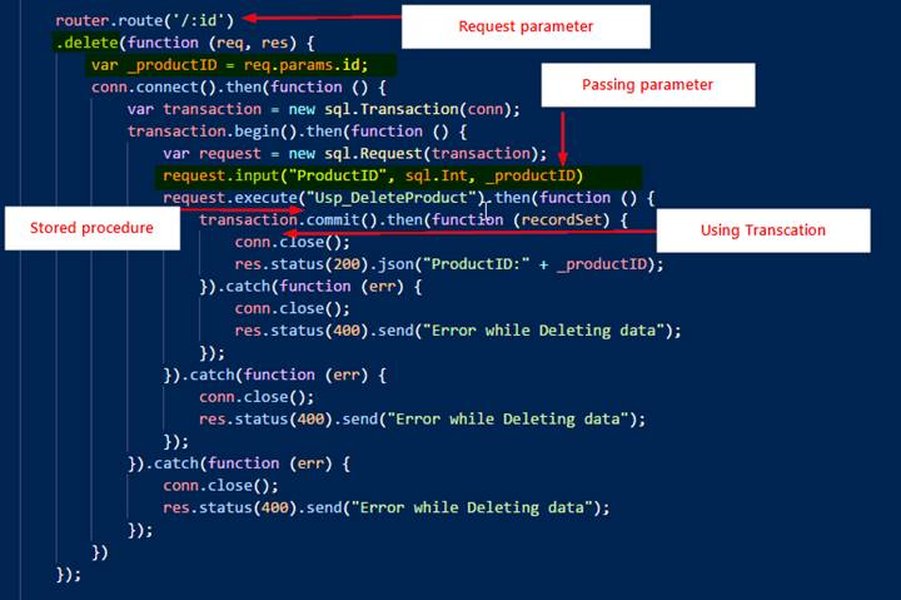
API Setup: The image illustrates the basic structure of a Node.js API, highlighting the use of Express.js for handling routes and requests. Setting up the API typically involves creating a project directory, initializing a Node.js project, and installing necessary dependencies such as Express.js. This foundational setup allows developers to define API endpoints, implement request handling logic, and establish middleware for tasks like authentication and data validation.

Fast and Secure API Setup: This image demonstrates a streamlined approach to setting up a secure Node.js REST API in a minimal amount of time. The focus is on creating an API quickly without compromising security. This involves implementing HTTPS, input validation, and authentication mechanisms to protect the API from common vulnerabilities. The image highlights the essential steps for setting up a secure API environment, including configuring SSL certificates and implementing middleware for security.
Node.js Installation: Shows the initial step of installing Node.js which is essential for creating a REST API with Node.js.
Practical Demonstration: Building REST APIs with Node.js and Express
This video provides a comprehensive guide to building a REST API with Node.js, Express, TypeScript, and MongoDB, including authentication. It's relevant because it offers a step-by-step tutorial that covers setting up the development environment, defining API endpoints, implementing CRUD operations, and securing the API. The video also delves into more advanced topics such as authentication, which is crucial for protecting the API from unauthorized access. By following this tutorial, developers can gain a solid understanding of how to build robust and secure REST APIs with Node.js.
FAQ: Building REST APIs with Node.js
What is a REST API?
A REST (Representational State Transfer) API is an architectural style for designing networked applications. It relies on a stateless, client-server communication protocol, typically HTTP, and uses standard HTTP methods (GET, POST, PUT, DELETE) to manipulate resources.
Why use Node.js for building REST APIs?
Node.js is well-suited for building REST APIs due to its non-blocking, event-driven architecture, which allows it to handle a large number of concurrent connections efficiently. Additionally, the vast NPM ecosystem provides numerous libraries and frameworks that simplify API development.
What is Express.js?
Express.js is a minimalist web application framework for Node.js. It provides a set of features for building web and mobile applications, including routing, middleware support, and request-response handling. Express.js simplifies the process of creating REST APIs by providing a structured and organized way to define API endpoints and handle HTTP requests.
How do I handle request data in Node.js with Express.js?
You can handle request data in Node.js with Express.js by using middleware such as express.json() and express.urlencoded(). These middleware functions parse incoming requests with JSON payloads and URL-encoded data, making it available in the req.body object. You can then access the data and use it in your API logic.
How do I secure my REST API in Node.js?
You can secure your REST API in Node.js by implementing authentication and authorization mechanisms, using HTTPS to encrypt communication, and validating input data to prevent injection attacks. Common authentication methods include API keys, JWT (JSON Web Tokens), and OAuth. Always sanitize and validate all data received from the client to ensure it is safe to use.
What are some best practices for building REST APIs?
Some best practices for building REST APIs include using standard HTTP methods appropriately, providing clear and consistent API documentation, implementing proper error handling, securing your API with authentication and authorization, and validating input data to prevent security vulnerabilities. Additionally, consider using versioning to manage API changes and providing rate limiting to prevent abuse.
References
Last updated April 11, 2025