
Leveraging Data Attributes to Embed Strings in HTML
Enhancing HTML with Custom Data Attributes for Dynamic Web Development
Key Takeaways
- Data attributes provide a flexible method to store custom data within HTML elements without affecting their presentation.
- Utilizing data attributes enables seamless integration between HTML and JavaScript, enhancing interactivity and functionality.
- Adhering to best practices in naming and using data attributes ensures maintainable and scalable web applications.
Introduction to Data Attributes
In the realm of web development, HTML serves as the backbone for structuring content. While HTML provides a plethora of elements and attributes to define the appearance and behavior of web pages, there are scenarios where developers need to embed additional, non-standard metadata within HTML elements. This is where data attributes come into play.
Data attributes, introduced in HTML5, allow developers to store extra information on standard, semantic HTML elements without the need for proprietary attributes or complex data storage mechanisms. They offer a straightforward way to pass information from the front end to the back end or to manipulate content dynamically using JavaScript.
Understanding Data Attributes
What Are Data Attributes?
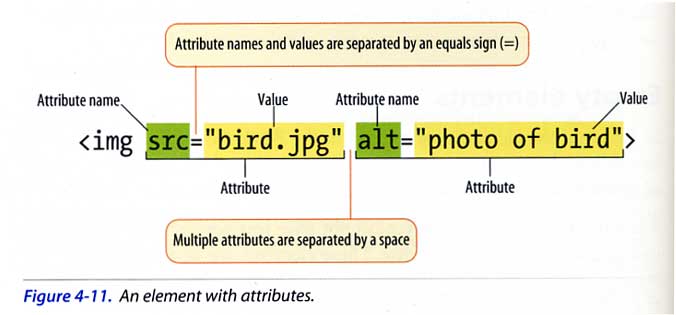
Data attributes are custom attributes that start with the prefix data- followed by a descriptive name. The general syntax is:
<element data-key="value"></element>For example:
<div data-user-id="12345">User Content</div>In this example, data-user-id is a data attribute that stores the user's ID.
Why Use Data Attributes?
Data attributes offer several advantages:
- Flexibility: They allow the embedding of custom data without disrupting the existing HTML structure.
- Separation of Concerns: They help keep data separate from presentation and behavior, adhering to best practices in web development.
- Accessibility: They enhance the semantic meaning of elements without altering their default behavior.
- Interactivity: They facilitate dynamic interactions by providing JavaScript with accessible data tied directly to HTML elements.
Implementing Data Attributes in HTML
Syntax and Formatting
Data attributes follow a specific naming convention to ensure they are valid within the HTML specification:
- The attribute name must start with
data-. - Following the prefix, the attribute name should be lowercase and can include hyphens for readability, e.g.,
data-user-id. - The attribute name should not contain uppercase letters or special characters beyond hyphens.
Proper formatting ensures compatibility across different browsers and maintains the integrity of the HTML document.
Embedding Strings with Data Attributes
To embed strings using data attributes, assign the desired string as the value of a custom data attribute. Here's an example:
<span data-tooltip="This is a tooltip message">Hover over me</span>In this scenario, the string "This is a tooltip message" is stored within the data-tooltip attribute of the <span> element. JavaScript can later access this value to display a tooltip.
Accessing Data Attributes with JavaScript
JavaScript provides a straightforward way to interact with data attributes through the dataset property. This property allows developers to access and manipulate data attributes as properties of the dataset object.
Consider the following example:
<button id="myButton" data-action="save">Save</button>const button = document.getElementById('myButton');
button.addEventListener('click', () => {
const action = button.dataset.action;
if(action === 'save') {
// Execute save functionality
}
});In this script, the data-action attribute is accessed via button.dataset.action, allowing the JavaScript function to determine which action to perform when the button is clicked.
Best Practices for Using Data Attributes
Naming Conventions
Adhering to clear and consistent naming conventions for data attributes is crucial for maintainability and readability. Here are some guidelines:
-
Use lowercase letters: Stick to lowercase to maintain consistency and avoid confusion.
-
Utilize hyphens for readability: Separate words with hyphens for better readability, e.g.,
data-user-idinstead ofdata-userid. -
Be descriptive: Choose attribute names that clearly describe the data they hold, avoiding overly generic names like
data-info.
Avoid Overuse
While data attributes are powerful, overusing them can lead to bloated HTML and reduced performance. Use them sparingly and only when necessary to store data that is directly tied to the HTML element.
Security Considerations
Always sanitize and validate data stored within data attributes, especially if the data will be processed or rendered by JavaScript. This practice helps prevent security vulnerabilities such as Cross-Site Scripting (XSS).
Performance Implications
Storing large amounts of data within data attributes can impact page performance. For substantial data storage, consider alternative methods like fetching data asynchronously or utilizing JavaScript objects.
Advanced Usage of Data Attributes
Conditional Styling and Classes
Data attributes can be harnessed to apply conditional styling or classes based on specific data values. This technique enhances user experience by dynamically altering the appearance of elements.
<div data-status="active" class="status-indicator"></div>.status-indicator[data-status="active"] {
background-color: green;
}
.status-indicator[data-status="inactive"] {
background-color: red;
}In this example, the data-status attribute determines the background color of the .status-indicator element.
Enhancing Accessibility
Data attributes can store additional information that can enhance the accessibility of web pages. For instance, storing descriptions or alternative text that can be utilized by screen readers or other assistive technologies.
<img src="image.jpg" alt="Profile Picture" data-description="John Doe's profile picture">While the alt attribute serves to provide alternative text, the data-description attribute can hold more detailed information that can be accessed and utilized as needed.
Integration with CSS and JavaScript Frameworks
Modern frameworks like React, Vue.js, and Angular can leverage data attributes to manage component states and pass data between components. This integration facilitates the creation of dynamic and interactive user interfaces.
const App = () => (
    <div data-component="App">
        <button data-action="toggle">Toggle</button>
    </div>
);
export default App;
Practical Examples and Use Cases
Storing Configuration Data
Data attributes can store configuration settings that can be read by JavaScript to initialize components or plugins.
<div data-carousel='{"autoplay": true, "interval": 3000}'>
    <img src="slide1.jpg" alt="Slide 1">
    <img src="slide2.jpg" alt="Slide 2">
    <img src="slide3.jpg" alt="Slide 3">
</div>
// JavaScript to initialize carousel
const carouselElement = document.querySelector('[data-carousel]');
const config = JSON.parse(carouselElement.dataset.carousel);
// Initialize carousel with config.autoplay and config.intervalTracking User Interactions
Embedding strings within data attributes can help track user interactions for analytics purposes.
<a href="/purchase" data-tracking-id="button-12345">Buy Now</a>const buyButton = document.querySelector('[data-tracking-id]');
buyButton.addEventListener('click', () => {
const trackingId = buyButton.dataset.trackingId;
// Send trackingId to analytics service
});Dynamic Content Rendering
Data attributes can control the rendering of dynamic content based on embedded strings.
<div data-content-type="image"></div>const contentDiv = document.querySelector('[data-content-type]');
const type = contentDiv.dataset.contentType;
if(type === 'image') {
contentDiv.innerHTML = '<img src="dynamic-image.jpg" alt="Dynamic Image">';
} else if(type === 'video') {
contentDiv.innerHTML = '<video src="dynamic-video.mp4"></video>';
}Internationalization and Localization
Storing localized strings within data attributes can facilitate the internationalization of web applications.
<span data-i18n-key="welcome_message">Welcome</span>const elements = document.querySelectorAll('[data-i18n-key]');
elements.forEach(element => {
const key = element.dataset.i18nKey;
element.textContent = translations[currentLanguage][key];
});Comparative Overview
| Aspect | Data Attributes | Alternative Methods |
|---|---|---|
| Use Case | Embedding custom data within HTML elements. | Using hidden input fields, global JavaScript variables. |
| Accessibility | Enhances semantic meaning without altering presentation. | Hidden fields may not be as semantically meaningful. |
| Maintenance | Easy to maintain with clear naming conventions. | Global variables can become cluttered and harder to manage. |
| Performance | Minimal impact when used appropriately. | Hidden fields can increase DOM size; global variables can affect memory usage. |
Common Pitfalls and How to Avoid Them
Naming Conflicts
Using generic or common names for data attributes can lead to conflicts and unexpected behaviors, especially when integrating third-party libraries.
Solution: Use unique and descriptive names for data attributes to prevent clashes. For example, instead of data-id, use data-user-id.
Overloading Data Attributes
Storing excessive or unrelated data within data attributes can make the HTML cumbersome and harder to read.
Solution: Limit the use of data attributes to store only the necessary data directly related to the element. For complex data structures, consider alternative storage methods.
Ignoring Data Validation
Embedding unvalidated data can expose applications to security vulnerabilities.
Solution: Always sanitize and validate data before embedding it within data attributes, and ensure that any data retrieved from them is handled securely in JavaScript.
Future Trends in Data Attributes
Enhanced CSS Selectors
With the evolution of CSS, future specifications may introduce more advanced selectors that leverage data attributes for more nuanced styling capabilities.
Integration with Web Components
As web components become more prevalent, data attributes will play a crucial role in passing data between components, facilitating encapsulation and reusability.
Standardization of Data Formats
There is a growing trend towards standardizing the data formats used within data attributes, such as adopting JSON structures, to ensure consistency and interoperability across different frameworks and libraries.
Conclusion
Data attributes are a powerful feature of HTML5 that allow developers to embed custom strings and metadata within HTML elements. They bridge the gap between static HTML and dynamic JavaScript functionalities, enabling more interactive and responsive web applications.
By adhering to best practices in naming, usage, and security, data attributes can significantly enhance the flexibility and maintainability of web development projects. As web technologies continue to advance, data attributes will undoubtedly remain a staple in the developer's toolkit, facilitating seamless data integration and interaction.
References
Last updated January 27, 2025