
Unlock the Power of C++: Seamlessly Modify Strings in Your JSON Files
A step-by-step guide to reading, altering, and rewriting JSON data in C++ using popular libraries.
Modifying specific data within JSON files, such as appending text to strings based on their length, is a common task in software development. While C++ doesn't offer native support for JSON manipulation, several powerful third-party libraries make this process straightforward and efficient. This guide will walk you through how to write a C++ function to achieve this, focusing on the popular nlohmann/json library.
Key Takeaways
- External Libraries are Essential: C++ requires external libraries like
nlohmann/jsonorJsonCppto parse, manipulate, and generate JSON data. - Core Workflow: The process typically involves reading the JSON file into memory, parsing it into a C++ data structure, recursively traversing this structure to find and modify strings, generating a new JSON string, and finally writing it back to a file.
- Conditional Modification: Strings are modified by appending "EASY" if their length is six characters or less, and "HARD" if their length is greater than six characters.
Understanding JSON Modification in C++
The Challenge of Native Support
JSON (JavaScript Object Notation) has become a ubiquitous data interchange format. However, the C++ standard library does not include built-in functionalities for handling JSON. This means developers must rely on external solutions to integrate JSON processing into their C++ applications.
Why External Libraries are Key
External JSON libraries provide the necessary tools for parsing JSON text into C++ objects, manipulating these objects in memory, and serializing them back into JSON text. They handle the complexities of JSON syntax, data types, and structural navigation, allowing developers to focus on the logic of their application rather than the intricacies of JSON parsing and generation.
Choosing Your JSON Toolkit: The nlohmann/json Library
Meet nlohmann/json
For modern C++ development, the nlohmann/json library is a highly recommended choice. It is a header-only library, which means integrating it into your project is as simple as including a single header file. It boasts an intuitive API that feels natural to C++ developers, leveraging standard C++ containers and idioms. Its features include easy parsing, serialization, and robust error handling.
Alternatives to Consider
While nlohmann/json is excellent, other libraries like JsonCpp and RapidJSON are also widely used. JsonCpp is an older, well-established library, while RapidJSON is known for its high performance, particularly in scenarios where speed is critical. The choice of library often depends on specific project requirements, such as performance needs, ease of integration, and preferred API style.
The Modification Process: A Deep Dive
The process of modifying strings within a JSON file according to the specified rules involves several distinct steps. Below is a visual representation of a typical JSON structure, which can contain objects (key-value pairs), arrays (ordered lists), strings, numbers, booleans, and null values. Our goal is to target only the string values for modification.
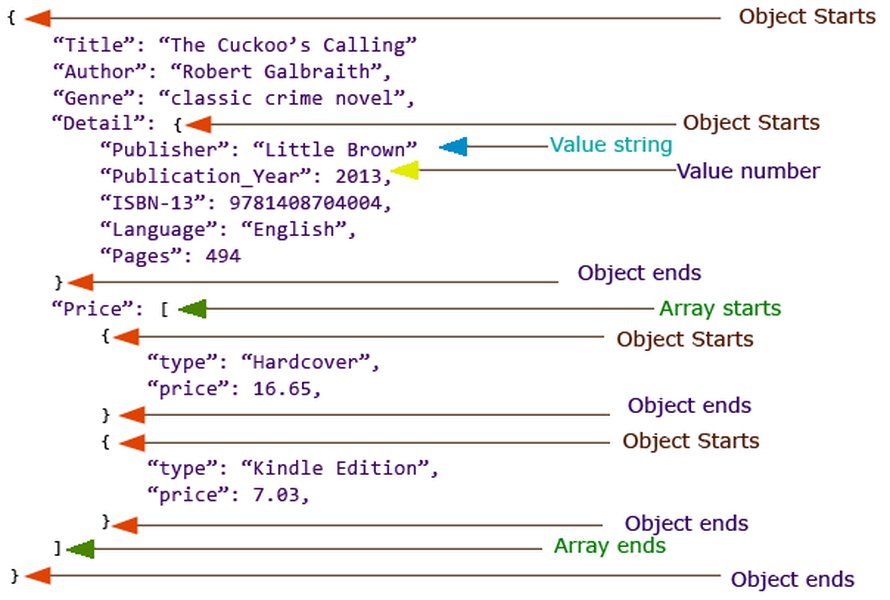
A visual representation of a typical JSON data structure, showcasing nested objects and arrays.
Step 1: Reading the JSON File
The first step is to read the contents of the JSON file into your C++ program. This is typically done using standard file input streams (std::ifstream) to load the entire file content into a string or directly parse from the stream.
Step 2: Parsing JSON Data
Once the JSON content is read, it needs to be parsed into a data structure that the chosen JSON library can work with. For nlohmann/json, this involves converting the raw JSON string into a nlohmann::json object. This object will represent the entire JSON hierarchy in memory.
Step 3: Traversing and Modifying Strings
Recursive Approach
JSON structures can be nested, with objects inside objects, arrays inside objects, arrays of arrays, and so on. To ensure all string values are processed, regardless of their depth in the JSON hierarchy, a recursive traversal approach is necessary. The function will iterate through elements of an object or an array. If an element is itself an object or array, the function calls itself on that element. If an element is a string, it's processed.
The Modification Logic
When a string value is encountered during traversal, its length is checked. Based on this length, either "EASY" or "HARD" is appended to the string. The table below summarizes this logic:
Condition (String Length L) |
Action |
|---|---|
If L <= 6 characters |
Append "EASY" to the string |
If L > 6 characters |
Append "HARD" to the string |
Step 4: Generating Modified JSON
After all necessary string modifications have been made to the in-memory nlohmann::json object, it needs to be converted back into a JSON-formatted string. Libraries provide functions for this serialization process, often allowing options for pretty-printing (to make the output human-readable) or compact printing (to save space).
Step 5: Writing to File
The final step is to write the newly generated JSON string to a file. This can be the original file (overwriting it) or a new file. Standard file output streams (std::ofstream) are used for this purpose.
Visualizing the Workflow: JSON Modification Mindmap
The following mindmap illustrates the entire process flow, from reading the initial JSON file to writing the modified version. This visual representation helps in understanding the sequence of operations and how each step connects to the next.
Recurse on each of its values"] id3_3["If current element is an Array:
Recurse on each of its elements"] id3_4["If current element is a String:
Apply modification logic"] id3_4_1["Get string value"] id3_4_2["Check string length"] id3_4_3["Length <= 6: Append 'EASY'"] id3_4_4["Length > 6: Append 'HARD'"] id4["4. JSON Generation"] id4_1["Serialize the modified in-memory JSON object back to a JSON-formatted string"] id4_2["Optionally, use pretty-printing for readability"] id5["5. File Output"] id5_1["Open an output file stream"] id5_2["Write the modified JSON string to the file"] id5_3["Handle potential file writing errors"]
Putting It All Together: C++ Code Implementation
Prerequisites
Before compiling and running the code below, ensure you have:
- The
nlohmann/json.hppheader file. You can download it from the official GitHub repository and place it in your project's include directory or a standard include path. - A C++ compiler that supports C++11 or a later standard (e.g., GCC, Clang, MSVC).
Complete Code Example
The following C++ code demonstrates the full process using the nlohmann/json library. It includes functions for recursive modification, file reading, parsing, and writing, along with basic error handling and an example main function.
#include <iostream>     // For std::cout, std::cerr
#include <fstream>      // For std::ifstream, std::ofstream
#include <string>       // For std::string
#include <iomanip>      // For std::setw (pretty printing)
#include "json.hpp"     // The nlohmann/json library header

// Use the nlohmann namespace for convenience
using json = nlohmann::json;

// Recursive function to traverse the JSON structure and modify string values
void modifyJsonNodeStrings(json& j_node) {
    if (j_node.is_object()) {
        // If the current node is an object, iterate through its key-value pairs
        for (auto& el : j_node.items()) {
            modifyJsonNodeStrings(el.value()); // Recursively call for each value
        }
    } else if (j_node.is_array()) {
        // If the current node is an array, iterate through its elements
        for (auto& el : j_node) {
            modifyJsonNodeStrings(el); // Recursively call for each element
        }
    } else if (j_node.is_string()) {
        // If the current node is a string, apply the modification logic
        std::string& str_val = j_node.get_ref<std::string&>(); // Get a reference to the string
        if (str_val.length() <= 6) {
            str_val += "EASY"; // Append "EASY"
        } else {
            str_val += "HARD"; // Append "HARD"
        }
    }
    // Other JSON types (numbers, booleans, null) are left unchanged
}

// Main function to process a JSON file: read, modify strings, and write back
bool processJsonFile(const std::string& input_filepath, const std::string& output_filepath) {
    // Step 1: Read the JSON file
    std::ifstream input_file_stream(input_filepath);
    if (!input_file_stream.is_open()) {
        std::cerr << "Error: Could not open input file: " << input_filepath << std::endl;
        return false;
    }

    json json_data;
    try {
        // Step 2: Parse the JSON data from the input file stream
        input_file_stream >> json_data;
    } catch (json::parse_error& e) {
        // Handle JSON parsing errors
        std::cerr << "Error: JSON parsing failed for file '" << input_filepath << "'. Details: " << e.what() << std::endl;
        input_file_stream.close(); // Ensure file is closed
        return false;
    }
    input_file_stream.close(); // Close the input file stream

    // Step 3: Traverse the JSON structure and modify string values
    modifyJsonNodeStrings(json_data);

    // Step 4: Write the modified JSON data to the output file
    std::ofstream output_file_stream(output_filepath);
    if (!output_file_stream.is_open()) {
        std::cerr << "Error: Could not open output file for writing: " << output_filepath << std::endl;
        return false;
    }

    try {
        // Step 5: Generate the modified JSON string (pretty-printed with an indent of 4 spaces)
        // and write it to the output file stream
        output_file_stream << std::setw(4) << json_data << std::endl;
    } catch (const std::exception& e) {
        // Handle potential errors during JSON serialization or file writing
        std::cerr << "Error: Failed to write JSON data to file '" << output_filepath << "'. Details: " << e.what() << std::endl;
        output_file_stream.close(); // Ensure file is closed
        return false;
    }
    output_file_stream.close(); // Close the output file stream

    std::cout << "JSON file processed successfully. Modified content saved to: " << output_filepath << std::endl;
    return true;
}

int main() {
    // Define input and output filenames
    const std::string input_filename = "example.json";
    const std::string output_filename = "modified_example.json";

    // Create a dummy example.json file for demonstration purposes
    std::ofstream example_json_file_creator(input_filename);
    if (example_json_file_creator.is_open()) {
        example_json_file_creator << "{\n";
        example_json_file_creator << "  \"title\": \"Book\",\n";
        example_json_file_creator << "  \"author\": \"JaneDoe\",\n";
        example_json_file_creator << "  \"metadata\": {\n";
        example_json_file_creator << "    \"genre\": \"Fiction\",\n";
        example_json_file_creator << "    \"id\": \"1234567\"\n";
        example_json_file_creator << "  },\n";
        example_json_file_creator << "  \"tags\": [\"novel\", \"story\", \"adventure\"],\n";
        example_json_file_creator << "  \"short_code\": \"AXBYCZ\",\n";
        example_json_file_creator << "  \"empty_str\": \"\"\n";
        example_json_file_creator << "}\n";
        example_json_file_creator.close();
        std::cout << "Created a sample '" << input_filename << "' for testing." << std::endl;
    } else {
        std::cerr << "Failed to create '" << input_filename << "' for testing." << std::endl;
        return 1; // Indicate an error
    }

    // Process the JSON file
    if (processJsonFile(input_filename, output_filename)) {
        std::cout << "String modification complete. Please check '" << output_filename << "'." << std::endl;
    } else {
        std::cout << "String modification failed. Please check error messages above." << std::endl;
        return 1; // Indicate an error
    }

    return 0; // Indicate successful execution
}
Code Breakdown
- Includes and Namespace: Standard headers for I/O and strings are included, along with
json.hpp.using json = nlohmann::json;provides a convenient alias. modifyJsonNodeStrings(json& j_node): This is the core recursive function.- It checks if the current JSON node (
j_node) is an object, array, or string. - For objects, it iterates through all key-value pairs (
j_node.items()) and calls itself for each value. - For arrays, it iterates through all elements and calls itself for each element.
- For strings, it retrieves a reference to the string (
j_node.get_ref<std::string&>()), checks its length, and appends "EASY" or "HARD" accordingly.
- It checks if the current JSON node (
processJsonFile(const std::string& input_filepath, const std::string& output_filepath): This function orchestrates the entire operation:- Opens the input file using
std::ifstream. - Parses the file stream directly into a
jsonobject (input_file_stream >> json_data;). Includes atry-catchblock forjson::parse_error. - Calls
modifyJsonNodeStringsto perform the modifications. - Opens the output file using
std::ofstream. - Writes the modified
json_datato the output file, usingstd::setw(4)for pretty-printing with an indent of 4 spaces. - Includes error checking for file operations.
- Opens the input file using
main():- Sets up input and output filenames.
- Creates a sample
example.jsonfile to ensure the program can be run and tested immediately. - Calls
processJsonFileto perform the modification. - Prints success or failure messages.
Compiling and Running
To compile this code, you'll need a C++ compiler (like g++, Clang, or MSVC) that supports at least C++11. Make sure the json.hpp file is accessible by your compiler (e.g., in the same directory or an include path).
Example compilation command using g++:
g++ your_file_name.cpp -o your_program_name -std=c++17 -I/path/to/nlohmann_json_header/
(Replace your_file_name.cpp, your_program_name, and adjust the -I path if json.hpp is not in a standard location or the same directory).
After successful compilation, run the executable: ./your_program_name
Illustrative Example: Before and After
Let's see the function in action with the sample example.json created by the main function:
Input JSON (example.json)
{
  "title": "Book",
  "author": "JaneDoe",
  "metadata": {
    "genre": "Fiction",
    "id": "1234567"
  },
  "tags": ["novel", "story", "adventure"],
  "short_code": "AXBYCZ",
  "empty_str": ""
}
Output JSON (modified_example.json after running the program)
{
    "title": "BookEASY",
    "author": "JaneDoeHARD",
    "metadata": {
        "genre": "FictionHARD",
        "id": "1234567HARD"
    },
    "tags": [
        "novelEASY",
        "storyEASY",
        "adventureHARD"
    ],
    "short_code": "AXBYCZEASY",
    "empty_str": "EASY"
}
As you can see, "EASY" was appended to strings like "Book" (4 chars), "novel" (5 chars), and "AXBYCZ" (6 chars), including the empty string (0 chars). "HARD" was appended to strings like "JaneDoe" (7 chars), "Fiction" (7 chars), "1234567" (7 chars), and "adventure" (9 chars).
Comparing C++ JSON Libraries: A Quick Overview
Choosing the right JSON library can impact development effort, performance, and maintainability. The radar chart below offers a subjective comparison of nlohmann/json, JsonCpp, and RapidJSON across several common criteria. Keep in mind that the "best" library is context-dependent.
This chart highlights that nlohmann/json excels in ease of use and modern C++ integration. RapidJSON is often favored for high-performance scenarios and memory efficiency. JsonCpp is a mature library with a longer history. The ideal choice depends on your project's specific priorities for these factors.
Exploring Further: C++ and JSON Handling Insights
For a deeper dive into the landscape of C++ JSON libraries, the following presentation offers valuable comparisons and insights into their performance, APIs, and suitability for different tasks.
"Comparing Libraries to Parse JSON Data in C++" by Maja Marevic at C++ on Sea 2023. This talk explores various C++ JSON libraries, discussing their features, performance characteristics, and overall usability.
This presentation provides a comprehensive overview that can help you make informed decisions when selecting a JSON library for more complex C++ projects. It covers aspects beyond simple string modification, such as schema validation, advanced querying, and performance under heavy load.
Frequently Asked Questions (FAQ)
What if my JSON file is extremely large?
For very large JSON files, parsing the entire document into memory (DOM parsing) can be inefficient or even infeasible due to high memory consumption. In such cases, consider using a SAX (Simple API for XML)-style parser. SAX parsers process the JSON as a stream of events (e.g., "start object," "key," "string value," "end object") without loading the whole structure into memory. nlohmann/json offers a SAX interface that you can use for stream processing. This approach is more memory-efficient for large files but can be more complex to implement for modifications that require context from different parts of the document.
How can I improve error handling during JSON parsing?
The provided code includes basic try-catch blocks for json::parse_error. To enhance error handling:
- Detailed Logging: Log the specific error message (
e.what()), line number, and column where the parsing error occurred.nlohmann::json::parse_errorprovides byte position (e.byte) which can be helpful. - User-Friendly Messages: Translate technical error messages into more understandable feedback for users if the application is interactive.
- Graceful Degradation: If a part of the JSON is malformed but other parts are usable, consider strategies to process valid sections or use default values.
- Schema Validation: For ensuring JSON structure conforms to expectations before parsing, you can use a JSON Schema validator (some libraries offer this, or you can use external tools/libraries).
Are there other C++ JSON libraries I can use?
Yes, besides nlohmann/json, several other robust C++ JSON libraries are available:
- JsonCpp: A well-established library that has been around for a long time. It's known for its stability.
- RapidJSON: Focuses on high performance and is often used in applications where processing speed is critical. It's also header-only.
- Boost.JSON: Part of the Boost C++ Libraries, offering a modern C++ interface and good performance.
- PicoJSON: A small, header-only library that's simple to integrate for basic JSON tasks.
- simdjson: An extremely fast parsing library that utilizes SIMD instructions, primarily for read-heavy workloads.
The choice depends on your specific requirements regarding performance, ease of use, feature set, and C++ version compatibility.
What if a string in my JSON contains non-ASCII (e.g., Unicode) characters?
nlohmann/json handles UTF-8 encoded strings by default, which is the standard encoding for JSON. When you read a JSON file, if it's UTF-8 encoded, the library will correctly parse strings containing Unicode characters (e.g., "你好", "έα", "🙂").
However, be mindful that std::string::length() in C++ returns the number of bytes, not the number of characters, for UTF-8 strings where characters can span multiple bytes. If your definition of "6 letters" strictly means 6 Unicode codepoints or grapheme clusters, you would need a more sophisticated Unicode-aware library to count characters correctly. For simple length checks based on byte count (as implemented in the example), it will work, but "你好" (6 bytes, 2 characters) would be treated as length 6.
How do I compile the provided C++ code?
To compile the provided C++ code:
- Get
nlohmann/json.hpp: Download the single header filejson.hppfrom the nlohmann/json GitHub repository (usually found in thesingle_include/nlohmann/directory of a release). - Place the Header: Put
json.hppin a location where your compiler can find it. This could be the same directory as your.cppfile, or a designated include directory. If it's in a subdirectory likenlohmann/, your include directive might be#include "nlohmann/json.hpp". The example code assumes#include "json.hpp", meaning it expectsjson.hppto be directly accessible. - Compile: Use a C++ compiler that supports C++11 or newer (e.g., g++, Clang, MSVC).
Example using g++ (assuming
json.hppis in the same directory asyour_source_file.cpp):g++ your_source_file.cpp -o your_executable_name -std=c++11(You can use
-std=c++14,-std=c++17, or-std=c++20as well, asnlohmann/jsonsupports these.)If
json.hppis in a different directory (e.g.,./include/), you might compile like this:g++ your_source_file.cpp -o your_executable_name -std=c++11 -I./include/ - Run: Execute the compiled program:
./your_executable_name
Recommended Further Exploration
- How can I efficiently navigate and modify deeply nested JSON objects and arrays in C++?
- What are the best practices for stream parsing very large JSON files in C++ to avoid high memory usage?
- How do different C++ JSON libraries like nlohmann/json, RapidJSON, and JsonCpp compare in terms of performance for read and write operations?
- What advanced error handling strategies can I implement for robust JSON processing in production C++ applications?
References
Last updated May 8, 2025