
Unlocking Digital Freedom: Do You Truly Need a VPN?
Navigate the Complexities of Online Privacy, Security, and Access with a Virtual Private Network
In today's interconnected world, the question of whether you need a Virtual Private Network (VPN) is more relevant than ever. While not an absolute necessity for every single internet user in every scenario, a VPN offers significant advantages that can enhance your online privacy, security, and freedom. This comprehensive guide will delve into the core functionalities of VPNs, their benefits, common use cases, and essential considerations for choosing a reputable provider.
Key Takeaways: Essential Insights on VPNs
- Enhanced Privacy and Security: A VPN encrypts your internet traffic and masks your IP address, making your online activities much more private and secure from ISPs, hackers, and other third parties.
- Access to Geo-Restricted Content: VPNs allow you to bypass geographical restrictions, enabling access to region-locked streaming services, websites, and online deals from anywhere in the world.
- Crucial for Public Wi-Fi: Using a VPN on public Wi-Fi networks is highly recommended as these networks are often unsecured, leaving your data vulnerable to cyber threats.
Understanding the Core Function of a VPN
A Virtual Private Network (VPN) essentially creates a secure, encrypted tunnel between your device and a remote server operated by the VPN provider. When you connect to a VPN, your internet traffic is routed through this server, effectively masking your real IP address and encrypting the data you send and receive. This process makes it significantly more difficult for third parties, such as your Internet Service Provider (ISP), government entities, or cybercriminals, to monitor your online activities, intercept your data, or identify your physical location.
How VPNs Bolster Your Digital Defenses
The primary mechanisms through which a VPN enhances your online experience revolve around encryption and IP masking. By encrypting your data, a VPN transforms it into an unreadable format, making it unintelligible to anyone who might try to intercept it. This is particularly vital when handling sensitive information like banking details or personal logins. Simultaneously, by masking your IP address with that of the VPN server, you appear to be browsing from the server's location, rather than your actual one. This not only adds a layer of anonymity but also unlocks a world of content previously inaccessible due to geographical restrictions.
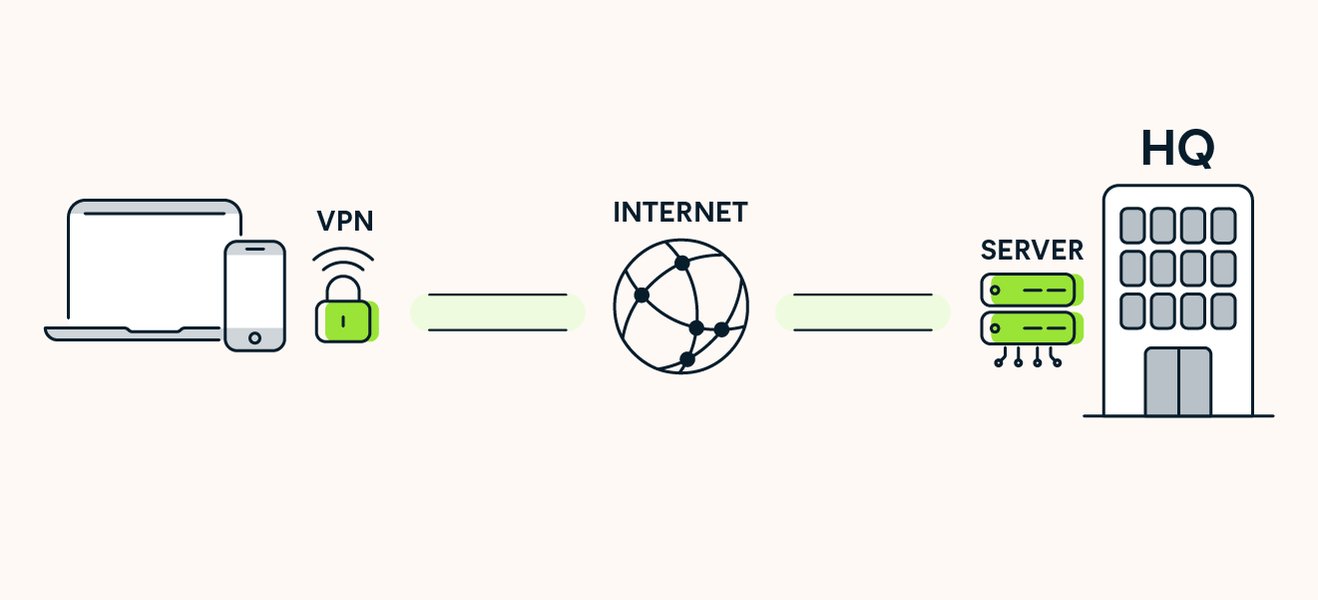
Visualizing the Secure Path: How a VPN Protects Your Data
When a VPN Becomes Indispensable
While the internet can be navigated without a VPN for basic tasks, certain scenarios make its use highly advisable or even necessary for enhanced privacy, security, and access.
Safeguarding Your Connection on Public Wi-Fi
One of the most critical reasons to use a VPN is when connecting to public Wi-Fi networks in places like cafes, airports, hotels, or libraries. These networks are often unsecured, making them prime targets for cybercriminals who can easily snoop on your data, inject malware, or steal personal information. A VPN encrypts your connection, creating a secure tunnel that protects your data from such threats, even if the public Wi-Fi network itself is compromised.
Protecting Your Privacy from ISPs and Advertisers
Your Internet Service Provider (ISP) can see your online activity, including the websites you visit, how long you stay on them, and information about your devices. Many ISPs collect and even share this data for various purposes, including targeted advertising. A VPN blinds your ISP's "prying eyes" by encrypting your traffic, preventing them from monitoring your browsing habits and thereby granting you greater control over your personal information. This is particularly relevant when conducting sensitive activities like online banking or shopping.
Accessing Geo-Restricted Content and Bypassing Censorship
Content licensing agreements often lead to geographical restrictions, meaning certain streaming services, news websites, or online applications are only available in specific regions. A VPN allows you to bypass these restrictions by connecting to a server in a different country, making it appear as if you are browsing from that location. This opens up a world of global content, from international Netflix libraries to region-specific online deals. For individuals in countries with strict internet censorship, a VPN can be a vital tool for accessing blocked social media platforms, news sources, and other online content, preserving freedom of information.
Enhancing Security for Remote Work and Sensitive Professions
For remote workers, a VPN creates a secure and private space for accessing company networks and sharing confidential information, shielding it from potential hackers. It ensures that sensitive company data remains inaccessible to unauthorized parties. Furthermore, individuals in professions that require extreme privacy and security, such as journalists, activists, and whistleblowers, frequently use VPNs to shield their identities and prevent communications from being monitored or intercepted.
Mitigating ISP Throttling and Price Discrimination
ISPs sometimes intentionally slow down certain types of internet traffic, like streaming or gaming, a practice known as bandwidth throttling, often to manage network load or encourage higher-tier subscriptions. By encrypting your traffic, a VPN can mask your online activities from your ISP, potentially helping you avoid such throttling. Additionally, some online retailers and service providers offer different prices based on a user's geographical location. A VPN can help you circumvent this "price discrimination" by allowing you to appear as if you are browsing from a region with more favorable pricing.
Understanding VPN Performance and Trade-offs
While VPNs offer a multitude of benefits, it's important to acknowledge potential trade-offs, primarily concerning internet speed and the need for a reputable provider.
Impact on Internet Speed
Routing your internet traffic through an encrypted tunnel and a remote server can sometimes lead to a slight decrease in internet speed. The extent of this impact depends on various factors, including the quality of the VPN service, the distance to the VPN server, and the server's load. Premium VPN providers typically invest in robust infrastructure and optimized protocols to minimize speed reductions, making the difference barely noticeable for most users.
The Importance of Choosing a Reputable VPN Provider
Not all VPNs are created equal. "Free" VPN services, in particular, should be approached with extreme caution. Many free providers compromise user privacy by collecting and selling browsing data, which defeats the very purpose of using a VPN. They may also suffer from slower speeds, fewer server locations, and weaker security protocols. It is crucial to select a reputable paid VPN service that has a clear no-logs policy, strong encryption standards, a wide network of servers, reliable performance, and transparent privacy practices. Independent audits and clear transparency reports are good indicators of a trustworthy provider.
A Comparative Analysis of VPN Benefits
To further illustrate the multifaceted utility of VPNs, let's consider a radar chart comparing different aspects of online activity with and without a VPN. This chart is based on general observations and the aggregated benefits reported by various sources, reflecting the typical impact a VPN can have on your digital life.
This radar chart visually represents how a VPN significantly boosts various aspects of your online experience compared to browsing without one. Notice the higher scores for 'Privacy Protection', 'Security on Public Wi-Fi', and 'ISP Tracking Prevention' when a VPN is in use, highlighting its core advantages. While 'Access to Geo-Restricted Content' and 'Anonymity' also see substantial improvements, it's important to remember that complete anonymity is a complex goal that requires more than just a VPN, often involving tools like Tor.
Understanding VPN Protocols and Their Importance
The effectiveness of a VPN heavily relies on the underlying protocols it uses. These protocols define how the encrypted tunnel is established and how data flows through it. Choosing a VPN provider that supports modern, secure protocols is crucial for optimal performance and security.
Understanding the Core: How a VPN Actually Protects Your Privacy and Internet Usage
The video delves into the fundamental mechanisms of VPNs, explaining how they function to protect your privacy and internet usage. It demystifies the common misconceptions about VPN capabilities, offering a realistic perspective on what a VPN can and cannot do. This is incredibly relevant because, to truly assess whether you "need" a VPN, it's essential to grasp its technical workings beyond marketing hype. The video touches on critical aspects like encryption and IP masking, which are the cornerstones of VPN functionality, and helps in understanding their real-world implications for your online security.
Common VPN Protocols and Their Characteristics
Below is a table outlining some common VPN protocols, their strengths, and weaknesses:
| Protocol | Description | Strengths | Weaknesses |
|---|---|---|---|
| OpenVPN | An open-source protocol known for strong encryption and configurability. | Highly secure, versatile, actively maintained. | Can be slower due to overhead, complex setup. |
| WireGuard | A newer, lightweight protocol designed for speed and simplicity. | Very fast, modern encryption, minimal codebase. | Still under development, less mature than OpenVPN. |
| IKEv2/IPSec | A secure and fast protocol, often used for mobile devices due to its stability. | Good for mobile, robust, re-establishes connection quickly. | Can be blocked, complex to set up manually. |
| SSTP | Microsoft-developed protocol, useful for bypassing firewalls. | Good at bypassing censorship, integrated into Windows. | Proprietary, potential Microsoft backdoor concerns. |
| L2TP/IPSec | A tunneling protocol combined with IPSec for encryption. | Widely supported, decent security with IPSec. | Can be slow, potential for being blocked by firewalls. |
| PPTP | One of the oldest VPN protocols, fast but highly insecure. | Fast, easy to set up. | Significant security vulnerabilities, should be avoided. |
When selecting a VPN, it's advisable to prioritize providers that offer modern and secure protocols like OpenVPN, WireGuard, and IKEv2/IPSec. Avoid services that primarily rely on outdated and vulnerable protocols like PPTP.
Beyond the Basics: Advanced VPN Features and Considerations
Many premium VPN services offer additional features that further enhance your online security and privacy. Understanding these can help you choose a service that aligns with your specific needs.
Kill Switch
A kill switch is a crucial security feature that automatically disconnects your device from the internet if the VPN connection drops unexpectedly. This prevents your real IP address and online activities from being exposed, ensuring continuous protection even during network fluctuations.
Split Tunneling
Split tunneling allows you to route some of your internet traffic through the VPN while allowing other applications or websites to access the internet directly. This can be useful for activities that don't require VPN protection, such as accessing local network devices or streaming content that isn't geo-restricted, potentially improving speeds for those specific tasks.
No-Logs Policy and Transparency
A strict no-logs policy means the VPN provider does not record your online activities, connection timestamps, or IP addresses. This is fundamental for maintaining privacy. Reputable VPNs often undergo independent audits to verify their no-logs claims and publish transparency reports detailing any requests from law enforcement, demonstrating their commitment to user privacy.
Device Compatibility and Router Installation
A good VPN service should offer applications for a wide range of devices, including smartphones, laptops, tablets, and even smart TVs. For comprehensive protection across all devices on your home network, some VPNs can be installed directly on your router. This ensures that every device connected to that router, including those that don't natively support VPN apps, benefits from the VPN's encryption and IP masking.
Navigating the VPN Landscape: Final Considerations
The decision to use a VPN ultimately depends on your individual needs, online habits, and risk tolerance. While not strictly necessary for every casual internet user, the benefits in terms of privacy, security, and access make a compelling case for its adoption, especially in today's data-driven world.
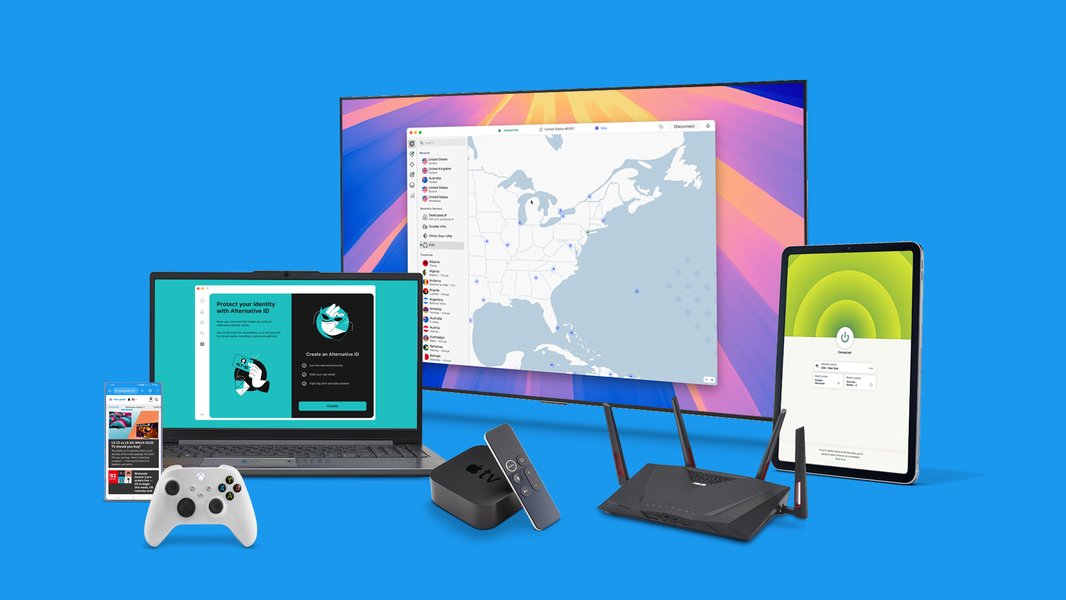
A Typical VPN Application Interface Demonstrating Ease of Use
Remember that a VPN is a powerful tool, but it's not a silver bullet for all online security threats. It complements, rather than replaces, other essential cybersecurity practices such as using strong, unique passwords, enabling multi-factor authentication (MFA), and maintaining up-to-date antivirus software.
Frequently Asked Questions
Do VPNs slow down internet speed?
Are free VPNs safe to use?
Can a VPN protect me from all cyber threats?
Should I use a VPN all the time?
Can a VPN bypass all geo-restrictions?
Conclusion
In conclusion, while the question "Do I need a VPN?" doesn't always yield a simple yes or no, the modern digital landscape strongly suggests that a VPN is a valuable and often essential tool for most internet users. It serves as a personal shield, safeguarding your privacy, bolstering your security, and expanding your access to global content. Whether you're a frequent traveler relying on public Wi-Fi, concerned about ISP tracking, or simply desire greater online freedom, a reputable VPN service offers a significant upgrade to your digital life. Investing in a quality VPN is a proactive step towards a more secure and private online experience in 2025 and beyond.
Recommended Further Exploration
- How can I choose the best VPN service for my needs?
- What are the specific benefits of a VPN for online streaming services?
- How does a VPN compare to Tor browser for achieving online anonymity?
- Can you explain advanced VPN security features like kill switches and split tunneling in more detail?