
Unlocking GitLab's Configuration Power: A Deep Dive into Settings, APIs, and Remediation
Navigate GitLab's intricate configuration landscape, leveraging powerful APIs and intelligent remediation strategies for optimal platform management.
Key Insights
- Comprehensive Setting Levels: GitLab offers settings at instance (application), group, project, and user levels, providing granular control over various functionalities and security postures.
- API-Driven Automation: A robust set of REST APIs (Application Settings API, Projects API, Users API, Security Settings API, etc.) enables programmatic management, allowing for automation and "configuration-as-code" practices.
- AI-Powered Remediation: GitLab integrates advanced security features, including AI-powered solutions like GitLab Duo, to detect vulnerabilities, explain findings, suggest fixes, and streamline the remediation workflow for security-related settings and code.
GitLab, as a comprehensive DevSecOps platform, provides a vast array of configurable settings that allow organizations to tailor its behavior, enforce policies, and ensure security across all levels. These settings are not only accessible through the user interface but can also be managed programmatically via a rich set of APIs, enabling automation, integration, and a "configuration-as-code" approach. Furthermore, GitLab offers robust mechanisms and features, often leveraging AI, to assist in the remediation of misconfigurations, vulnerabilities, and policy violations.
Navigating GitLab's Diverse Setting Categories
GitLab's settings are strategically categorized to provide distinct control over different scopes within the platform. Understanding these levels is crucial for effective management and security enforcement.
Application (Instance-Wide) Settings
These are global configurations that apply to the entire GitLab installation. They are critical for managing the overall security, performance, and operational parameters of the instance. Administrators can access and modify these settings via the Admin Area UI under the 'Settings' section or programmatically through the Application Settings API. Examples include setting default project creation roles, maximum project limits, attachment sizes, repository size limits, and security defaults such as allow_all_integrations.
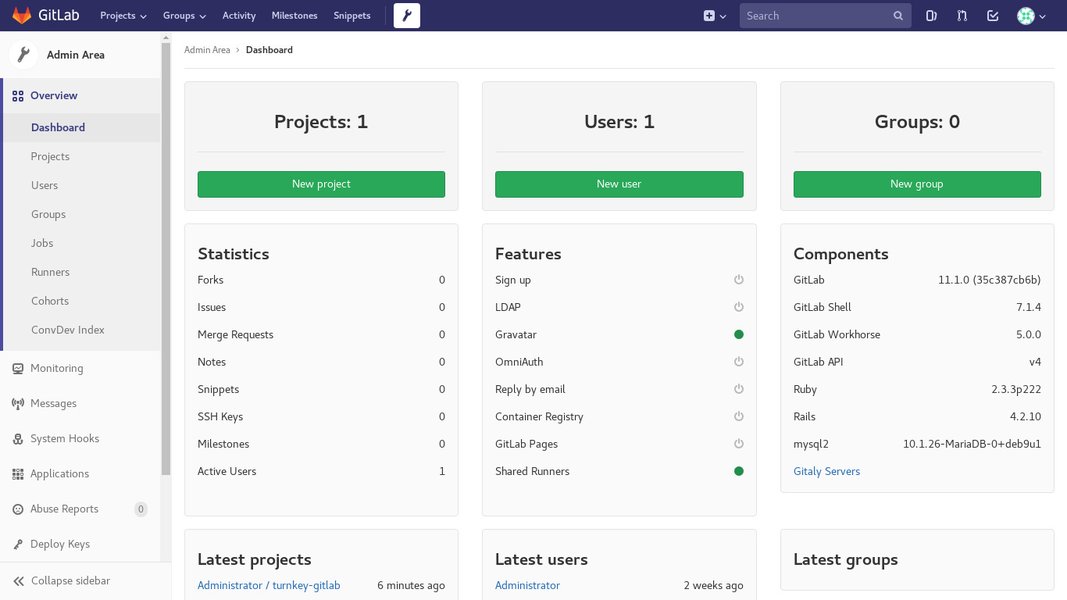
An example of the GitLab Admin Area interface, where instance-wide settings are managed.
Group Settings
Group-level settings provide a way to enforce consistent configurations across multiple projects nested within a specific group. This is particularly useful for centralized policy enforcement, such as managing memberships, permissions, security policies, and CI/CD variables that apply to all projects in that group.
Project Settings
Specific to individual projects, these settings control various aspects of a project's behavior and features. Users with at least the Maintainer role can configure project visibility, enable/disable specific project features (e.g., Issues, Merge Requests, CI/CD), manage repository settings, and define merge request approval rules. The Projects API allows for programmatic control over these configurations.
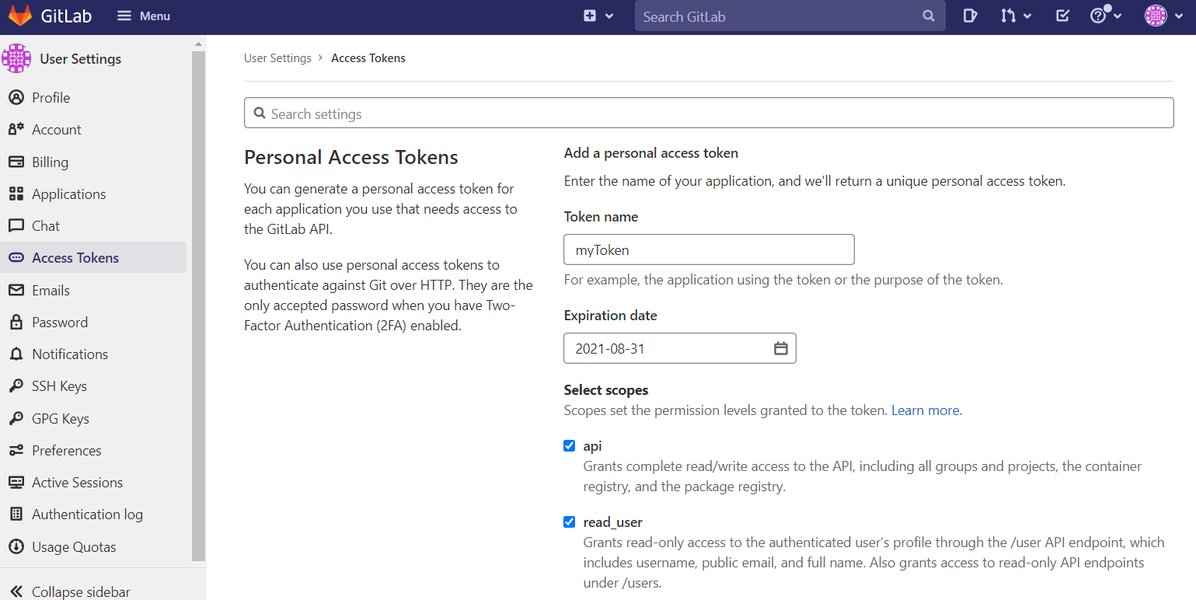
A screenshot illustrating GitLab project variables, which are part of project-level configurations.
User Settings
Individual user accounts have personal settings that allow users to customize their experience, manage notification levels, configure SSH keys, and create personal access tokens. The Users API and Notification Settings API facilitate programmatic interaction with these user-specific configurations.
CI/CD and Runner Configurations
Beyond the core application, project, group, and user settings, GitLab offers configurations for its CI/CD pipelines and Runners. The behavior of CI/CD pipelines is primarily defined in the .gitlab-ci.yml file, which includes various options for jobs, variables, and other pipeline elements. GitLab Runners, responsible for executing CI/CD jobs, are configured via a config.toml file, which can define global job concurrency and specific executor settings (e.g., Docker, Kubernetes).
Interacting Programmatically: GitLab's Extensive APIs
GitLab's REST API is a powerful tool for automating configuration management, integrating with external systems, and implementing "configuration-as-code" practices. Here's a breakdown of key APIs relevant to managing settings:
Application Settings API
This API is the primary interface for managing instance-wide settings. It allows administrators to retrieve the current global settings and update them. Changes made via this API are subject to a default 60-second caching period before they take full effect. This API can be used to control aspects like repository size limits, attachment sizes, and enabling/disabling various integrations.
- Endpoint Example:
GET /api/v4/application/settingsorPUT /api/v4/application/settings - Key Use Cases: Enforcing global limits, setting default visibilities, managing global authentication methods.
Projects API
The Projects API provides comprehensive control over individual GitLab projects, including their associated settings. It allows for managing project visibility, features, permissions, and even transferring or deleting projects. For example, you can programmatically change a project's visibility from private to internal or public.
- Endpoint Example:
GET /api/v4/projects/:idorPUT /api/v4/projects/:id - Key Use Cases: Automating project creation with predefined settings, modifying existing project configurations, archiving projects.
Security Settings APIs
GitLab offers dedicated APIs for managing project-level security configurations and interacting with vulnerability reports. The Project Security Settings API allows for customizing security scanners, enforcing specific security policies, and managing approval rules related to vulnerabilities. The Vulnerability Report API provides programmatic access to detected vulnerabilities, enabling automation of triage and remediation workflows.
- Endpoint Example:
PUT /api/v4/projects/:id/security/settingsorGET /api/v4/projects/:id/vulnerability_report - Key Use Cases: Enabling/disabling specific security scanners, fetching vulnerability data for external reporting, automating vulnerability lifecycle management.
Users API and Notification Settings API
The Users API allows for managing user accounts, including modifying personal settings such as enabling or disabling a user's ability to create groups. The Notification Settings API enables programmatic control over notification levels for users, groups, or projects, allowing for tailored communication preferences.
- Endpoint Example:
PUT /api/v4/users/:idorPUT /api/v4/users/:id/notification_settings - Key Use Cases: User provisioning and de-provisioning, enforcing notification policies, automating user preference updates.
Youtube Video: How to Make GitLab API Calls
This video demonstrates the fundamental process of making API calls to GitLab, providing a visual guide on how to interact with the platform programmatically. Understanding API usage is foundational for automating setting management and integrating GitLab with other tools, enhancing operational efficiency and enabling a robust "configuration-as-code" environment.
Structured Overview of GitLab Settings and APIs
The following table summarizes key GitLab settings, their applicable levels, and the corresponding API endpoints for management:
| Setting Name | Level | API Endpoint / Method | Description / Use Case |
|---|---|---|---|
default_project_creation_role |
Application | PUT /api/v4/application/settings |
Sets minimum role required to create new projects (e.g., Maintainers, Developers). |
default_project_visibility |
Application | PUT /api/v4/application/settings |
Determines default visibility for new projects (Private, Internal, Public). |
max_attachment_size |
Application | PUT /api/v4/application/settings |
Configures maximum file size for attachments in comments and issues. |
repository_size_limit |
Application | PUT /api/v4/application/settings |
Enforces maximum repository size per project to control storage. |
project_visibility |
Project | PUT /api/v4/projects/:id |
Sets visibility level of a specific project (public, internal, private). |
merge_request_approval_required |
Project | PUT /api/v4/projects/:id/merge_request_approvals |
Configures the requirement for merge request approvals before merging. |
security_scanner_enabled |
Project | PUT /api/v4/projects/:id/security/settings |
Enables or disables security scanners (SAST, DAST, etc.) on a project. |
notification_level |
User | PUT /api/v4/users/:id/notification_settings |
Allows users to customize email/notification levels for projects or groups. |
can_create_group |
User | PUT /api/v4/users/:id |
Determines if an external user can create groups. |
Remediation Steps: Addressing Issues and Enhancing Security
Remediation in GitLab extends beyond just fixing misconfigurations; it encompasses a comprehensive approach to addressing security vulnerabilities and ensuring compliance. GitLab integrates remediation into its DevSecOps lifecycle, from detection to resolution.
Key Remediation Workflow
- Detect Vulnerabilities: GitLab's built-in security scanners (SAST, DAST, Dependency Scanning, Secret Detection) are integrated into CI/CD pipelines to automatically identify security findings. These vulnerabilities are then surfaced in merge requests, dedicated vulnerability reports, and security dashboards.
- Analyze and Triage: Detailed vulnerability reports provide information on severity, description, and affected code locations. GitLab Duo, an AI-powered feature, enhances this phase by offering vulnerability explanations, outlining how an attacker could exploit a flaw, and suggesting potential fixes. This reduces the time developers spend understanding complex security issues.
- Fix and Remediate: Developers can directly incorporate fixes as part of merge requests. GitLab Duo further assists by providing AI-generated code fixes directly within merge requests, significantly accelerating the resolution process. For self-managed instances, configurations in files like
/etc/gitlab/gitlab.rbmight need manual adjustments followed by agitlab-ctl reconfigure. - Verify Remediation: After applying fixes, it's crucial to re-run security scans in pipelines to confirm that the vulnerabilities are resolved and no new issues are introduced. Vulnerabilities can then be marked as resolved within the GitLab interface.
- Policy and Automation: GitLab allows organizations to enforce security policies and approval rules to ensure that remediation practices are consistently followed. APIs can be leveraged to automate bulk actions on vulnerabilities, trigger scans, or update security settings programmatically.
- Training: GitLab integrates with platforms like SecureFlag to provide developers with hands-on security training and labs. This empowers developers with the necessary skills to understand and effectively remediate vulnerabilities, reducing remediation time and improving overall security posture.
AI-Powered Remediation with GitLab Duo
GitLab Duo represents a significant advancement in streamlining the remediation process. It utilizes large language models (LLMs) to:
- Vulnerability Explanation: Provides comprehensive details about a vulnerability, its potential exploitation, and guidance on how to fix it, drawing insights from public repositories.
- Vulnerability Resolution: Offers AI-generated code suggestions to fix identified vulnerabilities directly in merge requests. This feature aims to provide practical, actionable fixes, though it's always recommended to review and test proposed changes.
Challenges and Remediation Considerations
While powerful, programmatic setting changes and remediation also come with considerations:
- Caching Delays: As noted, changes via the Application Settings API can take up to 60 seconds to propagate due to caching. Remediation strategies should account for this delay when validating changes.
- Impact Assessment: Before applying any significant setting change or remediation, especially at the instance or group level, a thorough impact assessment is essential to prevent unintended side effects on projects or users.
- Testing: Always test changes in a staging environment before deploying to production. For code fixes, adding new tests is recommended to prevent regressions and ensure the fix is effective.
Analyzing GitLab's Remediation Capabilities
To further illustrate GitLab's strengths in vulnerability remediation, let's look at a radar chart comparing its capabilities in key areas. This chart provides an opinionated analysis based on the depth of features discussed.
The radar chart illustrates GitLab's robust capabilities across various aspects of vulnerability remediation. It highlights particular strengths in AI-powered remediation suggestions and integrated reporting/triage, signifying its advanced approach to helping users identify and fix security issues. While developer training and manual remediation support are strong, there's always room for growth toward an ideal state in security automation and seamless integration.
The Interconnectedness of GitLab Settings and Remediation
The following mindmap visually represents the relationships between GitLab settings, the APIs used to manage them, and the various aspects of remediation.
This mindmap provides a visual representation of how various GitLab settings are categorized, the specific APIs available for their programmatic management, and the integrated remediation processes. It highlights the central role of APIs in automating configuration and how security features, including AI, are woven into the remediation workflow from detection to verification and training.
Frequently Asked Questions
What are the primary levels of settings in GitLab?
How can I programmatically manage GitLab settings?
What is GitLab Duo's role in remediation?
Are there any delays when updating settings via API?
How does GitLab help with security vulnerability remediation?
Conclusion
GitLab's extensive and multi-layered settings, coupled with its powerful REST APIs, provide organizations with the flexibility and automation capabilities needed to manage their DevSecOps platform effectively. From instance-wide controls to granular project and user configurations, GitLab empowers administrators and developers to tailor the environment to their specific needs. Furthermore, the platform's integrated approach to remediation, heavily augmented by AI-driven insights and automated workflows, ensures that security vulnerabilities and misconfigurations are identified, analyzed, and addressed efficiently. This comprehensive ecosystem fosters a secure, scalable, and highly configurable development environment, critical for modern software delivery.
Recommended Further Exploration
- How to automate GitLab instance configuration with CI/CD
- Best practices for securing GitLab CI/CD pipelines
- Deep dive into GitLab's vulnerability management lifecycle
- Exploring GitLab Duo's advanced AI capabilities for developers