
Unlock the Power of Vue 3: A Deep Dive into Its Most Essential APIs
Navigate Vue 3's ecosystem with this comprehensive guide to its core Application Programming Interfaces, from Composition to Reactivity.
Vue 3 marks a significant evolution in the Vue.js framework, introducing a more powerful, flexible, and scalable way to build modern web applications. At its heart are a set of well-designed Application Programming Interfaces (APIs) that cater to different needs and development styles. Understanding these APIs is crucial for leveraging the full potential of Vue 3. This guide explores the most commonly used APIs, with a particular focus on the revolutionary Composition API.
Key Vue 3 API Highlights
- The Composition API: A new paradigm for organizing component logic by feature rather than by option type, enhancing reusability and readability, especially in large-scale projects.
- Enhanced Reactivity System: Leveraging ES6 Proxies, Vue 3's reactivity is more performant and offers finer-grained control with APIs like
ref()andreactive(). - Modular Application Initialization: Global APIs are now scoped to application instances created by
createApp(), improving modularity and testability.
The Composition API: Revolutionizing Component Logic
The Heart of Modern Vue Development
The Composition API is arguably the most impactful addition to Vue 3. It allows developers to colocate code based on logical concerns, rather than being forced to scatter related logic across different options (like data, methods, computed, etc.) as was common in the Options API. This makes components easier to understand, maintain, and reuse.
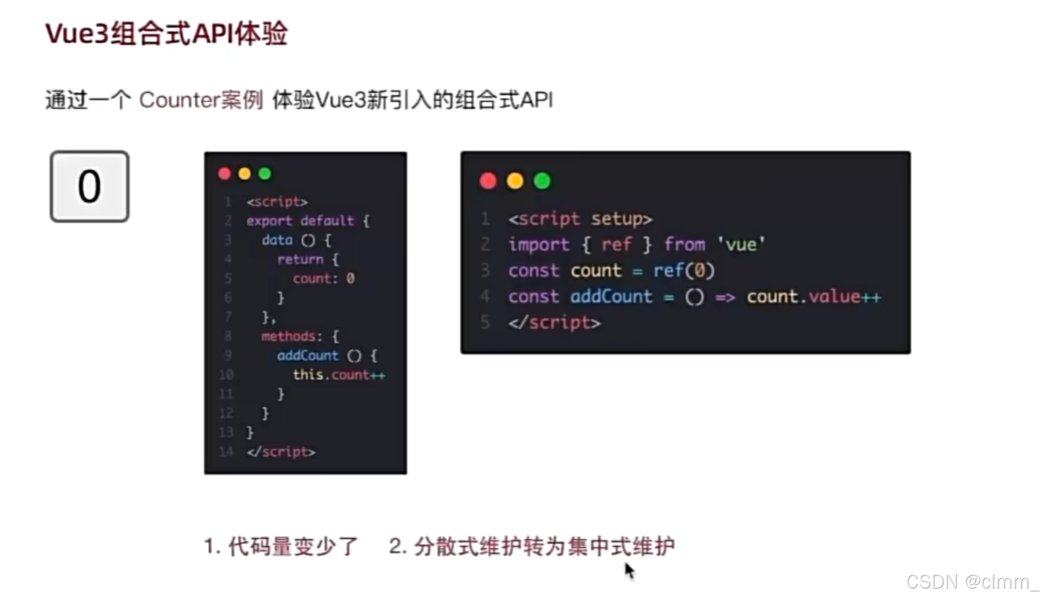
A diagram illustrating the flow and structure within Vue 3's Composition API.
setup() Function: The Entry Point
The setup() function is the cornerstone of the Composition API. It's a special hook that runs before the component instance is created (before beforeCreate and created from the Options API). All Composition API functions are typically used within setup().
Key characteristics of setup():
- It receives
propsas its first argument (which are reactive) and acontextobject (containingattrs,slots, andemit) as its second. - Anything returned from
setup()(objects, functions, refs) is exposed to the component's template and other Options API parts. - It is executed only once during the component's lifecycle.
A more concise way to use the Composition API is with the <script setup> syntax, which essentially turns the entire script block into a setup() function, automatically exposing top-level bindings to the template.
<script setup>
import { ref, computed } from 'vue';

// Reactive state
const count = ref(0);

// Computed property
const doubleCount = computed(() => count.value * 2);

// Method
function increment() {
  count.value++;
}
</script>

<template>
  <p>Count: {{ count }}</p>
  <p>Double Count: {{ doubleCount }}</p>
  <button @click="increment">Increment</button>
</template>
Core Reactivity APIs
Vue 3's reactivity system is built upon a set of powerful functions that allow you to create and manage reactive state.
ref()
The ref() function takes an inner value and returns a reactive and mutable "ref" object. This object has a single .value property that points to the inner value. It's primarily used for primitive types (strings, numbers, booleans) but can also hold objects. When a ref is mutated (ref.value = newValue), Vue tracks this change and updates the dependent parts of your application.
import { ref } from 'vue';
const message = ref('Hello Vue 3!');
console.log(message.value); // 'Hello Vue 3!'
message.value = 'Updated message';
reactive()
The reactive() function returns a reactive proxy of an object. This is primarily used for creating reactive state from objects or arrays. Unlike ref(), you don't need .value to access or modify properties of a reactive object. The reactivity is "deep," meaning changes to nested properties are also tracked.
import { reactive } from 'vue';
const state = reactive({
  user: {
    name: 'Ithy',
    age: 1
  },
  hobbies: ['learning', 'helping']
});
console.log(state.user.name); // 'Ithy'
state.user.age++;
state.hobbies.push('synthesizing');
computed()
The computed() function creates a computed property. It takes a getter function and returns an immutable reactive ref object for the returned value from the getter. The value is cached and only re-evaluates when one of its reactive dependencies changes. This is ideal for deriving state based on other reactive data.
import { ref, computed } from 'vue';
const price = ref(10);
const quantity = ref(5);
const totalPrice = computed(() => price.value * quantity.value);
console.log(totalPrice.value); // 50
price.value = 12;
console.log(totalPrice.value); // 60 (recomputed)
watch() and watchEffect()
These functions allow you to perform side effects in response to data changes.
watch(): Lazily watches one or more specific reactive data sources and executes a callback function when the sources change. It provides access to both the new and old values.import { ref, watch } from 'vue'; const question = ref(''); watch(question, (newVal, oldVal) => { console.log(<code>Question changed from "${oldVal}" to "${newVal}"); });watchEffect(): Runs a function immediately while reactively tracking its dependencies, and re-runs it whenever any of those dependencies change. It's useful when you don't need to specify exact sources to watch but rather want to react to any reactive data used within the effect function.import { ref, watchEffect } from 'vue'; const userID = ref(1); watchEffect(() => { // This will run initially and whenever userID.value changes console.log(<code>Fetching data for user: ${userID.value}); });
Other Reactivity Utilities
readonly(): Takes an object (reactive or plain) or a ref and returns a readonly proxy to the original. The readonly proxy is deep: any nested property accessed will also be readonly.isRef(),isReactive(),isReadonly(),isProxy(): Type-checking utilities.toRaw(): Returns the raw, original object from a Vue-created proxy.markRaw(): Marks an object so that it will never be converted to a proxy. Returns the object itself.shallowRef(): Creates a ref that tracks its own.valuemutation but doesn't make its value deeply reactive.shallowReactive(): Creates a reactive proxy that tracks its own properties' mutations but doesn't perform deep reactive conversion of nested objects.toRef(): Can be used to create a ref for a property on a source reactive object. The created ref is synced with its source property.toRefs(): Converts a reactive object to a plain object where each property of the resulting object is a ref pointing to the corresponding property of the original reactive object. This is useful when destructuring a reactive object while retaining reactivity.
Lifecycle Hooks in Composition API
Vue 3 provides Composition API equivalents for all existing lifecycle hooks. These are imported directly and used within the setup() function. They are prefixed with on (e.g., onMounted, onUpdated, onUnmounted).
import { onMounted, onUnmounted } from 'vue';

export default {
  setup() {
    onMounted(() => {
      console.log('Component is mounted!');
      // Perform setup tasks like fetching data, setting up event listeners
    });

    onUnmounted(() => {
      console.log('Component is about to be unmounted.');
      // Perform cleanup tasks like removing event listeners, clearing timers
    });

    // ... other setup logic
  }
}
The full list includes: onBeforeMount, onMounted, onBeforeUpdate, onUpdated, onBeforeUnmount, onUnmounted, onErrorCaptured, onRenderTracked, onRenderTriggered, onActivated, onDeactivated, and onServerPrefetch (for SSR).
Visualizing API Characteristics with a Radar Chart
The following radar chart provides a comparative overview of some key Composition API functions based on common development considerations. This is a subjective assessment to illustrate relative strengths and characteristics rather than absolute metrics. The scores range from a conceptual minimum of 3 to a maximum of 10.
This chart helps visualize how different APIs might be perceived in terms of how often they are used (Usage Frequency), how easy they are to pick up initially (Initial Learning Curve, where lower is easier but data is inverted for a "higher is better" feel, so higher means steeper curve here), and their contribution to creating reusable logic (Impact on Reusability).
Application Instance APIs
In Vue 3, global Vue behavior is no longer configured via a global Vue object. Instead, all configurations are scoped to an application instance created by createApp().
createApp(rootComponent, [rootProps]): Creates a new application instance.app.mount(rootContainer): Mounts the application instance's root component into a DOM element.app.unmount(): Unmounts a mounted application instance.app.component(name, component): Registers a global component.app.directive(name, directive): Registers a global custom directive.app.use(plugin, [options]): Installs a Vue plugin.app.mixin(mixin): Applies a global mixin (use with caution, Composition API is generally preferred for reusability).app.provide(key, value): Provides a value that can be injected by any component within the application.app.config.globalProperties: An object that can be used to register global properties that are accessible on any component instance within the application.
Other Essential APIs & Concepts
provide() and inject()
These APIs are used for dependency injection, allowing a parent component to serve as a dependency provider for all its descendants, regardless of how deep the component hierarchy is. provide is used in a parent component, and inject is used in a child/descendant component to access the provided data. This is a cleaner alternative to prop drilling for deeply nested components.
nextTick()
Defers a callback to be executed after the next DOM update cycle. This is useful when you want to perform an operation after Vue has updated the DOM in response to a data change.
import { ref, nextTick } from 'vue';
const message = ref('Initial');
async function updateMessage() {
  message.value = 'Updated';
  await nextTick();
  // DOM is now updated
  console.log(document.getElementById('myMessage').textContent); // 'Updated'
}
Built-in Components
Vue 3 includes several useful built-in components:<Transition>: For applying enter/leave animations to elements or components.<TransitionGroup>: For animating lists of elements or components.<KeepAlive>: Caches inactive component instances so their state is preserved.<Teleport>: Renders its slot content to a different part of the DOM, outside of the current component's hierarchy. Useful for modals, tooltips, etc.<Suspense>: Manages asynchronous dependencies in a component tree, allowing you to display fallback content while waiting for async components or setup functions to resolve.
Template Syntax
Vue 3 continues to use its familiar declarative template syntax, including directives like v-if, v-for, v-bind (or :), v-on (or @), and v-model.
Vue 3 API Landscape Mindmap
This mindmap provides a bird's-eye view of the major API categories and some key functions within Vue 3, helping to understand their relationships and overall structure.
The mindmap visually organizes Vue 3's APIs, starting from the main categories like Composition API and Application API, and branching out to specific functions and concepts. This helps in grasping the structured nature of Vue 3's capabilities.
Summary Table of Key Composition APIs
Here's a quick reference table for some of the most frequently used Composition API functions:
| API Function | Purpose | Basic Usage Example |
|---|---|---|
setup() |
Entry point for Composition API logic in a component. | export default { setup() { /* ... */ } } |
ref(initialValue) |
Creates a reactive reference for a value (often primitives). Access/modify via .value. |
const count = ref(0); count.value++; |
reactive(object) |
Creates a deep reactive proxy for an object or array. | const state = reactive({ user: 'John' }); state.user = 'Jane'; |
computed(getterFn) |
Creates a cached, reactive computed property based on other reactive sources. | const double = computed(() => count.value * 2); |
watch(source, callback, options?) |
Watches specific reactive source(s) and runs a callback on change. | watch(count, (newVal, oldVal) => { /* ... */ }); |
watchEffect(effectFn, options?) |
Runs an effect function immediately, tracking its dependencies and re-running on change. | watchEffect(() => console.log(count.value)); |
onMounted(callback) |
Registers a callback to be invoked after the component is mounted. | onMounted(() => { /* DOM is ready */ }); |
toRefs(reactiveObject) |
Converts a reactive object's properties into individual refs. | const { name, age } = toRefs(state); |
A comprehensive video tutorial introducing the Vue 3 Composition API, covering its core concepts and benefits for modern web development.
This video provides a foundational understanding of why the Composition API was introduced and how it can be used to build more organized and maintainable Vue components. It often covers practical examples, showing how to refactor existing Options API patterns or build new features from scratch using functions like ref, reactive, computed, and watch, along with the setup function.
Frequently Asked Questions (FAQ)
What is the primary purpose of the setup() function in Vue 3?
The setup() function is the central entry point for using the Composition API in a Vue 3 component. Its primary purposes are:
- To declare reactive state using functions like
ref()andreactive(). - To define computed properties using
computed(). - To set up watchers using
watch()orwatchEffect(). - To register lifecycle hooks (e.g.,
onMounted(),onUnmounted()). - To define methods (plain JavaScript functions) that operate on the reactive state.
- To return any state or functions that should be exposed to the component's template and other parts of the component (if using Options API alongside).
It runs before the component instance is created, providing a dedicated space to organize component logic by feature rather than by option type.
What's the main difference between ref() and reactive()?
The main differences lie in what types of data they are typically used for and how their underlying values are accessed:
ref():- Typically used for primitive values (strings, numbers, booleans), although it can also hold objects.
- Returns a "ref object" which has a
.valueproperty. You must use.valueto access or modify the underlying data (e.g.,myRef.value = 'new value'). - When used in templates, the
.valueis automatically unwrapped, so you can write{{ myRef }}directly.
reactive():- Used exclusively for objects (including arrays and built-in types like Map, Set). It cannot hold primitive values directly.
- Returns a reactive proxy of the original object. You access and modify properties directly on the proxy (e.g.,
myReactiveObj.property = 'new value'). - The reactivity is "deep," meaning changes to nested properties are also tracked.
In general, use ref() for standalone primitive reactive values and reactive() for grouping multiple related reactive properties into a single object.
How are lifecycle hooks used in the Composition API?
In the Composition API, lifecycle hooks are imported directly from vue and called within the setup() function (or at the top level of <script setup>). They are named with an on prefix, for example:
onMounted(() => { /* logic for when component is mounted */ })onUpdated(() => { /* logic for when component is updated */ })onUnmounted(() => { /* logic for when component is unmounted */ })onBeforeMount(),onBeforeUpdate(),onBeforeUnmount(), etc.
Each hook function accepts a callback that will be executed at the appropriate stage of the component's lifecycle. This allows you to colocate lifecycle-related logic with the reactive state and functions it pertains to, improving organization.
Is the Options API still usable in Vue 3?
Yes, the Options API is still fully supported in Vue 3. You can continue to write components using options like data, methods, computed, watch, and the traditional lifecycle hooks (e.g., mounted, created). Vue 3 is designed to be incrementally adoptable, meaning you can mix and match Options API and Composition API within the same project, or even within the same component (though using Composition API within setup() is generally cleaner for new logic).
While the Composition API offers benefits for larger and more complex components or for creating reusable logic ("custom hooks"), the Options API remains a valid and sometimes simpler choice for smaller, more straightforward components or for teams already familiar with it.
What are "custom Hooks" in Vue 3?
In Vue 3, "custom Hooks" (often called "Composables" or "Composition Functions") are a pattern for extracting and reusing stateful logic using the Composition API. A custom hook is essentially a JavaScript function that encapsulates a piece of reactive state and related logic (e.g., methods, computed properties, watchers, lifecycle hooks).
These functions typically follow a naming convention of starting with use (e.g., useMousePosition, useFetch, useLocalStorage). They can take arguments and return reactive state (refs, reactive objects) and methods that can be used by any component that calls the hook.
Custom hooks are a powerful way to achieve code reuse, keep components lean, and share complex logic across different parts of an application without resorting to mixins or higher-order components, offering better type inference and clearer data flow.
// Example: useCounter.js (a custom hook)
import { ref, computed } from 'vue';

export function useCounter(initialValue = 0) {
  const count = ref(initialValue);
  const increment = () => count.value++;
  const doubleCount = computed(() => count.value * 2);

  return { count, increment, doubleCount };
}

// In a component:
// import { useCounter } from './useCounter';
// const { count, increment, doubleCount } = useCounter(10);
Recommended Further Exploration
- How does Vue 3's Composition API improve code organization compared to Vue 2's Options API?
- What are the best practices for managing state in large Vue 3 applications?
- Can you provide examples of creating custom reusable hooks with Vue 3's Composition API?
- How does Vue 3's reactivity system work under the hood with Proxies?
References
Last updated May 13, 2025