
Unlock Repetitive Power: A Deep Dive into C Programming Loops
Master the art of iteration in C with for, while, and do-while loops to write efficient and concise code for any repetitive task.
In the realm of C programming, loops are indispensable tools. They allow you to execute a block of code multiple times, a fundamental requirement for automating repetitive tasks, processing collections of data, and implementing complex algorithms. Without loops, writing code for such scenarios would be cumbersome, error-prone, and highly inefficient. Understanding the different types of loops and their appropriate use cases is crucial for any C programmer aiming to write effective and optimized software.
Essential Insights: Key Takeaways on C Loops
- Three Core Loop Types: C provides three primary loop constructs: the
forloop, thewhileloop, and thedo-whileloop, each suited for different iteration scenarios. - Control Flow Management: Loops operate based on conditional statements. The
forandwhileloops are "entry-controlled," checking the condition before execution, while thedo-whileloop is "exit-controlled," checking after execution. - Code Efficiency and Readability: Loops significantly reduce code redundancy, making programs shorter, easier to understand, and more maintainable by encapsulating repetitive logic.
The Trio of Iteration: Exploring Loop Types in C
C programming offers a versatile set of looping mechanisms, each designed with specific scenarios in mind. Let's explore them in detail.
1. The for Loop: Iteration with Precision
The for loop is typically the go-to choice when the number of iterations is known beforehand. It provides a concise way to initialize a counter, define a continuation condition, and specify an update step, all in a single line. This makes it highly readable for fixed-iteration tasks.
Syntax Unveiled
The structure of a for loop is as follows:
for (initialization; condition; increment/decrement) {
    // Block of code to be executed
}- Initialization: Executed once at the beginning of the loop. It's commonly used to declare and initialize a loop control variable (e.g.,
int i = 0;). Multiple initializations are possible, separated by commas. - Condition: Evaluated before each iteration. If the condition is true, the loop body is executed. If it's false, the loop terminates.
- Increment/Decrement: Executed after each iteration of the loop body. It's typically used to update the loop control variable (e.g.,
i++,i--,i += 2). Multiple update statements are also possible, separated by commas.
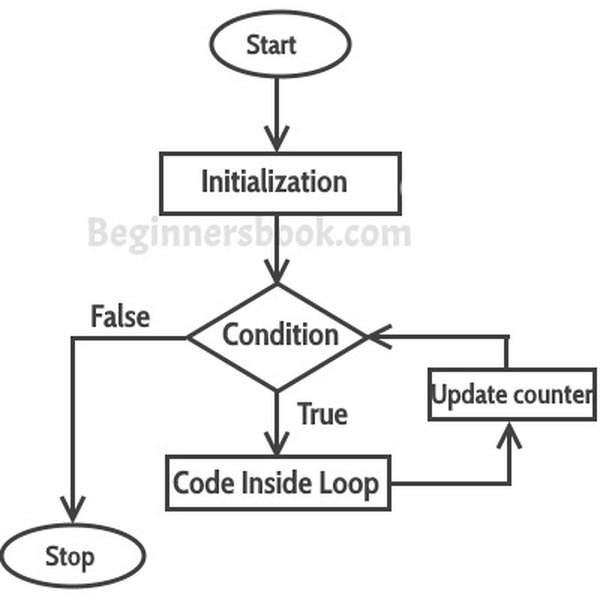
Diagram illustrating the syntax and flow of a for loop in C.
Practical Example: Printing Numbers
#include <stdio.h>

int main() {
  int i;
  // Loop to print numbers from 1 to 5
  for (i = 1; i <= 5; ++i) {
    printf("%d ", i);
  }
  // Output: 1 2 3 4 5
  printf("\n");
  return 0;
}
In this example, i is initialized to 1. The loop continues as long as i is less than or equal to 5. After each print statement, i is incremented by 1.
2. The while Loop: Condition-Driven Iteration
The while loop is an entry-controlled loop that repeats a block of code as long as a specified condition remains true. It's ideal when the number of iterations isn't known in advance, and the loop's continuation depends on a dynamically changing condition.
Syntax Unveiled
The structure of a while loop is:
while (condition) {
    // Block of code to be executed
    // Statement(s) to update the condition eventually must be present
}
The condition is evaluated before each execution of the loop body. If the condition is initially false, the loop body will not execute at all.
Practical Example: Summing Positive Numbers
#include <stdio.h>

int main() {
  int number;
  int sum = 0;

  printf("Enter a positive number (or 0 or negative to stop): ");
  scanf("%d", &number);

  while (number > 0) {
    sum += number;
    printf("Enter another positive number (or 0 or negative to stop): ");
    scanf("%d", &number);
  }

  printf("Sum of positive numbers entered: %d\n", sum);
  return 0;
}
This loop continues to ask the user for numbers and adds them to sum as long as the entered number is positive. The loop terminates when the user enters zero or a negative number.
3. The do-while Loop: Guaranteed Execution At Least Once
The do-while loop is an exit-controlled loop. This means the condition is checked *after* the loop body is executed. Consequently, the do-while loop guarantees that its body will be executed at least once, regardless of whether the condition is initially true or false.
Syntax Unveiled
The structure of a do-while loop is:
do {
    // Block of code to be executed
} while (condition);
Note the semicolon at the end of the while(condition); statement, which is mandatory.
Practical Example: Menu-Driven Program Stub
#include <stdio.h>

int main() {
  int choice;
  do {
    printf("\nMenu:\n");
    printf("1. Option 1\n");
    printf("2. Option 2\n");
    printf("3. Exit\n");
    printf("Enter your choice: ");
    scanf("%d", &choice);

    switch (choice) {
      case 1:
        printf("Option 1 selected.\n");
        break;
      case 2:
        printf("Option 2 selected.\n");
        break;
      case 3:
        printf("Exiting program.\n");
        break;
      default:
        printf("Invalid choice. Please try again.\n");
    }
  } while (choice != 3);

  return 0;
}
In this example, the menu is displayed at least once. The loop continues, prompting the user for a choice, until they select option 3 to exit.
Comparative Analysis: Choosing the Right Loop
Understanding the subtle differences between C loops helps in selecting the most appropriate one for a given task. The following table summarizes their key characteristics:
| Feature | for Loop |
while Loop |
do-while Loop |
|---|---|---|---|
| Control Type | Entry-Controlled | Entry-Controlled | Exit-Controlled |
| Primary Use Case | Known number of iterations (e.g., iterating arrays) | Number of iterations unknown, depends on a condition | Guaranteed at least one execution, condition checked after |
| Initialization | Typically within the loop structure | Before the loop begins | Before the loop begins |
| Condition Check | Before each iteration | Before each iteration | After each iteration |
| Update of Loop Variable | Typically within the loop structure | Inside the loop body | Inside the loop body |
| Guaranteed Execution | No (if condition is initially false) | No (if condition is initially false) | Yes (at least once) |
| Syntax Compactness for Fixed Iterations | High | Moderate | Moderate |
This table provides a quick reference for distinguishing between the three loop types based on their operational mechanics and common applications.
Visualizing Loop Characteristics: A Radar Chart Perspective
To further illustrate the distinctions and strengths of each loop type, the radar chart below compares them across several key attributes. The scores (on a scale of 1 to 5, where 5 is highest/most applicable) are based on general programming consensus and typical use-case suitability.
Radar chart comparing for, while, and do-while loops based on common characteristics.
This chart visually reinforces that for loops excel in predictable scenarios, while loops offer flexibility for condition-driven tasks, and do-while loops are unique in guaranteeing at least one pass through the loop body.
Mapping the Concepts: Loops in C Mindmap
The following mindmap provides a hierarchical overview of loops in C programming, branching from the core concept to individual loop types and their key characteristics. This visual aid helps in structuring your understanding of how these control flows are organized and related.
(number may be unknown)"] id2_2_4["Example: Reading input until sentinel value"] id2_3["do-while Loop"] id2_3_1["Exit-controlled"] id2_3_2["Syntax: do { ... } while(condition);"] id2_3_3["Use Case: Body must execute at least once"] id2_3_4["Example: Menu-driven programs"] id3["Loop Control Statements"] id3_1["break
(Exit loop immediately)"] id3_2["continue
(Skip current iteration,
proceed to next)"] id4["Special Concepts"] id4_1["Nested Loops
(Loop inside another loop)"] id4_2["Infinite Loops
(e.g., for(;;) or while(1))"]
This mindmap summarizes the main types of loops, their control mechanisms, syntax hints, typical applications, and related concepts like loop control statements and nested structures.
Advanced Looping Techniques and Considerations
Beyond the basic structures, C offers ways to refine loop behavior and handle more complex scenarios.
Nested Loops
A nested loop is a loop placed inside the body of another loop. The inner loop executes fully for each iteration of the outer loop. This is commonly used for working with multi-dimensional data structures like matrices or for generating patterns.
Example: Printing a 2D Pattern
#include <stdio.h>

int main() {
  int i, j;
  int rows = 3;
  int cols = 4;

  // Outer loop for rows
  for (i = 0; i < rows; i++) {
    // Inner loop for columns
    for (j = 0; j < cols; j++) {
      printf("* ");
    }
    printf("\n"); // Newline after each row
  }
  /*
  Output:
  * * * *
  * * * *
  * * * *
  */
  return 0;
}
Loop Control Statements
C provides statements to alter the normal flow of execution within a loop:
break: Immediately terminates the innermost loop (or switch statement) it is in. Execution resumes at the statement following the terminated loop.continue: Skips the remaining statements in the current iteration of the loop body and proceeds to the next iteration. In aforloop, the increment/decrement part is executed next. Inwhileanddo-whileloops, the condition is tested next.
Example: Using continue and break
#include <stdio.h>

int main() {
  int i;
  printf("Using continue to print odd numbers up to 10, and break at 7:\n");
  for (i = 1; i <= 10; i++) {
    if (i == 7) {
      printf("Breaking at 7...\n");
      break; // Exit loop when i is 7
    }
    if (i % 2 == 0) {
      continue; // Skip even numbers
    }
    printf("%d ", i);
  }
  // Output: Using continue to print odd numbers up to 10, and break at 7:
  // 1 3 5 Breaking at 7...
  printf("\n");
  return 0;
}
Infinite Loops
An infinite loop is a loop whose condition always evaluates to true, or which lacks a proper termination condition. While sometimes intentional (e.g., in embedded systems or server applications that must run continuously), they are often bugs. An infinite loop can be created, for example, with for(;;) or while(1). If intentional, such loops usually contain a break statement to exit under specific circumstances.
Mastering Loops: A Video Tutorial
For a dynamic explanation and practical demonstrations of C loops, including while, for, and do-while structures, the following video provides a comprehensive overview. It delves into the fundamentals and control instructions, offering valuable insights for mastering these essential programming constructs.
Video tutorial covering the fundamentals of while, for, and do-while loops in C programming.
This tutorial explains how loop control instructions work in C, breaking down the fundamentals of each loop type to help solidify your understanding through visual examples and expert commentary.
Benefits of Employing Loops in C
Integrating loops into your C programs offers several significant advantages:
- Code Reusability: Execute the same block of code multiple times without rewriting it.
- Reduced Code Length: Makes programs more concise and manageable.
- Efficiency: Automates repetitive tasks, saving development time and reducing the chance of manual errors.
- Data Processing: Essential for iterating through arrays, strings, files, and other data structures to perform operations on each element.
- Algorithm Implementation: Many algorithms, such as searching and sorting, inherently rely on looping constructs.
Frequently Asked Questions (FAQ)
What is the main difference between a `while` and a `do-while` loop?
The primary difference lies in when the condition is checked. A while loop is an entry-controlled loop, meaning the condition is checked before the loop body is executed. If the condition is false initially, the loop body might not execute at all. A do-while loop is an exit-controlled loop; the condition is checked after the loop body executes. This guarantees that the loop body will run at least once, regardless of the condition's initial state.
When should I use a `for` loop instead of a `while` loop?
A for loop is generally preferred when you know the exact number of times you need to iterate, or when you are iterating over a sequence with a clear start, end, and step (like an array). Its syntax conveniently groups the initialization, condition, and update expressions in one place. A while loop is more suitable when the number of iterations is not known beforehand and depends on a condition that might change during execution, such as user input or a flag variable.
Can I have a `for` loop without one of its expressions (initialization, condition, update)?
Yes, any or all of the three expressions in a for loop (initialization, condition, update) can be omitted, but the semicolons must still be present.
For example:
for (; condition; update): Initialization is done before the loop.for (initialization; ; update): If the condition is omitted, it's considered true, leading to an infinite loop unless abreakstatement is used.for (initialization; condition; ): The update is done inside the loop body.for (;;): Creates an infinite loop. This is equivalent towhile(1).
While flexible, omitting expressions should be done thoughtfully to maintain code clarity.
What are common mistakes to avoid when working with loops in C?
Common mistakes include:
- Infinite Loops: Forgetting to update the loop control variable or having a condition that never becomes false.
- Off-by-One Errors: Incorrectly defining the loop condition (e.g., using
<instead of<=or vice-versa), leading to one too few or one too many iterations. This is common when working with array indices. - Incorrect Semicolon Placement: Placing a semicolon immediately after a
fororwhilecondition (e.g.,while(condition); { /* body */ }) can lead to an empty loop body or unexpected behavior. Fordo-while, the semicolon afterwhile(condition);is required. - Scope of Variables: Variables declared inside a loop (e.g., in the initialization part of a
forloop in C99 and later) are only accessible within that loop's scope. - Modifying Loop Counter Inconsistently: Altering the loop counter both in the update expression and within the loop body can make the loop's behavior hard to predict.
Recommended Further Exploration
To deepen your understanding of iteration and control flow in C, consider exploring these related topics:
- How do `break` and `continue` statements specifically alter loop execution in C?
- Can you provide practical examples of using nested loops for manipulating 2D arrays in C?
- What are the best practices for writing loop conditions to prevent infinite loops in C programs?
- Are there performance differences between `for`, `while`, and `do-while` loops in C for specific scenarios?
References
This response was synthesized using information from the following authoritative sources:
Last updated May 9, 2025