
Mastering Argo CD: Your Essential CLI Command Guide
Unlock the power of GitOps on Kubernetes with these crucial Argo CD command-line tools for efficient application management.
Argo CD streamlines Kubernetes application deployment and lifecycle management using GitOps principles. Its command-line interface (CLI), invoked with the argocd command, is a powerful tool for interacting with your Argo CD instance, managing applications, repositories, clusters, and more directly from your terminal. Understanding these commands is key to leveraging Argo CD effectively.
Key Takeaways: Argo CD CLI Essentials
- Comprehensive Management: The
argocdCLI provides commands to manage the full lifecycle of applications, clusters, repositories, and projects within your GitOps workflow. - Declarative Control: Commands like
app create,app sync, andapp diffallow you to define, synchronize, and inspect application states based on configurations stored in Git. - Automation & Integration: The CLI is crucial for scripting automation tasks and integrating Argo CD into broader CI/CD pipelines, enhancing efficiency and reliability.
Understanding the Argo CD CLI
Argo CD operates by continuously monitoring running applications and comparing their live state against the desired target state defined in a Git repository. The CLI acts as your primary interface for instructing Argo CD, performing administrative tasks, and gaining insights into your deployments.
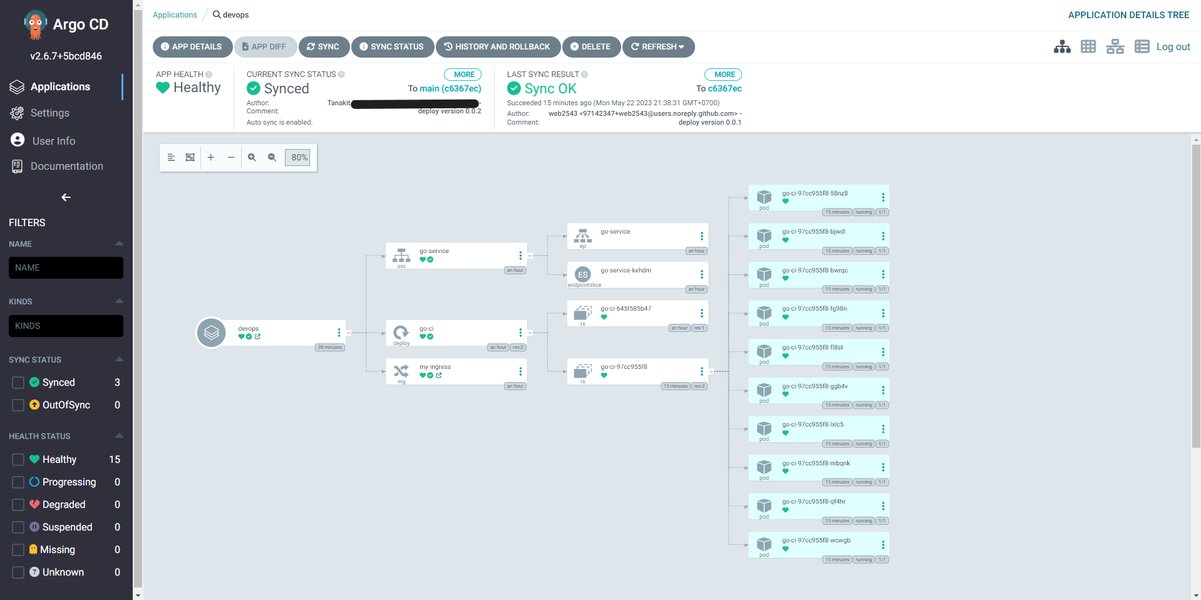
Conceptual overview of Argo CD's GitOps workflow.
Core Command Structure
Most interactions follow the pattern argocd <noun> <verb> [flags]. For example, argocd app list uses the noun app and the verb list.
- Nouns: Represent objects Argo CD manages (e.g.,
app,cluster,repo,proj,account). - Verbs: Specify the action to perform (e.g.,
create,list,get,sync,delete,add,rm). - Flags: Modify command behavior (e.g.,
--output yaml,--force,--selector). Use--helpon any command or subcommand for specific options.
Essential Argo CD Commands by Category
Here’s a breakdown of the most important argocd commands, grouped by their function:
1. Connection & Authentication
argocd login
Authenticates the CLI with your Argo CD server instance. This is the first step for most interactions.
- Usage:
argocd login <ARGOCD_SERVER> [--username <USER>] [--password <PASS>] [--sso] - Key Flags:
--ssofor Single Sign-On,--insecureto skip TLS verification (use cautiously).
argocd logout
Logs out from the current Argo CD server.
- Usage:
argocd logout <ARGOCD_SERVER>
argocd context
Manages different Argo CD server contexts, useful if you interact with multiple Argo CD instances.
- Usage:
argocd context [create|switch|delete] <NAME>
2. Application Management (argocd app)
These commands are central to managing the deployment and lifecycle of your applications.
argocd app list
Lists all applications managed by Argo CD.
- Usage:
argocd app list [flags] - Key Flags:
-l, --selectorto filter by labels,-o, --output(e.g.,yaml,json,wide).
argocd app create
Registers a new application with Argo CD based on repository details.
- Usage:
argocd app create <APP_NAME> --repo <REPO_URL> --path <PATH_IN_REPO> --dest-server <CLUSTER_URL> --dest-namespace <NAMESPACE> [flags]
argocd app get
Displays detailed information about a specific application, including sync status, health, and resources.
- Usage:
argocd app get <APP_NAME> [flags]
argocd app sync
Manually triggers a synchronization of the application's live state to match the desired state defined in Git.
- Usage:
argocd app sync <APP_NAME> [flags] - Key Flags:
--revisionto sync to a specific commit/tag,--forceto bypass certain safety checks,--pruneto delete resources not defined in Git.
argocd app diff
Shows the differences (diff) between the live state in the cluster and the desired state in Git.
- Usage:
argocd app diff <APP_NAME> [flags]
argocd app history
Displays the deployment history for an application, showing past sync operations and revisions.
- Usage:
argocd app history <APP_NAME>
argocd app rollback
Rolls back an application to a previous successfully deployed state based on its history.
- Usage:
argocd app rollback <APP_NAME> [HISTORY_ID] - Key Flags:
--to-revisionto rollback to a specific revision instead of using history ID.
argocd app delete
Removes an application from Argo CD management and optionally deletes its resources from the cluster.
- Usage:
argocd app delete <APP_NAME> [flags] - Key Flags:
--cascade=falseto only remove the AppProject definition without deleting resources.
argocd app wait
Waits for an application to reach a specific health and sync status (e.g., Synced and Healthy).
- Usage:
argocd app wait <APP_NAME> [flags]
3. Cluster Management (argocd cluster)
Manages the Kubernetes clusters where Argo CD deploys applications.
argocd cluster add
Registers a new Kubernetes cluster with Argo CD using a kubeconfig context.
- Usage:
argocd cluster add <CONTEXT_NAME> [flags]
argocd cluster list
Lists all Kubernetes clusters known to Argo CD.
- Usage:
argocd cluster list
argocd cluster get
Shows details about a specific connected cluster.
- Usage:
argocd cluster get <SERVER_URL_OR_NAME>
argocd cluster rm
Removes a cluster's credentials from Argo CD.
- Usage:
argocd cluster rm <SERVER_URL_OR_NAME>
4. Project Management (argocd proj)
Projects provide logical grouping and control policies (RBAC, allowed destinations/sources) for applications.
argocd proj list
Lists all configured projects.
- Usage:
argocd proj list
argocd proj create
Creates a new project with specified policies.
- Usage:
argocd proj create <PROJECT_NAME> [flags] - Key Flags:
--description,--src(allowed source repo),--dest(allowed destination cluster/namespace).
argocd proj get
Displays detailed information about a specific project.
- Usage:
argocd proj get <PROJECT_NAME>
argocd proj delete
Deletes a project.
- Usage:
argocd proj delete <PROJECT_NAME>
argocd proj role
Manages RBAC roles within a project.
- Usage:
argocd proj role [create|delete|add-policy|remove-policy] <PROJECT_NAME> <ROLE_NAME> [flags]
5. Repository Management (argocd repo)
Manages the Git or Helm repositories that contain your application manifests.
argocd repo add
Adds a Git or Helm repository to Argo CD's list of allowed sources.
- Usage:
argocd repo add <REPO_URL> [--username <USER>] [--password <PASS>] [--ssh-private-key-path <PATH>] [--type git|helm]
argocd repo list
Lists all repositories configured in Argo CD.
- Usage:
argocd repo list
argocd repo rm
Removes a repository from Argo CD.
- Usage:
argocd repo rm <REPO_URL>
6. Account and Admin Commands
argocd account update-password
Allows the currently logged-in user to change their password.
- Usage:
argocd account update-password
argocd admin
Provides subcommands for administrative tasks, often requiring cluster-level access.
- Examples:
argocd admin initial-password(retrieve initial admin password),argocd admin settings(manage system settings),argocd admin dashboard(open the web UI).
7. General Utility
argocd version
Displays the version of the Argo CD CLI client and the connected Argo CD server.
- Usage:
argocd version
argocd help
Shows help information for argocd or any subcommand.
- Usage:
argocd helporargocd <command> --help
Visualizing Command Importance
While all command categories are important, their frequency of use can vary depending on your role and workflow. This chart provides a relative view of how often different command groups might be used in typical Argo CD operations.
This chart highlights that application management commands (app list, app sync, app get, app diff) are generally used most frequently, especially in day-to-day operations and automation scripts. Authentication is crucial but less frequent after initial setup. Cluster, project, and repository management are important for setup and changes but used less often daily.
Argo CD Command Structure Mindmap
This mindmap provides a visual overview of the main command groups and some key subcommands within the argocd CLI structure.
Example CLI Workflow
Here's a typical sequence of commands you might use to deploy and manage an application:
# 1. Log in to your Argo CD server
argocd login my-argocd-server.example.com --username admin --password $ARGO_PASSWORD

# 2. (If needed) Add the target Kubernetes cluster
# Replace 'my-k8s-context' with your actual kubeconfig context name
argocd cluster add my-k8s-context

# 3. Add the Git repository containing your application manifests
argocd repo add https://github.com/my-org/my-app-repo.git --username gituser --password $GIT_PASSWORD

# 4. Create the application definition in Argo CD
argocd app create my-guestbook-app \
  --repo https://github.com/my-org/my-app-repo.git \
  --path guestbook \
  --dest-server https://kubernetes.default.svc \
  --dest-namespace guestbook-prod \
  --project default \
  --sync-policy automated # Optionally enable auto-sync

# 5. Check the application's status
argocd app get my-guestbook-app

# 6. Manually sync the application (if auto-sync is not enabled or immediate sync needed)
argocd app sync my-guestbook-app

# 7. List all applications to see the new one
argocd app list

# 8. Check for configuration drift
argocd app diff my-guestbook-app

# 9. If something goes wrong, check history and rollback
# argocd app history my-guestbook-app
# argocd app rollback my-guestbook-app <HISTORY_ID>

# 10. Log out when finished
argocd logout my-argocd-server.example.com
Video Guide: Argo CD CLI Introduction
For a visual walkthrough of installing the Argo CD CLI and using some basic commands, check out this helpful video:
This video provides a practical demonstration covering CLI installation and foundational commands, complementing the text-based information provided here.
Command Category Summary
This table summarizes the primary purpose of the main Argo CD CLI command categories:
| Command Category | Primary Function | Key Commands |
|---|---|---|
| Authentication & Context | Connect to Argo CD server(s) and manage sessions. | login, logout, context |
Application Management (app) |
Manage the lifecycle of deployed applications (create, sync, view, delete, rollback). | list, create, get, sync, diff, history, rollback, delete |
Cluster Management (cluster) |
Manage Kubernetes clusters as deployment targets. | add, list, get, rm |
Project Management (proj) |
Organize applications and manage access control policies. | list, create, get, delete, role |
Repository Management (repo) |
Manage source Git/Helm repositories. | add, list, rm |
Account Management (account) |
Manage user account settings (e.g., password). | update-password |
Administration (admin) |
Perform server-level administrative tasks. | initial-password, settings, dashboard |
| Utility | General helper commands. | version, help |
Frequently Asked Questions (FAQ)
How do I log in using Single Sign-On (SSO)?
What is the difference between `argocd app sync` and `argocd app rollback`?
How can I see the differences between my live application state and the Git configuration?
How do I add a private Git repository?
Recommended Further Exploration
- How can I automate Argo CD deployments using CLI scripts?
- Can you explain Argo CD projects and RBAC in detail with CLI examples?
- What are the best practices for managing secrets with Argo CD CLI?
- How do I troubleshoot Argo CD synchronization failures using CLI commands?
References
Last updated May 4, 2025