
The Curious Case of 0.1 + 0.2: Why JavaScript's Math Might Surprise You
Uncover the mystery behind a seemingly simple sum and explore the world of floating-point numbers.
Key Insights into JavaScript's Calculation
- The Unexpected Result: In JavaScript,
0.1 + 0.2does not equal0.3. Instead, it evaluates to0.30000000000000004. - The Culprit - IEEE 754: This behavior stems from JavaScript's use of the IEEE 754 standard for double-precision floating-point numbers, which cannot perfectly represent all decimal fractions in binary.
- Practical Solutions: Developers can manage this by rounding results, scaling numbers to integers, using specialized libraries, or employing epsilon comparisons for equality checks.
The Surprising Answer to a Simple Sum
When you perform the addition 0.1 + 0.2 in a JavaScript console or script, you might expect the result to be 0.3. However, what you'll actually see is:
console.log(0.1 + 0.2); // Output: 0.30000000000000004This tiny discrepancy is not a bug unique to JavaScript but a fundamental characteristic of how computers handle decimal numbers using floating-point arithmetic.
Why Does This Peculiarity Occur?
The root cause lies in the way JavaScript, and indeed most programming languages, store and process numbers. JavaScript represents all its numbers (except for BigInt values) as double-precision 64-bit binary format IEEE 754 floating-point numbers.
Binary Representation Limitations
Computers operate in binary (base-2), while we typically think and write numbers in decimal (base-10). Converting decimal fractions to binary can be problematic. Just as 1/3 cannot be represented perfectly as a finite decimal (it's 0.3333...), many decimal fractions, including 0.1 and 0.2, cannot be represented perfectly as finite binary fractions.
0.1in decimal is approximately0.00011001100110011...(repeating) in binary.0.2in decimal is approximately0.0011001100110011...(repeating) in binary.
Because computer memory is finite, these repeating binary fractions must be rounded to the nearest representable binary number. This introduces a tiny rounding error even before any calculation takes place.
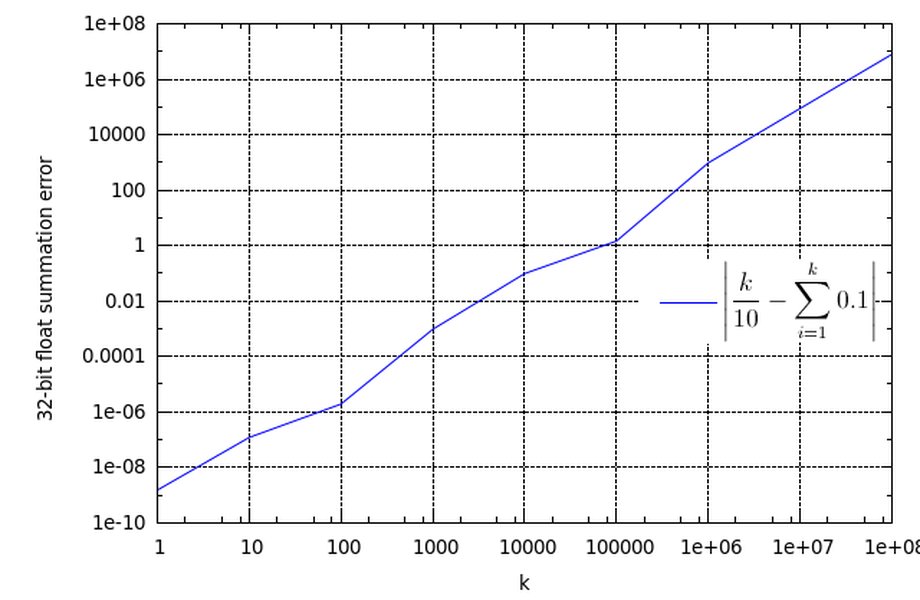
A visual representation indicating potential discrepancies in floating point calculations.
Accumulation of Rounding Errors
When these slightly imprecise binary approximations of 0.1 and 0.2 are added together, the rounding errors can accumulate. The binary sum is then converted back to a decimal number for display, resulting in 0.30000000000000004, which is the closest representable double-precision floating-point number to the true mathematical sum of the initial approximations.
The IEEE 754 Standard
The IEEE Standard for Floating-Point Arithmetic (IEEE 754) is a technical standard for floating-point computation established in 1985. JavaScript's Number type uses the 64-bit version ("double precision"). This format allocates bits as follows:
- Sign bit: 1 bit (determines if the number is positive or negative)
- Exponent: 11 bits (determines the magnitude or range of the number)
- Mantissa (or significand/fraction): 52 bits (determines the precision of the number)
While this allows for a vast range of numbers and a good degree of precision (about 15-17 decimal digits), it's not infinite. The inherent nature of converting base-10 fractions to base-2 fractions with a fixed number of bits leads to these small discrepancies.
This video provides a deeper technical dive into why 0.1 + 0.2 results in 0.30000000000000004 by explaining the implementation details of IEEE 754 in JavaScript.
Understanding the Core Concepts: A Mindmap
This mindmap illustrates the key factors and outcomes related to JavaScript's floating-point arithmetic concerning the 0.1 + 0.2 calculation. It branches from the core problem into its causes, consequences, and common solutions.
(0.1 + 0.2) === 0.3 is false"]
id6["Impact on Precision-Critical Applications(e.g., finance, science)"] ("Solutions & Mitigations") id7["Rounding Methods"] id7a["
toFixed(n) for display"]
id7b["toPrecision(n) for significant digits"]
id8["Integer Scaling"]
id8a["Multiply by power of 10"]
id8b["Perform integer arithmetic"]
id8c["Divide back by power of 10"]
id9["Precision Libraries"]
id9a["Decimal.js"]
id9b["Big.js"]
id9c["Provide arbitrary-precision arithmetic"]
id10["Epsilon Comparison"]
id10a["Math.abs(a - b) < epsilon"]
id10b["Checks if numbers are 'close enough'"]
Practical Implications of Floating-Point Arithmetic
This behavior has several practical implications for developers:
Equality Checks
Directly comparing the result of 0.1 + 0.2 with 0.3 using the strict equality operator (===) or abstract equality operator (==) will yield false.
console.log(0.1 + 0.2 === 0.3); // Output: falseThis can lead to unexpected logic errors if not handled carefully, especially in conditional statements.
Financial and Scientific Calculations
In applications where exact decimal precision is critical, such as financial software (calculating currency, taxes, interest) or scientific computations, these small errors can compound and lead to significant inaccuracies. Standard floating-point numbers are generally unsuitable for such tasks without mitigation strategies.
Visualizing Floating-Point Arithmetic Challenges
The radar chart below illustrates various contributing factors to the challenges encountered with floating-point arithmetic, such as the one observed with 0.1 + 0.2. The axes represent different aspects of the problem, and the datasets highlight their perceived impact severity in different contexts (e.g., simple sums vs. complex, iterated calculations). A higher value indicates a more significant challenge or impact.
This chart helps to conceptualize that while the error in a single sum like 0.1 + 0.2 is small, the underlying principles (like binary inconvertibility and finite precision) can lead to more pronounced issues in complex algorithms or systems requiring high numerical fidelity.
Strategies for Handling Precision Issues in JavaScript
Fortunately, there are several well-established techniques to manage and mitigate these floating-point precision issues in JavaScript.
1. Rounding the Result
For display purposes or when a specific number of decimal places is required, you can round the result.
Using toFixed()
The toFixed() method formats a number using fixed-point notation and returns a string representation. It rounds the number if necessary.
let sum = 0.1 + 0.2; // 0.30000000000000004
let roundedSum = parseFloat(sum.toFixed(2)); // "0.30" -> 0.3
console.log(roundedSum); // 0.3
Note: toFixed() returns a string, so you might need to convert it back to a number using parseFloat() or the unary plus operator (+).
Using toPrecision()
The toPrecision() method returns a string representing the number to a specified precision (total number of significant digits).
let sum = 0.1 + 0.2;
let preciseSum = parseFloat(sum.toPrecision(1)); // "0.3" -> 0.3 (1 significant digit for this case)
console.log(preciseSum); // 0.3
Caution: Both methods are primarily for formatting for display; they don't solve the underlying precision issue for subsequent calculations if you convert back to a number, as the number itself will still be the closest floating-point representation.
2. Scaling to Integers (Integer Arithmetic)
For calculations involving a fixed number of decimal places (common in currency), you can scale the numbers to integers, perform the arithmetic, and then scale them back down.
let num1 = 0.1;
let num2 = 0.2;
let result = (num1 * 10 + num2 * 10) / 10;
console.log(result); // 0.3
This approach can work well for simple cases but requires careful management of the scaling factor, especially with multiplication or division.
3. Using Specialized Libraries
For applications requiring high precision, especially financial applications, using dedicated decimal arithmetic libraries is often the best approach. Libraries like:
- Decimal.js
- Big.js
- BigNumber.js
These libraries implement their own decimal number types and arithmetic operations, avoiding the pitfalls of binary floating-point arithmetic for decimal calculations.
// Example using a hypothetical Decimal library syntax
  // const Decimal = require('decimal.js'); // In Node.js
  // let d1 = new Decimal(0.1);
  // let d2 = new Decimal(0.2);
  // let sum = d1.add(d2);
  // console.log(sum.toString()); // "0.3"
These libraries offer robust solutions for precise calculations.
4. Epsilon Comparison (Tolerance)
When comparing floating-point numbers for equality, it's often better to check if they are "close enough" rather than exactly equal. This involves defining a small tolerance value (epsilon, ε).
functionareNumbersEqual(num1, num2, epsilon = Number.EPSILON) {
  return Math.abs(num1 - num2) < epsilon;
}

let sum = 0.1 + 0.2;
console.log(areNumbersEqual(sum, 0.3)); // true (if epsilon is well-chosen)
console.log(Number.EPSILON); // 2.220446049250313e-16
Number.EPSILON represents the difference between 1 and the smallest floating-point number greater than 1. Choosing an appropriate epsilon depends on the required precision for your specific application.
Summary of Mitigation Techniques
The following table summarizes the common techniques for dealing with floating-point precision issues in JavaScript:
| Method | Description | Pros | Cons |
|---|---|---|---|
Rounding (toFixed(), toPrecision()) |
Formats the number to a specific number of decimal places or significant digits. | Simple for display purposes; controls output format. | Returns a string; doesn't fix underlying precision for further numeric calculations; potential rounding inaccuracies. |
| Integer Scaling | Convert decimals to integers by multiplying by a power of 10, perform calculations, then divide back. | Can achieve precise results for addition/subtraction with fixed decimal places. | More complex for multiplication/division; requires careful management of scaling factor. |
| Specialized Libraries (e.g., Decimal.js) | Use libraries designed for arbitrary-precision decimal arithmetic. | Provides robust and accurate decimal calculations; handles complex scenarios. | Adds external dependency; potentially slower performance than native numbers. |
| Epsilon Comparison | Check if the absolute difference between two numbers is within a small tolerance (epsilon). | Practical for comparing floating-point numbers for "equality". | Requires choosing an appropriate epsilon value; doesn't correct the numbers themselves. |
Frequently Asked Questions (FAQ)
What is the exact result of 0.1 + 0.2 in JavaScript?
In JavaScript, the expression 0.1 + 0.2 evaluates to 0.30000000000000004.
Why isn't the result exactly 0.3?
This is due to how JavaScript (and most programming languages) represent numbers using the IEEE 754 double-precision floating-point standard. Decimal fractions like 0.1 and 0.2 cannot be represented perfectly in binary. They are stored as approximations, and these tiny rounding errors accumulate during addition, leading to a result that is slightly off from the exact decimal sum.
Is this a bug in JavaScript?
No, this is not a bug in JavaScript itself. It's an inherent characteristic of floating-point arithmetic as defined by the IEEE 754 standard, which is used by almost all modern programming languages and computer hardware for representing decimal numbers.
How can I get the result 0.3 when adding 0.1 and 0.2 in JavaScript?
You can achieve a result that appears as 0.3 or behaves as 0.3 for comparisons using several methods:
- Rounding: Use
(0.1 + 0.2).toFixed(1)(returns a string "0.3") orparseFloat((0.1 + 0.2).toFixed(1))(returns the number 0.3). - Integer Scaling: Calculate
(0.1 * 10 + 0.2 * 10) / 10which results in0.3. - Precision Libraries: Use libraries like Decimal.js for calculations where exact decimal arithmetic is crucial.
- Epsilon Comparison: When checking for equality, test if
Math.abs((0.1 + 0.2) - 0.3) < Number.EPSILON.
Are other programming languages like Python or Java affected by this?
Yes, many other programming languages that use IEEE 754 floating-point numbers (like Python, Java, C++, C#, Ruby) exhibit similar behavior. For example, in Python, 0.1 + 0.2 also results in 0.30000000000000004. Some languages offer built-in decimal types (like Python's `Decimal` module or Java's `BigDecimal` class) to handle these situations more precisely.
Recommended Further Exploration
- How does the IEEE 754 standard represent floating-point numbers in binary?
- What are the best practices for financial calculations in JavaScript?
- Compare JavaScript decimal arithmetic libraries like Decimal.js, Big.js, and BigNumber.js.
- Explain the concept of machine epsilon and its relevance in numerical comparisons.
References
Last updated May 6, 2025