
Mastering ASCII Art: Create, Customize, and Share Stunning Text-Based Designs
Unlock the art of crafting intricate images using simple text characters
Key Takeaways
- Understanding the Basics: Grasp the foundational concepts of ASCII art, including its history and fundamental techniques.
- Tools and Techniques: Learn about essential tools and methods to create and enhance your ASCII art effectively.
- Customization and Sharing: Discover ways to personalize your designs and share them across various platforms.
Introduction to ASCII Art
What is ASCII Art?
ASCII art is a form of digital artwork that utilizes the characters of the American Standard Code for Information Interchange (ASCII) to create images and designs. Unlike traditional visual art forms that rely on colors, shapes, and shading, ASCII art achieves its visual impact through the strategic arrangement of text characters such as letters, numbers, and symbols.
Originating in the early days of computer programming and digital communication, ASCII art became a popular way to embed graphics in mediums that primarily supported text, such as early email systems, bulletin board systems (BBS), and text-based terminal interfaces. Its simplicity and accessibility have allowed artists to craft intricate and expressive designs without the need for advanced graphic tools.
Over the decades, ASCII art has evolved, incorporating more complex characters and leveraging modern technologies to enhance its visual appeal. Today, it remains a cherished form of digital expression, celebrated for its blend of creativity and technical skill.
History and Evolution of ASCII Art
The roots of ASCII art can be traced back to the 1960s and 1970s, a period marked by the rise of computer technology and the expansion of digital communication. During this era, computer monitors were largely text-based, and graphical capabilities were limited. Artists and programmers began to explore ways to represent images using the characters available on standard keyboards.
Early examples of ASCII art include simple representations like smiley faces and basic geometric shapes. As technology advanced and character sets expanded, so did the complexity and detail achievable in ASCII creations. The introduction of higher-resolution displays and the internet further fueled the popularity of ASCII art, providing new platforms for artists to share their work globally.
In recent years, ASCII art has found a resurgence in various forms, from creative expressions in online communities to being integrated into modern digital designs. Its enduring appeal lies in its ability to convey meaningful imagery through the minimalist use of text, bridging the gap between art and technology.
Creating ASCII Art
Tools and Resources
Creating ASCII art can be both a simple and intricate process, depending on the level of detail and complexity desired. Fortunately, a variety of tools and resources are available to assist both beginners and seasoned artists in crafting their own text-based masterpieces.
Online Libraries and Collections: Numerous websites host extensive collections of ASCII art, providing inspiration and ready-made designs that can be used or modified. These libraries often categorize artwork by themes, making it easier for artists to find relevant examples.
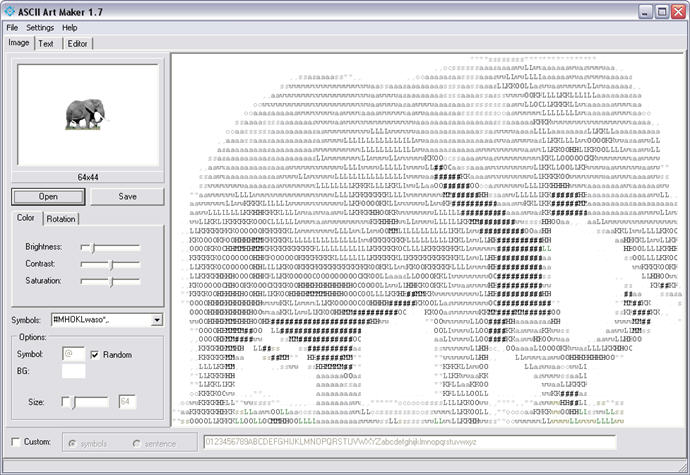
ASCII Art Generators: For those who prefer a more automated approach, ASCII art generators can convert images into text-based representations. These tools analyze the grayscale values of an image and map them to corresponding ASCII characters, producing an approximation of the original graphic.
Text Editors: A simple text editor with a fixed-width (monospace) font is essential for creating ASCII art manually. Editors like Notepad++, Sublime Text, or even basic command-line interfaces provide the environment needed to arrange characters precisely.
Graphic Design Software: Some artists integrate ASCII art within traditional graphic design workflows, using software like Adobe Illustrator or Photoshop alongside text editors to layer and enhance their creations.
Below is a table summarizing some recommended tools and their primary functions:
| Tool | Function | Website |
|---|---|---|
| ASCII Art Generator | Converts images to ASCII art automatically | https://www.ascii-art.de/ascii/ |
| Text Editors (Notepad++, Sublime Text) | Manually creates and edits ASCII art | https://notepad-plus-plus.org/, https://www.sublimetext.com/ |
| Adobe Illustrator | Enhances ASCII art with graphic design elements | https://www.adobe.com/products/illustrator.html |
| GitHub ASCII Art Collections | Access to curated lists of ASCII art | https://github.com/devtooligan/awesome-ascii-art |
Step-by-Step Guide to Creating ASCII Art
Crafting your own ASCII art involves both creativity and attention to detail. Whether you're starting from scratch or modifying an existing design, the following steps provide a comprehensive approach to creating compelling text-based artwork.
1. Choose Your Subject
Begin by selecting the image or concept you wish to represent. Simple shapes and familiar objects are ideal for beginners, while more complex subjects can be tackled as your skills improve.
2. Select the Appropriate Characters
Different ASCII characters represent varying levels of brightness and texture. For example, characters like '@' and '#' can denote darker areas, while '.' and ',' are suitable for lighter sections. Combining these characters strategically can create depth and dimension in your artwork.
3. Set Up a Fixed-Width Font Environment
Ensure you're working in a text editor that uses a monospace font, such as Courier or Consolas. This consistency is crucial for maintaining the alignment and proportions of your ASCII art.
4. Draft the Outline
Start by sketching the basic outline of your subject using simple characters. This framework serves as the foundation upon which you'll build the detailed aspects of your design.
5. Add Details and Texture
Gradually introduce more intricate characters to add depth and texture. Pay attention to shading and the transition between different areas of your design to enhance realism and visual interest.
6. Refine and Adjust
Review your artwork to identify areas that may require tweaking. Adjust character placement, replace symbols to better represent specific textures, and ensure overall balance and symmetry.
7. Save and Share
Once satisfied with your creation, save the file in a text format to preserve the formatting. You can then share your ASCII art across various platforms, including social media, forums, or personal websites.
Python Example: Creating ASCII Art
For those interested in automating the creation of ASCII art, Python offers a flexible and powerful approach. Below is an example of how you can generate a simple ASCII representation of a cat using Python's print statements.
# ASCII Art: Cat
print(" \/     \/")
print("              __    ")
print("  ____ _____ _/  |_  ")
print("_/ ___\\__  \\   __\\ ")
print("\\  \\___ / __ \\|  |   ")
print(" \\___  >____  /__|   ")
Explanation:
-
print(" \/ \\\/"): Prints the initial line of the cat's ears. -
Subsequent
printstatements output each subsequent line, gradually building the image from top to bottom.
Customization: You can modify the characters and spacing within the print statements to alter the appearance of the cat or create entirely new designs. Experimenting with different symbols can lead to unique and personalized ASCII art.
Techniques for Enhancing ASCII Art
Use of Characters and Spacing
The selection of ASCII characters significantly impacts the visual outcome of your artwork. Each character carries a distinct shape and density, contributing to the overall texture and shading of the image.
Character Density: Characters like '@', '#', and 'M' are denser and can be used to represent darker areas, while lighter characters such as '.', ',', and '`' are ideal for highlights and lighter sections.
Shape and Structure: The inherent shape of each character can influence the contours and lines within your artwork. For example, forward slashes '/' and backslashes '\\' are excellent for creating diagonal lines, while vertical bars '|' and underscores '_' are suitable for straight lines.
Spacing: Proper spacing ensures that your ASCII art maintains its intended proportions and alignment. Inconsistent spacing can distort the image, so it's essential to use a fixed-width font to preserve the integrity of the design.
Block vs. Line ASCII Art
ASCII art can broadly be categorized into two styles: block ASCII art and line ASCII art. Understanding the differences between these styles can help you choose the best approach for your project.
Block ASCII Art
Block ASCII art involves filling spaces with characters to create solid areas, offering a more pixelated and detailed representation. This style is particularly effective for rendering complex images with varying shades and textures.
Line ASCII Art
Line ASCII art relies on the strategic placement of characters to outline the shapes and contours of the subject. This minimalist approach emphasizes the silhouette and key features without delving into detailed shading.
Choosing Between Styles: The decision to use block or line ASCII art depends on the desired level of detail and the complexity of the subject. Often, artists blend both styles to achieve a balanced and visually appealing result.
Customization and Sharing
Modifying Existing Designs
Customizing existing ASCII art is a great way to personalize designs or adapt them to fit specific themes. By altering characters, adjusting spacing, or adding new elements, you can transform a basic ASCII image into a unique masterpiece.
Steps to Modify:
- Select the ASCII art you wish to customize.
- Open it in a text editor with a fixed-width font.
- Identify areas for modification, such as replacing characters to change shading.
- Adjust spacing to correct proportions or add new features.
- Save your customized design and share it with others.
Example: Taking the provided cat ASCII art, you can add more details to the face or change the body structure by replacing certain characters. For instance, adding whiskers or altering the shape of the ears can give the cat a different expression.
Creating Variations
Developing variations of a design allows you to explore different artistic expressions and styles. Variations can range from subtle tweaks to complete overhauls, providing endless possibilities for creativity.
Approaches to Creating Variations:
- Style Alteration: Change the overall style from block to line art or vice versa.
- Character Substitution: Replace certain characters to achieve different shading effects.
- Size Adjustment: Expand or condense the artwork to alter its dimensions.
- Theme Adaptation: Modify the design to fit a particular theme or concept, such as adding seasonal elements.
Example: Transforming the cat ASCII art into a winter-themed version by adding a scarf or snowflakes can bring a fresh perspective to the original design.
Sharing Your ASCII Art
Sharing your creations allows you to engage with a community of fellow ASCII art enthusiasts, receive feedback, and inspire others. There are various platforms and methods to showcase your artwork effectively.
Online Communities: Websites like ASCII Art.eu and GitHub repositories provide spaces for artists to upload and share their work. Engaging with these communities can lead to collaborations and improvements in your craft.
Social Media: Platforms like Twitter, Instagram, and Reddit allow you to reach a broader audience. Using appropriate hashtags and engaging with relevant groups can increase the visibility of your ASCII art.
Personal Portfolios: Creating a personal website or blog dedicated to your ASCII art can serve as a comprehensive portfolio. This approach not only showcases your work but also highlights your creative journey and growth as an artist.
Advanced ASCII Art Concepts
Animating ASCII Art
Bringing ASCII art to life through animation is an advanced technique that involves manipulating frames of text to create motion. While more complex than static designs, animated ASCII art can add a dynamic and engaging element to your creations.
Creating Animations: By scripting a series of ASCII art frames in programming languages like Python, you can display these frames in rapid succession, simulating movement. Libraries such as curses in Python can assist in handling terminal display updates.
Example: Animating a cat's tail wagging or blinking eyes can add personality and flair to your ASCII art.
Integrating with Other Media
Combining ASCII art with other forms of media can create hybrid artworks that leverage the strengths of each medium. Integrations include blending ASCII art with traditional images, embedding it within web designs, or using it in digital storytelling.
Web Integration: ASCII art can be embedded within HTML pages, styled with CSS, or manipulated with JavaScript to respond to user interactions. This fusion allows for interactive and responsive designs that engage viewers.
Digital Storytelling: Incorporating ASCII art into narratives can enhance storytelling by providing visual representations of characters, settings, or key events, enriching the reader's experience.
Example: Creating an interactive webpage where ASCII art elements change based on user input or actions can make for an engaging and memorable user experience.
Displaying and Supporting ASCII Art
Best Practices for Display
Properly displaying ASCII art ensures that its intended appearance is maintained across various platforms and devices. Adhering to best practices can prevent distortion and preserve the integrity of your design.
Use Monospace Fonts: Always display ASCII art in a fixed-width or monospace font to maintain consistent character alignment and spacing.
Preserve Formatting: When sharing ASCII art online or in documents, use preformatted text blocks or code snippets to ensure that line breaks and spacing are retained.
Responsive Design Considerations: Be mindful of how ASCII art scales across different screen sizes. Designing with adaptability in mind can help maintain visual consistency on various devices.
Tools for Display and Sharing
Utilizing the right tools can enhance the presentation and accessibility of your ASCII art. These tools facilitate sharing, embedding, and displaying your creations seamlessly.
Code Editors and IDEs: Advanced code editors not only assist in creating ASCII art but also offer features like syntax highlighting and live previews, making the design process more efficient.
Web Embedding Tools: Plugins and libraries that support preformatted text and code blocks can help integrate ASCII art into websites without compromising its structure.
Sharing Platforms: Platforms like GitHub Gists or Pastebin allow for easy sharing of text-based artworks, providing convenient access for others to view and contribute.
Conclusion
Recap and Final Thoughts
ASCII art stands as a testament to the ingenuity and creativity that can flourish within the constraints of limited mediums. By harnessing the power of simple text characters, artists can craft intricate and evocative images that resonate across time and technology.
Whether you're a novice eager to explore the basics or a seasoned artist looking to refine your techniques, the world of ASCII art offers endless opportunities for expression and innovation. Embrace the challenges, experiment with different styles, and join a vibrant community that celebrates the unique blend of art and technology.
As digital landscapes continue to evolve, ASCII art remains a beloved and enduring form, bridging the gap between simplicity and complexity, and inviting creators to push the boundaries of what's possible with just a few keystrokes.
References
https://www.asciiart.website/
https://www.asciiarthub.com/
http://www.ascii-art.de/ascii/
https://github.com/devtooligan/awesome-ascii-art
https://www.wikihow.com/Create-ASCII-Art
https://www.instructables.com/ASCII-Art/
https://ascii.co.uk/art
https://en.wikipedia.org/wiki/ASCII_art
https://www.adobe.com/uk/creativecloud/illustration/discover/digital-art/ascii-art.html
https://www.youtube.com/watch?v=z8yw9gUJaHo
https://emojicombos.com/cute-cat-ascii-art
http://graphics.stanford.edu/~munzner/dinos/all
https://www.asciiart.eu/animals/cats
Last updated January 31, 2025