
Unlocking AI's Full Potential: The Comprehensive Guide to Model Context Protocol (MCP)
Discover how this groundbreaking protocol standardizes LLM integration with external tools and data sources
Essential MCP Insights
- MCP functions as a "USB-C for AI" by standardizing how AI applications connect to external data sources and tools
- Built on a client-server architecture that enables secure, two-way communication between LLMs and external systems
- Available with official SDKs for Python, TypeScript, and Java to facilitate rapid implementation
What is the Model Context Protocol?
The Model Context Protocol (MCP) is an open standard that facilitates seamless integration between Large Language Model (LLM) applications and external data sources and tools. Introduced primarily by Anthropic, MCP standardizes how applications provide context to AI systems, creating a unified interface that simplifies the development process. Think of MCP like a USB-C port for AI applications—it establishes a common connection standard that works across different systems and tools.
At its core, MCP enables secure, two-way connections between AI-powered tools and various data repositories, databases, and business tools. This standardization eliminates the need for developers to build and maintain separate connectors for each data source, significantly streamlining the development process while enhancing AI capabilities through improved contextual understanding.
The radar chart above compares MCP with traditional integration approaches across key performance metrics. As illustrated, MCP offers significant advantages in standardization, integration ease, and scalability compared to traditional API integrations and custom connectors, making it an increasingly attractive solution for AI-powered application development.
MCP Architecture Overview
The Model Context Protocol employs a client-server architecture designed to facilitate efficient communication between AI applications and external data sources. This architecture consists of three primary components that work together to provide a seamless integration experience.
Core Architectural Components
1. MCP Clients
MCP clients are applications that leverage capabilities exposed by MCP servers through standardized interfaces. These clients maintain one-to-one connections with servers and are responsible for invoking tools, querying resources, and interpolating prompts. Examples include Anthropic's applications, Cursor, Windsurf, and AI agents like Goose.
2. MCP Servers
MCP servers are lightweight programs that expose specific capabilities through the standardized Model Context Protocol. They can securely access local data sources (files, databases, services) and remote services (external systems available over the internet via APIs). Servers provide the fundamental building blocks—Prompts, Resources, and Tools—for adding context to language models.
3. Protocol Communication
The protocol itself is built on JSON-RPC and provides a stateful session protocol focused on context exchange and sampling coordination between clients and servers. MCP supports multiple transport mechanisms, including stdio and HTTP over Server-Sent Events (SSE), allowing for flexible implementation across different environments.
| Component | Description | Examples | Key Features |
|---|---|---|---|
| MCP Clients | Applications that consume MCP server capabilities | Anthropic's Claude desktop app, Cursor, Windsurf | Invoke tools, query resources, interpolate prompts |
| MCP Servers | Services that expose data and functionality | Custom data connectors, API proxies, tool providers | Access local/remote data, execute functions, provide context |
| Resources | Data objects providing context | Document collections, database records, knowledge bases | Structured data retrieval, contextual information |
| Tools | Functions for LLMs to execute | Code execution, API calls, data transformation | Extend LLM capabilities, enable action taking |
| Prompts | Templated messages and workflows | Structured instructions, conversation templates | Guide LLM behavior, standardize interactions |
MCP Implementation Overview
Implementing the Model Context Protocol involves understanding both the client and server components, as well as how they interact within the broader ecosystem. The following mindmap illustrates the key elements of MCP implementation, highlighting the relationships between different components and considerations.
This mindmap provides a comprehensive overview of the various aspects involved in MCP implementation, from client and server components to security considerations and deployment options. Understanding these relationships is crucial for successful MCP integration into your AI applications.
Key Features and Capabilities
Standardized Communication
At the heart of MCP is its standardized communication protocol, which defines how applications interact with AI models. By establishing a uniform interface, MCP simplifies the integration process and ensures compatibility across different systems and tools. This standardization is particularly valuable as the AI ecosystem continues to grow and evolve.
Context Management
MCP excels at providing relevant context to AI models, enabling them to generate more accurate and useful responses. Through its Resource API, MCP allows applications to feed structured data directly to models, enhancing their understanding of specific domains or user requirements. This capability is especially valuable for specialized applications that require deep domain knowledge.
Tool Integration
The Tool API enables AI models to interact with external systems and execute functions outside their native capabilities. This feature empowers models to perform actions such as querying databases, making API calls, or executing code, significantly expanding their utility beyond simple text generation. By standardizing tool interfaces, MCP makes it easier for developers to extend model capabilities with custom functionality.
Prompt Management
Through the Prompt API, MCP provides a structured way to define and manage model instructions. This capability allows developers to create templated workflows and consistent interaction patterns, ensuring reliable model behavior across different contexts and use cases. Effective prompt management is crucial for developing robust AI applications that perform consistently over time.
Security and Privacy
While MCP itself doesn't enforce security principles at the protocol level, it encourages developers to implement robust consent and authorization flows. MCP documentation emphasizes the importance of user consent, data privacy, and tool safety, providing guidelines for responsible implementation that respects user rights and preferences.
MCP in Action: Video Overview
For a visual explanation of the Model Context Protocol and its practical applications, this video provides a clear and concise overview. It breaks down the core concepts behind MCP, explains why it matters for AI development, and demonstrates how it transforms the way AI models interact with external data and tools.
This comprehensive video explanation covers the evolution of LLMs from text prediction to tool use, provides a detailed overview of the MCP ecosystem, and offers insights into how this protocol is shaping the future of AI application development.
MCP Architecture Visualized
The following images provide visual representations of the MCP architecture, illustrating how clients and servers interact within the ecosystem. These diagrams help clarify the relationship between different components and the flow of information in MCP-based applications.
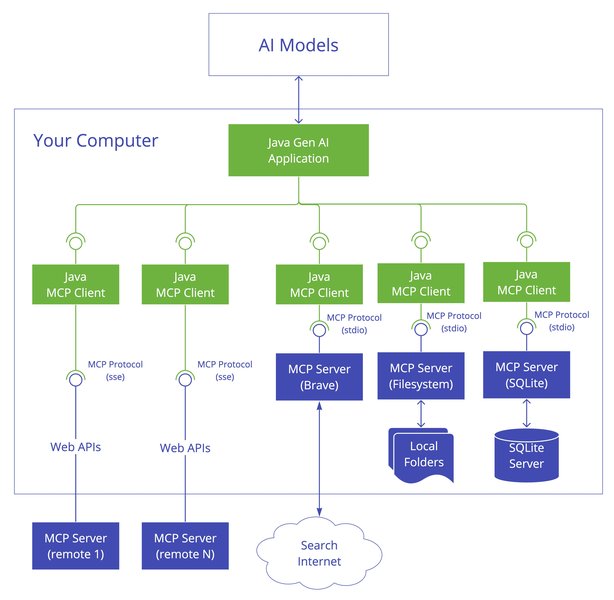
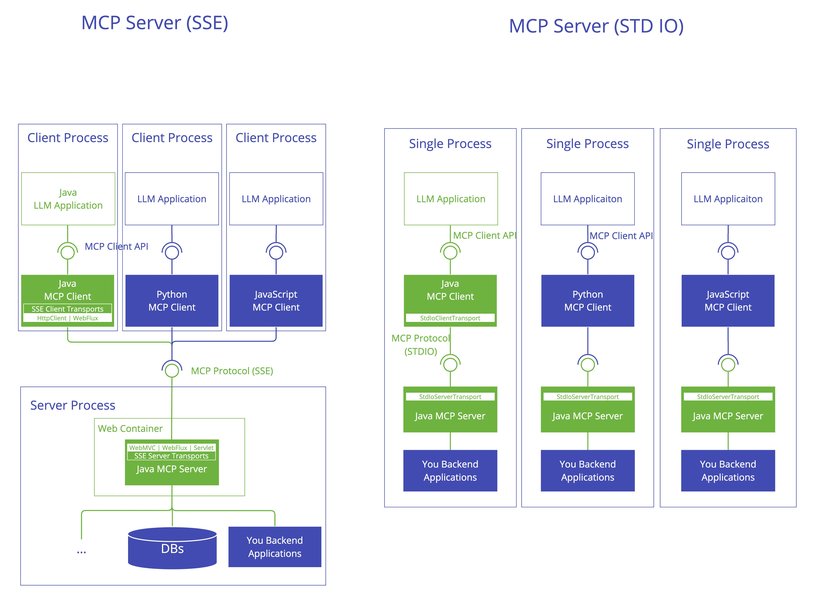
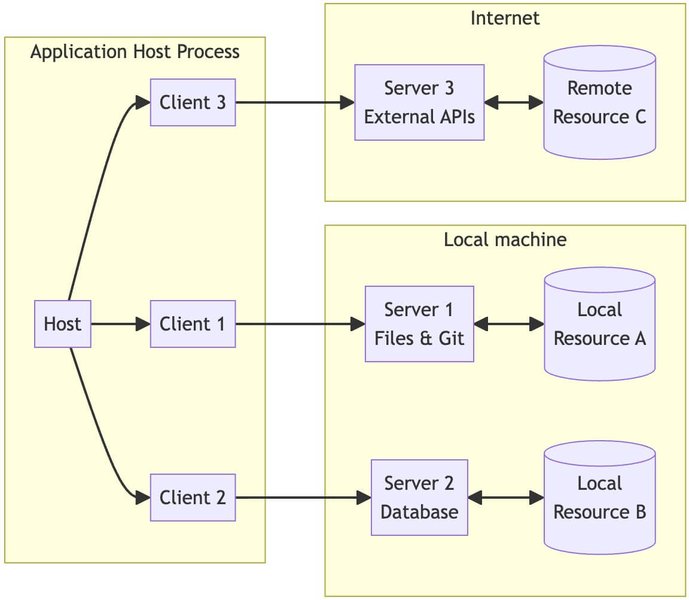
These architectural diagrams illustrate the client-server relationship in MCP implementations, showing how each component interacts with the others to facilitate seamless communication between AI models and external data sources or tools. Understanding this architecture is crucial for effective implementation of MCP in your applications.
Getting Started with MCP
Available SDKs
To simplify MCP implementation, several Software Development Kits (SDKs) are available in popular programming languages:
Python SDK
The Python SDK provides a comprehensive implementation of the Model Context Protocol, making it easy to integrate MCP into Python applications. It includes client and server implementations, as well as utilities for handling resources, tools, and prompts. The SDK is particularly useful for data science and AI applications built on Python.
TypeScript SDK
For web and Node.js applications, the TypeScript SDK offers a type-safe implementation of MCP. It provides robust interfaces for client-server communication and includes utilities for handling JSON-RPC messages. This SDK is ideal for web-based AI applications and services built on JavaScript/TypeScript technologies.
Java SDK
The Java SDK enables MCP integration in enterprise applications and services built on the Java platform. It supports both synchronous and asynchronous communication patterns and provides a robust implementation of the protocol specification. Integration with Spring AI further enhances its capabilities for enterprise applications.
Implementation Steps
Implementing MCP in your application typically involves the following steps:
- Choose an SDK: Select the appropriate SDK based on your application's programming language and requirements.
- Set up client components: Implement client-side logic to connect to MCP servers and handle communication.
- Develop server capabilities: Create server implementations that expose your data sources, tools, or context providers.
- Implement security measures: Ensure proper authorization, authentication, and consent management.
- Test and optimize: Verify the integration works correctly and optimize for performance and reliability.
For detailed implementation guides and examples, refer to the official documentation and resources listed in the references section.
Frequently Asked Questions
References
- Model Context Protocol Introduction - Official MCP Documentation
- Model Context Protocol Specification - MCP Spec Documentation
- Model Context Protocol GitHub Repository - Official MCP Resources
- MCP Java SDK Overview - Spring AI Reference
- Model Context Protocol Announcement - Anthropic News
- The Model Context Protocol: A Complete Tutorial - Medium
- Model Context Protocol (MCP) Overview - Philipp Schmid's Blog
- MCP vs API: Model Context Protocol Explained - Norah Sakal's Blog
Recommended Queries
Last updated April 7, 2025