
Unveiling the Power Within: How Modern Computer Hypervisors Redefine Computing
Discover the magic behind running multiple operating systems on a single machine, enhancing efficiency and security.
Key Insights into Hypervisor Technology
- Centralized Control: Hypervisors act as a sophisticated management layer, creating and overseeing multiple isolated virtual machines (VMs) on one physical computer.
- Resource Mastery: They expertly abstract and allocate hardware resources like CPU, memory, and storage, ensuring each VM receives what it needs without interference.
- Two Core Architectures: Hypervisors primarily come in two flavors – Type 1 (bare-metal) for high-performance enterprise needs and Type 2 (hosted) for flexible desktop virtualization.
Modern computing owes a significant debt to hypervisor technology. These powerful software, firmware, or hardware components are the linchpin of virtualization, a process that allows a single physical machine to host multiple independent virtual machines. Each VM operates as a distinct computer with its own operating system and applications. Understanding hypervisors is key to grasping how today's data centers, cloud services, and even personal computing environments achieve remarkable efficiency and flexibility.
What Exactly is a Hypervisor?
The Foundation of Virtualization
A hypervisor, often referred to as a Virtual Machine Monitor (VMM), is essentially the orchestrator of the virtual world. Its primary role is to create a virtualized environment on top of physical hardware. It then manages the lifecycle of multiple virtual machines, ensuring they can run simultaneously without conflict. The hypervisor presents each VM with a set of virtual hardware resources (like virtual CPUs, RAM, and network interface cards), making the VM believe it's running on its own dedicated physical machine. This abstraction is fundamental to how virtualization works, enabling multiple operating systems and their applications to share a common hardware platform securely and efficiently.
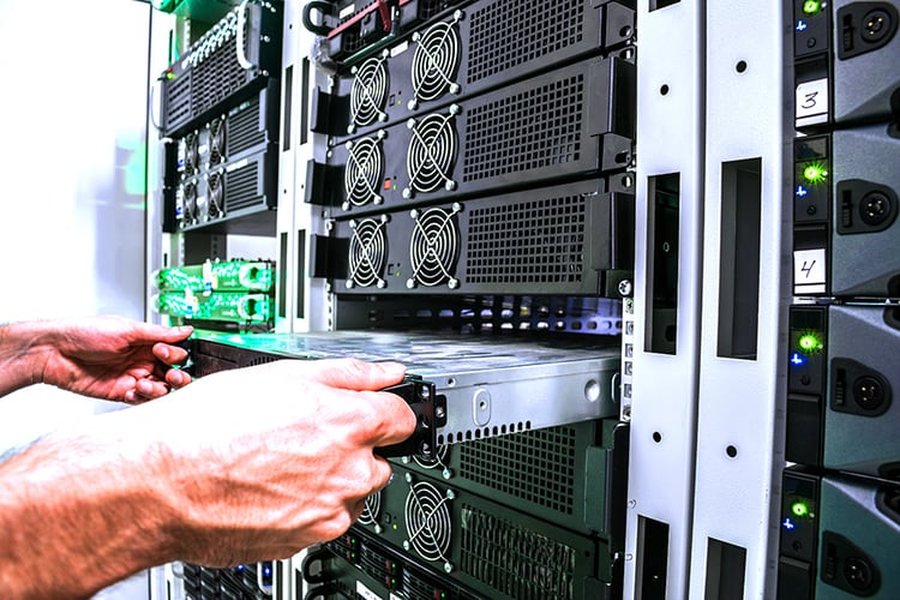
Physical server infrastructure, the typical home for Type 1 hypervisors managing multiple virtual machines.
The Inner Workings: How Hypervisors Operate
Hypervisors perform their magic through a combination of sophisticated techniques that manage the interaction between virtual machines and the underlying physical hardware. Here's a breakdown of their operational mechanics:
Resource Virtualization and Allocation
At its core, a hypervisor intercepts requests from VMs for hardware resources. When a guest operating system (the OS running inside a VM) tries to perform an operation that requires hardware access (e.g., writing to disk or sending network packets), the hypervisor steps in. It translates these virtual requests into actual operations on the physical hardware. It dynamically allocates physical resources like CPU processing power, memory, and storage to each VM based on pre-defined policies or real-time demand. This ensures efficient utilization of the host machine's capabilities.
Isolation: The Virtual Wall
A critical function of the hypervisor is to maintain strong isolation between VMs. Each VM operates in its own separate, secure space. This means that if one VM crashes, experiences a security breach, or encounters a software bug, other VMs running on the same physical host remain unaffected. The hypervisor achieves this by managing memory address spaces and controlling access to hardware, preventing any direct unauthorized interaction between VMs or between a VM and the host system (in the case of Type 2 hypervisors).
The Role of Hardware Assistance
Modern CPUs (from Intel with VT-x and AMD with AMD-V) include specialized hardware features designed to support virtualization. Hypervisors leverage these features to improve performance and security. These extensions allow the hypervisor to more efficiently manage guest OS instructions, particularly privileged instructions that would normally require complex software emulation. This hardware assistance reduces the overhead associated with virtualization, allowing VMs to run at near-native speeds.
Managing Virtual Machine Execution
The hypervisor controls the execution context of each VM. It schedules time slices for each VM on the physical CPU(s), much like an operating system schedules processes. It handles interrupts and I/O operations, emulating hardware devices for the VMs or, in some cases (like with paravirtualization or SR-IOV), allowing more direct, yet controlled, access to physical devices for improved performance.
Visualizing Hypervisor Concepts
To better understand the relationships between the core components and benefits of hypervisor technology, the mindmap below illustrates key concepts. It shows how hypervisors function, their main types, and the advantages they bring to modern computing environments.
(CPU, Memory, Storage)"] id1_4["Strict Isolation Between VMs"] id2["Types of Hypervisors"] id2_1["Type 1 (Bare-Metal/Native)"] id2_1_1["Runs directly on physical hardware"] id2_1_2["Often part of the firmware or a specialized OS"] id2_1_3["High Performance & Security"] id2_1_4["Examples: VMware ESXi, Microsoft Hyper-V,
KVM, Citrix Hypervisor (XenServer)"] id2_2["Type 2 (Hosted)"] id2_2_1["Runs as an application on top of a host OS
(Windows, macOS, Linux)"] id2_2_2["Easier Setup & Management for desktops"] id2_2_3["Examples: VMware Workstation,
Oracle VirtualBox, Parallels Desktop"] id3["Key Benefits & Advantages"] id3_1["Server Consolidation & Reduced Footprint"] id3_2["Optimized Resource Utilization"] id3_3["Enhanced Scalability & Flexibility"] id3_4["Improved Security & Stability via Isolation"] id3_5["Significant Cost Efficiency (Hardware & Operational)"] id3_6["Streamlined Disaster Recovery & Business Continuity"] id3_7["Enables Cloud Computing & VDI"] id4["Working Mechanism Insights"] id4_1["Virtual Hardware Presentation to VMs"] id4_2["CPU & Memory Management (Scheduling, Mapping)"] id4_3["I/O Virtualization (Emulation, Passthrough)"] id4_4["Leverages Hardware-Assisted Virtualization
(e.g., Intel VT-x, AMD-V)"]
Types of Hypervisors: A Comparative Look
Hypervisors are generally categorized into two main types, distinguished by how they interact with the host hardware and operating system.
Type 1: The Bare-Metal Powerhouses
Type 1 hypervisors, also known as "bare-metal" or "native" hypervisors, are installed directly onto the physical hardware of the host machine. They essentially act as a compact, specialized operating system whose sole purpose is to run virtual machines. Because they have direct access to the hardware resources without an intervening host OS layer, Type 1 hypervisors are known for their efficiency, performance, and security. They are the standard in enterprise data centers, cloud computing infrastructure, and server virtualization scenarios where maximum performance and stability are critical. Management is typically done remotely via a dedicated management console.
Key Characteristics:
- Direct Hardware Access: Leads to lower overhead and better performance.
- Enhanced Security: Reduced attack surface as there's no underlying general-purpose OS to compromise.
- Scalability: Ideal for managing large numbers of VMs and complex virtual environments.
- Examples: VMware ESXi, Microsoft Hyper-V (when installed in its bare-metal role), Kernel-based Virtual Machine (KVM) which is part of the Linux kernel, Citrix Hypervisor (formerly XenServer), and IBM POWER Hypervisor (PHYP).
Type 2: The Hosted Conveniences
Type 2 hypervisors, or "hosted" hypervisors, run as software applications on top of an existing conventional host operating system (like Windows, macOS, or Linux). The hypervisor relies on the host OS to manage hardware interactions. This makes Type 2 hypervisors easier to install and manage, especially for individual users or developers who want to run multiple operating systems on their personal computers for testing, development, or accessing applications exclusive to a particular OS. While they introduce an additional layer of software (the host OS), which can lead to some performance overhead compared to Type 1, modern Type 2 hypervisors are quite efficient for their intended use cases.
Key Characteristics:
- Ease of Installation: Simple setup as they install like any other software application.
- Host OS Dependency: Relies on the host OS for device drivers and resource management.
- Flexibility for Desktop Use: Excellent for running different OS environments on a single workstation.
- Examples: VMware Workstation, Oracle VirtualBox, VMware Fusion (for macOS), and Parallels Desktop (for macOS).
Visual Comparison: Type 1 vs. Type 2 Hypervisors
The radar chart below provides an opinionated comparison of Type 1 and Type 2 hypervisors across several key attributes. It highlights their relative strengths and weaknesses, helping to illustrate why one type might be chosen over the other depending on specific requirements. The scores are relative, with higher values indicating a stronger performance or suitability in that category.
Detailed Feature Showdown
The following table provides a more detailed comparison between Type 1 and Type 2 hypervisors, outlining their architectural differences and common characteristics:
| Feature | Type 1 Hypervisor (Bare-Metal) | Type 2 Hypervisor (Hosted) |
|---|---|---|
| Architecture | Runs directly on the host's physical hardware. Acts as its own lightweight OS. | Runs as an application on top of a conventional host operating system (e.g., Windows, Linux, macOS). |
| Installation | Installed directly onto the server hardware, often replacing any existing OS. | Installed like any other software application within an existing host OS. |
| Performance | Generally higher performance and lower latency due to direct hardware access and minimal overhead. | Performance can be slightly lower due to the overhead of the host OS and an additional layer of abstraction. |
| Security | Typically more secure due to a smaller attack surface (no full host OS). Strong isolation capabilities. | Security can be influenced by the host OS. Vulnerabilities in the host OS could potentially impact the hypervisor or VMs. |
| Overhead | Low, as it's a lean software layer designed specifically for virtualization. | Higher, due to the resources consumed by the host OS in addition to the hypervisor and VMs. |
| Management Complexity | Often requires dedicated management tools and can be more complex to set up initially. Suited for IT professionals. | Generally easier to set up, manage, and use, making it suitable for end-users and developers. |
| Typical Use Cases | Enterprise data centers, cloud computing infrastructure, server virtualization, virtual desktop infrastructure (VDI), mission-critical applications. | Desktop virtualization, software development and testing, running legacy applications, personal use for experimenting with different OSes. |
| Examples | VMware ESXi, Microsoft Hyper-V, KVM, Citrix Hypervisor, Oracle VM Server. | Oracle VirtualBox, VMware Workstation, VMware Fusion, Parallels Desktop, QEMU (can also be used with KVM for Type 1). |
The Advantages Unleashed: Benefits of Modern Hypervisors
The widespread adoption of hypervisors is driven by a multitude of benefits they bring to IT environments:
Efficiency and Optimization
Hypervisors enable server consolidation, allowing multiple virtual machines to run on a single physical server. This drastically improves hardware utilization, as resources that might sit idle on multiple underutilized servers can be pooled and shared among VMs. This leads to reduced physical server count, lower power consumption, and decreased cooling requirements.
Scalability and Agility
Virtual machines can be provisioned, cloned, or decommissioned quickly, often in minutes. Resources like CPU, memory, and storage can be dynamically allocated or reallocated to VMs as demands change. This agility allows organizations to scale their IT infrastructure up or down rapidly in response to business needs.
Security and Stability
The isolation provided by hypervisors is a significant security benefit. If one VM is compromised by malware or experiences a software crash, it does not typically affect other VMs on the same host. This containment enhances overall system stability and security. Advanced hypervisor features can include memory encryption and secure boot for VMs.
Cost-Effectiveness
By reducing the number of physical servers needed, hypervisors help lower capital expenditures (CapEx) on hardware and associated operational expenditures (OpEx) like power, cooling, and physical space. Software licensing costs can also sometimes be optimized in virtualized environments.
Disaster Recovery and Business Continuity
Hypervisors facilitate robust disaster recovery strategies. VMs can be easily backed up, snapshotted, and replicated to secondary sites. In the event of a hardware failure or site-wide disaster, VMs can be quickly restored or migrated to other physical hosts (often automatically), minimizing downtime and ensuring business continuity.
Understanding Virtualization: A Deeper Dive
Virtualization is a broad concept, and hypervisors are the core engine that makes it possible. The following video from IBM provides an excellent overview of virtualization, explaining its fundamental principles and how hypervisors fit into the picture. It helps to clarify how physical resources are transformed into virtual ones, enabling the many benefits discussed.
Managing these virtual environments often involves sophisticated dashboards and tools that provide insights into VM performance, resource utilization, and overall health of the virtualized infrastructure. These tools are crucial for administrators to effectively monitor and control potentially hundreds or thousands of VMs.
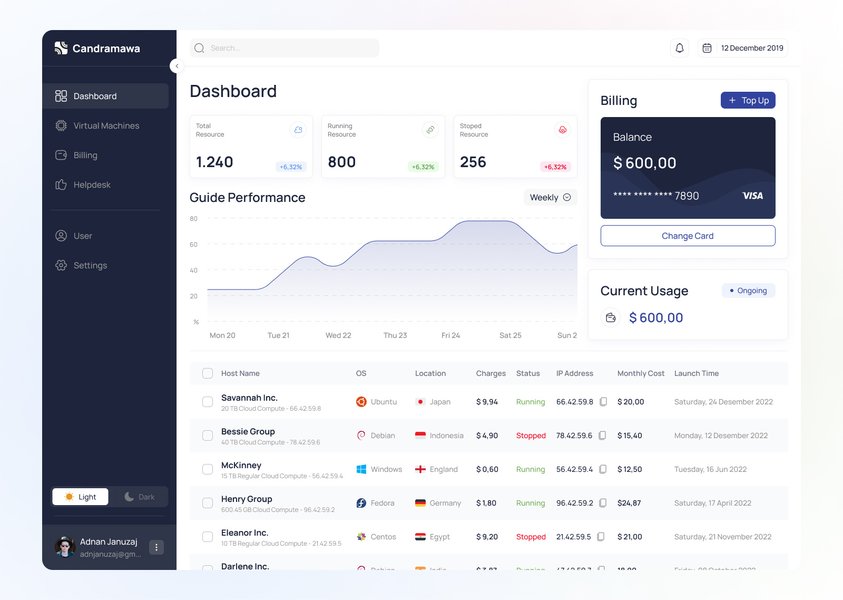
An example of a modern dashboard interface for managing virtual machines, showcasing resource monitoring.
Modern Trends and Future Outlook
Hypervisor technology continues to evolve, adapting to new demands and integrating with emerging technologies.
Integration with Cloud and Containers
Hypervisors are the bedrock of Infrastructure as a Service (IaaS) cloud offerings, enabling providers to offer scalable, on-demand compute resources. While containerization (e.g., Docker, Kubernetes) offers a more lightweight form of virtualization for applications, hypervisors often provide the underlying secure, multi-tenant infrastructure for container hosts. There's also a trend towards running VMs and containers side-by-side, managed by unified platforms.
Enhanced Security Features
As virtual environments become more prevalent, security remains a paramount concern. Modern hypervisors are incorporating more advanced security features, such as finer-grained access controls, VM encryption (at rest and in motion), integrity monitoring, and integration with sophisticated threat detection systems. The focus is on protecting not just the VMs but the hypervisor layer itself from attacks.
Frequently Asked Questions (FAQ)
What is the fundamental role of a hypervisor?
How do Type 1 and Type 2 hypervisors differ in terms of installation?
Can a hypervisor run multiple different operating systems at the same time?
What are the main security advantages of using hypervisors?
Are hypervisors only for large data centers?
Conclusion
Modern computer hypervisors are a cornerstone technology that has revolutionized how we utilize computing resources. By enabling the creation and management of multiple isolated virtual machines on a single physical host, they provide unparalleled efficiency, scalability, and flexibility. Whether it's powering vast cloud infrastructures with Type 1 hypervisors or enabling developers to run multiple OS environments on a laptop with Type 2 hypervisors, their impact is profound. As of 2025, hypervisors continue to evolve, integrating with new paradigms like containerization and bolstering security to meet the demands of an increasingly complex digital world.
Recommended Further Exploration
- How does hardware-assisted virtualization (Intel VT-x/AMD-V) improve hypervisor performance?
- What are the security implications of running containers within virtual machines managed by hypervisors?
- Compare the leading Type 1 hypervisors: VMware ESXi vs. Microsoft Hyper-V vs. KVM.
- What is paravirtualization and how does it differ from full virtualization in hypervisors?
References
 aws.amazon.com
aws.amazon.com
aws.amazon.com
Last updated May 21, 2025