
Automating LinkedIn Profile Processing with n8n and AI
Leveraging workflow automation and artificial intelligence for enhanced data handling and outreach.
Key Insights for Looping and AI Integration in n8n
- N8n's inherent looping: Many n8n nodes automatically process multiple incoming items, often eliminating the need for explicit loop structures.
- The Loop Over Items node: For scenarios requiring controlled iteration or batch processing of arrays, the "Loop Over Items" node provides a dedicated solution.
- AI and LinkedIn synergy: Combining n8n's LinkedIn integration with AI nodes allows for powerful automation in areas like lead enrichment, personalized communication, and content generation.
N8n, a powerful workflow automation platform, offers robust capabilities for integrating various applications and services. When dealing with data, particularly arrays of information such as LinkedIn profile details, the ability to process each item individually or in batches is crucial. Furthermore, the integration of Artificial Intelligence (AI) within these workflows unlocks advanced possibilities for data analysis, enrichment, and automated interaction.
Understanding Looping Mechanisms in n8n
How n8n Handles Iteration
One of the core strengths of n8n lies in its automatic handling of multiple items. When a node receives an array of data, subsequent nodes in the workflow typically process each item in that array sequentially without requiring explicit loop constructs like those found in traditional programming languages. This simplifies workflow design for many common scenarios.
Consider a scenario where you retrieve a list of LinkedIn profiles. If you connect this output to another node, such as a data transformation node, n8n will automatically apply that transformation to each profile in the list.
The Role of the "Loop Over Items" Node
While n8n's automatic iteration is convenient, there are situations where more controlled looping or processing in batches is necessary. This is where the "Loop Over Items" node becomes invaluable. This node is specifically designed to take an array of items and process them either one by one or in defined batches. This allows for more granular control over how data is handled within a workflow, which can be particularly useful when interacting with APIs that have rate limits or when you need to perform specific actions on subsets of your data.
Using the "Loop Over Items" node allows you to explicitly define how the workflow should proceed through an array, ensuring that each item or batch of items is processed before moving to the next. This can be essential for complex workflows involving external services or conditional logic applied to each item.
Integrating LinkedIn Data with n8n Workflows
Accessing LinkedIn Information
N8n provides dedicated integration with LinkedIn through its LinkedIn node. This node allows you to interact with the LinkedIn API to perform various actions, such as retrieving profile information, creating posts, and managing job postings. To use the LinkedIn node, you will typically need to authenticate your LinkedIn account, often requiring API keys or tokens with the necessary permissions.
Once authenticated, the LinkedIn node can be configured to fetch data, which can then be passed as an array of items to subsequent nodes in your workflow. This initial step of retrieving LinkedIn profile information forms the basis for further automation and AI processing.
Common LinkedIn Automation Use Cases
N8n enables a wide range of LinkedIn automation scenarios. These can include:
- Automatically posting updates to your LinkedIn profile based on triggers from other applications (e.g., new blog posts).
- Synchronizing contact data between LinkedIn and CRM systems for lead management.
- Automating outreach and communication based on specific criteria.
- Managing job postings directly from your n8n instance.

Leveraging AI Nodes for Profile Enrichment and Analysis
Enhancing LinkedIn Data with AI
The integration of AI nodes in n8n workflows, particularly after retrieving LinkedIn profile data, opens up powerful possibilities. AI can be used to process and enrich the collected information in ways that would be time-consuming or impossible manually. Examples include:
- Lead Scoring: Using AI to analyze profile information and determine the potential value of a lead based on predefined criteria.
- Content Personalization: Employing AI to generate personalized messages or content tailored to individual profiles for outreach.
- Sentiment Analysis: Analyzing text associated with a profile to understand sentiment.
- Data Extraction and Structuring: Using AI to extract specific pieces of information from unstructured text in profiles and structure it for further use.
Structuring the Workflow with AI Nodes
A typical n8n flow for looping over an array of LinkedIn profile information and running AI nodes would involve the following structure:
- Trigger Node: This could be a manual trigger, a schedule, or a webhook that initiates the workflow.
- LinkedIn Node: Configured to retrieve a list of LinkedIn profiles based on your criteria. This node outputs an array of profile data.
- Loop Over Items Node (Optional but Recommended for Control): Connect the output of the LinkedIn node to the "Loop Over Items" node. This allows you to process each profile individually or in batches.
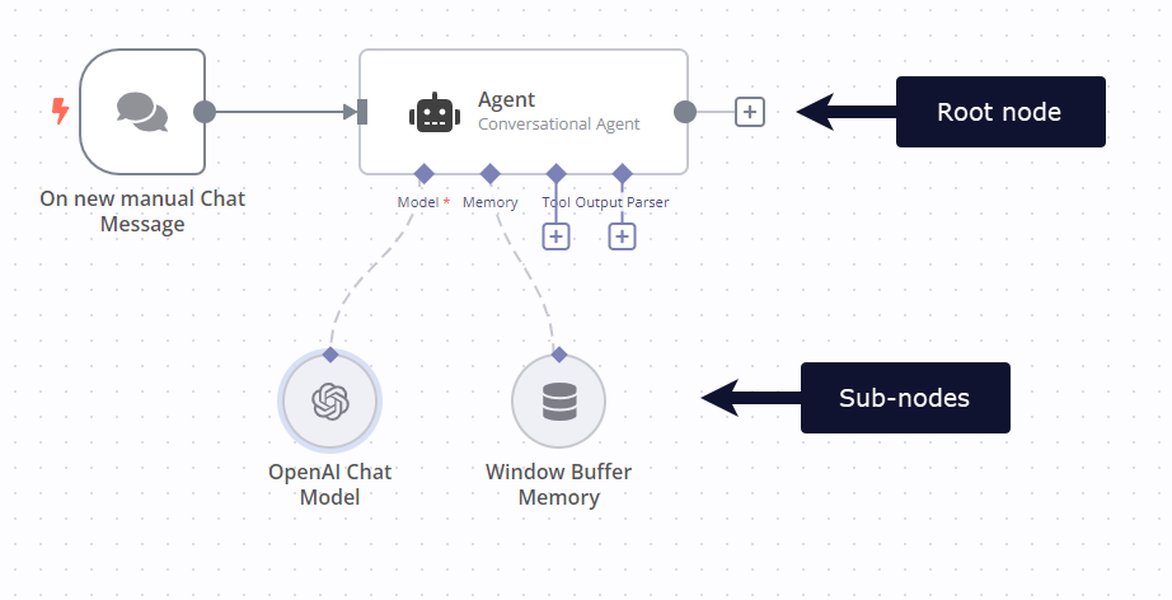
- AI Nodes: Within the loop (or directly after the LinkedIn node if not using "Loop Over Items"), add one or more AI nodes. These could be:
- OpenAI Node: For generating text, summarizing profiles, or performing sentiment analysis.
- Other AI Service Nodes: Depending on the specific AI tasks (e.g., image analysis if profiles include images, data enrichment services).
- Data Handling/Output Nodes: After the AI nodes process the data, use nodes to handle the results. This could involve:
-
Google Sheets Node: To log enriched profile data.
-
CRM Node: To update contact information.
-
Email Node: To send personalized outreach.
-
Database Node: To store processed information.
-
Practical Example Workflow Structure
Let's consider a workflow designed to find potential leads on LinkedIn, enrich their profiles using AI, and then add them to a CRM. The flow might look something like this:
| Step | N8n Node | Purpose |
|---|---|---|
| 1 | Manual Trigger / Schedule | Initiate the lead generation process. |
| 2 | LinkedIn Node | Search for and retrieve a list of LinkedIn profiles based on criteria (e.g., job title, industry). |
| 3 | Loop Over Items Node | Process each retrieved LinkedIn profile individually. |
| 4 | OpenAI Node | Analyze the profile summary to extract key skills and interests. |
| 5 | Another AI Node (e.g., a data enrichment service) | Fetch additional company information based on the profile's listed company. |
| 6 | CRM Node (e.g., HubSpot, Salesforce) | Create or update a contact in the CRM with the enriched profile and company data. |
This table illustrates a simplified workflow. Real-world scenarios might involve more complex logic, including conditional routing based on AI analysis results or integration with additional services.
Considering Alternatives and Advanced Techniques
Batch Processing vs. Single Item Processing
The choice between processing items one by one or in batches using the "Loop Over Items" node depends on the specific requirements of your workflow and the limitations of the services you are integrating with. Batch processing can be more efficient for certain operations, while single-item processing provides finer control.
Handling Errors and Retries
When processing multiple items and interacting with external APIs or AI services, it's crucial to implement error handling. N8n provides mechanisms to catch errors and define retry strategies, ensuring that your workflow is resilient to temporary issues.
Community Nodes and Custom Integrations
Beyond the built-in nodes, the n8n community develops custom nodes that can extend functionality. For specific or advanced LinkedIn operations, you might find community nodes or need to use the HTTP Request node to interact directly with the LinkedIn API if a specific action is not supported by the standard node. However, be mindful that community nodes may require self-hosted n8n instances.
Video Tutorial: Automate Your Job Search with LinkedIn & n8n
To further illustrate the practical application of n8n with LinkedIn, the following video demonstrates a workflow for automating job searches:
This video showcases how n8n can be used to streamline repetitive tasks on LinkedIn, providing a tangible example of the concepts discussed.
Frequently Asked Questions
Do I need an API key to integrate LinkedIn with n8n?
Yes, typically you will need an API key, token, or similar credentials from your LinkedIn account with the necessary permissions to allow n8n to interact with the LinkedIn API.
Can I use n8n to post to my LinkedIn profile?
Yes, n8n's LinkedIn node supports creating posts on your profile or company pages.
Is it safe to use n8n for LinkedIn automation?
N8n offers security features like encrypted data transfers and secure credential storage. For hosted plans, data is stored in secure data centers. Self-hosting provides additional control over your data environment. Always ensure your credentials have the minimum necessary permissions.
How does n8n handle looping over large arrays?
N8n's architecture is designed to handle multiple items efficiently. The "Loop Over Items" node can also be configured to process data in batches, which can be helpful for managing memory usage and adhering to API limits when dealing with very large datasets.
References
Last updated May 6, 2025