
Unlocking AI Workflow Automation on Your iPhone: Beyond Traditional Tools
Exploring No-Code and AI-Powered Solutions for Mobile Automation
Key Insights for iPhone AI Workflow Building
- No-code and AI-powered platforms are increasingly enabling the creation of complex workflows on mobile devices without traditional coding.
- Apple's built-in Shortcuts app is a powerful, free tool for personal automation on iPhones, offering integration with various apps and system features.
- Several third-party no-code app builders and automation tools provide more advanced features and integrations, some incorporating AI capabilities for enhanced workflow creation.
Building AI workflows traditionally involved complex coding and server setups, often associated with tools like n8n, which is a powerful open-source workflow automation platform. While n8n itself can be self-hosted and accessed remotely, running its full capabilities directly on an iPhone in a native app context is not its primary design. n8n is typically utilized on a server to handle the heavy lifting of connecting various services and executing complex logic. However, the increasing sophistication of mobile operating systems and the rise of no-code/low-code platforms, particularly those integrating artificial intelligence, have made it possible to create and manage powerful automations and AI-driven workflows directly from or for your iPhone.
The key to achieving n8n-like functionality on an iPhone lies in leveraging platforms and tools designed for mobile-first or no-code automation, often with integrated AI features. These tools abstract away the need for traditional programming, allowing users to visually design and implement workflows that can interact with various apps, data sources, and AI models.
Native iPhone Automation with Shortcuts
Leveraging Apple's Built-in Automation Powerhouse
For iPhone users, the most accessible and powerful tool for creating automations is Apple's native Shortcuts app. Shortcuts allows you to create personalized workflows that can be triggered manually, by Siri, based on time, location, or system events. While not a full-fledged AI workflow builder in the same vein as some dedicated platforms, Shortcuts can incorporate AI functionalities through integrations with other apps or by utilizing on-device intelligence where available.
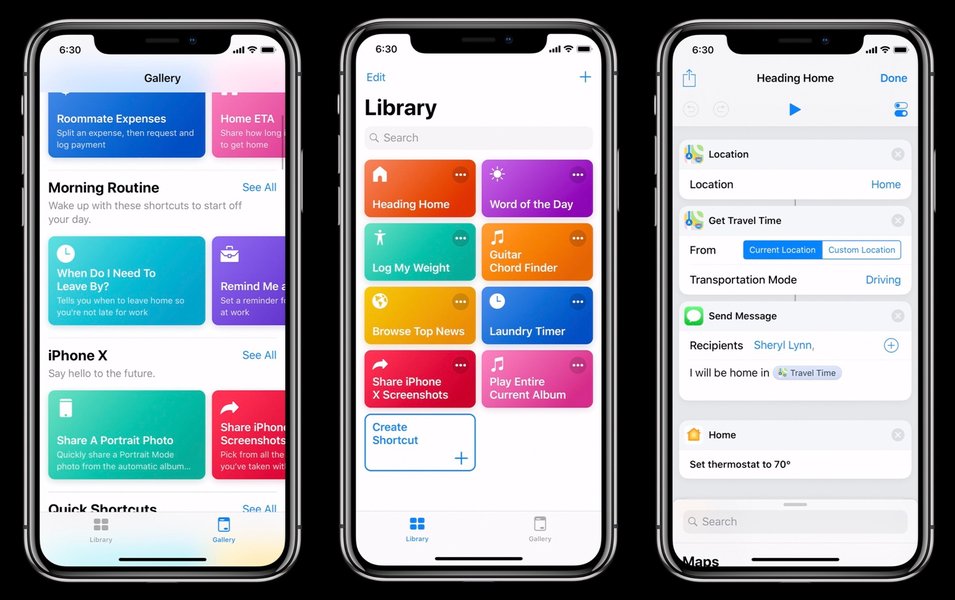
Shortcuts employs a visual, block-based interface, making it a no-code solution. You can chain together actions from various apps installed on your iPhone, as well as built-in system functions like sending messages, setting alarms, getting directions, and much more. Automations within Shortcuts can be set up to run automatically when certain conditions are met, such as arriving at a specific location, connecting to a Wi-Fi network, or at a scheduled time.
Here's a basic overview of how Shortcuts works:
- Creating a Shortcut: Open the Shortcuts app and tap the '+' icon to create a new shortcut.
- Adding Actions: Browse or search for actions from your apps or system features. You can add multiple actions to a single shortcut.
- Configuring Actions: Customize the parameters for each action, such as specifying the recipient of a message or the destination for directions.
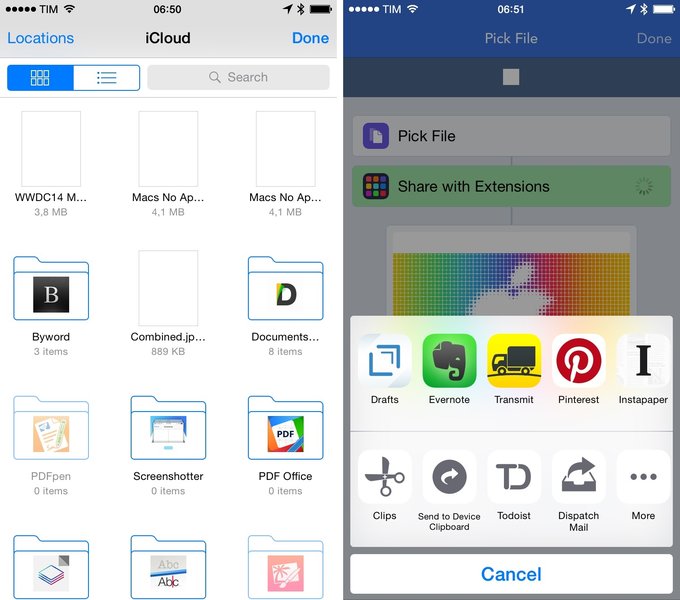
- Running the Shortcut: Execute the shortcut by tapping it in the app, using a Siri voice command, adding it to your home screen, or through the Share Sheet.
Integrating AI Capabilities with Shortcuts
While Shortcuts doesn't have a built-in AI model for complex tasks, you can integrate with apps that do. For example, you could create a shortcut that sends text to a language translation app with AI capabilities, or one that utilizes an image recognition app to process photos. As AI features become more integrated into standard iOS apps, the potential for AI-powered workflows within Shortcuts will continue to grow.
For more advanced AI workflows, you might use Shortcuts to trigger actions in a third-party no-code automation platform that has stronger AI integrations. This allows you to leverage the mobile convenience of Shortcuts while utilizing the more powerful AI processing of another service.
Third-Party No-Code and AI Workflow Builders
Platforms Bringing Advanced Automation to Mobile
Beyond Shortcuts, a growing number of third-party no-code and AI workflow builders are available or accessible on the iPhone, offering more extensive integrations and capabilities than the native app. These platforms often provide a web interface for building complex workflows that can then be triggered or monitored from a mobile device. Some are specifically designed for mobile app building with integrated automation and AI features.
Notable Alternatives and Platforms
Several platforms are considered alternatives to n8n and offer varying degrees of mobile accessibility and AI features:
- Zapier: A widely-used no-code automation tool that connects over 7,000 apps. While primarily web-based for building "Zaps" (workflows), Zapier has a mobile app to monitor and manage your automations. It doesn't have native AI building but can integrate with AI services.
- Make (formerly Integromat): Similar to Zapier but often considered more powerful for complex multi-step workflows. Make also uses a visual editor and offers extensive app integrations. Like Zapier, workflow building is typically done on the web, but monitoring can be done on mobile.
- Activepieces: An open-source alternative to Zapier and Make, offering a visual workflow builder. It can be self-hosted, providing flexibility similar to n8n, and has a focus on enabling users to build their own integrations. Its mobile accessibility would depend on the self-hosted setup or a potential companion app. It is mentioned as a popular alternative with a custom license.
- Bardeen AI: This platform emphasizes AI-powered workflow automation and a no-code visual builder. It operates in the browser and allows for connecting apps and creating automations based on triggers and actions, including those involving AI. Its browser-based nature means it's accessible on iPhone via a web browser.
- Latenode: Described as an emerging automation tool blending no-code and low-code with AI-driven features. It offers flexibility for custom automations and can be a powerful alternative for those needing more technical control while still leveraging AI.
- Adalo and Appy Pie: These are examples of no-code platforms for building mobile apps. While their primary focus is app creation, they often include workflow automation features and can integrate with other services like Zapier to add more complex automation or potentially AI functionalities. They allow users to build visually without code and deploy to iOS.
- Huginn and Node-RED: These are open-source, self-hosted automation platforms. Huginn is described as a system for building agents that can perform automated tasks, while Node-RED is a flow-based programming tool for wiring together hardware devices, APIs, and online services. Both require more technical setup than no-code platforms but offer high levels of customization. Accessing and managing workflows built on these platforms from an iPhone would typically involve accessing their web interfaces or building custom interfaces. Node-RED is noted as a popular alternative to n8n for self-hosted setups.
When considering these alternatives for use with an iPhone, it's important to consider:
- Mobile Interface: Does the platform offer a dedicated iPhone app for building, managing, or triggering workflows? Or is it primarily web-based and accessible via the iPhone's browser?
- AI Integration: How deeply are AI capabilities integrated into the workflow builder? Can you easily incorporate AI models for tasks like natural language processing, image analysis, or data prediction within your workflows?
- Ease of Use: Is the visual workflow builder intuitive and easy to use on a mobile screen?
- Integrations: Does the platform connect with the specific apps and services you need for your workflows?
- Self-Hosting vs. SaaS: Do you prefer a self-hosted solution like n8n, Huginn, or Node-RED for maximum control and privacy, or a Software as a Service (SaaS) model like Zapier or Make for ease of use?
Building AI Workflows with No-Code Platforms for iPhone
A Step-by-Step Approach
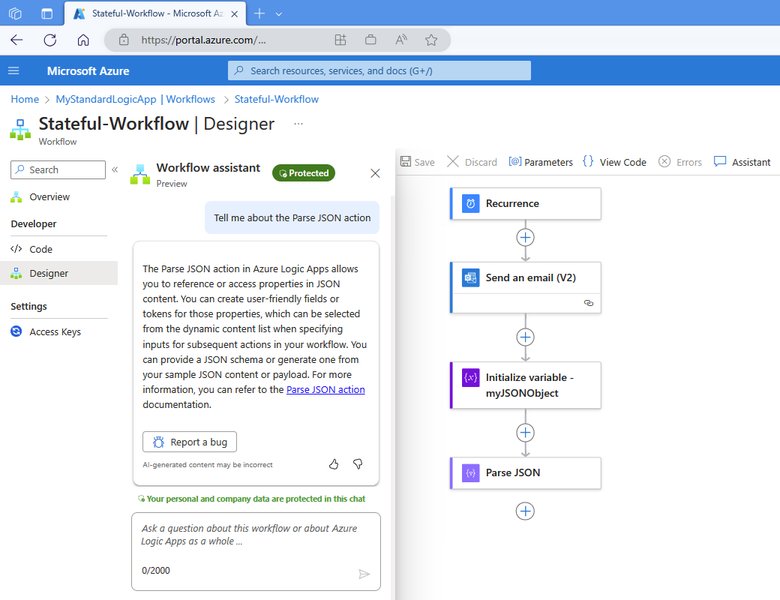
Regardless of whether you use Shortcuts or a third-party platform, the general process for building AI workflows for or on your iPhone using no-code principles involves several key steps:
- Identify the Task: Clearly define the repetitive task or process you want to automate and where AI can add value (e.g., categorizing emails, summarizing text, analyzing images).
- Choose the Right Tool: Select a platform that aligns with your needs in terms of mobile access, AI capabilities, and integrations. For simple personal automations, Shortcuts might suffice. For more complex business processes or deeper AI integration, a third-party no-code/AI workflow builder will likely be necessary.
- Define the Trigger: Determine what event will start your workflow (e.g., receiving an email, a file being added to cloud storage, a specific time).
- Outline the Steps: Break down the task into a sequence of actions that need to be performed. Identify where AI processing is required.
- Connect Applications: Use the chosen platform's connectors or integrations to link the apps and services involved in your workflow.
- Incorporate AI Actions: If the platform has built-in AI features, configure them for the relevant steps (e.g., using a text analysis module, an image recognition action). If not, you might need to integrate with a dedicated AI service via an API or a connector.
- Test the Workflow: Run your workflow with test data to ensure it functions as expected and that the AI components are providing the desired output.
- Deploy and Monitor: Activate your workflow. Use the platform's mobile interface or notifications to monitor its execution and troubleshoot any issues.
Here is a table summarizing some of the n8n alternatives and their relevance to iPhone AI workflow building:
| Platform | Type | AI Capabilities | iPhone Accessibility | Notes |
|---|---|---|---|---|
| Shortcuts (Apple) | Native Automation Tool | Limited native AI, can integrate with AI apps | Fully native app for building and running | Best for personal, on-device automations. Free. |
| Zapier | No-Code Automation (SaaS) | Integrates with AI services via connectors | Mobile app for monitoring/management, web for building | Extensive app integrations, easy to use. |
| Make | No-Code Automation (SaaS) | Integrates with AI services via connectors | Mobile access for monitoring/management, web for building | Powerful for complex workflows, more features than Zapier. |
| Activepieces | Open Source Automation | Potential for AI integration via custom pieces | Depends on self-hosted setup or future app | Flexible, self-hostable alternative. |
| Bardeen AI | AI Workflow Builder (Browser-Based) | Integrated AI features, AI-powered content generation | Accessible via iPhone browser | Focus on AI in workflows, browser extension capabilities. |
| Latenode | No-Code/Low-Code with AI | AI-driven features | Details on iPhone accessibility may vary, likely web-based building | Blends no-code/low-code, suitable for more technical users. |
| Adalo / Appy Pie | No-Code App Builders | App features and integrations can include AI | Platform for building apps that run on iPhone | Primarily for building mobile apps, with included automation features. |
Considerations for Mobile AI Workflow Building
Challenges and Opportunities
Building and running AI workflows on or for an iPhone comes with specific considerations:
-
Resource Limitations: Mobile devices have less processing power and memory compared to servers, which can impact the performance of complex AI tasks.
-
Battery Consumption: Running intensive automations or AI processes can drain the iPhone's battery quickly.
-
Background Execution: iOS has limitations on background processes, which can affect workflows that need to run continuously or at specific intervals without user interaction. Shortcuts automations have become more reliable in this regard, but external platforms may still face limitations.
-
Internet Connectivity: Many AI services and integrations require a stable internet connection to function.
-
Data Privacy and Security: When using third-party platforms, it's important to understand how your data is handled and secured, especially if sensitive information is involved in your workflows. Self-hosted options like n8n or Activepieces can offer more control over data.
-
User Interface on Mobile: Building complex workflows with a visual editor on a small iPhone screen can be challenging compared to a desktop interface. Platforms with well-designed mobile interfaces or those that allow building on the web and managing on mobile are preferable.
Despite these challenges, the opportunities are significant. Mobile AI workflows enable increased productivity, on-the-go automation, and personalized experiences. As AI models become more efficient and mobile hardware more powerful, the capabilities for building sophisticated workflows directly on smartphones will continue to expand.
FAQ
Can I build a complex AI workflow entirely on my iPhone without a computer?
While native tools like Shortcuts allow significant on-device automation, building highly complex, n8n-scale AI workflows might still require a combination of mobile access for triggering and monitoring, and potentially a web interface (accessible on iPhone's browser or a computer) for the initial intricate setup and configuration, especially when dealing with multiple integrations and conditional logic. However, the trend is towards more capable mobile-friendly builders.
Are there free options for building AI workflows on iPhone?
Yes, Apple's Shortcuts app is free and offers robust automation capabilities, including the ability to integrate with apps that use AI. Some third-party platforms offer free tiers, though they may have limitations on the number of tasks or features.
How can I connect my iPhone workflows to external services and APIs?
Shortcuts has built-in actions for interacting with web services and APIs. Third-party no-code automation platforms like Zapier, Make, Activepieces, and Latenode specialize in connecting to a wide range of external applications and APIs, often through pre-built connectors or the ability to configure custom API calls.
Do I need to know how to code to build AI workflows on my iPhone?
For most of the platforms discussed, including Shortcuts and the various no-code/AI workflow builders, no traditional coding is required. These tools use visual interfaces and pre-built components to allow users to design workflows without writing code. However, some low-code platforms or self-hosted options might offer more flexibility if you have some technical knowledge, but it's not a necessity for basic to intermediate workflows.
References
Last updated May 13, 2025