
Q-Learning Implementation in the Frozen Lake Environment with Python
A Comprehensive Guide to Training an Agent to Navigate a Slippery World
Key Insights
- Frozen Lake: This environment, often used in reinforcement learning, challenges an agent to navigate a grid of frozen tiles (F) to reach a goal (G) while avoiding holes (H). The environment can be slippery, adding stochasticity to the agent's movements.
- Q-Learning: A model-free reinforcement learning algorithm that utilizes a Q-table to store the expected future rewards (Q-values) for taking specific actions in different states. The agent learns an optimal policy by iteratively updating these Q-values based on observed rewards and future potential rewards.
- Python Implementation: The Frozen Lake environment is readily available within the Gymnasium (formerly OpenAI Gym) library, making it a popular choice for implementing and testing Q-learning algorithms using Python and libraries like NumPy for managing the Q-table.
Reinforcement Learning (RL) is a powerful paradigm in machine learning where an agent learns to make decisions by interacting with an environment. The goal is to maximize a cumulative reward signal over time. A classic and widely used environment for introducing and experimenting with RL algorithms, particularly Q-learning, is the Frozen Lake environment.
Understanding the Frozen Lake Environment
The Frozen Lake environment, available through the Gymnasium (or older OpenAI Gym) library, is a grid-world problem. The agent starts at a designated starting point (S) and must navigate across a frozen lake, represented by frozen tiles (F), to reach a goal (G). The challenge lies in avoiding holes (H) scattered across the lake, as falling into a hole results in the termination of the episode and often a negative reward.
The environment can be configured to be "slippery," meaning the agent's attempted action (moving up, down, left, or right) does not always result in movement in the intended direction. Instead, there is a probability of moving in a perpendicular direction. This stochasticity makes the problem more challenging and provides a good testbed for algorithms that can handle uncertainty.
Environment States and Actions
In the standard 4x4 Frozen Lake environment, there are 16 possible states, representing the agent's position on the grid. These states can be represented by a single integer from 0 to 15. The agent has four possible actions in each state: move up, down, left, or right. The observation space is typically an integer representing the agent's current position.
For example, in a 4x4 grid, the states might be indexed as follows:
0  1  2  3
4  5  6  7
8  9 10 11
12 13 14 15
The actions can be represented numerically, for instance: 0 for left, 1 for down, 2 for right, and 3 for up.
Here is a visual representation of a 4x4 Frozen Lake environment:
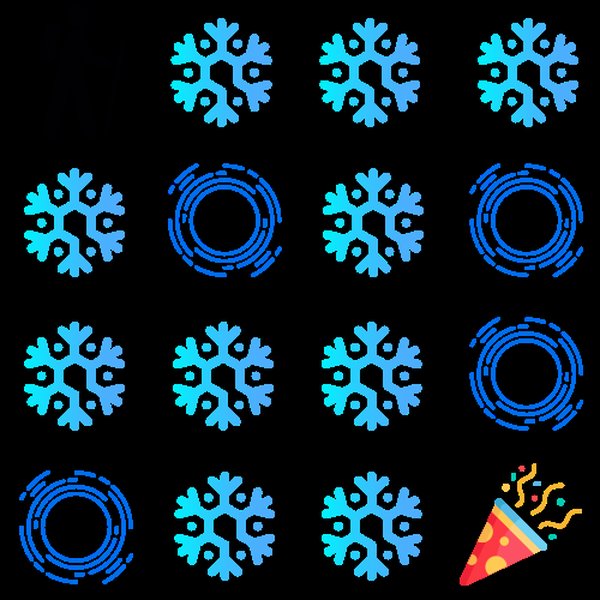
A 4x4 Frozen Lake Grid with Start (S), Frozen (F), Hole (H), and Goal (G)
Introduction to Q-Learning
Q-learning is a value-based, model-free, off-policy reinforcement learning algorithm. "Model-free" means the agent doesn't need to understand the environment's dynamics (i.e., the transition probabilities between states or the exact rewards for each action). "Value-based" means it learns a value function that estimates the "goodness" of being in a particular state or taking a particular action in a given state. "Off-policy" means it learns the value of the optimal policy independently of the agent's exploration policy.
The core of Q-learning is the Q-table (or Q-matrix). This table stores Q-values, denoted as \(Q(s, a)\), which represent the expected cumulative future reward of taking action \(a\) in state \(s\) and then following the optimal policy thereafter.
The Q-Learning Algorithm Steps
The Q-learning algorithm involves the following steps:
- Initialization: Create a Q-table with dimensions \(states \times actions\) and initialize all values, typically to zero.
- Observation: The agent observes the current state \(s\).
- Action Selection: The agent chooses an action \(a\) based on a policy derived from the Q-table. A common strategy is the epsilon-greedy policy, which involves exploring (taking a random action) with a probability of epsilon (\(\epsilon\)) and exploiting (taking the action with the highest Q-value for the current state) with a probability of \(1 - \epsilon\).
- Execution: The agent performs the selected action \(a\) in the environment.
- Observation and Reward: The environment transitions to a new state \(s'\), and the agent receives a reward \(r\).
- Q-Table Update: The Q-value for the previous state-action pair \((s, a)\) is updated using the Q-learning update rule (the Bellman equation for Q-values):
Where:
- \(Q(s, a)\) is the current Q-value for state \(s\) and action \(a\).
- \(\alpha\) is the learning rate (a value between 0 and 1) that determines how much the new information impacts the existing Q-value.
- \(r\) is the immediate reward received after taking action \(a\) in state \(s\).
- \(\gamma\) is the discount factor (a value between 0 and 1) that discounts future rewards. A higher discount factor means the agent values future rewards more.
- \(\max_{a'} Q(s', a')\) is the maximum Q-value for the next state \(s'\) across all possible actions \(a'\). This represents the estimated optimal future reward.
- Iteration: Steps 2-6 are repeated for many episodes (attempts to reach the goal or fall into a hole) until the Q-table converges, meaning the Q-values stabilize and the agent has learned a good policy.
Implementing Q-Learning for Frozen Lake in Python
Implementing Q-learning for the Frozen Lake environment in Python typically involves using the Gymnasium library to create the environment and NumPy to manage the Q-table. Here's a breakdown of the key components:
Setting up the Environment
First, you need to install the Gymnasium library (if you haven't already):
pip install gymnasium
Then, you can create an instance of the Frozen Lake environment:
import gymnasium as gym

env = gym.make("FrozenLake-v1", is_slippery=True) # Set is_slippery to True for the stochastic version
You can also choose to render the environment to visualize the agent's movements, although this is typically done after training to observe the learned policy:
env = gym.make("FrozenLake-v1", is_slippery=True, render_mode="human")
Initializing the Q-Table
The Q-table is a NumPy array with dimensions corresponding to the number of states and the number of actions. For the 4x4 Frozen Lake, there are 16 states and 4 actions.
import numpy as np

state_space_size = env.observation_space.n
action_space_size = env.action_space.n

q_table = np.zeros((state_space_size, action_space_size))
Defining Hyperparameters
Key hyperparameters for Q-learning include the learning rate (\(\alpha\)), discount factor (\(\gamma\)), and the exploration rate (\(\epsilon\)) along with its decay rate.
learning_rate = 0.1  # Alpha
discount_factor = 0.99 # Gamma
epsilon = 1.0       # Epsilon-greedy probability
max_epsilon = 1.0   # Exploration probability at the start
min_epsilon = 0.01  # Minimum exploration probability
decay_rate = 0.005  # Exponential decay rate for epsilon
The Training Loop
The core of the implementation is the training loop, where the agent interacts with the environment for a specified number of episodes.
num_episodes = 10000
max_steps_per_episode = 100

for episode in range(num_episodes):
    state, info = env.reset()
    done = False
    rewards_current_episode = 0

    for step in range(max_steps_per_episode):
        # Exploration vs. Exploitation
        exploration_rate_threshold = np.random.uniform(0, 1)
        if exploration_rate_threshold > epsilon:
            action = np.argmax(q_table[state,:]) # Exploit
        else:
            action = env.action_space.sample()   # Explore

        new_state, reward, terminated, truncated, info = env.step(action)

        # Q-learning update rule
        q_table[state, action] = q_table[state, action] + learning_rate * (reward + discount_factor * np.max(q_table[new_state,:]) - q_table[state, action])

        state = new_state
        rewards_current_episode += reward

        done = terminated or truncated
        if done:
            break

    # Decay epsilon
    epsilon = min_epsilon + (max_epsilon - min_epsilon)*np.exp(-decay_rate*episode)
Evaluating the Agent
After training, you can evaluate the agent's performance by running episodes with the learned policy (setting \(\epsilon = 0\) or using a very small value) and observing the success rate.
Visualizing the Learned Q-Values and Policy
After training, the Q-table contains the learned Q-values. These values implicitly define the agent's optimal policy: in any given state, the agent should choose the action with the highest Q-value. Visualizing the Q-table can provide insights into what the agent has learned.
Here's an example of how a trained Q-table might look for the 4x4 Frozen Lake (values are illustrative):
| State | Action 0 (Left) | Action 1 (Down) | Action 2 (Right) | Action 3 (Up) |
|---|---|---|---|---|
| 0 (S) | 0.0 | 0.1 | 0.0 | 0.0 |
| 1 | 0.0 | 0.2 | 0.3 | 0.0 |
| ... | ... | ... | ... | ... |
| 15 (G) | 0.0 | 0.0 | 0.0 | 1.0 |
The table shows the Q-value for each state-action pair. A higher value suggests that taking that action in that state is expected to lead to a greater cumulative reward.
We can also infer the learned policy from the Q-table by selecting the action with the maximum Q-value for each state. For example, if for state 0, the maximum Q-value is for action 1 (Down), the policy for state 0 would be to move down.
Here are examples of visualized Q-values:
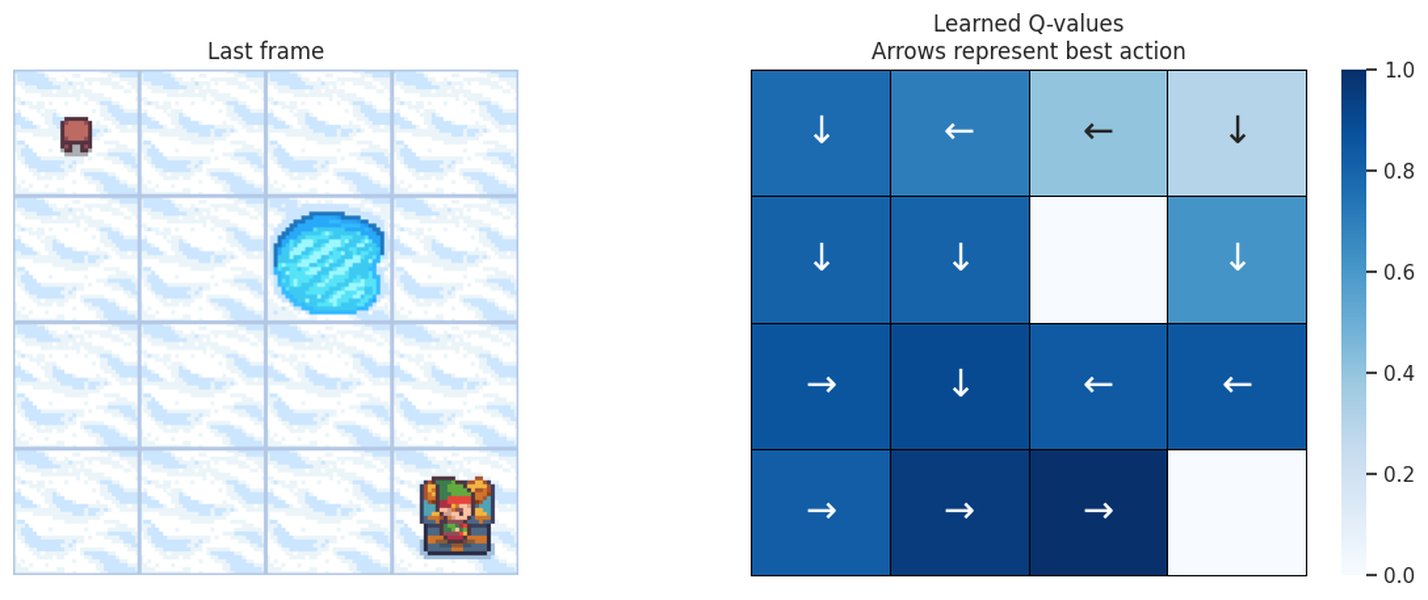
Visualized Q-values for a 4x4 Frozen Lake Environment
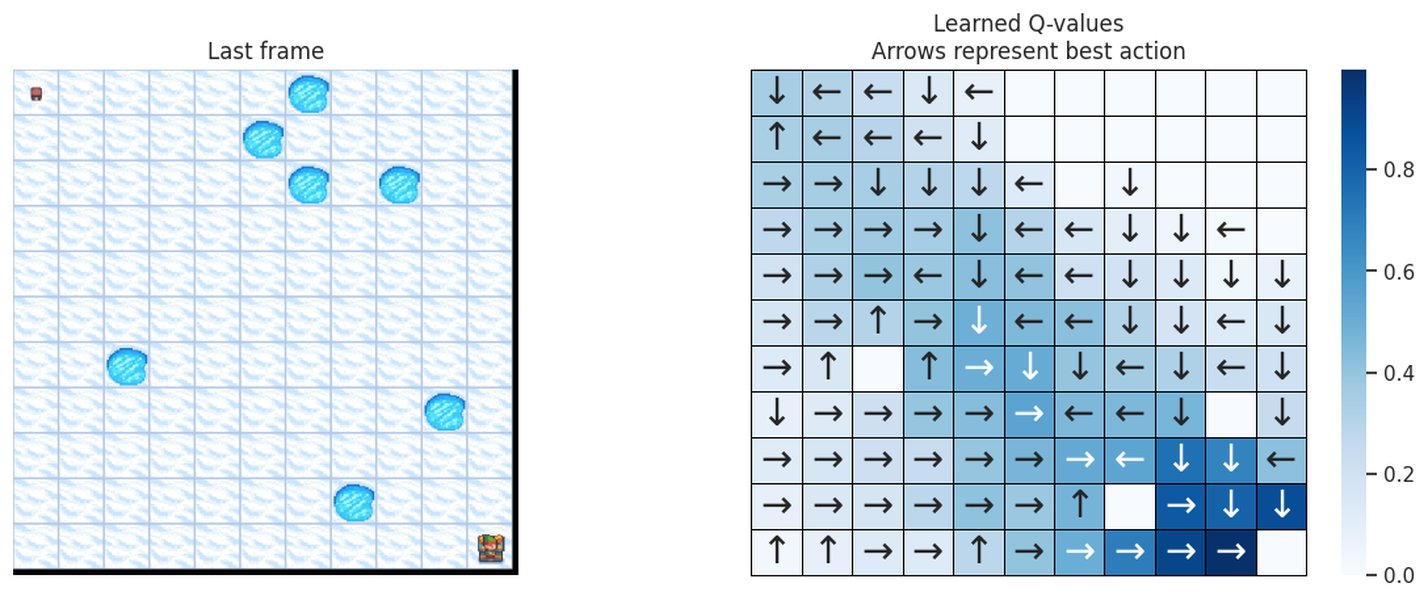
Visualized Q-values for an 11x11 Frozen Lake Environment
These visualizations often use colors or arrows to indicate the preferred action in each state based on the learned Q-values.
Challenges and Considerations
While Q-learning is a simple and effective algorithm for small, discrete environments like Frozen Lake, several factors can influence its performance:
-
Hyperparameter Tuning: The learning rate, discount factor, and exploration rate decay schedule significantly impact the training process and the final policy. Careful tuning is often required.
-
Exploration vs. Exploitation: Finding the right balance between exploring new actions and exploiting known good actions is crucial for converging to the optimal policy. The epsilon-greedy strategy is a common approach, but others exist.
-
Stochasticity: The slippery nature of the Frozen Lake environment introduces randomness. Q-learning can handle this, but it may require more training episodes to converge reliably.
-
State Space Size: For environments with a large number of states, the Q-table can become prohibitively large, making basic Q-learning impractical. This is where techniques like Deep Q-Networks (DQN), which use neural networks to approximate the Q-values, become necessary.
Frozen Lake and Q-Learning in the Context of Reinforcement Learning
The Frozen Lake environment serves as an excellent entry point into the world of reinforcement learning. It demonstrates the fundamental concepts of states, actions, rewards, and policies in a simple setting. Implementing Q-learning on Frozen Lake provides hands-on experience with a foundational RL algorithm and highlights the process of an agent learning through trial and error.
The problem, despite its apparent simplicity, encapsulates key challenges in RL, such as navigating stochastic environments and balancing exploration and exploitation. Successfully training an agent to solve Frozen Lake with Q-learning builds a strong intuition for how RL algorithms work and provides a stepping stone to more complex environments and algorithms.
A Relevant Video on Q-Learning and Frozen Lake
To further illustrate the concepts discussed, here is a relevant YouTube video demonstrating Q-Learning with the Gymnasium FrozenLake-v1 environment in Python. This video provides a visual walkthrough of the implementation and training process.
Demonstration of Training a Q-Learning Agent on Frozen Lake
This video walks through the process of training a reinforcement learning agent using Q-learning to navigate the Frozen Lake environment. It covers the Python code implementation, including setting up the environment, initializing the Q-table, implementing the epsilon-greedy action selection, and updating the Q-table using the Bellman equation. Watching this video can provide a practical understanding of how the theoretical concepts translate into a working program and allow you to see the agent's learning progress.
Frequently Asked Questions about Q-Learning in Frozen Lake
What is the goal of the Frozen Lake environment?
The primary goal in the Frozen Lake environment is for an agent to move from the starting state (S) to the goal state (G) by traversing frozen tiles (F) while avoiding falling into holes (H).
Why is Frozen Lake a good environment for learning Q-learning?
Frozen Lake is ideal for learning Q-learning because it has a small, discrete state and action space, making the Q-table manageable. Its simple rules and the option for stochasticity (slippery ice) effectively demonstrate core RL concepts and the challenges of learning in uncertain environments.
What is the Q-table used for in Q-learning?
The Q-table stores the learned Q-values, which are estimates of the expected cumulative future reward for taking a specific action in a specific state. It acts as a lookup table that guides the agent's decision-making process.
How does the epsilon-greedy policy work?
The epsilon-greedy policy is a common strategy for balancing exploration and exploitation. With a probability of epsilon (\(\epsilon\)), the agent takes a random action (exploration) to discover new possibilities. With a probability of \(1 - \epsilon\), it takes the action with the highest Q-value for the current state (exploitation) to leverage its current knowledge.
What are the key hyperparameters in Q-learning?
The key hyperparameters are the learning rate (\(\alpha\)), which controls the step size of updates to the Q-table; the discount factor (\(\gamma\)), which determines the importance of future rewards; and the exploration rate (\(\epsilon\)) and its decay, which manage the exploration-exploitation trade-off.
How many episodes are typically needed to train a Q-learning agent on Frozen Lake?
The number of episodes required can vary depending on the environment size (e.g., 4x4 vs. 8x8), whether the environment is slippery, and the chosen hyperparameters. However, often several thousand to tens of thousands of episodes are needed for the agent to learn a robust policy, especially in the slippery version.
Can Q-learning be used for environments with continuous state or action spaces?
Basic Q-learning with a Q-table is not directly applicable to environments with continuous state or action spaces because the Q-table would be infinitely large. For such environments, variations like Deep Q-Networks (DQN) or other policy-based methods are used.
References
Last updated May 7, 2025