
Unlocking Your Raspberry Pi's True Potential: The Measurable Power of Heatsinks
Discover how strategically cooling your Raspberry Pi can dramatically boost its performance and longevity.
The Raspberry Pi, a versatile single-board computer, has found its way into countless projects, from simple home automation to complex computing tasks. However, as these tiny powerhouses, especially newer models like the Raspberry Pi 4 and 5, tackle more demanding applications, they generate significant heat. This heat, if unmanaged, can lead to a phenomenon known as thermal throttling, where the device intentionally slows itself down to prevent overheating. This is where third-party heatsinks come into play, offering a tangible way to enhance thermal performance. This guide delves into the specific, measurable impacts these cooling components can have.
Key Thermal Performance Enhancements
- Significant Temperature Reduction: Heatsinks can lower CPU operating temperatures by a measurable 5-15°C, and even more when combined with active airflow, directly combating overheating.
- Mitigation of Thermal Throttling: By keeping temperatures below the typical 80-85°C throttling threshold, heatsinks allow the Raspberry Pi to maintain higher clock speeds for extended periods, leading to more consistent and improved performance.
- Enhanced System Stability and Longevity: Cooler operating conditions reduce thermal stress on components, contributing to greater system stability during intensive tasks and potentially extending the lifespan of your Raspberry Pi.
The Science Behind Heatsink Effectiveness
How Heatsinks Wage War on Heat
A heatsink is a passive heat exchanger that transfers the heat generated by an electronic device, like the Raspberry Pi's System on a Chip (SoC), to a fluid medium—usually air—where it is dissipated away from the device. This process relies on fundamental principles of thermodynamics, primarily conduction and convection. The heatsink, typically made from materials with high thermal conductivity such as aluminum or copper, makes direct contact with the heat-generating component. Heat conducts from the hotter component to the cooler heatsink. The heatsink itself is designed with a large surface area, often featuring fins or pins, which then allows for more efficient convective heat transfer to the surrounding air. The greater the surface area and the better the airflow over this area, the more effectively heat can be removed. This simple yet effective mechanism is crucial for preventing a Raspberry Pi from reaching temperatures that trigger self-preservation measures like thermal throttling.
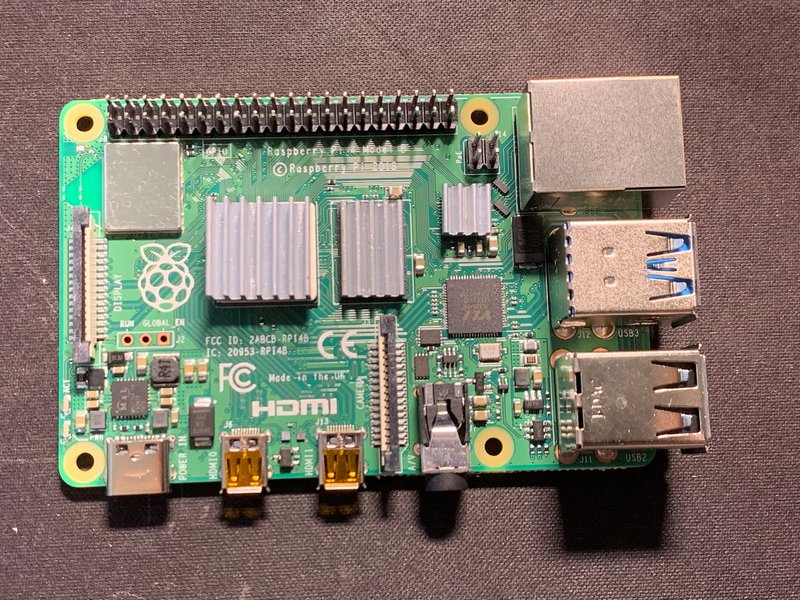
A Raspberry Pi 4 board equipped with third-party heatsinks on its main heat-producing components.
Material Matters: Aluminum vs. Copper
The choice of material for a heatsink significantly impacts its performance. Aluminum is widely used due to its good thermal conductivity, light weight, and cost-effectiveness. It's an excellent all-around choice for many Raspberry Pi applications. Copper, on the other hand, boasts nearly twice the thermal conductivity of aluminum, meaning it can absorb and transfer heat more quickly. This makes copper heatsinks generally more effective, especially in scenarios with high heat loads or limited airflow. However, copper is also denser and more expensive than aluminum. For Raspberry Pi users, the practical difference might be a few degrees Celsius, which can be critical for heavily overclocked systems or those operating in very warm environments. The design of the heatsink, including fin density and height, also plays a vital role, sometimes outweighing small differences in material properties.
The Crucial Role of Thermal Interface Material (TIM)
For a heatsink to perform optimally, efficient heat transfer from the chip to the heatsink body is paramount. Microscopic imperfections on the surface of both the chip and the heatsink create air gaps, which are poor conductors of heat. This is where Thermal Interface Material (TIM) comes in. TIMs are thermally conductive compounds, such as thermal paste or thermal adhesive tape, that fill these air gaps, ensuring a much more effective thermal pathway. Pre-applied thermal adhesive tape is common on many Raspberry Pi heatsinks for ease of installation. While convenient, its thermal conductivity can vary. For maximum performance, some users opt for high-quality thermal paste, similar to that used in desktop PCs, which can offer lower thermal resistance but requires a more careful application. The quality of the TIM and the evenness of its application can have a measurable impact on the heatsink's overall cooling capacity, sometimes making as much difference as the heatsink material itself.
Measurable Impact 1: Significant Temperature Reductions
Keeping the Core Cool
One of the most direct and measurable impacts of using a third-party heatsink is a substantial reduction in the Raspberry Pi's operating temperatures, particularly that of the CPU/SoC. Without any cooling, a Raspberry Pi 4 under heavy load can easily see its CPU temperature climb to 80-85°C. Empirical tests consistently show that even a modest aluminum heatsink can lower these peak temperatures by 5-10°C. More robust solutions, like larger copper heatsinks or those designed with more elaborate fin structures, can achieve temperature drops of 10-15°C or more under similar load conditions. For instance, a Raspberry Pi 4 might idle around 50-55°C without a heatsink in a typical room environment. With a basic heatsink, this idle temperature can drop to 40-45°C. Under sustained load, where an uncooled Pi might hit 85°C and start throttling, a Pi with a good quality heatsink might stabilize around 70-75°C, or even lower. These temperature differences are easily verifiable using the Raspberry Pi's built-in command vcgencmd measure_temp, allowing users to directly observe the benefits. For example, some studies have shown a Pi 4 running a CPU stress test reaching 64°C without a heatsink, but with a reasonably sized aluminum heatsink attached using thermal paste, the peak temperature was reduced to around 58°C under the same test conditions.
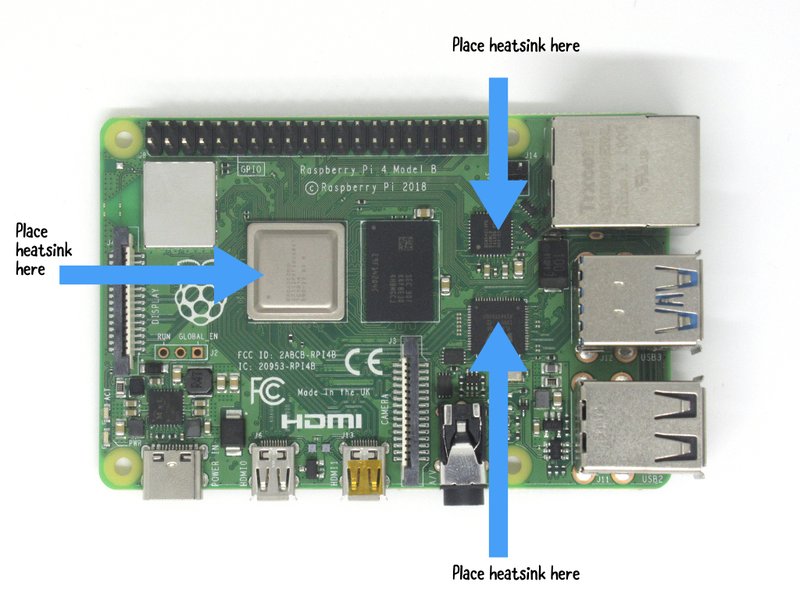
A typical heatsink kit for Raspberry Pi, including pieces for the CPU, RAM, USB controller, and network chip.
Heatsink kits often include smaller heatsinks for other heat-generating components on the Raspberry Pi board, such as the RAM chip, the USB controller, and the Ethernet controller. While the SoC is the primary heat source, these other components also contribute to the overall thermal load, especially in newer models like the Raspberry Pi 4 and 5. Cooling these auxiliary components can contribute to overall system stability and prevent localized hot spots, further enhancing the device's thermal resilience. The cumulative effect of cooling multiple components can lead to a more uniformly managed thermal environment across the entire board.
Measurable Impact 2: Taming Thermal Throttling
Unleashing Sustained Performance
Thermal throttling is a protective mechanism embedded in the Raspberry Pi's firmware. When the SoC temperature reaches a predefined threshold (typically 80-85°C, though this can vary slightly by model and firmware), the system automatically reduces the CPU's clock speed and sometimes voltage to lower heat generation and prevent damage. While essential for hardware safety, thermal throttling directly translates to reduced performance. Tasks take longer to complete, responsiveness can suffer, and applications may become sluggish. This is where heatsinks demonstrate a critical, measurable impact. By dissipating heat more effectively, heatsinks keep the SoC temperature below the throttling point for longer periods, or even entirely prevent throttling during typical heavy workloads. For example, under a sustained CPU benchmark, a Raspberry Pi 4 without a heatsink might start to throttle within 60 seconds, with its CPU frequency oscillating significantly (e.g., between its peak 1.5GHz or 1.8GHz down to 1.0GHz or lower). With an adequate heatsink, the same Pi might sustain its maximum clock speed for 150 seconds or longer, or even complete the benchmark without any throttling. This means computational tasks, video encoding, or game emulation will run faster and more smoothly because the CPU can operate at its full potential for a greater duration. The impact is quantifiable by monitoring CPU frequency (`vcgencmd measure_clock arm`) alongside temperature during stress tests.
Measurable Impact 3: Enhanced Stability and Potential Longevity
Building a More Reliable System
Consistently lower operating temperatures, facilitated by heatsinks, contribute to improved system stability, especially when the Raspberry Pi is used for demanding, long-running applications such as a web server, media center, or in an overclocked configuration. Heat is a known stressor for electronic components. Prolonged exposure to high temperatures can accelerate wear and tear, potentially reducing the lifespan of the device. While Raspberry Pis are generally robust, keeping them cooler can mitigate these risks. A system that frequently hits its thermal throttle point is operating under significant thermal stress. By using heatsinks to maintain temperatures well below this threshold, users can expect more reliable operation, fewer unexpected shutdowns or performance dips, and a generally healthier environment for the delicate electronics. This is particularly important for Pis deployed in enclosed cases or warmer ambient environments where heat buildup is a greater concern. While directly measuring an increase in lifespan is a long-term endeavor, the principles of electronics reliability strongly suggest that cooler operation is beneficial for longevity.
Visualizing Cooling Effectiveness: A Comparative Overview
To better understand the relative benefits and trade-offs of different cooling approaches for a Raspberry Pi, a radar chart can be quite illustrative. This chart compares "No Cooling," a "Basic Aluminum Heatsink," a more premium "Copper Heatsink," and a "Heatsink + Fan" combination across several key metrics: Temperature Reduction (how many degrees Celsius it typically drops the temperature), Cost Efficiency (lower cost scores higher), Silent Operation (higher score means quieter), Ease of Installation, and Sustained Performance (ability to maintain high performance under load).
As the chart indicates, while doing nothing is the cheapest and easiest, it offers the poorest thermal performance. Basic heatsinks provide a good balance, significantly improving thermals with minimal effort and cost. Copper heatsinks offer a further edge in cooling. For maximum temperature reduction and sustained performance, especially under extreme loads or overclocking, a combination of a heatsink and a fan (active cooling) is generally the most effective, though it comes with the trade-offs of potential noise, higher cost, and slightly more involved installation.
Comparative Performance with Heatsinks
The following table summarizes the typical thermal performance one might expect from a Raspberry Pi (like a Pi 4) under different cooling scenarios. These are generalized figures, and actual results can vary based on ambient temperature, specific workload, case ventilation, and the quality of the heatsink and TIM used.
| Cooling Solution | Typical Idle CPU Temp (°C) | Typical Load CPU Temp (°C) | Thermal Throttling Behavior | Relative Cost |
|---|---|---|---|---|
| No Cooling | 50-60 | 80-85+ (throttles quickly) | Frequent under heavy load | None |
| Small Aluminum Heatsink | 45-55 | 70-80 (throttling delayed/reduced) | Occasional under very heavy/prolonged load | Low |
| Large/Copper Heatsink | 40-50 | 65-75 (throttling rare) | Rarely, only under extreme conditions | Medium |
| Heatsink + Fan (Active Cooling) | 35-45 | 50-65 (throttling usually avoided) | Very rare, typically none | Medium-High |
This table underscores that even a simple, low-cost heatsink can make a noticeable difference in managing your Raspberry Pi's temperature, thereby delaying or preventing performance-degrading thermal throttling. More advanced solutions provide even greater benefits, allowing the Pi to operate closer to its peak capabilities for longer durations.
Mapping Out Raspberry Pi Thermal Management
Understanding the landscape of Raspberry Pi thermal management involves recognizing the challenges, the available solutions, and the benefits they bring. The mindmap below provides a conceptual overview of these interconnected aspects, highlighting the role of heatsinks within the broader strategy of keeping your Pi cool and performing optimally.
good conductivity)"] id2bb["Copper (Excellent conductivity
higher cost)"] id2c["Thermal Interface Material (TIM)"] id2ca["Thermal Adhesive Tape (Convenient)"] id2cb["Thermal Paste (Potentially better transfer)"] id2d["Target Components"] id2da["CPU/SoC (Primary)"] id2db["RAM, USB Controller, LAN Chip"] id3["Measurable Impacts & Benefits"] id3a["Lower Operating Temperatures (Idle & Load)"] id3b["Delayed or Prevented Thermal Throttling"] id3c["Sustained Higher Clock Speeds"] id3d["Improved Benchmark Results & Task Completion"] id3e["Enhanced System Stability & Reliability"] id4["Broader Cooling Strategies"] id4a["Active Cooling (Heatsink + Fan)"] id4b["Ventilated Cases & Enclosures"] id4c["Software-based Power Management (Limited)"]
This mindmap illustrates that heatsinks are a core component in addressing the thermal challenges of a Raspberry Pi. They function based on established physical principles and come in various forms, with their effectiveness influenced by material and application. The ultimate goals are tangible improvements in temperature, performance, and stability.
Visual Guide: Installing and Testing Heatsinks
For many, a visual demonstration can be incredibly helpful. The video below shows the process of installing heatsinks on a Raspberry Pi 4 and includes a brief comparison of thermal performance, offering a practical look at how these components are applied and the kind of results you might expect. It covers the placement of heatsinks on various components and gives an idea of the temperature changes observed.
Watching such a guide can demystify the installation process, which is typically straightforward, involving peeling off an adhesive backing and firmly pressing the heatsink onto the clean surface of the chip. The thermal tests often shown in these videos provide real-world evidence of the temperature drops discussed, reinforcing the value of these simple additions for maintaining optimal Raspberry Pi performance.
Frequently Asked Questions (FAQ)
Are heatsinks always necessary for a Raspberry Pi?
Not strictly for very light, intermittent use, especially with older, less powerful Raspberry Pi models. However, for newer models like the Raspberry Pi 4 and Pi 5, or for any Pi subjected to sustained moderate to heavy workloads (e.g., desktop use, media server, gaming, compiling software), heatsinks are highly recommended. They help prevent thermal throttling, maintain consistent performance, and can be crucial in warmer ambient temperatures or when the Pi is in an enclosure with limited airflow.
What's better: aluminum or copper heatsinks for a Raspberry Pi?
Copper generally has superior thermal conductivity compared to aluminum, meaning it can transfer heat away from the chip more efficiently. This often translates to slightly lower operating temperatures with a copper heatsink versus an aluminum one of similar size and design. However, copper heatsinks are usually more expensive and heavier. For many Raspberry Pi applications, a well-designed aluminum heatsink provides a very good balance of performance and cost. The quality of the thermal interface material (TIM) and the overall design (surface area, fin density) also significantly influence effectiveness, sometimes more than the material itself.
Do heatsinks produce any noise?
Passive heatsinks, which are the most common type for Raspberry Pis (metal blocks with fins), are completely silent. They have no moving parts and rely on natural convection and radiation to dissipate heat. If a heatsink is part of an "active cooling" solution that includes a fan, then the fan will produce some noise. The amount of noise depends on the fan's size, speed, and bearing quality.
How can I check if my Raspberry Pi is overheating or throttling?
You can monitor your Raspberry Pi's CPU temperature by opening a terminal window and running the command: vcgencmd measure_temp. To check the current CPU clock speed (which will reduce if throttling), use: vcgencmd measure_clock arm. If the temperature consistently exceeds 80°C and the clock speed drops significantly below its maximum during load, your Pi is likely thermal throttling. Other signs can include sluggish performance or system instability.
Can I use any heatsink on any Raspberry Pi component?
Not necessarily. Heatsinks are designed to fit specific chips based on their size and heat output. The main SoC (CPU/GPU) is the primary target for a heatsink. Many third-party heatsink kits come with multiple pieces of varying sizes to fit other components like the RAM chip, USB controller, or Ethernet PHY. It's important to use a heatsink that properly covers the intended chip without shorting out nearby components. Always ensure the heatsink is designed for your specific Raspberry Pi model and the component you wish to cool.
Recommended Further Exploration
- Explore the differences and benefits of active fan cooling versus passive heatsinks for your Raspberry Pi.
- Learn about various thermal interface materials (TIMs) and their impact on Raspberry Pi heatsink performance.
- Discover techniques for safely overclocking your Raspberry Pi with the aid of effective cooling solutions.
- Investigate how Raspberry Pi case designs can influence internal airflow and thermal efficiency, even when heatsinks are used.
References

Last updated May 8, 2025