
Chaining Multiple Raspberry Pi Picos to Create a PS1-like Graphics Engine
Building a PlayStation 1-inspired Graphics Engine with Raspberry Pi Pico Clusters
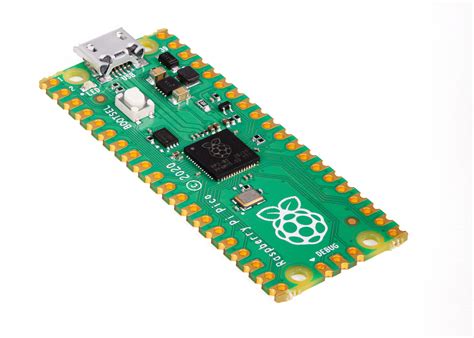
Key Takeaways
- Parallel Processing: Leveraging multiple Raspberry Pi Picos to distribute graphics tasks effectively.
- Communication Protocols: Implementing SPI, I2C, or UART for seamless inter-Pico data transfer.
- Optimizations: Employing memory management and culling techniques to enhance performance within hardware constraints.
Introduction
Creating a graphics engine analogous to the PlayStation 1 (PS1) using multiple Raspberry Pi Picos is an ambitious project that blends hardware ingenuity with software optimization. The PS1, a 32-bit console, was renowned for its ability to render 3D graphics with texture mapping, shading, and other effects, despite its limited hardware resources. Replicating such functionality requires a deep understanding of both the original PS1 graphics pipeline and the capabilities of the Raspberry Pi Pico microcontrollers. This comprehensive guide explores the methodologies, challenges, and solutions involved in chaining multiple Picos to achieve a PS1-like graphics engine.
Understanding the PS1 Graphics Pipeline
Core Components of the PS1 Graphics Engine
The PS1's graphics engine was built around several key components that collectively enabled its rendering capabilities:
- Geometry Transformation Engine (GTE): Responsible for 3D mathematical computations, including matrix transformations, lighting calculations, and vertex processing.
- Graphics Processing Unit (GPU): Managed rasterization, texture mapping, shading, and rendering of 2D and 3D primitives.
- Video RAM (VRAM): Limited to 1 MB, with a 16-bit color depth, which constrained the complexity and size of textures and scenes.
Comparing PS1 and Raspberry Pi Pico Capabilities
Hardware Specifications
| Feature | PlayStation 1 | Raspberry Pi Pico |
|---|---|---|
| Processor | 33 MHz Custom CPU and GPU | Dual-core ARM Cortex-M0+ at up to 133 MHz |
| Memory | 1 MB VRAM | 264 KB SRAM per Pico |
| Graphics Capabilities | 3D rendering with texture mapping, shading, and lighting | No dedicated GPU; requires multiple Picos to emulate graphics tasks |
| Communication Interfaces | N/A | GPIO with support for SPI, I2C, UART |
Implications of Hardware Differences
The Raspberry Pi Pico, while versatile and powerful for a microcontroller, lacks the dedicated GPU and high-speed memory of the PS1. To bridge this gap, the project necessitates the use of multiple Picos working in tandem to distribute and handle the complex computations required for real-time 3D rendering.
Hardware Setup
Daisy-Chaining Raspberry Pi Picos
Connecting multiple Picos in a daisy-chain configuration allows them to communicate and distribute processing tasks efficiently. The primary communication protocols suitable for this setup include SPI (Serial Peripheral Interface), I2C (Inter-Integrated Circuit), and UART (Universal Asynchronous Receiver/Transmitter).
- SPI: Offers high-speed communication, making it ideal for transferring large amounts of data between Picos.
- I2C: Simpler to implement but generally slower than SPI, suitable for less data-intensive tasks.
- UART: Provides reliable serial communication, useful for sending sequential data streams.
Power Supply Considerations
Ensuring a stable power supply is critical when chaining multiple Picos. Options include:
- Shared Power Source: Use a single power supply unit to feed all Picos, ensuring consistent voltage and current levels.
- Chaining VBUS Pins: Connect the VBUS pins of the Picos to distribute power effectively while preventing overloads.
Display Output Mechanism
Outputting the rendered graphics to a display involves integrating a Pico with a display interface. Possible approaches include:
- SPI-based Displays: Utilize SPI-compatible displays for direct rendering.
- HDMI via External Adapters: Employ external components like shift registers or HDMI adapters to facilitate higher-resolution outputs.
Communication Between Picos
Selecting the Right Communication Protocol
Effective inter-Pico communication is essential for synchronizing tasks and sharing data. Here's how to choose the appropriate protocol:
- SPI: Best suited for high-speed data transfer, crucial for handling the large amounts of data in graphics rendering.
- I2C: Easier to implement for smaller data packets and simpler communication needs.
- UART: Reliable for sequential data streams but may introduce latency in high-demand scenarios.
Master-Slave Configuration
Implementing a master-slave architecture allows one Pico to act as the coordinator, distributing tasks and synchronizing data across the chain:
- Master Pico: Oversees task distribution, manages synchronization, and aggregates results from slave Picos.
- Slave Picos: Handle specific graphics processing tasks, such as geometry transformations or texture mapping.
Custom Communication Protocols
Designing a lightweight, efficient communication protocol tailored to the project's needs can optimize data transfer rates and reduce latency:
- Packet-Based Communication: Structure data into packets with addressing to ensure accurate delivery and processing.
- Node Addressing: Assign unique identifiers to each Pico to facilitate targeted communication and task allocation.
Software Architecture
Dividing the Graphics Workload
To emulate the PS1's graphics capabilities, the workload must be strategically divided among the Picos:
- Pico 1: Geometry transformations, including vertex processing and lighting calculations.
- Pico 2: Texture mapping and rasterization, converting transformed vertices into pixels.
- Pico 3: Framebuffer management and display output, handling the final rendering to the screen.
Geometry Processing
Performing 3D math operations using fixed-point arithmetic due to the Pico's lack of a floating-point unit:
- Matrix Transformations: Scaling, rotation, and translation of vertices.
- Perspective Projection: Converting 3D coordinates to 2D screen space.
- Lighting Calculations: Determining light interactions with surfaces.
Rasterization and Texture Mapping
Converting geometric data into pixel data involves:
- Scanline Algorithms: Efficiently filling polygons line by line.
- Texture Mapping: Applying texture coordinates to pixels using preloaded textures stored in flash memory.
- Shading Techniques: Implementing flat or Gouraud shading for realistic surface rendering.
Framebuffer Management
Storing and managing pixel data before output involves:
- Double Buffering: Using two framebuffers to prevent screen tearing by alternating between them during rendering.
- Output Interfaces: Sending framebuffer data to the display via SPI or external controllers.
Synchronization Mechanisms
Ensuring all Picos operate in harmony during rendering:
- Interrupts: Triggering specific actions upon certain events to maintain synchronization.
- Polling: Continuously checking the status of Picos to coordinate processing stages.
Optimizations
Parallel Processing
Maximizing the performance of the Pico cluster by distributing tasks evenly and leveraging each Pico's dual-core architecture to handle independent processes.
Memory Management
Overcoming the limited SRAM by:
- External Memory Solutions: Utilizing SRAM or flash memory expansion boards to store larger textures and framebuffers.
- Efficient Memory Sharing: Implementing protocols that allow Picos to access and share memory resources without conflicts.
Culling Techniques
Reducing the number of polygons processed by:
- Frustum Culling: Eliminating objects outside the camera's view to save processing power.
- Backface Culling: Disregarding polygons facing away from the camera to streamline rendering.
Challenges and Limitations
Processing Power Constraints
The RP2040 microcontrollers in the Picos are significantly less powerful than the PS1's CPU and GPU, resulting in:
- Lower polygon counts and reduced rendering speeds.
- Challenges in achieving real-time performance, such as maintaining 30 FPS.
Memory Limitations
Each Pico's 264 KB of SRAM is insufficient for handling large textures or complex scenes, necessitating:
- External RAM expansion to increase available memory.
- Optimized memory usage through efficient data storage and retrieval techniques.
Synchronization Overheads
Maintaining synchronization across multiple Picos introduces latency and complexity, requiring:
- Advanced synchronization mechanisms to ensure timely data processing.
- Careful task distribution to prevent bottlenecks and ensure smooth operation.
Software Implementation
Programming Language and Libraries
Developing the graphics engine primarily involves:
- C/C++: Chosen for low-level access and optimized performance crucial for real-time graphics processing.
- Graphics Libraries: Utilizing or adapting open-source libraries such as Sean Butler's rpi-pico-graphics-lib to facilitate basic drawing and texture handling.
Fixed-Point Arithmetic
Implementing integer-based math to handle geometric transformations and rasterization due to the absence of a floating-point unit:
- Matrix Multiplication: Efficiently performing scaling, rotation, and translation operations.
- Perspective Projection: Simulating depth and distance in 3D space.
Multithreading and Dual-Core Utilization
Maximizing the processing capabilities by utilizing both cores of each Pico for independent tasks:
- Parallel Task Execution: Assigning different stages of the graphics pipeline to separate cores.
- Independent Processing: Allowing one core to handle vertex calculations while the other manages rasterization.
Display Output
Connecting to Displays
Outputting the final rendered frames to a display involves:
- SPI-based Displays: Directly connecting SPI-compatible displays to the Pico responsible for framebuffer management.
- HDMI via External Adapters: Using intermediary components like HDMI adapters or shift registers to achieve higher-resolution outputs.
Framebuffer Strategies
Implementing effective framebuffer management techniques:
- Double Buffering: Preventing screen tearing by alternating between two framebuffers during rendering.
- Optimized Data Transfer: Ensuring rapid transmission of framebuffer data to the display to maintain consistent frame rates.
Assembly and Optimization
Chaining Picos for Distributed Task Processing
Configuring the Picos to work collaboratively on separate stages of the graphics pipeline:
- Geometry Processing: Assigning one Pico to handle all vertex transformations and lighting calculations.
- Rasterization and Texturing: Designating another Pico to manage the conversion of geometric data into pixel data and applying textures.
- Framebuffer Management: Allocating a Pico to oversee the final assembly and transmission of the framebuffer to the display.
Workload Balancing
Ensuring an even distribution of tasks to prevent any single Pico from becoming a bottleneck:
- Task Allocation: Assigning more computationally intensive tasks, like texture mapping, to multiple Picos to enhance performance.
- Dynamic Load Balancing: Adjusting task distribution in real-time based on processing demands.
Performance Optimization
Enhancing the overall system performance through:
- Efficient Code: Writing optimized code to maximize processing speed and minimize latency.
- Hardware Utilization: Making the best use of the Pico's dual-core architecture and available GPIO pins.
Challenges and Limitations
Processing Power Limitations
The inherent limitations of the Raspberry Pi Pico's processing capabilities mean that achieving PS1-level performance is challenging:
- Lower maximum polygon counts compared to the PS1.
- Potential difficulties in maintaining consistent frame rates.
Memory Constraints
Managing limited memory resources requires innovative solutions:
- Implementing external memory expansions to handle larger textures and more complex scenes.
- Optimizing memory usage through efficient data structures and storage techniques.
Synchronization Overheads
Coordinating multiple Picos to work in unison introduces complexity and potential latency:
-
Developing robust synchronization mechanisms to prevent data processing delays.
-
Minimizing communication delays through optimized protocols and efficient data handling.
Conclusion
Chaining multiple Raspberry Pi Picos to create a graphics engine reminiscent of the PlayStation 1 is a complex yet rewarding endeavor. It demands a deep understanding of both the original PS1 graphics pipeline and the intricacies of microcontroller-based parallel processing. While the project faces significant challenges, including processing power and memory limitations, strategic task distribution, efficient communication protocols, and meticulous optimization can lead to impressive results. This project not only serves as a testament to the versatility of Raspberry Pi Picos but also provides invaluable insights into distributed computing and graphics rendering.
References
Embarking on this project offers a unique educational platform to delve into graphics rendering, parallel processing, and microcontroller programming. While replicating the PS1's graphics engine presents formidable challenges, the hands-on experience garnered through this endeavor fosters a deeper appreciation of both hardware and software engineering principles.
Last updated January 18, 2025