
How to Create Responsive Poster Layouts
Master the art of dynamic design adaptable to any screen
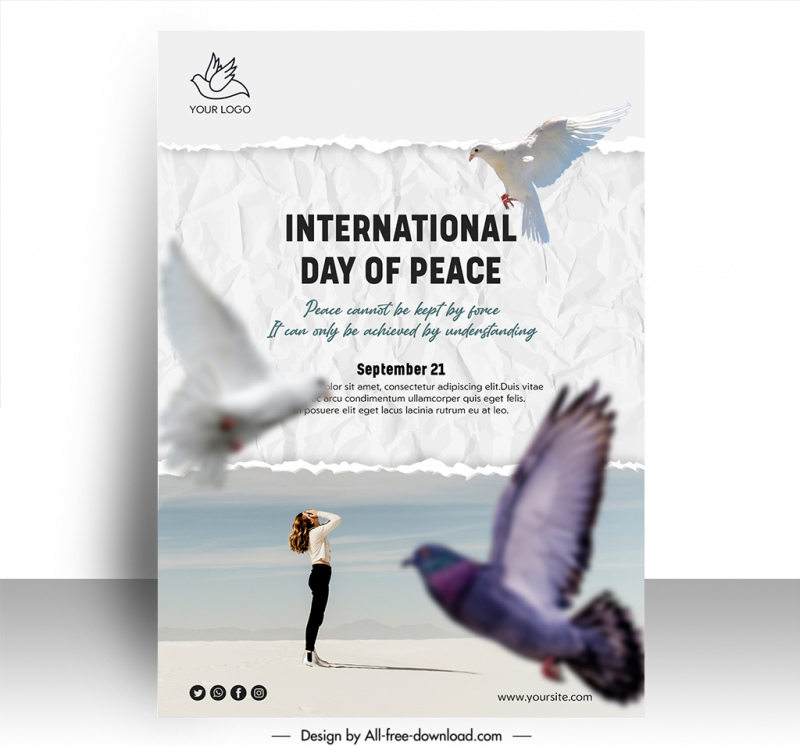
Key Insights
- Adaptable Grids: Use flexible grid systems to automatically adjust layouts.
- Balanced Composition: Leverage white space and strategic element placement.
- Responsive Typography and Imagery: Ensure text and images scale for legibility and quality.
Introduction
Designing a poster that maintains its visual impact across multiple devices and display sizes is both an art and a science. A responsive poster layout is more than just a collection of attractive graphics—it is an adaptive design that communicates your core message whether viewed on a poster board, a tablet, or a smartphone. In this guide, we break down the process of creating responsive poster layouts by integrating effective design planning, adaptable technical solutions, and contemporary styling techniques.
Planning and Conceptualization
Determine Your Objectives
Begin by identifying the primary purpose of your poster. Is it designed to convey information at a conference, promote a business event, or serve as a digital advertisement? Defining the purpose will help guide everything from your choice of color schemes and typography to the overall composition. Consider the following:
- Target audience – who will be viewing the poster?
- Key messaging – what is the central message to communicate?
- Brand alignment – how does the poster reflect your brand’s identity?
Establish a Theme and Layout
Once your objectives are clear, sketch a preliminary layout. This initial planning phase should include considering the balance between text and images, the use of white space, and the necessary visual hierarchy. A well-executed theme ensures that every element on your poster contributes to a coherent and engaging design.
Visual Design Fundamentals
Grid Systems and Structured Layouts
A grid system is imperative for organizing your content and creating a layout that consistently adapts to different screen sizes. Grids provide a framework which contributes to the visual balance of the design. A responsive grid will allow you to structure your text, images, and other design elements in a way that maintains clarity and balance as the layout scales.
Implementing CSS Grid
CSS Grid Layout offers powerful tools for creating complex and adaptable layouts. Using CSS Grid, you can define columns and rows that adjust automatically based on the screen width. This approach ensures that your layout remains adaptive when tailored for both large monitors and small handheld devices.
/* Example CSS for grid layout */
.container {
  display: grid;
  grid-template-columns: repeat(auto-fit, minmax(200px, 1fr));
  gap: 20px;
}
.poster-section {
  padding: 20px;
  background: #f4f4f4;
}
White Space and Content Balance
Equally important to the content itself is the effective use of white space. Designers often target a balance of approximately 30% white space, 40% for text, and 30% for graphics. White space alleviates visual clutter, allowing viewers’ eyes to travel smoothly from one part of the poster to another. This technique ensures that each component has room to breathe while maintaining an excellent overall balance in the composition.
Key Techniques for Managing White Space
- Leave adequate margins between text blocks and images.
- Utilize padding and spacing in your CSS to maintain space consistency.
- Create clear visual separation between different content sections.
Responsive Design Techniques
Scalable Typography
One of the key components in designing a responsive poster layout is typography that adjusts effectively across different devices. Instead of absolute units like pixels, use relative units such as ems or rems to ensure that text scales properly. Selecting typefaces that are legible at various sizes is crucial. It is recommended to use clear, modern sans-serif fonts for digital displays, while considering that decorative fonts may work well for headlines.
Responsive Font Sizing Example
/* CSS example for responsive typography */
h1 {
  font-size: 2.5rem;
}
p, li {
  font-size: 1rem;
}
@media (max-width: 600px) {
  h1 {
    font-size: 2rem;
  }
  p, li {
    font-size: 0.9rem;
  }
}
Flexible Imagery
The imagery used in your poster should be flexible and optimized for different resolutions. When targeting multiple devices, avoid using raster images that may become pixelated when scaled. Instead, consider using vector graphics or high-resolution imagery that can adapt without losing quality. This is especially important for maintaining a professional look in business contexts or prestigious academic presentations.
Optimizing Responsive Images
- Implement the HTML
srcsetattribute to deliver different image sizes based on the device's resolution. - Consider using modern image formats like WebP that offer efficient compression with minimal quality loss.
- Test your images on various devices to ensure they maintain their sharpness and clarity.
Media Queries and CSS Techniques
CSS media queries allow designers to define different styles for specific screen sizes. This enables properties such as font sizes, margins, and layout orientations to adjust dynamically. For digital posters, this means that you can fine-tune your design to look attractive whether viewed on a desktop monitor, tablet, or phone.
Implementing Media Queries
/* Example of media queries for responsiveness */
@media (max-width: 800px) {
  .container {
    grid-template-columns: 1fr;
  }
  .banner {
    font-size: 1.5rem;
  }
}
Technical Considerations and Advanced Approaches
Container Queries and Aspect Ratios
Recent advancements in CSS, such as container queries, allow for even more granular control of design elements based on the size of their container, rather than the viewport. This offers a nuanced approach to responsiveness, where individual components can adjust their styling independent of global media queries.
Example Code for Container Queries
/* Container query example */
.poster-container {
  container-type: inline-size;
  aspect-ratio: 16/9;
}
Using Design Tools for Rapid Prototyping
While CSS offers robust tools for technical adjustments, design platforms such as Canva and Adobe XD provide user-friendly environments to experiment with layout designs visually. Many of these platforms offer responsive templates that are ready to be customized. They let you explore various poster configurations, ensuring that your final design will translate well across devices.
Steps to Utilize Online Design Tools
- Select a responsive template that closely aligns with your objectives.
- Customize text, colors, and images using an intuitive drag-and-drop interface.
- Preview and test your design on simulated device screens to verify responsiveness.
- Export your design in appropriate formats like JPEG or PNG, ensuring compatibility.
Implementing Consistent Branding
A responsive poster layout should not sacrifice branding consistency. Maintain visual integrity by reusing design elements, fonts, color schemes, and imagery that align with your established aesthetic. Whether you are crafting an academic poster or a marketing campaign, uniformity in design reinforces brand identity and creates a cohesive experience for viewers.
Visual Layout Overview
Responsive Layout Components
The following table summarizes the core elements to focus on when developing a responsive poster layout. This table condenses the main points and techniques discussed throughout the guide:
| Component | Key Techniques | Benefits |
|---|---|---|
| Grid Systems | CSS Grid, flexible columns, auto-fit, and auto-fill | Ensures organized, adaptable structure |
| Typography | Responsive units (em, rem), media queries | Maintains clarity and legibility on all devices |
| Imagery | Vector graphics, high-resolution images, srcset | Keeps images sharp and scalable |
| White Space | Margins, padding, balanced content distribution | Reduces visual clutter, guides viewer attention |
| Media Queries | Conditional CSS for device breakpoints | Adapts layout seamlessly across different screens |
Practical Steps for Creating Your Layout
Step 1: Draft a Wireframe
Start with a simple wireframe to plan the layout’s structure. Sketch positions for headlines, images, text blocks, and call-to-action sections. This blueprint will serve as the foundational guide for your design. By having a clear roadmap, you can ensure that your layout will efficiently direct the viewer's focus throughout the poster.
Step 2: Define the Grid
Use a dynamic grid system as outlined earlier. Employ CSS Grid or design software with grid functionalities to create columns and rows that adapt to various screen sizes. A well-constructed grid ensures that elements do not overlap or collapse when scaled to fit a smaller device.
Step 3: Incorporate Visual Hierarchy
Design the content so that there is a natural visual flow. Keep important elements—such as titles and key images—prominent, followed by supporting text. Utilize size, contrast, and color to differentiate sections. This hierarchy not only enhances readability but also contributes significantly to the overall aesthetic appeal.
Step 4: Fine-tune Media Adjustments
Deploy media queries to adjust individual aspects of the layout based on the device. Customize CSS rules so that the design is harmonious whether in portrait or landscape mode. This may include adjusting the font size, spacing, and repositioning images to accommodate new dimensions.
Step 5: Test Across Devices
Rigorous testing is essential. Verify how your poster layout appears across different devices and screen sizes. Use browser developer tools, simulators, or physical devices to identify issues like overcrowded text or distorted images. Iteratively refine your design until the layout is consistently engaging and legible.
Enhancing Your Responsive Design
Integrating Interactive Elements
For digital posters, consider integrating interactive elements that encourage user engagement. These might include hover animations, clickable areas for more information, or dynamic content that adjusts as the viewer interacts with it. These elements can be implemented using JavaScript and CSS transitions.
Example: Animated Button Hover
/* CSS for an interactive button */
.button {
  transition: background 0.3s ease;
}
.button:hover {
  background: #cc9900;
}
Maintaining Consistency and Visual Appeal
Consistency is key in any cohesive design. Reuse established brand elements such as fonts, colors, and imagery across all iterations of your layout. Whether you are working with CSS directly or using design tools like Canva, maintaining a consistent visual language reinforces the message and builds trust with your audience.
Additional Technical Resources and Tools
Online Design Platforms
Numerous online platforms offer templates and design tools that can significantly expedite the process of creating responsive poster layouts. Tools like Canva and Adobe XD provide intuitive interfaces along with robust previews to simulate multiple screen sizes. These platforms often come with pre-built grids and design elements, making them a great starting point for beginners and professionals alike.
Advanced CSS Techniques
For designers comfortable with front-end development, further exploration into CSS variables, gradients, and container queries can yield highly refined and flexible poster designs. Experiment with advanced techniques to optimize both the design and performance of your responsive poster. This can include dynamic sizing, multi-column layouts, and even flexbox alignments to enhance the user experience.
Summarizing the Essentials
What You Need to Remember
Creating a responsive poster layout integrates several distinct design and technical elements into a cohesive whole. From initial planning and wireframing to advanced CSS techniques and iterative testing, every step is integral to ensuring that your final design communicates effectively across various platforms. By adhering to established principles such as a flexible grid, optimized typography, balanced white space, and interactive elements, you equip your design with the robustness needed to succeed in today's multi-device world.
Embrace the notion that a responsive layout is not a static final product but rather a dynamic framework that evolves with your audience’s needs. By continuously testing and refining your layout, you can adapt your design to future devices and changing viewing habits, ensuring your poster remains contemporary and effective. The principles discussed in this guide serve as a solid foundation for responsive poster design, whether you’re creating content for academic conferences, business events, or digital marketing campaigns.
References
- Guide to Effective Poster Design - Argonne National Laboratory
- Poster Design Tips - CrazyLeaf Design
- Poster Layout - Vistaprint
- Poster Design Layout - UNC Libraries
- How to Make a Good Poster - Stanford Research
Recommended Related Queries
Last updated March 5, 2025