
Unlocking the Secrets of Revenue Analysis in Power BI
Discover the best practices and techniques to elevate your revenue insights
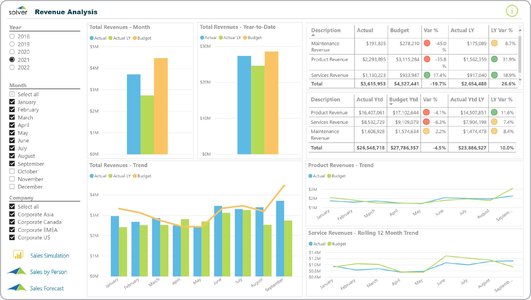
Key Insights
- Optimized Data Modeling: Employ a star schema with fact and dimension tables and streamline data for enhanced performance.
- Effective Visualization & Dashboards: Design clear, dynamic dashboards with appropriate KPIs, slicers, and interactive elements.
- Advanced Analytics: Utilize DAX for customized calculations, revenue forecasting, and profitability insights.
Data Preparation and Modeling
A robust foundation is essential for effective revenue analysis. Begin by consolidating data from various sources – ranging from ERP systems and accounting software to spreadsheets – to create a unified dataset. The following practices ensure your data is clean and optimized:
Streamlined Data Structures
Create a dedicated model using a star schema, which includes fact tables that store quantitative measures and dimension tables that provide context. This structure reduces data granularity by aggregating data to the necessary level and minimizes unnecessary columns. A well-designed star schema not only improves query performance but also facilitates easy scalability of reports.
Data Cleaning and Transformation
Use Power Query to cleanse, transform, and prepare your data. This stage involves:
- Removing duplicates and addressing inconsistencies.
- Ensuring proper data types and dealing with null values.
- Creating calculated columns and measures using DAX (Data Analysis Expressions) for computed metrics such as year-over-year growth, average revenue per user, and gross profit margins.
Building an Efficient Data Model
Correct relationships between tables are vital for accurate analysis. While Power BI's auto-detect feature is available, manually reviewing and adjusting relationships guarantees accuracy, especially when dealing with complex datasets. Incorporate a dedicated calendar table to enhance time series analysis, and remove any extraneous columns that do not contribute to the revenue analysis.
Dashboard Design and Visualization
Once your data is meticulously prepared and modeled, transitioning to an engaging dashboard design is crucial. The objective is to build a simple yet insightful interface that empowers stakeholders to make informed decisions.
Choosing the Right Visuals
Select appropriate visual components that enhance data interpretation:
- Bar and Column Charts: Ideal for comparing revenue across multiple categories like product lines or regions.
- Line Charts and Area Charts: Best suited to display trends over time, enabling users to identify seasonality and growth patterns.
- Pie Charts and Donut Charts: Useful for showing proportional relationships, particularly when analyzing revenue contributions by segment.
- Waterfall Charts: Effective in visualizing the step-by-step progression of revenue, taking into account various adjustments.
Dynamic and Interactive Elements
Enhance user experience by integrating interactive features such as slicers, dynamic filters, and drill-through capabilities. These elements empower stakeholders to:
- Filter revenue data by time periods, geographic regions, or product categories.
- Examine multiple dimensions simultaneously, revealing underlying patterns in revenue performance.
- Personalize views using bookmarks for different audiences, which helps in presenting tailored narratives for diverse user groups.
KPI Highlights and Annotations
Prominently display Key Performance Indicators (KPIs) such as revenue targets vs. actual sales, percentage changes, and gross profit margins. Use conditional formatting to emphasize critical data points, and include descriptive annotations to provide context for complex visualizations. Ensuring clarity in your dashboard design minimizes clutter while emphasizing actionable insights.
Advanced Analytics and Revenue Forecasting
Beyond basic visualizations, Power BI's powerful analytical tools offer advanced revenue analysis capabilities that enhance business strategic decisions.
Utilizing DAX for Custom Calculations
Leverage Power BI's DAX functions to create calculated measures that derive essential insights such as:
- Year-over-Year Growth: Measure changes in revenue across consecutive periods.
- Profitability Analysis: Calculate revenues versus expenses to identify high-performing products or services.
- Average Selling Price: Monitor trends in pricing and ascertain the impact on revenue streams.
Revenue Forecasting Techniques
Implement forecasting methods to project future revenue trends and cash flows. Incorporate historical performance data to predict future outcomes, and use scenario analysis to evaluate the impact of price changes, volume fluctuations, or shifts in product mix. These forecasting models are invaluable for resource allocation, budget planning, and strategic decision-making.
Interactivity in Financial Reporting
Use interactive dashboards to go beyond static visuals. By integrating reports with automated updates and dynamic elements, users can explore data in real time. Frequent report refreshes ensure that decisions are based on the most recent insights available, which is essential in fast-paced business environments.
Comprehensive Revenue Analysis Practices
Below is a table summarizing the components of effective revenue analysis in Power BI, offering an at-a-glance overview:
| Component | Key Elements | Benefits |
|---|---|---|
| Data Preparation |
|
Ensures data consistency and accuracy, reducing processing time. |
| Data Modeling |
|
Enhances report performance and scalability, simplifies data relationships. |
| Dashboard Design |
|
Improves user engagement and immediately highlights actionable insights. |
| Advanced Analytics |
|
Provides deeper insights into revenue drivers and supports strategic planning. |
Implementation Tips and Best Practices
Data Management
Secure a strong data foundation by integrating and continuously updating your data sources. Regularly review your data model for redundancies, ensuring that the structure remains efficient as new data becomes available. Automated refresh schedules in Power BI, including incremental loads, are powerful features that can be leveraged to maintain accurate live dashboards.
Dashboard Enhancements
Keep the dashboard clean and uncluttered. Use thematic color palettes aligned with corporate branding and limit excessive scrolls on pages by strategically grouping visuals. Dynamic interactions and drill-through options allow business users to navigate from overarching trends to granular details seamlessly. By emphasizing simplicity, dashboards communicate volumes of data clearly and effectively.
Performance Optimization
Efficiency matters in high-demand analytics environments. Regularly audit the performance of DAX formulas and query timings. Optimize data models by removing unused columns and ensuring that calculated measures do not overload visualizations with complex computations. Such practices not only provide a smoother user experience but also reduce the risk of performance bottlenecks during data refreshes.
Change Management and Continuous Improvement
Revenue analysis is an evolving process. Engage stakeholders through feedback sessions to collect insights on report usability and clarity. Monitor dashboard interaction metrics and iterate on design improvements. Regular training sessions and documentation help ensure that all users are proficient with the tools, thus maximizing the overall impact of your analytical efforts.
Further Enhancement with Collaboration and Documentation
Beyond the technical aspects, successful revenue analysis requires strong collaboration among team members. Share insights and dashboards across departments using Power BI’s sharing and collaborative features. Clear documentation, annotated findings, and well-described metrics ensure that your revenue analysis is accessible and interpretable by a wide range of stakeholders. Such practices increase transparency while fostering a data-driven culture within the organization.
Interactive Collaboration
Reports in Power BI can be shared and embedded within other applications, allowing decision-makers to interact with live data. Utilize personalized bookmarks and shareable links to direct users to the most relevant insights, ensuring they focus on areas that most affect business growth. Cross-department sessions where finance, marketing, and operations collaborate on a unified dashboard can drive strategic alignment and accelerate the decision-making process.
Robust Documentation
Each dashboard should include contextual annotations and detailed metadata that describe how calculations were derived and what each metric signifies. This not only aids in troubleshooting but also offers clarity to stakeholders who may not be as familiar with the underlying data structures. Consistency in reporting and regular updates on metadata are key drivers for improved transparency and sustained insights.
References
- Best Practices and Essential Tools to Optimize Power BI Reports - DailyBiTalks
-
Revenue Forecast Technique for Project Data - Enterprise DNA
- Power BI for Business Analysts - ZebraBI
- Detailed Revenue Analysis Dashboard in Power BI - Medium
- Optimization Guide for Power BI - Microsoft Learn
Recommended Queries for Further Exploration
Last updated March 27, 2025