
Diagnosing Sync Failures: A Deep Dive into the theset-verceledit Repository
Unraveling potential errors preventing data synchronization in your music event application.
The GitHub repository swbam/theset-verceledit hosts "The Set - Music Event App," a web application designed for discovering music events, artists, and shows. It leverages technologies like Vite, React, TypeScript, Tailwind CSS, Supabase (PostgreSQL), and Next.js API routes. A core feature is its data synchronization system, intended to pull data from external APIs like Ticketmaster, Setlist.fm, and Spotify, integrate it, and store it in the Supabase database. However, synchronization issues can arise from various sources within this complex system.
Key Areas Prone to Sync Errors
- API Integration Flaws: Issues with authenticating, handling rate limits, parsing responses, or specific bugs documented in the repository (like inserting empty arrays or parameter mismatches) can halt data flow from external sources (Ticketmaster, Setlist.fm, Spotify).
- Database & Sync Logic Faults: Errors in database migrations, schema inconsistencies, flawed data insertion/update logic within sync scripts, or incorrect mapping between API data and database tables can prevent data from being stored correctly in Supabase.
- Environment & Deployment Mismatches: Discrepancies between local development and the Vercel deployment environment (e.g., missing environment variables, build failures, Git configuration issues) can cause sync processes to fail only when deployed.
Understanding the Sync System Architecture
How Data Flows from APIs to Your Database
Based on documentation within the repository (like sync-system-overview.md and sync-implementation-summary.md), the synchronization system is designed to perform several key tasks:
- Fetch venue, show, artist, setlist, and song data from multiple external APIs (Ticketmaster, Setlist.fm, Spotify).
- Process and transform this data to fit the application's Supabase database schema.
- Insert or update records in the relevant database tables (e.g.,
venues,shows,artists,setlists,setlist_songs). - Manage API interactions efficiently, respecting rate limits imposed by the external services.
- Utilize a caching mechanism (
api_cachetable) to potentially improve performance and reduce redundant API calls.
The diagram below illustrates the interconnected components involved in the synchronization process:
(Venues, Shows)"] id1_2["Setlist.fm
(Setlists, Songs)"] id1_3["Spotify
(Artist/Song Details)"] id2["Integration Layer"] id2_1["API Client Code
(src/integrations)"] id2_2["Authentication &
Key Management (.env)"] id2_3["Rate Limit Handling"] id2_4["Response Parsing &
Error Handling"] id3["Sync Logic & Processing"] id3_1["Sync Scripts/Triggers
(e.g., API Routes in src/app/api)"] id3_2["Data Transformation &
Mapping"] id3_3["Database Operations
(Insert/Update/Upsert)"] id4["Data Storage (Supabase)"] id4_1["PostgreSQL Database"] id4_2["Schema & Migrations
(src/db-migrations)"] id4_3["Tables:
venues, shows, artists,
setlists, setlist_songs"] id5["Caching Mechanism"] id5_1["api_cache Table"] id5_2["Cache Read/Write Logic"] id5_3["Cache Invalidation/Reset
(npm run reset:cache)"] id6["Trigger Source"] id6_1["Frontend Actions (React App)"] id6_2["Backend Processes/Cron Jobs"] id6_3["Deployment Hooks (Vercel)"]
Failures can occur at any point in this flow – from fetching data at the source APIs to storing it correctly in the database, often complicated by environmental factors during deployment.
Dissecting Potential Sync Errors
Where Things Might Be Going Wrong
Let's delve deeper into the specific categories of errors that could be preventing the synchronization from functioning correctly in the theset-verceledit application.
1. API Integration Issues
The interaction with external APIs is a frequent source of sync problems. Errors here can prevent data from even entering your system.
- Authentication & API Keys: Ensure that API keys for Ticketmaster, Setlist.fm, and Spotify are correctly configured in your environment variables (likely in a
.env.localfile for local development and configured securely in Vercel settings for deployment). Invalid, expired, or missing keys will cause API requests to fail. Check Vercel's documentation on environment variables and potential issues with secret synchronization if using tools like Doppler. - Rate Limiting: External APIs enforce usage limits. If the sync process makes too many requests too quickly, it might get throttled or blocked. The code needs robust mechanisms to handle rate limits, possibly including delays or backoff strategies. The
sync-system-overview.mdmentions this design goal, but implementation flaws could exist. - API Response Handling: The code responsible for fetching and parsing data (likely within
src/integrations/or utility functions) might not correctly handle different response formats, errors returned by the APIs, or unexpected data structures. This can lead to crashes or incorrect data processing. - Documented Bugs (
API_INTEGRATION_FIX.md): This file explicitly mentions past bugs that directly impacted sync:- Empty
setlist_songsArray: A bug was noted where an empty array was inserted into thesetlist_songstable, preventing songs from being associated with setlists. This points to issues in data validation or handling conditional logic before database insertion. - Vote Function Parameter Mismatch: An SQL function call had incorrect parameters, referencing a song ID improperly. This highlights potential issues with data type mismatches or incorrect variable passing between the application code and database functions, which could easily affect broader sync operations.
- Empty
2. Database and Sync Logic Errors
Even if data is fetched successfully, errors in processing or storing it can break the sync.
- Database Migrations & Schema: The application relies on Supabase migrations (found in
src/db-migrations/) to set up the correct database structure. If migrations haven't been applied correctly (usingnpm run db:migration:apply) or contain errors, the database schema might not match what the application code expects, leading to errors during data insertion or updates. - Data Insertion/Update Logic: The code that saves fetched data to Supabase tables (detailed in
IMPLEMENTATIONS.mdfor entities like venues, shows, etc.) could contain bugs. This might involve issues with SQL queries, Supabase client usage, handling database constraints (like unique keys or foreign keys), or managing transactions correctly. Failures here can lead to incomplete or inconsistent data. - Data Mapping: Discrepancies between the structure of data received from APIs and the schema of the database tables can cause errors. The sync logic must correctly map fields from the API response to the appropriate database columns.
- Concurrency Issues: While less emphasized in the provided docs, if multiple sync processes could potentially run concurrently, there might be race conditions or deadlocks when accessing shared database resources, unless proper locking mechanisms are implemented (as generically mentioned in Answer D).
3. Caching Problems
The use of an API cache (api_cache table) introduces another potential point of failure.
- Stale Cache Data: If the cache is not correctly invalidated or updated when new data should be fetched, the sync process might operate on outdated information, making it seem like the sync isn't working or reflecting recent changes.
- Cache Logic Errors: Bugs in the code that reads from, writes to, or clears the cache (the README mentions an
npm run reset:cachecommand) could lead to incorrect data being used or sync operations failing unexpectedly.
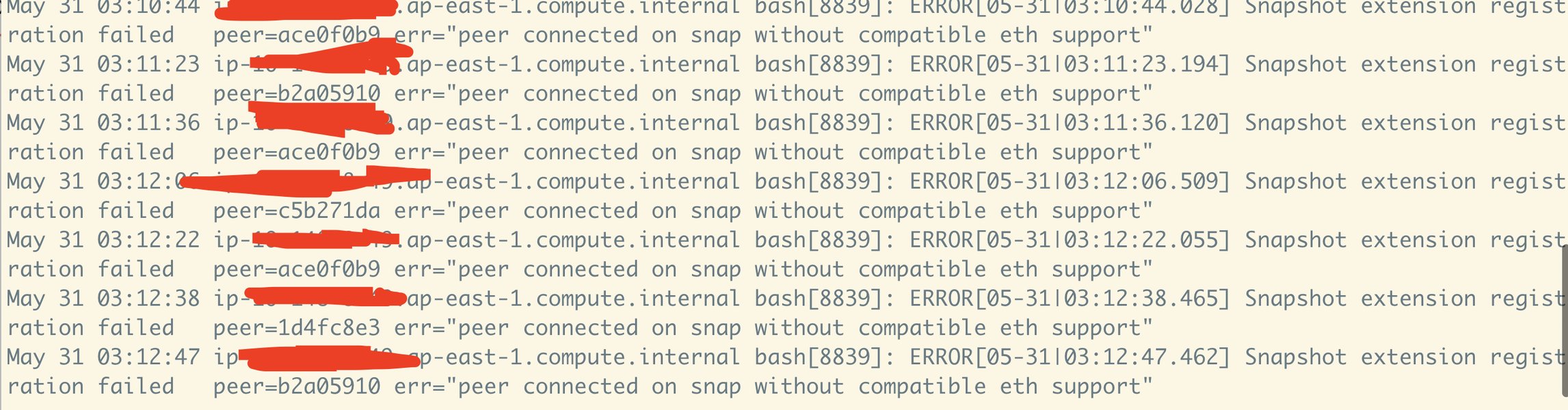
Example of an error log that might indicate sync problems (Source: GitHub Issue). Check Vercel logs for specific errors.
4. Environment and Deployment Issues (Vercel)
Differences between the local development setup and the Vercel production environment are common culprits for sync failures that only appear after deployment.
- Environment Variable Discrepancies: Crucial settings like API keys or database connection strings might be correctly set locally (
.env.local) but misconfigured or missing in the Vercel project settings. - Build Failures: Errors during the Vercel build process (
npm run build:allor similar) can prevent the latest code (including sync fixes) from being deployed successfully. Check Vercel deployment logs for errors like "Command exited with 1". - Git Configuration: Vercel deployments are typically triggered by pushes to a specific branch (e.g.,
main). Incorrect Git settings in Vercel, issues with the Git connection, or commits made by non-team members might prevent automatic deployments, leaving outdated code running. - Resource Limitations: Serverless functions on Vercel have time and memory limits. Complex or long-running sync operations might exceed these limits, causing them to terminate prematurely.
- Dependency Issues: Differences in Node.js versions or package dependencies between local and Vercel environments can cause unexpected behavior. Ensure consistency.
5. Frontend/Backend Coordination
If the sync is triggered or managed via API routes called from the frontend React application:
- API Route Failures: The Next.js API routes under
src/app/api/responsible for initiating or managing sync tasks might contain bugs or fail to handle requests correctly. - Network/CORS Issues: Browser security policies (CORS) or general network issues could prevent the frontend from successfully communicating with the backend API routes to trigger the sync. Check browser developer console for network errors.
Likelihood of Error Sources
Where to Focus Your Debugging Efforts
Based on the information available, particularly the detailed documentation on API integration bugs and sync implementation logic within the repository itself, some error categories appear more likely than others. The following chart provides a relative assessment of where problems might be concentrated:
This chart suggests that API integration flaws and issues within the database synchronization logic are highly probable causes, closely followed by environment-specific problems related to Vercel deployment. While less likely to be the primary cause based on available info, issues with migrations, caching, or frontend calls shouldn't be entirely discounted.
Recommended Debugging Strategy
A Step-by-Step Approach
To systematically identify the root cause of the synchronization failure, consider following these debugging steps. This table outlines key actions and areas to investigate:
| Step | Action | Focus Area | Tools/Commands |
|---|---|---|---|
| 1 | Verify Environment Variables | Check API keys (Ticketmaster, Setlist.fm, Spotify) and Supabase credentials. Ensure they are correctly set locally (.env.local) and in Vercel deployment settings. |
.env.local file, Vercel Project Settings UI |
| 2 | Review Logs | Inspect logs from the sync process. Add detailed logging within sync functions (API routes, integration code) if needed. Check Vercel function logs for errors during deployed execution. | console.log(), Vercel Dashboard (Logs tab) |
| 3 | Ensure Database Migrations | Confirm that the latest database migrations have been applied successfully to your Supabase instance. Re-run migrations if unsure. | npm run db:migration:apply, Supabase Table Editor/SQL Editor |
| 4 | Test API Calls Directly | Isolate API calls. Use tools like Postman or curl to test requests to Ticketmaster, Setlist.fm, and Spotify endpoints directly with your credentials to verify connectivity and expected responses. |
Postman, curl, Insomnia |
| 5 | Inspect Sync Code Logic | Carefully review the code responsible for fetching, processing, and saving data. Look for logical errors, incorrect data handling, issues mentioned in API_INTEGRATION_FIX.md, and error handling gaps. Focus on src/integrations/, src/lib/utils/, and relevant API routes in src/app/api/. |
Code Editor (VS Code, etc.), Debugger |
| 6 | Clear Cache | If caching issues are suspected, try clearing the API cache to force fresh data fetches. | npm run reset:cache (if script is functional) or manual DB operation |
| 7 | Check Vercel Deployment | Verify successful builds and deployments on Vercel. Check build logs for errors. Confirm Git settings and production branch configuration. | Vercel Dashboard (Deployments, Logs, Settings) |
| 8 | Review Recent Commits & Docs | Examine recent Git commit messages and any updated documentation (.md files like sync_fix_plan.md or sync_revamp_plan.md mentioned in search results) for clues about recent changes or known issues related to sync. |
git log, GitHub Repository Interface |
Understanding Vercel Deployment
How Deployment Can Impact Sync
Deploying applications, especially those with backend processes like data synchronization, to platforms like Vercel introduces environment-specific considerations. Issues that don't appear locally can manifest in the deployed environment due to differences in configuration, resource limits, or build processes. Understanding how to deploy and troubleshoot on Vercel is crucial if your sync fails only after deployment.
The following video provides a general guide on deploying a Next.js application (similar structure) to Vercel from GitHub, highlighting steps like connecting the repository and managing the deployment process, which are relevant to ensuring your sync code runs correctly in the Vercel environment.
Deploying a Next.js App to Vercel from GitHub (Source: YouTube). Understanding this process helps troubleshoot deployment-related sync issues.
Frequently Asked Questions (FAQ)
Common Questions About Debugging Sync Issues
Recommended Next Steps
Further Exploration
- How can I effectively debug Next.js API routes specifically when they are deployed on Vercel?
- What are the best practices for handling API rate limits within a Node.js application to prevent sync failures?
- What steps should I take to troubleshoot potential Supabase database connection problems originating from a Vercel deployment?
- How can environment variables be managed securely and effectively across different environments (development, production) in Vercel?
References
Sources Used for Analysis
Last updated May 5, 2025