
Unlock Rumble Transcriptions: Your Guide to Easy & API Methods
Discover how to effortlessly convert Rumble videos to text using simple tools and programmatic approaches.
Getting a text version of a Rumble video can be incredibly useful for content repurposing, accessibility, or analysis. While Rumble itself doesn't currently offer a straightforward, built-in "one-click" transcription feature or a documented public API specifically for retrieving video transcripts via its developer console, there are several highly effective methods using external tools and services. These range from user-friendly web interfaces to powerful command-line tools and programmable APIs.
This guide will walk you through the best options available today (as of 2025-05-04), addressing both simple "one-click" style solutions and API-driven workflows for developers.
Key Transcription Takeaways
- No Native Rumble Feature: Rumble does not provide a direct, publicly accessible API endpoint or simple button within its platform to generate video transcriptions automatically like some other platforms.
- Third-Party Tools Essential: You'll need to rely on external software or services to transcribe Rumble videos. Thankfully, many excellent options exist.
- "One-Click" Solutions Available: Several tools offer a near one-click experience by accepting a Rumble video URL directly, automating the download and transcription process.
User-Friendly Transcription Methods ("One-Click" Style)
If you prefer simplicity and don't want to delve into coding, these methods offer the easiest ways to get your Rumble video transcribed.
Web-Based Transcription Services
Several online platforms allow you to simply paste the Rumble video URL or upload the video file to get a transcription.
How They Work:
- Copy the URL of the Rumble video you want to transcribe.
- Visit a transcription service website that supports video URLs or uploads (e.g., HappyScribe, Zeemo AI, Veed.io, TurboScribe).
- Paste the URL into the designated field or upload the video file if you've downloaded it separately.
- Select the language of the video.
- Initiate the transcription process (often a single click like "Transcribe" or "Submit").
- The service will process the video and provide the transcription, usually available for download as a text file (.txt), subtitles (.srt), or viewable directly on their platform.
Popular Options:
- HappyScribe: Known for supporting numerous languages and providing both transcription and subtitling services. Often has a free trial or limited free usage.
- Zeemo AI: Offers tools specifically for transcribing video to text and may support direct Rumble URL input.
- Veed.io: While primarily a video editor, it includes robust automatic transcription features.
These services are generally intuitive but may involve costs depending on the video length and desired features.
Command-Line Simplicity: transcribe-anything
For users comfortable with a terminal or command prompt, the transcribe-anything Python tool offers a powerful and often free way to transcribe Rumble videos with a single command after initial setup. It leverages the highly accurate Whisper AI model from OpenAI.
Setup:
First, you need Python and pip (Python's package installer) on your system. Then, install the tool by running:
pip install transcribe-anythingUsage:
Once installed, open your terminal or command prompt and use the following command, replacing RUMBLE_VIDEO_URL with the actual URL:
transcribe-anything "RUMBLE_VIDEO_URL"For example:
transcribe-anything "https://rumble.com/v1abcde/example-video-title.html"The tool will automatically:
- Download the audio from the Rumble video URL.
- Transcribe the audio using Whisper AI.
- Save the transcription as various files (e.g., .txt, .srt, .vtt) in the same directory.
This method is highly effective, supports many languages (inherited from Whisper AI), and processes the transcription locally (enhancing privacy). It's a favourite for achieving near "one-click" transcription from a URL with excellent accuracy.
Programmatic & API-Based Transcription
For developers needing to integrate Rumble video transcription into applications or automate the process, using APIs is the way to go.
Leveraging Third-Party Transcription APIs
The most common approach is to use the API provided by a dedicated transcription service. While Rumble doesn't offer its own transcription API, you can programmatically send Rumble video data (or URLs) to services like OpenAI's Whisper API, Google Cloud Speech-to-Text, AWS Transcribe, HappyScribe's API, or Stammer.ai.
General API Workflow:
- Obtain Video/Audio: Your application needs to either get the direct Rumble video URL or download the video/audio file. Tools like
yt-dlp(a versatile command-line downloader supporting Rumble) can be integrated into your backend script to fetch the media. - Authentication: Obtain an API key or access token from the chosen transcription service provider (e.g., OpenAI, Google Cloud, HappyScribe). This is typically done through their developer dashboard.
- API Call: Send the audio data (or sometimes the media URL, if supported by the API) to the transcription service's API endpoint using an authenticated request.
- Receive Transcription: The API will process the audio and return the transcribed text, often in JSON format, which your application can then parse and use.
Example Services with APIs:
- OpenAI Whisper API: Highly accurate, supports many languages. Requires sending audio data.
- HappyScribe API: Offers transcription and subtitling, potentially supporting URL inputs.
- Stammer.ai: Provides an API that can integrate with platforms like Rumble for speech-to-text, possibly using API keys or tokens for authentication.
This method offers the most flexibility and scalability for automated workflows within applications.
Custom Scripting (e.g., yt-dlp + Local Whisper)
Developers can create a custom script that combines downloading and local transcription.
Workflow Steps:
- Use a library or command-line tool like
yt-dlpwithin your script to download the audio track from a given Rumble URL.# Example command using yt-dlp to extract mp3 audio yt-dlp --extract-audio --audio-format mp3 --output "audio_%(id)s.%(ext)s" "RUMBLE_VIDEO_URL" - Use a local instance or library wrapper for an AI model like Whisper AI to process the downloaded audio file.
# Example using the command-line Whisper tool whisper "audio_downloaded_id.mp3" --model medium --language English - The script captures the output (transcribed text) for further processing or storage.
This approach provides maximum control, can be free (apart from computational cost), and keeps data processing local if desired.
Understanding Transcription Approaches: A Visual Comparison
Different methods for transcribing Rumble videos offer trade-offs in terms of ease of use, cost, accuracy, and control. The radar chart below visualizes a comparison between common approaches. Higher scores generally indicate better performance in that category (Note: Cost and Setup Effort are inverted - lower is better, represented visually as higher scores).
Mapping Your Transcription Path
Understanding the different routes to get a Rumble transcription can help you choose the best method. This mindmap illustrates the main pathways and tools involved.
transcribe-anything"]
id2b["API / Programmatic Methods"]
id2b1["Use Transcription Service APIs"]
id2b1a["OpenAI Whisper API"]
id2b1b["Google Speech-to-Text"]
id2b1c["AWS Transcribe"]
id2b1d["HappyScribe API"]
id2b1e["Stammer.ai API"]
id2b2["Build Custom Scripts"]
id2b2a["Step 1: Download Audio (yt-dlp)"]
id2b2b["Step 2: Transcribe Locally/API (Whisper AI)"]
id2c["Core Technologies"]
id2c1["Whisper AI (Transcription Engine)"]
id2c2["yt-dlp (Video/Audio Downloader)"]
Comparing Popular Transcription Tools
Here's a quick comparison of some of the tools and methods discussed:
| Tool/Method | Input Method | Output Formats | Typical Cost | Key Feature |
|---|---|---|---|---|
| HappyScribe (Web) | URL Paste / File Upload | TXT, SRT, VTT, etc. | Freemium / Paid Plans | User-friendly interface, good language support, subtitles. |
| Zeemo AI (Web) | URL Paste / File Upload | TXT, SRT | Freemium / Paid Plans | Specialized in video transcription and captioning. |
transcribe-anything (CLI) |
Rumble URL | TXT, SRT, VTT | Free (uses local Whisper) | Direct URL processing, high accuracy via Whisper, command-line control. |
| Whisper API (via Custom Script) | Audio File Upload | JSON (Text), SRT, VTT | Paid (per minute/hour) | High accuracy, programmatic control, multilingual. |
Custom Script (yt-dlp + Local Whisper) |
Rumble URL | TXT, SRT, VTT | Free (computation cost) | Maximum control, local processing, potentially free. |
Clarification: Rumble API & OAuth 2 Tokens
Your query specifically mentioned looking for a 'Generated access token' under OAuth 2 in an app console. It's important to clarify this in the context of Rumble video transcription:
- Rumble's APIs: Rumble does have APIs, such as the Live Stream API, which likely use OAuth 2.0 for authentication. These APIs allow developers to access certain data like follower counts or manage live streams programmatically. You would indeed generate an access token in your Rumble app console to use *these* specific APIs.
- No Transcription Endpoint: However, based on available information, Rumble's publicly documented APIs **do not include an endpoint for requesting video transcriptions**. Therefore, the OAuth 2 access token generated in the Rumble developer console cannot be used to directly request transcriptions from Rumble itself.
- Third-Party Authentication: If you use a third-party transcription service's API (like Stammer.ai or others), *that service* will have its own authentication mechanism, which might involve API keys or potentially its own OAuth 2 flow, separate from Rumble's.
The image below shows a typical OAuth 2.0 flow, often used for granting application access to user data or platform features. While Rumble uses this for some APIs, it doesn't apply to a non-existent transcription feature.
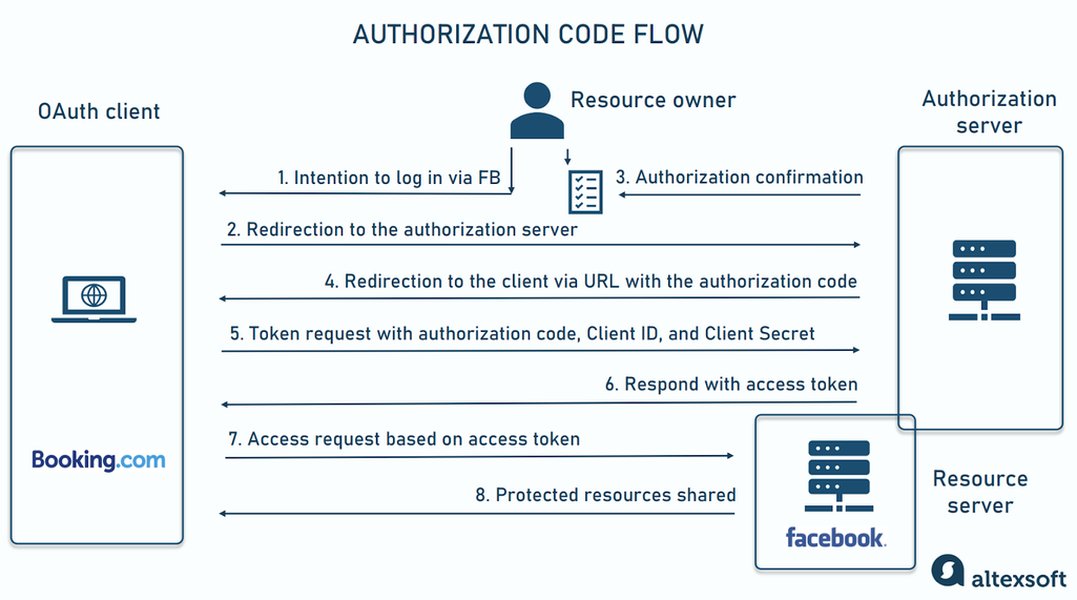
A typical OAuth 2.0 flow for authorization.
Exploring AI Transcription Tools
The field of AI transcription is rapidly evolving. Many tools leverage powerful models like OpenAI's Whisper to provide accurate and fast results. Understanding how these tools work can help you choose the best fit for your needs. This video provides an overview of some AI transcription software available:
Overview of AI transcription tools and software.
Frequently Asked Questions (FAQ)
1. Does Rumble have a built-in transcription feature like YouTube?
No, currently Rumble does not provide an automatic, built-in transcription or caption generation feature for videos hosted on its platform in the same way that YouTube does. Users need to rely on external tools or manual methods to obtain transcriptions.
2. Are there free tools to transcribe Rumble videos?
Yes, there are several free options. Using tools based on OpenAI's Whisper model, like the `transcribe-anything` command-line tool or setting up Whisper locally, allows for free transcription (you only incur computational costs if any). Many web-based services also offer free trials or limited free usage tiers (e.g., HappyScribe, Zeemo AI may have free options).
3. How accurate are these AI transcriptions?
Accuracy depends heavily on the AI model used and the audio quality of the Rumble video (clear speech, minimal background noise, single speaker). Tools using state-of-the-art models like Whisper AI generally offer very high accuracy, often comparable to human transcription, especially for clear English audio. However, accuracy can decrease with poor audio quality, strong accents, multiple overlapping speakers, or specialized jargon.
4. Can I transcribe Rumble videos in languages other than English?
Yes, many modern transcription tools, particularly those based on models like Whisper AI, support a wide range of languages. Services like HappyScribe also boast extensive language support (often over 100 languages). When using a tool, check its documentation for supported languages and ensure you select the correct language during the transcription setup for best results.
5. What about the OAuth 2 token mentioned for API access?
As clarified earlier, while Rumble uses OAuth 2 tokens for authenticating access to some of its APIs (like the Live Stream API), there is no known Rumble API endpoint that uses this token to provide video transcriptions. The OAuth 2 token generated in the Rumble app console is for interacting with existing, documented Rumble API features, not for transcription. If you use a third-party transcription API, you will need to use *their* specific authentication method (API key, token, etc.), which is separate from Rumble's OAuth token.
Recommended Further Exploration
To delve deeper into related topics, consider exploring these queries:
- How does the accuracy of Whisper AI compare to Google Speech-to-Text for noisy audio?
- Can you provide a Python script to automate downloading Rumble videos with yt-dlp and transcribing them using the Whisper library?
- What are the best practices for preparing audio to maximize AI transcription accuracy?
- What is the current cost comparison between major cloud transcription APIs like AWS Transcribe, Google Cloud Speech-to-Text, and Azure Speech to Text?
References
Last updated May 4, 2025